
A streaming markdown renderer for modern terminals with syntax highlighting

Project description
Streamdown

I needed a streaming Markdown TUI CLI shell parser and honestly all the ones I found lacking. They were broken or janky in some kind of way. So here we go. From the ground up. It's a bad idea but it has to be done.
This will work with simonw's llm unlike with richify.py which jumps around the page or blocks with an elipses or glow which buffers everything, this streams and does exactly what you want.
Some Features
Provides clean copyable code for long code blocks and short terminals.
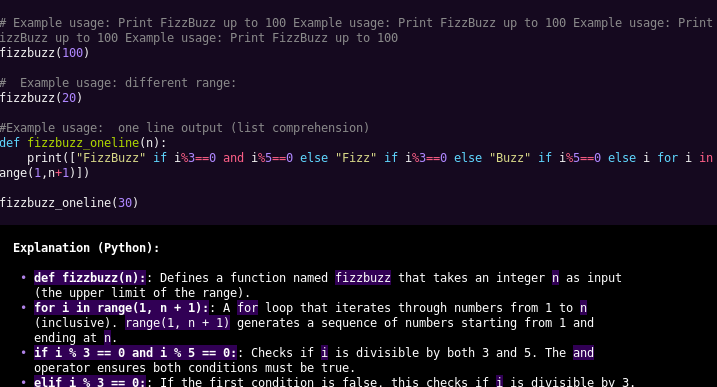
Does OSC 8 links for modern terminals.
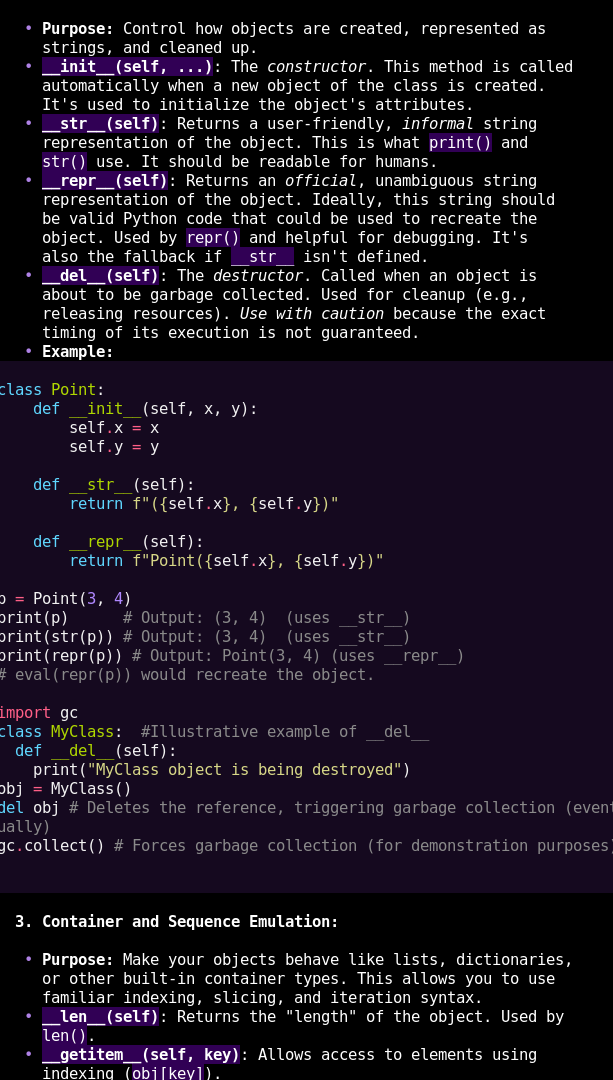
Doesn't consume characters like _ and * as style when they are in blocks like this because _they_can_be_varaiables_
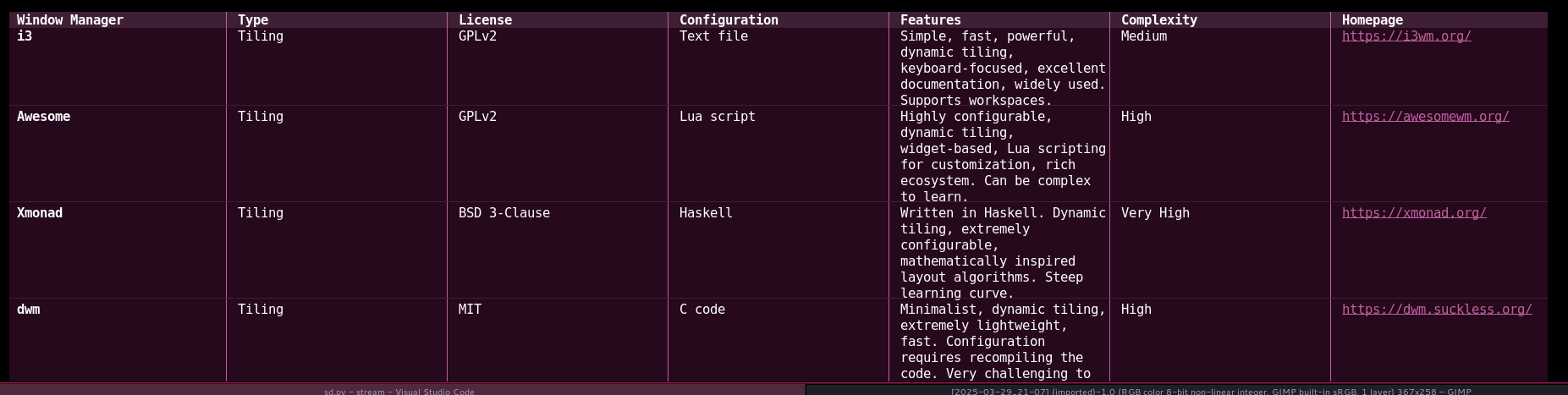
Also, tables are carefully supported to hopefully not be too broken
Configuration
Streamdown uses a configuration file located at ~/.config/streamdown/config.toml (following the XDG Base Directory Specification). If this file does not exist upon first run, it will be created with default values.
The configuration file uses TOML format and currently supports the following sections:
[colors]
This section defines the base Hue (H), Saturation (S), and Value (V) from which all other palette colors are derived. Due to limitations in TOML, these all must be floats (have a decimal point).
HSV: [ 0.0 - 360.0, 0.0 - 1.0, 0.0 - 1.0 ]DARK: Multipliers for background elements, code blocks. (Default: S=1.50, V=0.30)MID: Multipliers for inline code backgrounds, table headers. (Default: S=1.00, V=0.50)SYMBOL: Multipliers for list bullets, horizontal rules, links. (Default: S=1.00, V=1.50)HEAD: Multipliers for level 3 headers. (Default: S=2.00, V=1.50)BRIGHT: Multipliers for level 2 headers. (Default: S=2.00, V=1.90)
Example:
[colors]
HSV = [240.0, 0.5, 0.5]
DARK = { H = 1.0, S = 1.2, V = 0.25 } # Make dark elements less saturated and darker
SYMBOL = { H = 1.0, S = 1.8, V = 1.8 } # Make symbols more vibrant
The highlighting themes come via pygments.
[features]
This section controls optional features:
CodeSpaces(boolean, default:true): Enables detection of code blocks indented with 4 spaces. Set tofalseto disable this detection method (triple-backtick blocks still work).Clipboard(boolean, default:true): Enables copying the last code block encountered to the system clipboard using OSC 52 escape sequences upon exit. Set tofalseto disable.Margin(integer, default:2): The left and right indent for the output.PrettyPad(boolean, default:false): Uses a unicode vertical pad trick to add a half height background to code blocks. This makes copy/paste have artifacts. See #2. I like it on. But that's just meTimeout(float, default:0.5): This is a workaround to the buffer parsing bugs. By increasing the select timeout, the parser loop only gets triggerd on newline which means that having to resume from things like a code block, inside a list, inside a table, between buffers, without breaking formatting doesn't need to be done. It's a problem I'm working on (2025-04-01) and there will be bugs. Set this value to something like 3.0 and you'll avoid it with a pretty minor tradeoff.Width(integer, default:0): Along with theMargin,Widthspecifies the base width of the content, which when set to 0, means use the terminal width.
Example:
[features]
CodeSpaces = false
Clipboard = false
Margin = 4
Width = 120
Timeout = 1.0
Demo
Do this
$ ./tester.sh tests/*md | streamdown/sd.py
Certainly room for improvement and I'll probably continue to make them
Install from source
At least one of these should work, hopefully
$ pipx install -e .
$ pip install -e .
$ uv pip install -e .
Release history Release notifications | RSS feed


Download files
Download the file for your platform. If you're not sure which to choose, learn more about installing packages.
Source Distribution
Built Distribution
Filter files by name, interpreter, ABI, and platform.
If you're not sure about the file name format, learn more about wheel file names.
Copy a direct link to the current filters
File details
Details for the file streamdown-0.8.0.tar.gz.
File metadata
- Download URL: streamdown-0.8.0.tar.gz
- Upload date:
- Size: 32.2 kB
- Tags: Source
- Uploaded using Trusted Publishing? No
- Uploaded via: twine/6.1.0 CPython/3.13.2
File hashes
| Algorithm | Hash digest | |
|---|---|---|
| SHA256 |
0132de94305a713c8a0b7555a4155ae1b1d322dba3df2c4ab267b3f003f93ba4
|
|
| MD5 |
c5c0874fda76bd84d9213a01e573db1c
|
|
| BLAKE2b-256 |
8875601ec9d5236cde5a7f6409062c6e4f1c86a20e1dfd37cef049de4cae28bc
|
File details
Details for the file streamdown-0.8.0-py3-none-any.whl.
File metadata
- Download URL: streamdown-0.8.0-py3-none-any.whl
- Upload date:
- Size: 14.5 kB
- Tags: Python 3
- Uploaded using Trusted Publishing? No
- Uploaded via: twine/6.1.0 CPython/3.13.2
File hashes
| Algorithm | Hash digest | |
|---|---|---|
| SHA256 |
5d7d9a37f11e0b5aedd1b29c58d826618b9038ec62da987f5511d54673c20d34
|
|
| MD5 |
7373d0a8e669139d172215e3f1dde6a7
|
|
| BLAKE2b-256 |
ec2864b0d5e0a9f14b31cb019b4904a880cf57bdb0519246ca311b15f035c068
|






