

streaming-community
Fast, accurate streaming of training data from cloud storage
[Website] - [Quick Start] - [Docs]




Stream training data from cloud storage to every GPU: fast, deterministic and resumable.
The maintained fork of MosaicML Streaming. import streaming and your MDS datasets work unchanged, now with transformers 5, numpy 2.5 and Python 3.14.
Install • Quick start • Why this fork • Features • Storage • Migrating • Docs
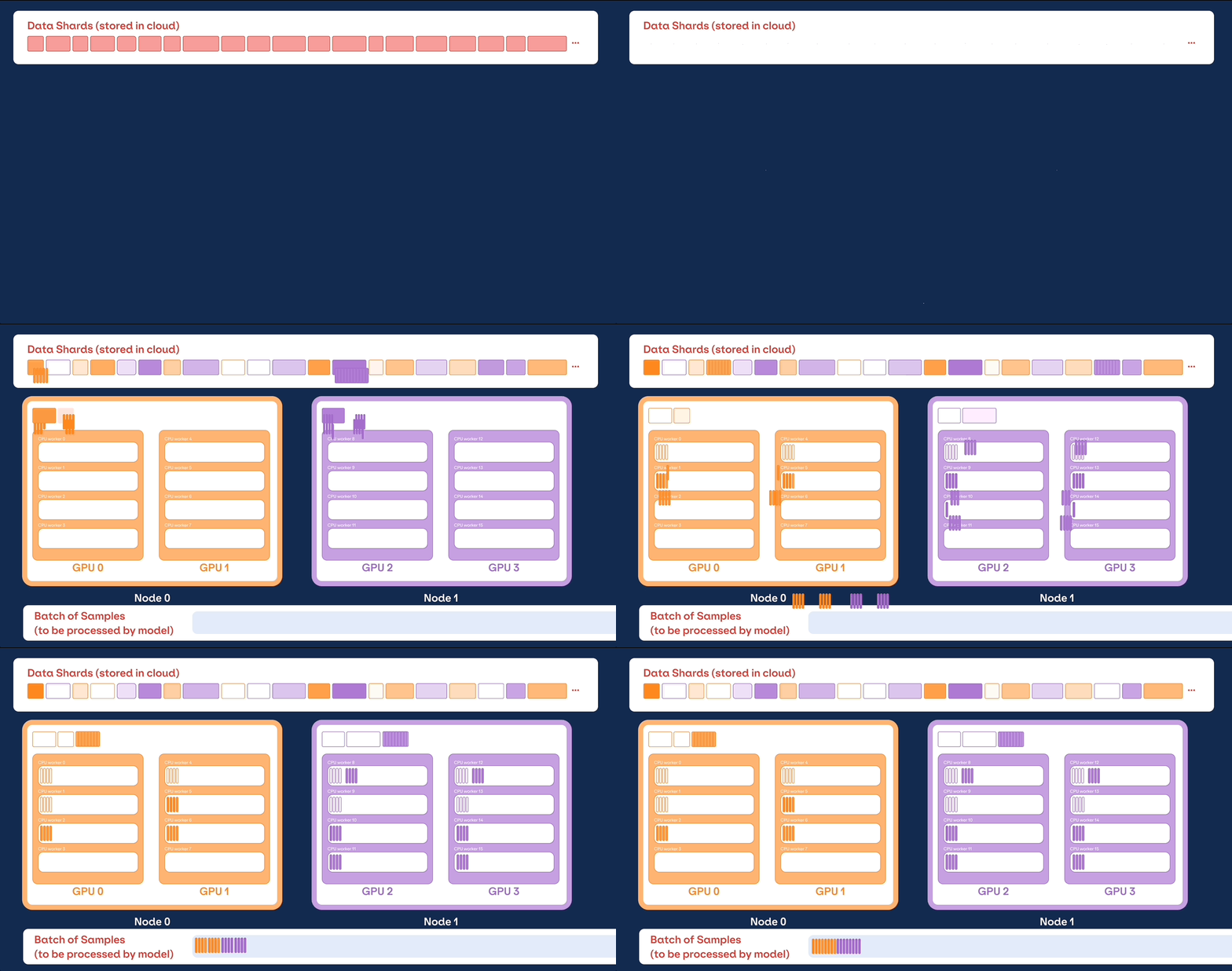
✅ Why streaming-community
- Drop-in. Same
import streaming, same MDS, JSON and CSV/TSV formats, samestate_dictkeys. Golden tests check that datasets, sample order and checkpoints written by 0.13.0 still read the same. - Installs with today's stack.
transformers<6,numpy<3,huggingface_hub<3andpyspark<5, and CI checks on every change that[all]resolves with numpy 2.5 and transformers 5. - Tested on Python 3.10 to 3.14 on every pull request.
- Bugs fixed: cache eviction no longer deletes local-only shards, the shared-memory prefix race is gone, and file locks and PNG encoding work with filelock 4 and Pillow 13.
- Released regularly to PyPI through trusted publishing, with a changelog for every version.
💾 Installation
pip install streaming-community
S3 and S3-compatible stores, Google Cloud Storage, Azure, OCI and SFTP work out of the box. Optional extras:
| Extra | Adds |
|---|---|
hf |
Hugging Face Hub datasets (hf://) |
databricks |
Databricks Unity Catalog volumes and DBFS (dbfs:/) |
spark |
dataframe_to_mds, converting Spark DataFrames to MDS |
alipan |
Alipan (alipan://) |
simulator |
the simulator app for tuning shuffle quality and throughput |
pip install "streaming-community[hf,databricks]"
Moving from mosaicml-streaming? Uninstall it first; see Migrating.
🏁 Quick start
Write samples as MDS shards, then stream them into a PyTorch DataLoader:
import numpy as np
from torch.utils.data import DataLoader

from streaming import MDSWriter, StreamingDataset

# 1. Write samples as compressed MDS shards. `out` can also be a cloud path such as s3://bucket/dataset.
columns = {'image': 'ndarray:uint8', 'label': 'int'}
with MDSWriter(out='/tmp/streaming-quickstart', columns=columns, compression='zstd', exist_ok=True) as out:
    for i in range(1000):
        out.write({'image': np.random.randint(0, 256, (32, 32, 3), dtype=np.uint8), 'label': i % 10})

# 2. Stream them back. For a cloud dataset, pass remote='s3://bucket/dataset' and a local cache directory.
dataset = StreamingDataset(local='/tmp/streaming-quickstart', batch_size=32, shuffle=True)
batch = next(iter(DataLoader(dataset, batch_size=32)))
print(batch['image'].shape, batch['label'][:8])
Next steps: main concepts, converting your dataset, cloud credentials, and end-to-end tutorials for CIFAR-10, FaceSynthetics and SyntheticNLP.
🔑 Key features
| Feature | What you get | |
|---|---|---|
| 🎛️ | Seamless data mixing | Mix any number of Streams by proportion, repeat or sample count, shuffled together just in time. |
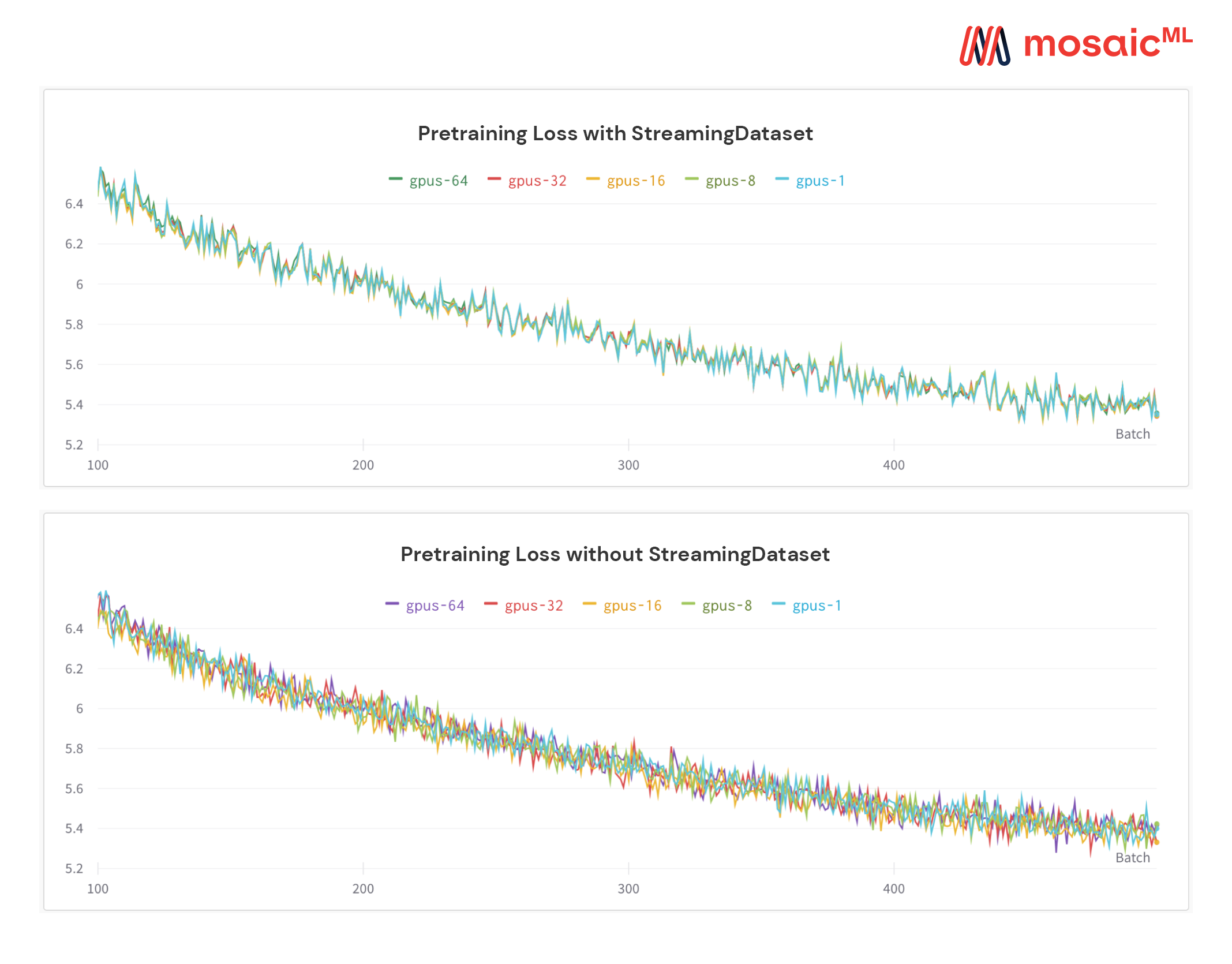
| 🎯 | True determinism | The same sample order on 1 or 64 GPUs and any number of nodes or workers, so runs and loss spikes reproduce. |
| ⏯️ | Instant mid-epoch resumption | Resume a long run from a checkpoint in seconds instead of replaying the epoch. |
| 🚀 | High throughput | The MDS format keeps per-sample overhead minimal for dataloader-bound workloads. |
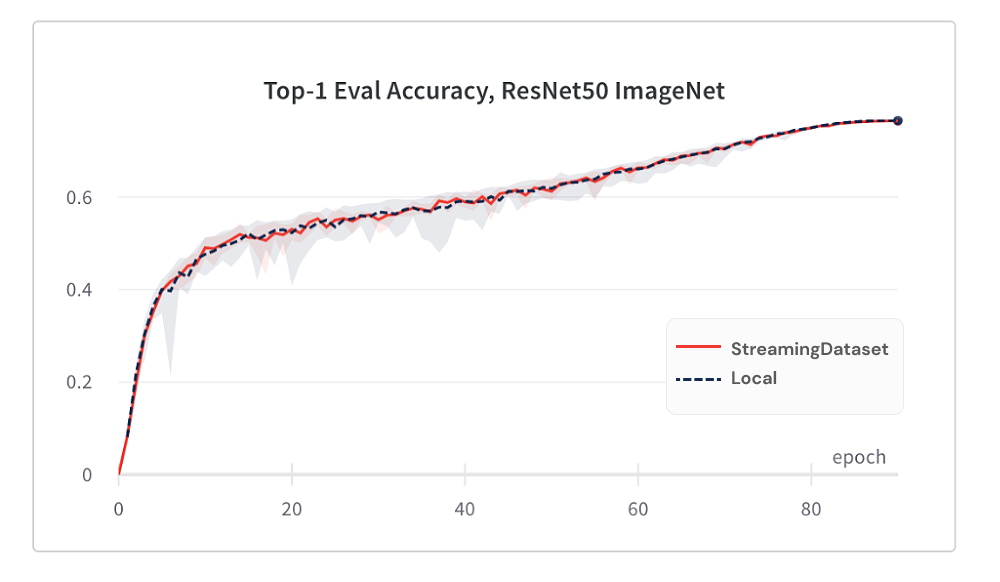
| 📈 | Equal convergence | Shuffling across all samples on a node converges like training from local disk. |
| 🔍 | Random access | dataset[i] works even before sample i is downloaded. |
| 🧮 | No divisibility requirements | Any number of samples on any number of devices; samples are repeated, never dropped. |
| 💽 | Disk usage limits | cache_limit='100gb' evicts least recently used shards to stay under budget. |
Mixing datasets in code
# mix C4, github code, and internal datasets
streams = [
  Stream(remote='s3://datasets/c4', proportion=0.4),
  Stream(remote='s3://datasets/github', proportion=0.1),
  Stream(remote='gcs://datasets/my_internal', proportion=0.5),
]

dataset = StreamingDataset(
  streams=streams,
  samples_per_epoch=1e8,
)
Determinism, convergence and throughput results
Results measured for the original MosaicML Streaming on ImageNet with ResNet-50, collected over 5 repetitions.
Training on 1, 8, 16, 32 or 64 GPUs yields the exact same loss curve, up to the limits of floating-point math:
Convergence matches training from local disk:
| Tool | Throughput | Top-1 accuracy |
|---|---|---|
| StreamingDataset | ~19000 img/sec | 76.51% +/- 0.09 |
| ImageFolder | ~18000 img/sec | 76.57% +/- 0.10 |
| WebDataset | ~16000 img/sec | 76.23% +/- 0.17 |
Throughput is measured after the data is cached in the first epoch.
🌐 Storage and formats
| Storage | Remote path | Install |
|---|---|---|
Amazon S3 and S3-compatible stores (set S3_ENDPOINT_URL) |
s3://bucket/path |
included |
| Google Cloud Storage | gs://bucket/path |
included |
| Azure Blob Storage / Azure Data Lake | azure:// / azure-dl:// |
included |
| Oracle Cloud Infrastructure | oci://bucket/path |
included |
| SFTP | sftp://host/path |
included |
| Hugging Face Hub | hf://datasets/org/name |
[hf] |
| Databricks Unity Catalog / DBFS | dbfs:/Volumes/... / dbfs:/... |
[databricks] |
| Alipan | alipan://path |
[alipan] |
| Local disk | /path/to/dataset |
included |
Shard formats: MDS (recommended), JSON and CSV/TSV. See dataset formats.
🧪 Compatibility
| Supported | Checked in CI | |
|---|---|---|
| Python | 3.10 to 3.14 | full test suite on each version |
| PyTorch | >=1.10,<3 |
current release, CPU |
| transformers | >=4.21.3,<6 |
resolves with transformers 5 |
| numpy | >=1.21.5,<3 |
resolves with numpy 2.5 |
🔀 About this fork
streaming-community is a community fork of MosaicML Streaming. The last upstream release, 0.13.0, was published on 2025-07-15 and no release has followed. That release pins transformers<5, so it cannot be installed together with transformers 5, and it pins numpy<2.2, so with numpy>=2.2 pip and uv silently fall back to 0.10.0, the last release without the numpy pin. This fork publishes the same library as streaming-community with current dependency bounds.
What stays the same, and migrating from mosaicml-streaming
What stays the same:
- the import name,
import streaming - the MDS, JSON and XSV shard formats and
index.jsonversion 2 - the
state_dictkeys used for mid-epoch resumption - the environment variable names
Migrating from mosaicml-streaming:
-
Uninstall the upstream package first. Both distributions install into the
streaming/package directory, so they cannot be installed side by side.pip uninstall mosaicml-streaming pip install streaming-community
-
Projects that pin
mosaicml-streaming, such as composer<1.0and llm-foundry>=0.12.0,<0.13, would pull the upstream package back in. With uv, drop their requirement with an override inpyproject.toml:[tool.uv] override-dependencies = ["mosaicml-streaming ; sys_platform == 'never'"]
pip has no dependency override. Install such a project with
pip install --no-depsand add its other requirements yourself.
Upstream remains at https://github.com/mosaicml/streaming; see NOTICE for attribution.
Starter code for popular datasets
We also have starter code for the following popular datasets, which can be found in the streaming directory:
| Dataset | Task | Read | Write |
|---|---|---|---|
| LAION-400M | Text and image | Read | Write |
| WebVid | Text and video | Read | Write |
| C4 | Text | Read | Write |
| EnWiki | Text | Read | Write |
| Pile | Text | Read | Write |
| ADE20K | Image segmentation | Read | Write |
| CIFAR10 | Image classification | Read | Write |
| COCO | Image classification | Read | Write |
| ImageNet | Image classification | Read | Write |
To start training on these datasets:
- Convert raw data into .mds format using the corresponding script from the
convertdirectory.
For example:
$ python -m streaming.multimodal.convert.webvid --in <CSV file> --out <MDS output directory>
- Import dataset class to start training the model.
from streaming.multimodal import StreamingInsideWebVid
dataset = StreamingInsideWebVid(local=local, remote=remote, shuffle=True)
🏆 Project showcase
Here are some projects and experiments that used StreamingDataset. Got something to add? Open a pull request.
- BioMedLM: a Domain Specific Large Language Model for BioMedicine by MosaicML and Stanford CRFM
- Mosaic Diffusion Models: Training Stable Diffusion from Scratch Costs <$160k
- Mosaic LLMs: GPT-3 quality for <$500k
- Mosaic ResNet: Blazingly Fast Computer Vision Training with the Mosaic ResNet and Composer
- Mosaic DeepLabv3: 5x Faster Image Segmentation Training with MosaicML Recipes
- …more to come! Stay tuned!
💫 Community
We welcome contributions, pull requests and issues.
- Questions and ideas: Discussions
- Bugs and feature requests: Issues
- Contributing: CONTRIBUTING.md
- Security reports: SECURITY.md
- Release notes: CHANGELOG.md
If you like this project, give us a star ⭐
✍️ Citation
@misc{mosaicml2022streaming,
    author = {The Mosaic ML Team},
    title = {streaming},
    year = {2022},
    howpublished = {\url{<https://github.com/mosaicml/streaming/>}},
}
1 maintainer

Metadata
1 maintainer
Release files for streaming-community 0.14.2
For a detailed explanation of source distributions (sdists) and built distributions (wheels), please see the package formats documentation.
Source distribution (sdist)
| File | Size | Uploaded | Provenance | Actions |
|---|---|---|---|---|
| streaming_community-0.14.2.tar.gz | 257.9 kB | With provenance | Details for streaming_community-0.14.2.tar.gz |
Built distribution (wheel)
| File | Interpreter | ABI | Platform | Actions Reset |
|---|---|---|---|---|
| streaming_community-0.14.2-py3-none-any.whl | Python 3 | none | any | Details for streaming_community-0.14.2-py3-none-any.whl |
Total release size: 529.4 kB
Release files / streaming_community-0.14.2.tar.gz
| Download URL | streaming_community-0.14.2.tar.gz |
|---|---|
| Size | 257.9 kB |
| Tags | Source |
|
SHA-256 checksum How to use checksums |
01fbb4821fd480ad24b6c9de9a099eb9eedda2b0180b33473ea12c853412f9c5
|
|
BLAKE2b-256 checksum How to use checksums |
91161222eb1b06f23f8e3130aed73ae0087e306f3a138fb0e5418d4b314aa4be
|
| Upload date | |
|
Uploaded using Trusted Publishing? What is trusted publishing? |
Yes |
| Uploaded via |
twine/7.0.0 CPython/3.13.16
|
Provenance
Provenance describes where a file came from. On PyPI, provenance is shared via attestations, which provide a verifiable record of the build or publishing details. View details, limitations and caveats.


PyPI Publish Attestation
PyPI verified that this artifact, at this checksum, originated from the publisher listed below.
Signed by GitHub Actions, verified by PyPI on Oct 25, 2026.
Transparency logRelease files / streaming_community-0.14.2-py3-none-any.whl
| Download URL | streaming_community-0.14.2-py3-none-any.whl |
|---|---|
| Size | 271.5 kB |
| Tags | Python 3 |
|
SHA-256 checksum How to use checksums |
2746f1cdb3ad74ec20b3a7d9728ae1c60eb83df2d910bc7067149ef2b0ade529
|
|
BLAKE2b-256 checksum How to use checksums |
64d7d461c00f96bedcd2b1e5218eddfeefaa91ae8183ef386f33c7f4d40bdb32
|
| Upload date | |
|
Uploaded using Trusted Publishing? What is trusted publishing? |
Yes |
| Uploaded via |
twine/7.0.0 CPython/3.13.16
|
Provenance
Provenance describes where a file came from. On PyPI, provenance is shared via attestations, which provide a verifiable record of the build or publishing details. View details, limitations and caveats.
PyPI Publish Attestation
PyPI verified that this artifact, at this checksum, originated from the publisher listed below.
Signed by GitHub Actions, verified by PyPI on Oct 25, 2026.
Transparency logSecurity for streaming-community 0.14.2
Provenance
Provenance describes where a file came from. On PyPI, provenance is shared via attestations, which provide a verifiable record of the build or publishing details. View details, limitations and caveats.
Full provenance
Both files in this release have been uploaded with provenance metadata.
Attestation for streaming_community-0.14.2.tar.gz
PyPI Publish Attestation
PyPI verified that this artifact, at this checksum, originated from the publisher listed below.
Signed by GitHub Actions, verified by PyPI on Oct 25, 2026.
Transparency logA note on package security
PyPI is a repository for distributing packages, not a service for auditing them. While third-party security researchers and our staff do their best to detect and remove malicious packages, PyPI cannot guarantee the quality, security or suitability of any given package.
To learn more about protecting yourself from malicious actors, visit our package security documentation.














