
streamlit-audio-editor
A browser-based audio editor & jam-session recorder for Streamlit



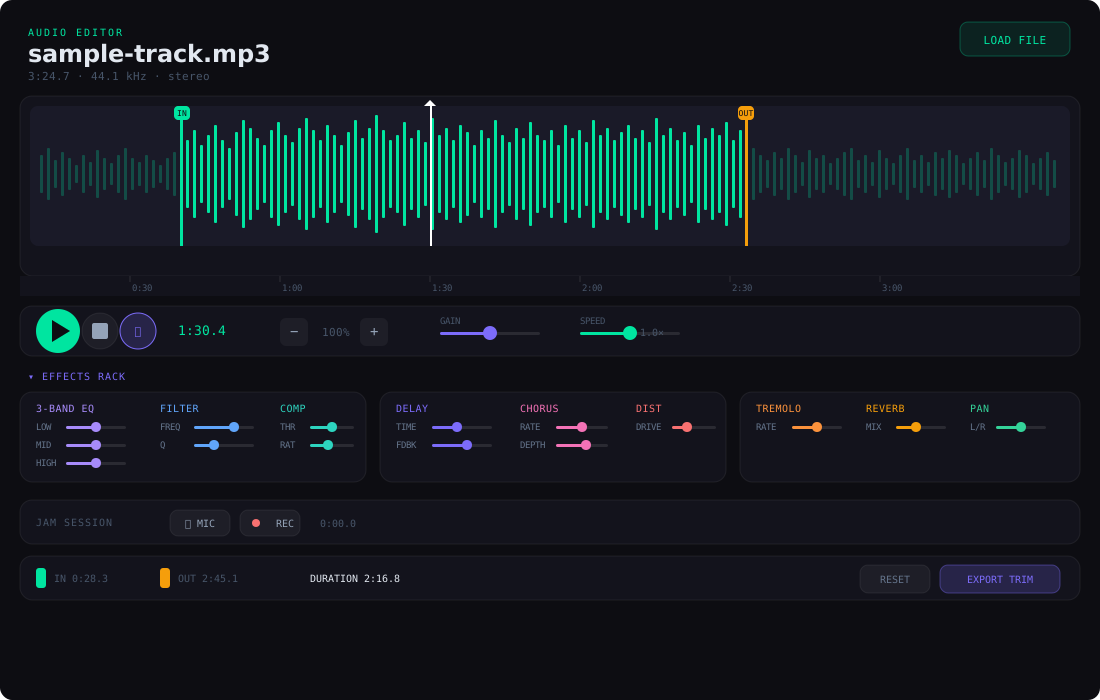
streamlit-audio-editor is a fully interactive audio editor that runs inside any Streamlit application. Load any audio file, trim with precision handles, apply a full rack of real-time effects, route your microphone through the effects chain, and record jam sessions — all entirely client-side via the Web Audio API with zero server-side dependencies (no ffmpeg, no pydub).
Features
Waveform Display
- PCM waveform rendering — decoded via Web Audio API
decodeAudioDataand drawn on an HTML5 canvas - Click-to-seek — click anywhere on the waveform to jump to that position
- Animated playhead — a live cursor tracks the current playback position
- Zoom — scroll wheel or ± buttons to zoom in on waveform detail; horizontal scrollbar for navigation
- Loop mode — toggle looping with correct
loopStart/loopEndon the AudioBufferSourceNode
Trim & Export
- Draggable IN / OUT trim handles — set precise start and end points directly on the waveform
- PCM slicing — exports only the selected region as raw PCM
- 16-bit WAV encoding — encodes the trim in the browser, no server round-trip
- Inline preview — listen to the trimmed result before exporting
- Download button — one-click WAV download of the trimmed audio
Effects Rack
All effects are real-time — no playback restart required:
| Effect | Controls |
|---|---|
| 3-Band EQ | Low shelf · Mid peak · High shelf |
| Filter | Lowpass / Highpass / Bandpass / Notch with frequency + resonance |
| Compressor | Threshold, ratio, attack, release |
| Delay | Delay time with feedback loop |
| Chorus | LFO-modulated delay — rate, depth, mix |
| Distortion | Waveshaper overdrive curve |
| Tremolo | LFO amplitude modulation — rate, depth |
| Reverb | Convolution with synthetic impulse response |
| Stereo Pan | Left / right panning |
| Speed / Pitch | Tape-style playback rate adjustment |
| Gain | Master output level (0.0 – 2.0) |
Microphone Input
- Route live mic through the entire effects chain in real time
- Uses
getUserMedia— works in any modern browser with microphone permission
Jam Session Recording
- MediaRecorder capture — records the effected output (file playback + mic) as WebM/Opus
- Preview & download — listen to the recording inline, then download or send to Python
- Duration tracking — recording length in seconds returned with the result
Format Support
- Supports MP3, WAV, OGG, M4A, FLAC — anything the browser can decode
- Load from URL or base64 data URI
Dark Theme
- Consistent dark UI designed to match Streamlit's dark mode
- Glass-morphism panels with subtle borders and hover effects
Installation
pip install streamlit-audio-editor
Quick Start
import base64
import streamlit as st
from streamlit_audio_editor import st_audio_editor

st.title("Audio Editor")

result = st_audio_editor(key="editor")

if result and result.get("type") == "export":
    st.success(
        f"Trimmed {result['trimStart']:.2f}s → {result['trimEnd']:.2f}s "
        f"({result['trimEnd'] - result['trimStart']:.2f}s)"
    )
    wav_bytes = base64.b64decode(result["wavBase64"])
    st.audio(wav_bytes, format="audio/wav")
    st.download_button("Download trimmed WAV", wav_bytes, "trimmed.wav", "audio/wav")

if result and result.get("type") == "recording":
    audio_bytes = base64.b64decode(result["recordingBase64"])
    st.audio(audio_bytes, format=result["mimeType"])
    st.download_button("Download recording", audio_bytes, "jam.webm", result["mimeType"])
API Reference
st_audio_editor
st_audio_editor(
    audio_url: str | None = None,
    key: str | None = None,
) -> dict | None
Parameters
| Parameter | Type | Default | Description |
|---|---|---|---|
audio_url |
str or None |
None |
URL or data-URI of an audio file to pre-load. Supports any browser-decodable format. |
key |
str or None |
None |
An optional key that uniquely identifies this component. Required when placing multiple editors on one page. |
Return Value
Returns a dict when the user exports a trim or sends a recording, or None before any interaction.
Export trim (type="export"):
{
    "type":      "export",
    "trimStart": float,       # trim in-point (seconds)
    "trimEnd":   float,       # trim out-point (seconds)
    "duration":  float,       # total file duration (seconds)
    "gain":      float,       # gain multiplier (0.0 – 2.0)
    "wavBase64": str,         # base64-encoded 16-bit PCM WAV of the trimmed region
    # … plus all current effect parameters:
    # eqLow, eqMid, eqHigh, filterFreq, filterQ, filterType,
    # compThreshold, compRatio, compAttack, compRelease,
    # delayTime, delayFeedback, chorusRate, chorusDepth, chorusMix,
    # distortion, tremoloRate, tremoloDepth, reverbMix, pan, speed
}
Jam session recording (type="recording"):
{
    "type":            "recording",
    "mimeType":        str,      # e.g. "audio/webm;codecs=opus"
    "recordingBase64": str,      # base64-encoded audio blob
    "durationSec":     float,    # recording length in seconds
}
Usage Examples
Pre-loading Audio from a URL
result = st_audio_editor(
    audio_url="https://example.com/sample.mp3",
    key="editor",
)
Pre-loading a Local File via Data URI
import base64

with open("sample.wav", "rb") as f:
    b64 = base64.b64encode(f.read()).decode()

result = st_audio_editor(
    audio_url=f"data:audio/wav;base64,{b64}",
    key="editor",
)
Processing Exported Audio
import base64
import streamlit as st
from streamlit_audio_editor import st_audio_editor

result = st_audio_editor(key="editor")

if result and result["type"] == "export":
    wav_bytes = base64.b64decode(result["wavBase64"])

    col1, col2, col3 = st.columns(3)
    col1.metric("Trim Start", f"{result['trimStart']:.2f}s")
    col2.metric("Trim End",   f"{result['trimEnd']:.2f}s")
    col3.metric("Duration",   f"{result['trimEnd'] - result['trimStart']:.2f}s")

    st.audio(wav_bytes, format="audio/wav")
    st.download_button("Download WAV", wav_bytes, "trimmed.wav", "audio/wav")

    # Show active effects
    if result.get("gain", 1.0) != 1.0:
        st.info(f"Gain: {result['gain']:.2f}x")
    if result.get("reverbMix", 0) > 0:
        st.info(f"Reverb mix: {result['reverbMix']:.0%}")
Handling Jam Session Recordings
import base64
import streamlit as st
from streamlit_audio_editor import st_audio_editor

result = st_audio_editor(key="editor")

if result and result["type"] == "recording":
    audio_bytes = base64.b64decode(result["recordingBase64"])
    st.success(f"Recorded {result['durationSec']:.1f}s of audio")
    st.audio(audio_bytes, format=result["mimeType"])
    st.download_button(
        "Download Recording",
        audio_bytes,
        "jam-session.webm",
        result["mimeType"],
    )
Architecture
The component is built with React 18 communicating with Streamlit via the bidirectional component API (streamlit-component-lib). All audio processing runs entirely in the browser via the Web Audio API.
┌──────────────────────────────────────────────────────────┐
│  Python (Streamlit)                                      │
│  st_audio_editor(audio_url, key)                         │
│       ↓ args                  ↑ componentValue           │
├──────────────────────────────────────────────────────────┤
│  React Frontend (iframe)                                 │
│  ┌────────────────────────────────────────────────────┐  │
│  │ Toolbar: Load · Play/Pause · Loop · Zoom · Export  │  │
│  ├────────────────────────────────────────────────────┤  │
│  │ Waveform Canvas                                    │  │
│  │ ┌─ IN ──────── ▶ playhead ──────── OUT ─┐         │  │
│  │ │ ╱╲╱╲╱╲╱╲╱╲╱╲╱╲╱╲╱╲╱╲╱╲╱╲╱╲╱╲╱╲╱╲╱╲ │         │  │
│  │ └──────────────────────────────────────────┘       │  │
│  ├────────────────────────────────────────────────────┤  │
│  │ Effects Rack                                       │  │
│  │ ┌──────┐ ┌──────┐ ┌──────┐ ┌──────┐ ┌──────┐     │  │
│  │ │ EQ   │ │Filter│ │Comp  │ │Delay │ │Chorus│ ... │  │
│  │ └──────┘ └──────┘ └──────┘ └──────┘ └──────┘     │  │
│  ├────────────────────────────────────────────────────┤  │
│  │ Jam Session: Mic Input → Effects → MediaRecorder   │  │
│  └────────────────────────────────────────────────────┘  │
│                                                          │
│  Web Audio API Graph:                                    │
│  Source → EQ → Filter → Comp → Delay → Chorus →         │
│  Distortion → Tremolo → Reverb → Pan → Gain → Dest      │
└──────────────────────────────────────────────────────────┘
- Audio decoding —
AudioContext.decodeAudioData()decodes any browser-supported format to PCM - Effects chain — each effect is a Web Audio node wired in series; parameters update in real time
- Mic routing —
getUserMediastream is connected to the same effects chain - Recording —
MediaRecordercaptures the final output node as WebM/Opus - Export — raw PCM is sliced and encoded to 16-bit WAV entirely in JavaScript
Browser Compatibility
| Browser | Status |
|---|---|
| Chrome / Edge 90+ | ✅ Full support |
| Firefox 90+ | ✅ Full support |
| Safari 15+ | ✅ Full support (mic requires HTTPS) |
| Mobile browsers | ⚠️ Mic input may require user gesture |
Requirements
- Python 3.8+
- Streamlit ≥ 1.28.0
License
MIT — see LICENSE for details.
Links
1 maintainer

Metadata
1 maintainer
Release files for streamlit-audio-editor 0.4.2
For a detailed explanation of source distributions (sdists) and built distributions (wheels), please see the package formats documentation.
Source distribution (sdist)
| File | Size | Uploaded | |
|---|---|---|---|
| streamlit_audio_editor-0.4.2.tar.gz | 434.5 kB | Details |
Built distribution (wheel)
| File | Interpreter | ABI | Platform | Reset |
|---|---|---|---|---|
| streamlit_audio_editor-0.4.2-py3-none-any.whl | Python 3 | none | any | Details |
Total release size: 869.6 kB
Release files / streamlit_audio_editor-0.4.2.tar.gz
| Download URL | streamlit_audio_editor-0.4.2.tar.gz |
|---|---|
| Size | 434.5 kB |
| Tags | Source |
|
SHA-256 checksum How to use checksums |
d72d546c85effd8340e3803754ef2e388cefa8d9b16b3327dfe3dbc7e1308119
|
|
BLAKE2b-256 checksum How to use checksums |
535a43161e2ff330759f9ba4fbf9ee7754bd0e3c2544ba8f75bbe9fa8fe8f818
|
| Upload date | |
|
Uploaded using Trusted Publishing? What is trusted publishing? |
No |
| Uploaded via |
twine/6.2.0 CPython/3.11.9
|
Release files / streamlit_audio_editor-0.4.2-py3-none-any.whl
| Download URL | streamlit_audio_editor-0.4.2-py3-none-any.whl |
|---|---|
| Size | 435.1 kB |
| Tags | Python 3 |
|
SHA-256 checksum How to use checksums |
0775b5b6394ec6980fdf04684bfd935d78b6514d7a86b3ef5627957143f91b3a
|
|
BLAKE2b-256 checksum How to use checksums |
458d5a14758fd543d28632a9726e8766e52e8921503bb9db4c8aeea1ea422015
|
| Upload date | |
|
Uploaded using Trusted Publishing? What is trusted publishing? |
No |
| Uploaded via |
twine/6.2.0 CPython/3.11.9
|














