
A Streamlit custom component for viewing JSON with interactive tooltips and tags

Project description
Streamlit JSON Tip
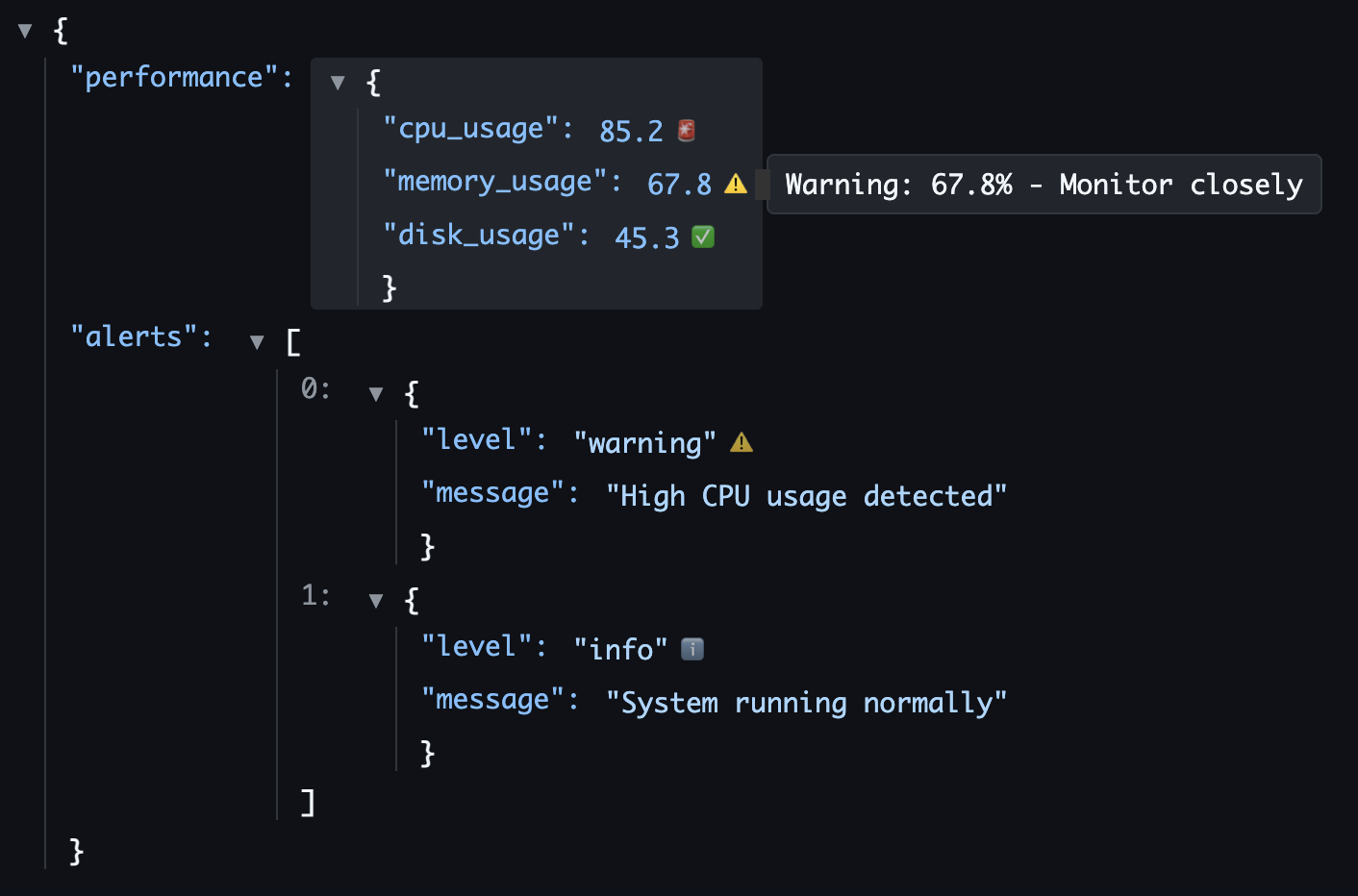
A Streamlit custom component for viewing JSON data with interactive tooltips and tags for individual fields.
Features
- 🔍 Interactive JSON Viewer: Expand/collapse objects and arrays
- 📝 Interactive Tooltips: Add contextual help for any field with professional Tippy.js tooltips
- 🏷️ Field Tags: Categorize fields with colored tags (PII, CONFIG, etc.)
- 🎯 Field Selection: Click on fields to get detailed information
- 🎨 Syntax Highlighting: Color-coded JSON with proper formatting
- 📱 Responsive Design: Works well in different screen sizes
Installation
From PyPI (Recommended)
pip install streamlit-json-tip
From TestPyPI (Latest Development Version)
pip install --index-url https://test.pypi.org/simple/ --extra-index-url https://pypi.org/simple/ streamlit-json-tip
Development Setup
-
Clone this repository:
git clone https://github.com/isaac/streamlit-json-tip.git
cd streamlit-json-tip
-
Set up development environment with uv:
# Install uv if you haven't already
curl -LsSf https://astral.sh/uv/install.sh | sh

# Create virtual environment and install all dependencies (including dev dependencies)
uv sync
-
Run the example app:
uv run streamlit run example_app.py
Usage
import streamlit as st
from streamlit_json_tip import json_viewer

# Your JSON data
data = {
    "user": {
        "id": 123,
        "name": "John Doe",
        "email": "john@example.com"
    }
}

# Help text for specific fields
help_text = {
    "user.id": "Unique user identifier",
    "user.name": "Full display name",
    "user.email": "Primary contact email"
}

# Tags for categorizing fields
tags = {
    "user.id": "ID",
    "user.name": "PII",
    "user.email": "PII"
}

# Display the JSON viewer
selected = json_viewer(
    data=data,
    help_text=help_text,
    tags=tags,
    height=400
)

# Handle field selection
if selected:
    st.write(f"Selected field: {selected['path']}")
    st.write(f"Value: {selected['value']}")
    if selected.get('help_text'):
        st.write(f"Help: {selected['help_text']}")
Parameters
- data (dict): The JSON data to display
- help_text (dict, optional): Dictionary mapping field paths to help text
- tags (dict, optional): Dictionary mapping field paths to tags/labels
- height (int, optional): Height of the component in pixels (default: 400)
- key (str, optional): Unique key for the component
Field Path Format
Field paths use dot notation for objects and bracket notation for arrays:
"user.name"- Object field"items[0].title"- Array item field"settings.preferences.theme"- Nested object field
Development
Frontend Development
-
Set up the development environment (see Development Setup above)
-
Navigate to the frontend directory:
cd streamlit_json_tip/frontend
-
Install frontend dependencies:
npm install -
Start development server:
npm start -
In your Python code, set
_RELEASE = Falsein__init__.py -
Run the example app in another terminal:
uv run streamlit run example_app.py
Building for Production
-
Build the frontend:
cd streamlit_json_tip/frontend
npm run build
-
Set
_RELEASE = Truein__init__.py -
Build the Python package:
uv run python -m build
-
Upload to PyPI:
uv run python -m twine upload dist/*
License
MIT License
Release history Release notifications | RSS feed


Download files
Download the file for your platform. If you're not sure which to choose, learn more about installing packages.
Source Distribution
Built Distribution
Filter files by name, interpreter, ABI, and platform.
If you're not sure about the file name format, learn more about wheel file names.
Copy a direct link to the current filters
File details
Details for the file streamlit_json_tip-0.2.2.tar.gz.
File metadata
- Download URL: streamlit_json_tip-0.2.2.tar.gz
- Upload date:
- Size: 769.3 kB
- Tags: Source
- Uploaded using Trusted Publishing? No
- Uploaded via: twine/6.1.0 CPython/3.11.13
File hashes
| Algorithm | Hash digest | |
|---|---|---|
| SHA256 |
96ac865886186a09a8d42ca8a7eacaac973f1d24c51076ef6bd2b305f98e7adf
|
|
| MD5 |
bcb4fb5f3a384bd7e4c93e06ead21cfe
|
|
| BLAKE2b-256 |
bf4c57b9457ef7f6c98024b936cf9a0a6c045a33229d73232d6ae74f958b0a81
|
File details
Details for the file streamlit_json_tip-0.2.2-py3-none-any.whl.
File metadata
- Download URL: streamlit_json_tip-0.2.2-py3-none-any.whl
- Upload date:
- Size: 653.9 kB
- Tags: Python 3
- Uploaded using Trusted Publishing? No
- Uploaded via: twine/6.1.0 CPython/3.11.13
File hashes
| Algorithm | Hash digest | |
|---|---|---|
| SHA256 |
f68f8c64ff9eb55eeae5d7cb79d6963e7b7394208178ca654a7bdd18c6c05f83
|
|
| MD5 |
33dcca270fe4580eb7592dae1129bddd
|
|
| BLAKE2b-256 |
f8107a31fb9ae62b52f4b0a73393f686d44abf4cf0f23ac4f5477c85449d25eb
|






