
A Streamlit custom component for viewing JSON with interactive tooltips and tags

Project description
Streamlit JSON Tip





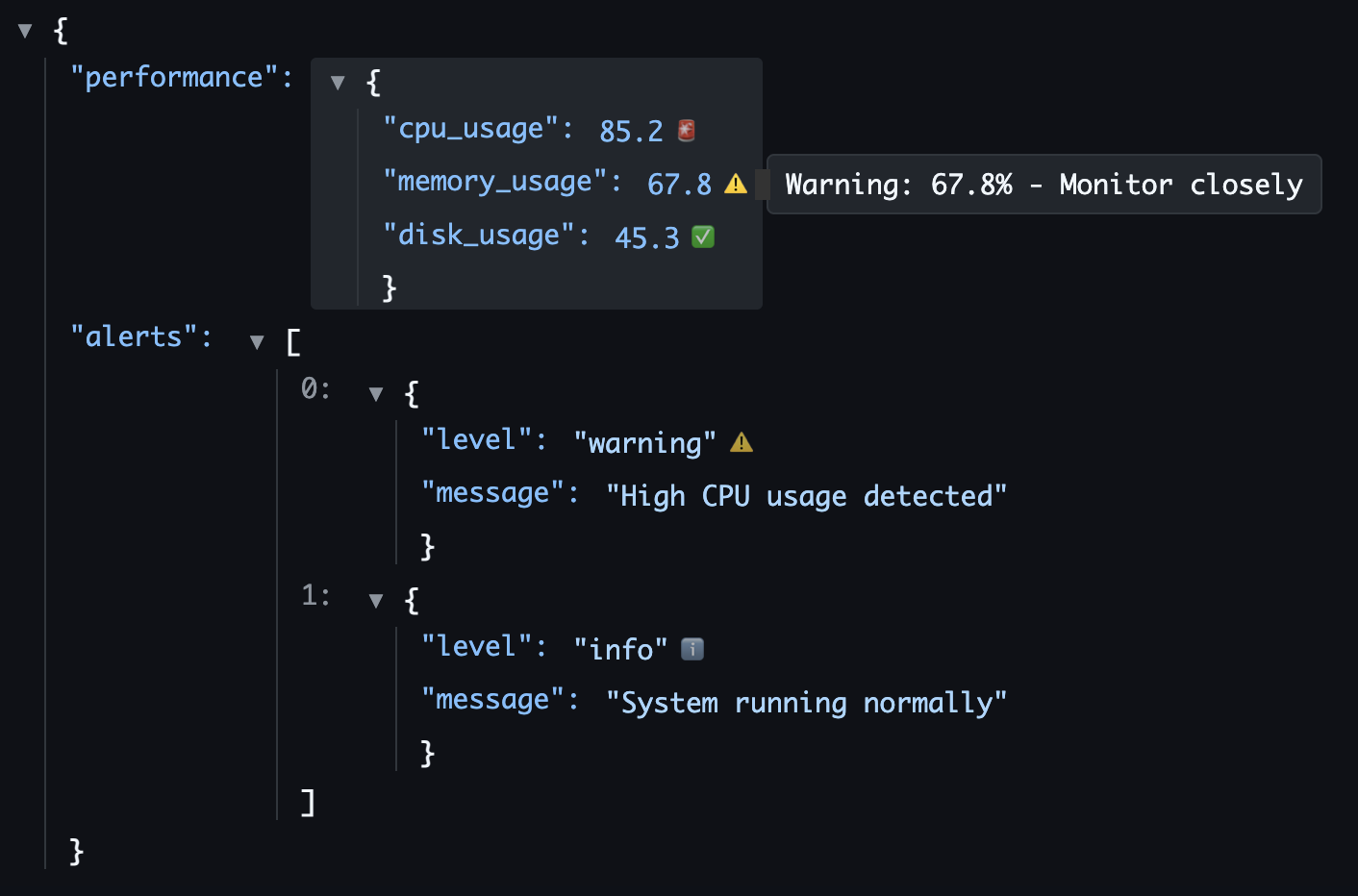
A Streamlit custom component for viewing JSON data with interactive tooltips and tags for individual fields.
Features
- 🔍 Interactive JSON Viewer: Expand/collapse objects and arrays
- 📝 Interactive Tooltips: Add contextual help for any field with professional Tippy.js tooltips
- 🏷️ Field Tags: Categorize fields with colored tags (PII, CONFIG, etc.)
- 🎯 Field Selection: Click on fields to get detailed information
- 🎨 Syntax Highlighting: Color-coded JSON with proper formatting
- 📱 Responsive Design: Works well in different screen sizes
Installation
With uv (Recommended)
uv add streamlit-json-tip
Or for a one-off script:
uv run --with streamlit-json-tip streamlit run your_app.py
With pip
pip install streamlit-json-tip
From TestPyPI (Latest Development Version)
With uv:
uv add --index-url https://test.pypi.org/simple/ --extra-index-url https://pypi.org/simple/ streamlit-json-tip
With pip:
pip install --index-url https://test.pypi.org/simple/ --extra-index-url https://pypi.org/simple/ streamlit-json-tip
Development Setup
Prerequisites
- Install task
brew install go-task/tap/go-task
- Install uv
curl -LsSf https://astral.sh/uv/install.sh | sh
Build repo
-
Clone this repository:
git clone https://github.com/isaac/streamlit-json-tip.git
cd streamlit-json-tip
-
Set up development environment with uv:
# Create virtual environment and install all dependencies (including dev dependencies)
uv sync
-
Run the example app:
uv run streamlit run example_app.py
Usage
import streamlit as st
from streamlit_json_tip import json_viewer

# Your JSON data
data = {
    "user": {
        "id": 123,
        "name": "John Doe",
        "email": "john@example.com"
    }
}

# Help text for specific fields
help_text = {
    "user.id": "Unique user identifier",
    "user.name": "Full display name",
    "user.email": "Primary contact email"
}

# Tags for categorizing fields
tags = {
    "user.id": "ID",
    "user.name": "PII",
    "user.email": "PII"
}

# Display the JSON viewer
selected = json_viewer(
    data=data,
    help_text=help_text,
    tags=tags,
    height=400
)

# Handle field selection
if selected:
    st.write(f"Selected field: {selected['path']}")
    st.write(f"Value: {selected['value']}")
    if selected.get('help_text'):
        st.write(f"Help: {selected['help_text']}")
Advanced Examples
Dynamic Tooltips
Dynamic tooltips allow you to generate contextual help text programmatically based on field paths, values, and the complete data structure:
import streamlit as st
from streamlit_json_tip import json_viewer

# Sample data with various types
data = {
    "user": {
        "name": "Alice Johnson",
        "score": 95,
        "email": "alice@company.com",
        "role": "admin"
    },
    "metrics": {
        "cpu_usage": 0.78,
        "memory_usage": 0.65,
        "disk_usage": 0.92
    },
    "items": [
        {"id": 1, "status": "active"},
        {"id": 2, "status": "pending"}
    ]
}

def dynamic_tooltip(path, value, data):
    """Generate contextual tooltips based on field path and value."""

    # Name fields
    if path.endswith(".name"):
        return f"👤 Full name: {len(value)} characters"

    # Score fields with conditional icons
    elif path.endswith(".score"):
        icon = "🟢" if value >= 90 else "🟡" if value >= 70 else "🔴"
        return {
            "text": f"Performance score: {value}/100",
            "icon": icon
        }

    # Email fields
    elif path.endswith(".email"):
        domain = value.split("@")[1] if "@" in value else "unknown"
        return {
            "text": f"📧 Email domain: {domain}",
            "icon": "📧"
        }

    # Usage metrics with warnings
    elif "usage" in path:
        percentage = f"{value * 100:.1f}%"
        if value > 0.9:
            return {
                "text": f"⚠️ High usage: {percentage}",
                "icon": "⚠️"
            }
        elif value > 0.7:
            return f"🟡 Moderate usage: {percentage}"
        else:
            return f"🟢 Normal usage: {percentage}"

    # Status fields
    elif path.endswith(".status"):
        status_info = {
            "active": {"icon": "✅", "desc": "Currently active"},
            "pending": {"icon": "⏳", "desc": "Awaiting approval"},
            "inactive": {"icon": "❌", "desc": "Not active"}
        }
        info = status_info.get(value, {"icon": "❓", "desc": "Unknown status"})
        return {
            "text": f"{info['desc']}: {value}",
            "icon": info["icon"]
        }

    # Role-based tooltips
    elif path.endswith(".role"):
        role_descriptions = {
            "admin": "👑 Full system access",
            "user": "👤 Standard user access",
            "guest": "👁️ Read-only access"
        }
        return role_descriptions.get(value, f"Role: {value}")

    return None

# Display with dynamic tooltips
json_viewer(
    data=data,
    dynamic_tooltips=dynamic_tooltip,
    height=500
)
Custom Tooltip Configuration
Configure Tippy.js tooltip behavior and appearance:
import streamlit as st
from streamlit_json_tip import json_viewer

data = {
    "api": {
        "endpoint": "https://api.example.com",
        "version": "v2.1",
        "rate_limit": 1000
    },
    "database": {
        "host": "db.example.com",
        "port": 5432,
        "ssl": True
    }
}

help_text = {
    "api.endpoint": "The base URL for API requests",
    "api.version": "Current API version - breaking changes in major versions",
    "api.rate_limit": "Maximum requests per hour",
    "database.host": "Database server hostname",
    "database.port": "Database connection port",
    "database.ssl": "SSL encryption enabled for secure connections"
}

# Custom tooltip configuration
tooltip_config = {
    "placement": "right",           # Position: top, bottom, left, right, auto
    "animation": "scale",           # Animation: fade, shift-away, shift-toward, scale, perspective
    "delay": [500, 100],           # [show_delay, hide_delay] in milliseconds
    "duration": [200, 150],        # [show_duration, hide_duration] in milliseconds
    "interactive": True,           # Allow hovering over tooltip content
    "maxWidth": 300,              # Maximum width in pixels
    "trigger": "mouseenter focus", # Events: mouseenter, focus, click, etc.
    "hideOnClick": False,         # Keep tooltip open when clicking
    "sticky": True,               # Tooltip follows cursor movement
    "arrow": True,                # Show pointing arrow
    "theme": "light"              # Theme: light, dark, or custom
}

json_viewer(
    data=data,
    help_text=help_text,
    tooltip_config=tooltip_config,
    tooltip_icon="💡",  # Custom global icon
    height=400
)
Complex Data with Tags and Icons
Handle complex nested structures with comprehensive tooltips:
import streamlit as st
from streamlit_json_tip import json_viewer
# Complex nested data structure
data = {
"users": [
{
"id": 1,
"profile": {
"name": "John Doe",
"email": "john@company.com",
"ssn": "***-**-1234",
"department": "Engineering"
},
"permissions": ["read", "write", "admin"],
"last_login": "2024-01-15T10:30:00Z",
"settings": {
"theme": "dark",
"notifications": True,
"api_key": "sk-abc123...xyz789"
}
}
],
"system": {
"version": "2.1.0",
"environment": "production",
"uptime": 99.9,
"memory_usage": 0.78
}
}
# Static help text for specific fields
help_text = {
"users[0].id": "Unique user identifier in the system",
"system.version": "Current application version following semantic versioning",
"system.environment": "Deployment environment (dev/staging/production)"
}
# Field categorization with tags
tags = {
"users[0].profile.email": "PII",
"users[0].profile.ssn": "SENSITIVE",
"users[0].profile.name": "PII",
"users[0].settings.api_key": "SECRET",
"system.environment": "CONFIG",
"system.version": "INFO"
}
# Advanced dynamic tooltips with context awareness
def advanced_tooltips(path, value, data):
# Get user context for personalized tips
if "users[0]" in path:
user_name = data["users"][0]["profile"]["name"]
if path.endswith(".permissions"):
perm_count = len(value)
return {
"text": f"🔐 {user_name} has {perm_count} permission(s): {', '.join(value)}",
"icon": "🔐"
}
elif path.endswith(".last_login"):
return {
"text": f"🕒 {user_name}'s last activity: {value}",
"icon": "🕒"
}
elif path.endswith(".department"):
dept_info = {
"Engineering": "👨💻 Technical development team",
"Sales": "💼 Revenue generation team",
"Marketing": "📢 Brand and promotion team"
}
return dept_info.get(value, f"Department: {value}")
# System metrics with thresholds
elif path.startswith("system."):
if path.endswith(".uptime"):
if value >= 99.9:
return {"text": f"🟢 Excellent uptime: {value}%", "icon": "🟢"}
elif value >= 99.0:
return {"text": f"🟡 Good uptime: {value}%", "icon": "🟡"}
else:
return {"text": f"🔴 Poor uptime: {value}%", "icon": "🔴"}
elif path.endswith(".memory_usage"):
percentage = f"{value * 100:.1f}%"
if value > 0.9:
return {"text": f"⚠️ Critical memory usage: {percentage}", "icon": "⚠️"}
elif value > 0.7:
return {"text": f"🟡 High memory usage: {percentage}", "icon": "🟡"}
else:
return {"text": f"🟢 Normal memory usage: {percentage}", "icon": "🟢"}
# Sensitive data warnings
if any(keyword in path for keyword in ["ssn", "api_key", "password"]):
return {
"text": "🚨 Sensitive data - handle with care",
"icon": "🚨"
}
return None
# Advanced tooltip configuration for better UX
advanced_config = {
"placement": "auto", # Auto-position based on available space
"animation": "fade", # Smooth fade animation
"delay": [300, 100], # Quick show, delayed hide
"interactive": True, # Allow interaction with tooltip content
"maxWidth": 400, # Wider tooltips for more content
"hideOnClick": False, # Keep tooltips persistent
"appendTo": "parent" # Better positioning within container
}
selected = json_viewer(
data=data,
help_text=help_text,
tags=tags,
dynamic_tooltips=advanced_tooltips,
tooltip_config=advanced_config,
tooltip_icon="ℹ️",
height=600
)
# Handle field selection with detailed information
if selected:
st.sidebar.header("Field Details")
st.sidebar.json({
"Path": selected['path'],
"Value": selected['value'],
"Type": type(selected['value']).__name__,
"Help": selected.get('help_text', 'No help available')
})
Parameters
- data (dict): The JSON data to display
- help_text (dict, optional): Dictionary mapping field paths to help text
- tags (dict, optional): Dictionary mapping field paths to tags/labels
- dynamic_tooltips (function, optional): Function that takes (field_path, field_value, full_data) and returns tooltip text or dict with text and icon
- tooltip_config (dict, optional): Tippy.js configuration options (see Tooltip Configuration below)
- tooltip_icon (str, optional): Default icon for tooltips (default: "ℹ️")
- height (int, optional): Height of the component in pixels (default: 400)
- key (str, optional): Unique key for the component
Tooltip Configuration Options
The tooltip_config parameter accepts any valid Tippy.js options:
| Option | Type | Default | Description |
|---|---|---|---|
placement |
str | "top" | Tooltip position: "top", "bottom", "left", "right", "auto" |
animation |
str | "fade" | Animation type: "fade", "shift-away", "shift-toward", "scale", "perspective" |
delay |
int/list | 0 | Show delay in ms, or [show_delay, hide_delay] |
duration |
int/list | [300, 250] | Animation duration in ms, or [show_duration, hide_duration] |
interactive |
bool | False | Allow hovering over tooltip content |
maxWidth |
int | 350 | Maximum width in pixels |
trigger |
str | "mouseenter focus" | Events that trigger tooltip |
hideOnClick |
bool | True | Hide tooltip when clicking |
sticky |
bool | False | Tooltip follows cursor movement |
arrow |
bool | True | Show pointing arrow |
theme |
str | "light" | Tooltip theme |
Field Path Format
Field paths use dot notation for objects and bracket notation for arrays:
"user.name"- Object field"items[0].title"- Array item field"settings.preferences.theme"- Nested object field
Development
Frontend Development
-
Set up the development environment (see Development Setup above)
-
Navigate to the frontend directory:
cd streamlit_json_tip/frontend
-
Install frontend dependencies:
npm install -
Start development server:
npm start -
In your Python code, set
_RELEASE = Falsein__init__.py -
Run the example app in another terminal:
uv run streamlit run example_app.py
Running Tests
Python Tests
# Run all Python unit tests with coverage
uv run pytest

# Run tests with verbose output
uv run pytest -v

# Generate HTML coverage report
uv run pytest --cov-report=html
Frontend Tests
cd streamlit_json_tip/frontend

# Run Jest tests once
npm test -- --ci --watchAll=false

# Run tests with coverage
npm test -- --coverage --ci --watchAll=false

# Run tests in watch mode (for development)
npm test
Run All Tests
Both Python and frontend tests run automatically in GitHub Actions on every push and pull request.
Building for Production
-
Build the frontend:
cd streamlit_json_tip/frontend
npm run build
-
Set
_RELEASE = Truein__init__.py -
Build the Python package:
uv run python -m build
-
Upload to PyPI:
uv run python -m twine upload dist/*
Build Scripts
The project includes convenient uv scripts for common development tasks:
Frontend Development
task build-frontend
Package Building
uv run clean                 # Clean build artifacts
uv run build                 # Clean + build Python package
uv run build-check           # Build + validate package with twine
Publishing
task release-test          # Build + upload to TestPyPI
task release               # Build + upload to PyPI
This will build the frontend, package the Python distribution, validate it, and upload to PyPI.
Releasing a New Version
This project uses automated GitHub Actions for releases. Follow these steps to release a new version:
1. Update Version and Changelog
-
Update the version in
pyproject.toml:version = "0.2.5" # Increment according to semver
-
Add changelog entry in
CHANGELOG.md:## [0.2.5] - 2025-01-26 ### ✨ Added - New feature description ### 🔧 Fixed - Bug fix description
-
Commit your changes:
git add pyproject.toml CHANGELOG.md
git commit -m "Bump version to 0.2.5"
git push origin main
2. Create and Push Release Tag
git tag v0.2.5
git push origin v0.2.5
3. Automated Release Process
Once you push the tag, GitHub Actions will automatically:
- ✅ Build the frontend (React components)
- ✅ Build the Python package (wheel + source distribution)
- ✅ Extract changelog section for this version
- ✅ Create GitHub Release with changelog as release notes
- ✅ Upload distribution files as release assets
- ✅ Publish to PyPI
4. Monitor the Release
- Check GitHub Actions: Go to the Actions tab to monitor the release workflow
- Verify GitHub Release: Check that the release was created with proper changelog
- Verify PyPI: Confirm the new version appears on PyPI
Setup Requirements (One-time)
To use automated releases, you need:
- PyPI API Token: Add
PYPI_API_TOKENto your repository secrets- Go to: Repository → Settings → Secrets and variables → Actions
- Add your PyPI token as
PYPI_API_TOKEN
Manual Release (Alternative)
If you prefer manual releases or need to troubleshoot:
# Build everything
task build

# Upload to PyPI manually
export TWINE_PASSWORD=your_pypi_token_here
python -m twine upload --username __token__ dist/*
License
MIT License
Release history Release notifications | RSS feed


Download files
Download the file for your platform. If you're not sure which to choose, learn more about installing packages.
Source Distribution
Built Distribution
Filter files by name, interpreter, ABI, and platform.
If you're not sure about the file name format, learn more about wheel file names.
Copy a direct link to the current filters
File details
Details for the file streamlit_json_tip-0.2.6.tar.gz.
File metadata
- Download URL: streamlit_json_tip-0.2.6.tar.gz
- Upload date:
- Size: 936.7 kB
- Tags: Source
- Uploaded using Trusted Publishing? No
- Uploaded via: twine/6.1.0 CPython/3.12.9
File hashes
| Algorithm | Hash digest | |
|---|---|---|
| SHA256 |
cb618ac8c2618bc6925334273e65c6ecd02ebecb68acb73859f84380588d7c8e
|
|
| MD5 |
b6cc0ba95a31e43e32e3aae42e88c196
|
|
| BLAKE2b-256 |
9f65def9db3e9ceac35c073a98caebc8cd79a2089f1bc72e56e7d3dbba004b4e
|
File details
Details for the file streamlit_json_tip-0.2.6-py3-none-any.whl.
File metadata
- Download URL: streamlit_json_tip-0.2.6-py3-none-any.whl
- Upload date:
- Size: 663.6 kB
- Tags: Python 3
- Uploaded using Trusted Publishing? No
- Uploaded via: twine/6.1.0 CPython/3.12.9
File hashes
| Algorithm | Hash digest | |
|---|---|---|
| SHA256 |
2eac837f2d54ce0714940cb8cfbe3aebd8099ffa89f42ec63efec314663d8af4
|
|
| MD5 |
4fb4f56b583390a06bf37f9aafe26ec8
|
|
| BLAKE2b-256 |
3c6968a7c4f3662b8dcc01783d1020010193c4496406ff101b63451f4a131dbc
|






