
Test it Live !

streamlit-kpi
Streamlit component for displaying KPIs, easy layout to fit all your needs !
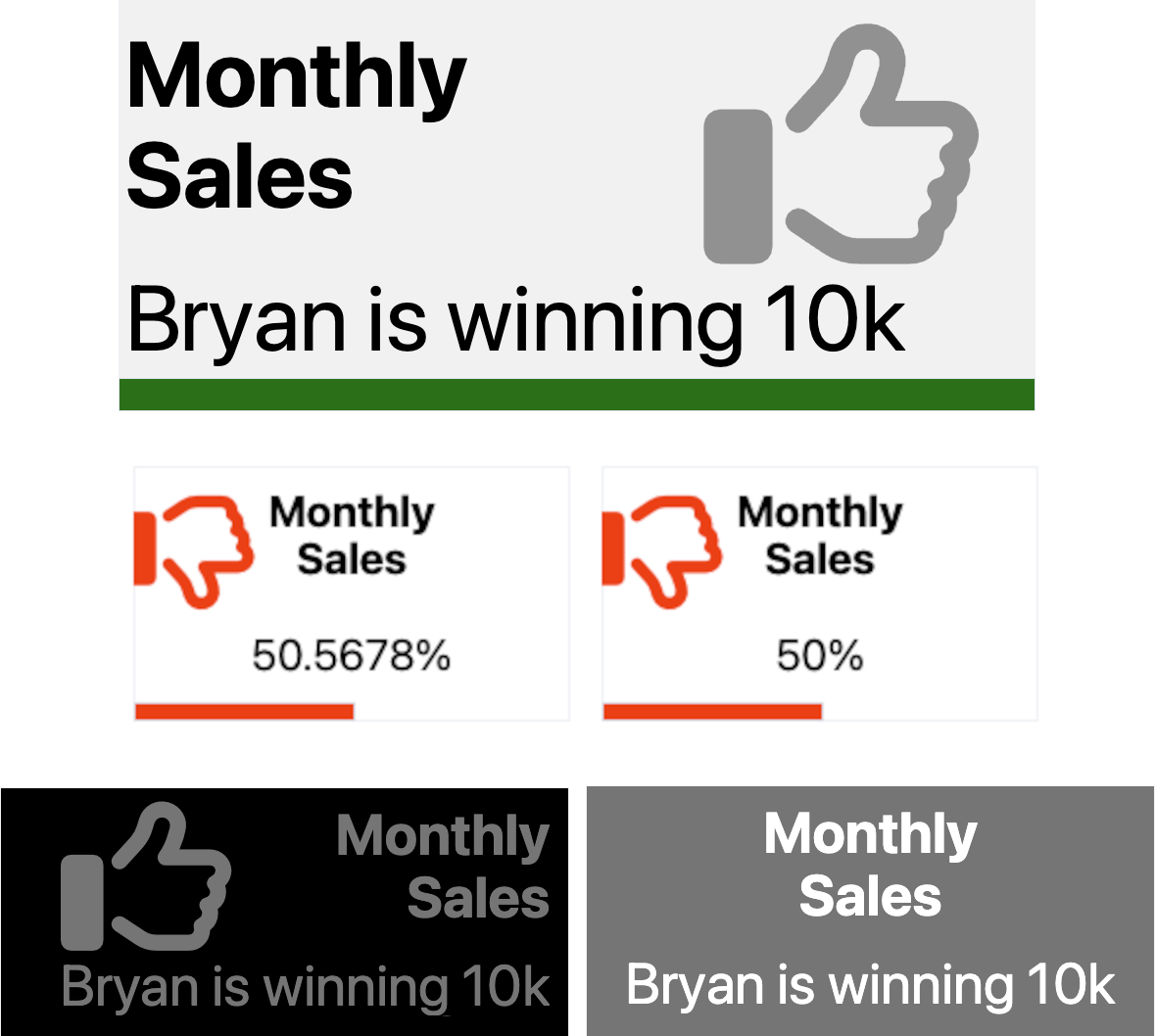
Installation instructions
pip install streamlit-kpi
Usage instructions
import streamlit as st
from streamlit_kpi import streamlit_kpi

streamlit_kpi(key="first_kpi",height='200',title='Monthly Sales',value=25000,icon='fa-solid fa-globe',progressValue=100,unit='K€')

   """
    Parameters:

    key: Optional str, default is '', the streamlit component key, higly recommended
    title: Mandatory str, the title...
    value: Mandatory str or int or float, the value...
    icon: Optional str, default is 'fa-solid fa-globe', any Font Awesome class (v6.3). See https://fontawesome.com/search?o=r&m=free
    icon: Optional str, default is '', the value unit appended after the value
    textAlign: Optional str, default is 'left', title and value alignement
    backgroundColor: Optional str, default is '#f3f3f3', widget background color can be str like blue, orange, transparent... or HEX color
    titleColor: Optional str, default is 'dark', title font color, can be str like blue, orange... or HEX color
    valueColor: Optional str, default is 'dark', value font color, can be str like blue, orange... or HEX color
    progressColor: Optional str, default is 'green', progress color, can be str like blue, orange... or HEX color
    iconColor: Optional str, default is 'black', icon font color, can be str like blue, orange... or HEX color
    animate: Optional bool, default is True, activate or not the animation
    animateDuration: Optional int, default is 2000, the animation duration in milliseconds
    progressValue: Optional int, default is 100, the progress bar completion, from 0 to 100
    iconOpacity: Optional int, default is 50, the opacity of the icon, from 0 to 100, 0 is invisible
    iconTop: Optional int, default is 24, the icon position from the top, from 0 to 100
    iconLeft: Optional int, default is 91, the icon position from the left, from 0 to 100
    showProgress: Optional bool, default is True, show or hide the progress bar
    showIcon: Optional bool, default is True, show or hide the icon
    height: Optional int, default is 250, the height of the whole widget

    """
1 maintainer

Metadata
1 maintainer
Release files for streamlit-kpi 0.0.36
For a detailed explanation of source distributions (sdists) and built distributions (wheels), please see the package formats documentation.
Source distribution (sdist)
| File | Size | Uploaded | |
|---|---|---|---|
| streamlit-kpi-0.0.36.tar.gz | 8.2 kB | Details |
Built distribution (wheel)
| File | Interpreter | ABI | Platform | Reset |
|---|---|---|---|---|
| streamlit_kpi-0.0.36-py3-none-any.whl | Python 3 | none | any | Details |
Total release size: 17.4 kB
Release files / streamlit-kpi-0.0.36.tar.gz
| Download URL | streamlit-kpi-0.0.36.tar.gz |
|---|---|
| Size | 8.2 kB |
| Tags | Source |
|
SHA-256 checksum How to use checksums |
273f80f5f4d4c1788a48741759481beba1d04ef307b55e582cb9b5993a73780c
|
|
BLAKE2b-256 checksum How to use checksums |
c8e5d30ebb9f88eaa45a9128eac5ff6af99ce289a3f5be74db7d10d3ec21c5d5
|
| Upload date | |
|
Uploaded using Trusted Publishing? What is trusted publishing? |
No |
| Uploaded via |
twine/4.0.2 CPython/3.11.3
|
Release files / streamlit_kpi-0.0.36-py3-none-any.whl
| Download URL | streamlit_kpi-0.0.36-py3-none-any.whl |
|---|---|
| Size | 9.2 kB |
| Tags | Python 3 |
|
SHA-256 checksum How to use checksums |
ed20c4c763cb6b079a88e8fabb4f3ee23e57d4e30a4a6fc6c9d878e46d0c97ce
|
|
BLAKE2b-256 checksum How to use checksums |
111a73e110f604374bf6a228cde6fc34e5ecc86a9ce983fe04f71e0e52ac92eb
|
| Upload date | |
|
Uploaded using Trusted Publishing? What is trusted publishing? |
No |
| Uploaded via |
twine/4.0.2 CPython/3.11.3
|














