
streamlit-nle
A professional non-linear video editor component for Streamlit



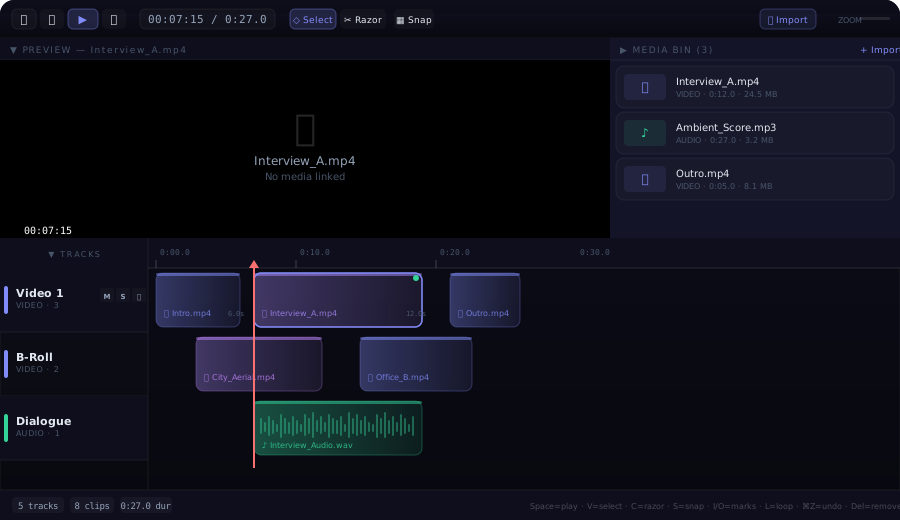
streamlit-nle (Non-Linear Editor) is a fully-featured video/audio timeline editor that runs inside any Streamlit application. It brings real NLE capabilities — multi-track timelines, clip manipulation, transport controls, media management, and keyboard shortcuts — directly into the browser, with no server-side dependencies beyond Streamlit itself.
Features
Multi-Track Timeline
- Unlimited video & audio tracks — add as many tracks as your project needs
- Drag-and-drop clip placement — move clips freely along the timeline or between tracks
- Clip trimming — drag the left/right edge of any clip to trim its in/out points
- Razor tool — split a clip at the playhead position with a single click
- Snap-to-grid — clips snap to second boundaries for clean edits (toggle with
S) - Track controls — per-track Mute, Solo, and Lock buttons
Video Preview
- Integrated preview panel — displays the video file at the current playhead position
- Transport-linked playback — preview follows the playhead in real time during play
- Frame-accurate seeking — click the timeline ruler or use keyboard shortcuts to scrub
- Timecode overlay — always-visible timecode in
HH:MM:SSformat over the preview
Audio Engine
- Real-time audio playback — HTML5 Audio elements are created per clip, synced to the timeline clock
- Drift correction — audio position is automatically corrected when it drifts more than 150 ms from the playhead
- Mute / Solo aware — the engine respects per-track mute and solo states
- Automatic cleanup — audio elements are properly disposed on unmount to prevent memory leaks
Media Bin
- File import — click Import or the Media Bin's + Import link to add video, audio, or image files
- Drag from bin to timeline — drag any media item from the bin and drop it onto a track (or outside existing tracks to auto-create a new one)
- Thumbnail generation — video files are sampled at 2 seconds for an automatic thumbnail (with a 5-second timeout fallback)
- Metadata display — each item shows its type (VIDEO / AUDIO / IMAGE), duration, and file size
- Extension-based MIME detection — supports
.mp4,.webm,.mov,.avi,.mkv,.mp3,.wav,.ogg,.m4a,.flac,.aac,.jpg,.png,.gif,.webp, and more
Resizable & Collapsible Layout
- Three independent sections — Preview, Media Bin, and Timeline
- Drag-to-resize dividers — grab the divider between sections and drag to redistribute space
- Collapse any section — click the section header's arrow to collapse it to a slim tab; click again to restore
- Remembers proportions — section sizes persist during the session
Editing Tools
- Select tool (
V) — click to select clips, drag to move them - Razor tool (
C) — click a clip to split it at the playhead - Mark In / Out (
I/O) — set in/out markers on the timeline ruler - Loop region (
L) — toggle looping between the in and out markers - Undo / Redo (
⌘Z/⌘⇧Z) — full history stack with unlimited undo - Copy / Paste (
⌘C/⌘V) — duplicate clips across tracks - Delete (
Delete/Backspace) — remove selected clips
Keyboard Shortcuts
| Key | Action |
|---|---|
Space or K |
Play / Pause |
J |
Jump back 5 seconds |
← / → |
Nudge playhead by 1 second |
Home |
Jump to start (0:00) |
End |
Jump to end of last clip |
V |
Select tool |
C |
Razor tool |
S |
Toggle snap |
I |
Set mark in |
O |
Set mark out |
L |
Toggle loop |
⌘Z |
Undo |
⌘⇧Z |
Redo |
⌘C |
Copy selected clip |
⌘V |
Paste clip |
Delete |
Remove selected clip |
Installation
pip install streamlit-nle
Note: The PyPI package is named
streamlit-nlebecausestreamlit-video-editorwas already registered. The Python import remainsstreamlit_video_editor.
Quick Start
import streamlit as st
from streamlit_video_editor import st_video_editor

st.set_page_config(layout="wide")
st.title("🎬 Video Editor")

result = st_video_editor(key="editor")

if result:
    st.write(f"Tracks: {len(result.get('tracks', []))}")
    st.write(f"Playhead: {result.get('playhead', 0):.1f}s")
API Reference
st_video_editor
st_video_editor(
    tracks: list[dict] | None = None,
    height: int = 700,
    key: str | None = None,
) -> dict | None
Parameters
| Parameter | Type | Default | Description |
|---|---|---|---|
tracks |
list[dict] or None |
None |
Initial track data. When None, the editor starts empty and tracks can be created interactively. |
height |
int |
700 |
Height of the editor component in pixels. The layout adapts to the available space. |
key |
str or None |
None |
An optional key that uniquely identifies this component. Required when placing multiple editors on one page. |
Return Value
Returns a dict (or None before first interaction) with the following structure:
{
    "tracks": [
        {
            "id": "track-1",
            "name": "Video 1",
            "type": "video",          # "video" or "audio"
            "muted": False,
            "solo": False,
            "locked": False,
            "clips": [
                {
                    "id": "clip-1",
                    "name": "Interview_A.mp4",
                    "start": 2.0,      # start position in seconds on timeline
                    "duration": 12.0,  # clip length in seconds
                    "src": "blob:...", # object URL of media file (browser-local)
                    "type": "video",
                    "offset": 0.0,     # source-media offset (for trimmed clips)
                    "mediaId": "m-1"   # reference to media bin item
                }
            ]
        }
    ],
    "playhead": 7.25  # current playhead position in seconds
}
Data Structures
Track
| Field | Type | Description |
|---|---|---|
id |
str |
Unique track identifier (auto-generated if omitted) |
name |
str |
Display name shown in the track header |
type |
str |
"video" or "audio" — determines track color scheme |
muted |
bool |
Whether the track's audio is muted |
solo |
bool |
Whether the track is soloed (only soloed tracks play audio) |
locked |
bool |
Whether clips on this track are locked from editing |
clips |
list[dict] |
List of clip objects on this track |
Clip
| Field | Type | Description |
|---|---|---|
id |
str |
Unique clip identifier |
name |
str |
Display name (usually the file name) |
start |
float |
Start time on the timeline in seconds |
duration |
float |
Duration in seconds |
src |
str |
Object URL or data URL for the media file |
type |
str |
"video", "audio", or "image" |
offset |
float |
Offset into the source media (for trimmed clips) |
mediaId |
str |
Reference to the corresponding media bin item |
Usage Examples
Pre-populated Timeline
import streamlit as st
from streamlit_video_editor import st_video_editor

initial_tracks = [
    {
        "id": "v1",
        "name": "Main Video",
        "type": "video",
        "muted": False,
        "solo": False,
        "locked": False,
        "clips": [
            {"id": "c1", "name": "Intro", "start": 0, "duration": 5,
             "type": "video", "offset": 0},
            {"id": "c2", "name": "Interview", "start": 5, "duration": 15,
             "type": "video", "offset": 0},
        ],
    },
    {
        "id": "a1",
        "name": "Background Music",
        "type": "audio",
        "muted": False,
        "solo": False,
        "locked": False,
        "clips": [
            {"id": "c3", "name": "Ambient.mp3", "start": 0, "duration": 20,
             "type": "audio", "offset": 0},
        ],
    },
]

result = st_video_editor(tracks=initial_tracks, height=800, key="editor")
Reading the Edit Back
result = st_video_editor(key="editor")

if result and result.get("tracks"):
    for track in result["tracks"]:
        st.subheader(f"🎚️ {track['name']} ({track['type']})")
        for clip in track.get("clips", []):
            col1, col2, col3 = st.columns(3)
            col1.metric("Clip", clip["name"])
            col2.metric("Start", f"{clip['start']:.1f}s")
            col3.metric("Duration", f"{clip['duration']:.1f}s")
Controlling Editor Height
# Compact mode for dashboards
result = st_video_editor(height=400, key="compact")

# Full-screen editing
result = st_video_editor(height=900, key="fullscreen")
Architecture
The component is built with a React 18 frontend communicating with Streamlit via the bidirectional component API (streamlit-component-lib).
┌─────────────────────────────────────────────┐
│  Python (Streamlit)                         │
│  st_video_editor(tracks, height, key)       │
│       ↓ args         ↑ componentValue       │
├─────────────────────────────────────────────┤
│  React Frontend (iframe)                    │
│  ┌──────────────────────────────────────┐   │
│  │ Toolbar (transport, tools, zoom)     │   │
│  ├────────────────────┬─────────────────┤   │
│  │ Video Preview      │ Media Bin       │   │
│  │ (HTML5 <video>)    │ (imported files)│   │
│  ├────────────────────┴─────────────────┤   │
│  │ Timeline                             │   │
│  │ ┌─────────┬──────────────────────┐   │   │
│  │ │ Track   │ Clips on grid        │   │   │
│  │ │ headers │ (drag, trim, razor)  │   │   │
│  │ └─────────┴──────────────────────┘   │   │
│  └──────────────────────────────────────┘   │
└─────────────────────────────────────────────┘
- Transport system —
requestAnimationFrameloop drives the playhead at 30 fps during playback - Audio engine — one
HTMLAudioElementper clip, with seek + drift correction on every animation frame - Video preview — a single
<video>element that iscurrentTime-synced to the playhead - State — React
useStatewith a custom undo/redo history stack; changes are debounced before being sent to Streamlit viaStreamlit.setComponentValue() - Layout — CSS flexbox with draggable resize dividers; section heights are stored in component state
Browser Compatibility
| Browser | Status |
|---|---|
| Chrome / Edge 90+ | ✅ Full support |
| Firefox 90+ | ✅ Full support |
| Safari 15+ | ✅ Full support |
| Mobile browsers | ⚠️ Usable but optimized for desktop |
Requirements
- Python 3.8+
- Streamlit ≥ 1.28.0
License
MIT — see LICENSE for details.
Links
1 maintainer

Metadata
1 maintainer
Release files for streamlit-nle 0.1.1
For a detailed explanation of source distributions (sdists) and built distributions (wheels), please see the package formats documentation.
Source distribution (sdist)
| File | Size | Uploaded | |
|---|---|---|---|
| streamlit_nle-0.1.1.tar.gz | 434.4 kB | Details |
Built distribution (wheel)
| File | Interpreter | ABI | Platform | Reset |
|---|---|---|---|---|
| streamlit_nle-0.1.1-py3-none-any.whl | Python 3 | none | any | Details |
Total release size: 873.1 kB
Release files / streamlit_nle-0.1.1.tar.gz
| Download URL | streamlit_nle-0.1.1.tar.gz |
|---|---|
| Size | 434.4 kB |
| Tags | Source |
|
SHA-256 checksum How to use checksums |
a97a16b420acc4c62e7b8c430a0d9f3f47fce956445c68b0301ad3046bd75981
|
|
BLAKE2b-256 checksum How to use checksums |
40fa01b1bfa925f856a6acb553d1f00b6c39961e014cc71f321d41bda1161f32
|
| Upload date | |
|
Uploaded using Trusted Publishing? What is trusted publishing? |
No |
| Uploaded via |
twine/6.2.0 CPython/3.11.9
|
Release files / streamlit_nle-0.1.1-py3-none-any.whl
| Download URL | streamlit_nle-0.1.1-py3-none-any.whl |
|---|---|
| Size | 438.6 kB |
| Tags | Python 3 |
|
SHA-256 checksum How to use checksums |
bea50d26d9f5d8732f3f2506f07738e63ba09439e7d47e31a63bf0b4493f6ac7
|
|
BLAKE2b-256 checksum How to use checksums |
27012959093d25f97bae230b51183ba34639777fb97f719125cdea40b0f2d8cc
|
| Upload date | |
|
Uploaded using Trusted Publishing? What is trusted publishing? |
No |
| Uploaded via |
twine/6.2.0 CPython/3.11.9
|














