
Non-linear video editor component for Streamlit with multi-track timeline

Project description
streamlit-nle
A professional non-linear video editor component for Streamlit



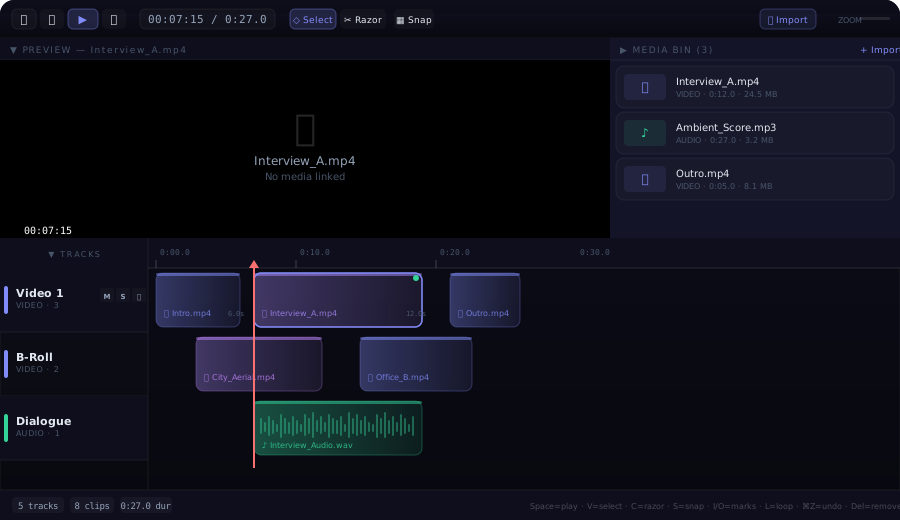
streamlit-nle (Non-Linear Editor) is a fully-featured video/audio timeline editor that runs inside any Streamlit application. It brings real NLE capabilities — multi-track timelines, clip manipulation, transport controls, media management, and keyboard shortcuts — directly into the browser, with no server-side dependencies beyond Streamlit itself.
Features
Multi-Track Timeline
- Unlimited video & audio tracks — add as many tracks as your project needs
- Drag-and-drop clip placement — move clips freely along the timeline or between tracks
- Clip trimming — drag the left/right edge of any clip to trim its in/out points
- Razor tool — split a clip at the playhead position with a single click
- Snap-to-grid — clips snap to second boundaries for clean edits (toggle with
S) - Track controls — per-track Mute, Solo, and Lock buttons
Video Preview
- Integrated preview panel — displays the video file at the current playhead position
- Transport-linked playback — preview follows the playhead in real time during play
- Frame-accurate seeking — click the timeline ruler or use keyboard shortcuts to scrub
- Timecode overlay — always-visible timecode in
HH:MM:SSformat over the preview
Audio Engine
- Real-time audio playback — HTML5 Audio elements are created per clip, synced to the timeline clock
- Drift correction — audio position is automatically corrected when it drifts more than 150 ms from the playhead
- Mute / Solo aware — the engine respects per-track mute and solo states
- Automatic cleanup — audio elements are properly disposed on unmount to prevent memory leaks
Media Bin
- File import — click Import or the Media Bin's + Import link to add video, audio, or image files
- Drag from bin to timeline — drag any media item from the bin and drop it onto a track (or outside existing tracks to auto-create a new one)
- Thumbnail generation — video files are sampled at 2 seconds for an automatic thumbnail (with a 5-second timeout fallback)
- Metadata display — each item shows its type (VIDEO / AUDIO / IMAGE), duration, and file size
- Extension-based MIME detection — supports
.mp4,.webm,.mov,.avi,.mkv,.mp3,.wav,.ogg,.m4a,.flac,.aac,.jpg,.png,.gif,.webp, and more
Resizable & Collapsible Layout
- Three independent sections — Preview, Media Bin, and Timeline
- Drag-to-resize dividers — grab the divider between sections and drag to redistribute space
- Collapse any section — click the section header's arrow to collapse it to a slim tab; click again to restore
- Remembers proportions — section sizes persist during the session
Editing Tools
- Select tool (
V) — click to select clips, drag to move them - Razor tool (
C) — click a clip to split it at the playhead - Mark In / Out (
I/O) — set in/out markers on the timeline ruler - Loop region (
L) — toggle looping between the in and out markers - Undo / Redo (
⌘Z/⌘⇧Z) — full history stack with unlimited undo - Copy / Paste (
⌘C/⌘V) — duplicate clips across tracks - Delete (
Delete/Backspace) — remove selected clips
Keyboard Shortcuts
| Key | Action |
|---|---|
Space or K |
Play / Pause |
J |
Jump back 5 seconds |
← / → |
Nudge playhead by 1 second |
Home |
Jump to start (0:00) |
End |
Jump to end of last clip |
V |
Select tool |
C |
Razor tool |
S |
Toggle snap |
I |
Set mark in |
O |
Set mark out |
L |
Toggle loop |
⌘Z |
Undo |
⌘⇧Z |
Redo |
⌘C |
Copy selected clip |
⌘V |
Paste clip |
Delete |
Remove selected clip |
Installation
pip install streamlit-nle
Note: The PyPI package is named
streamlit-nlebecausestreamlit-video-editorwas already registered. The Python import remainsstreamlit_video_editor.
Quick Start
import streamlit as st
from streamlit_video_editor import st_video_editor

st.set_page_config(layout="wide")
st.title("🎬 Video Editor")

result = st_video_editor(key="editor")

if result:
    st.write(f"Tracks: {len(result.get('tracks', []))}")
    st.write(f"Playhead: {result.get('playhead', 0):.1f}s")
API Reference
st_video_editor
st_video_editor(
    tracks: list[dict] | None = None,
    height: int = 700,
    key: str | None = None,
) -> dict | None
Parameters
| Parameter | Type | Default | Description |
|---|---|---|---|
tracks |
list[dict] or None |
None |
Initial track data. When None, the editor starts empty and tracks can be created interactively. |
height |
int |
700 |
Height of the editor component in pixels. The layout adapts to the available space. |
key |
str or None |
None |
An optional key that uniquely identifies this component. Required when placing multiple editors on one page. |
Return Value
Returns a dict (or None before first interaction) with the following structure:
{
    "tracks": [
        {
            "id": "track-1",
            "name": "Video 1",
            "type": "video",          # "video" or "audio"
            "muted": False,
            "solo": False,
            "locked": False,
            "clips": [
                {
                    "id": "clip-1",
                    "name": "Interview_A.mp4",
                    "start": 2.0,      # start position in seconds on timeline
                    "duration": 12.0,  # clip length in seconds
                    "src": "blob:...", # object URL of media file (browser-local)
                    "type": "video",
                    "offset": 0.0,     # source-media offset (for trimmed clips)
                    "mediaId": "m-1"   # reference to media bin item
                }
            ]
        }
    ],
    "playhead": 7.25  # current playhead position in seconds
}
Data Structures
Track
| Field | Type | Description |
|---|---|---|
id |
str |
Unique track identifier (auto-generated if omitted) |
name |
str |
Display name shown in the track header |
type |
str |
"video" or "audio" — determines track color scheme |
muted |
bool |
Whether the track's audio is muted |
solo |
bool |
Whether the track is soloed (only soloed tracks play audio) |
locked |
bool |
Whether clips on this track are locked from editing |
clips |
list[dict] |
List of clip objects on this track |
Clip
| Field | Type | Description |
|---|---|---|
id |
str |
Unique clip identifier |
name |
str |
Display name (usually the file name) |
start |
float |
Start time on the timeline in seconds |
duration |
float |
Duration in seconds |
src |
str |
Object URL or data URL for the media file |
type |
str |
"video", "audio", or "image" |
offset |
float |
Offset into the source media (for trimmed clips) |
mediaId |
str |
Reference to the corresponding media bin item |
Usage Examples
Pre-populated Timeline
import streamlit as st
from streamlit_video_editor import st_video_editor

initial_tracks = [
    {
        "id": "v1",
        "name": "Main Video",
        "type": "video",
        "muted": False,
        "solo": False,
        "locked": False,
        "clips": [
            {"id": "c1", "name": "Intro", "start": 0, "duration": 5,
             "type": "video", "offset": 0},
            {"id": "c2", "name": "Interview", "start": 5, "duration": 15,
             "type": "video", "offset": 0},
        ],
    },
    {
        "id": "a1",
        "name": "Background Music",
        "type": "audio",
        "muted": False,
        "solo": False,
        "locked": False,
        "clips": [
            {"id": "c3", "name": "Ambient.mp3", "start": 0, "duration": 20,
             "type": "audio", "offset": 0},
        ],
    },
]

result = st_video_editor(tracks=initial_tracks, height=800, key="editor")
Reading the Edit Back
result = st_video_editor(key="editor")

if result and result.get("tracks"):
    for track in result["tracks"]:
        st.subheader(f"🎚️ {track['name']} ({track['type']})")
        for clip in track.get("clips", []):
            col1, col2, col3 = st.columns(3)
            col1.metric("Clip", clip["name"])
            col2.metric("Start", f"{clip['start']:.1f}s")
            col3.metric("Duration", f"{clip['duration']:.1f}s")
Controlling Editor Height
# Compact mode for dashboards
result = st_video_editor(height=400, key="compact")

# Full-screen editing
result = st_video_editor(height=900, key="fullscreen")
Architecture
The component is built with a React 18 frontend communicating with Streamlit via the bidirectional component API (streamlit-component-lib).
┌─────────────────────────────────────────────┐
│  Python (Streamlit)                         │
│  st_video_editor(tracks, height, key)       │
│       ↓ args         ↑ componentValue       │
├─────────────────────────────────────────────┤
│  React Frontend (iframe)                    │
│  ┌──────────────────────────────────────┐   │
│  │ Toolbar (transport, tools, zoom)     │   │
│  ├────────────────────┬─────────────────┤   │
│  │ Video Preview      │ Media Bin       │   │
│  │ (HTML5 <video>)    │ (imported files)│   │
│  ├────────────────────┴─────────────────┤   │
│  │ Timeline                             │   │
│  │ ┌─────────┬──────────────────────┐   │   │
│  │ │ Track   │ Clips on grid        │   │   │
│  │ │ headers │ (drag, trim, razor)  │   │   │
│  │ └─────────┴──────────────────────┘   │   │
│  └──────────────────────────────────────┘   │
└─────────────────────────────────────────────┘
- Transport system —
requestAnimationFrameloop drives the playhead at 30 fps during playback - Audio engine — one
HTMLAudioElementper clip, with seek + drift correction on every animation frame - Video preview — a single
<video>element that iscurrentTime-synced to the playhead - State — React
useStatewith a custom undo/redo history stack; changes are debounced before being sent to Streamlit viaStreamlit.setComponentValue() - Layout — CSS flexbox with draggable resize dividers; section heights are stored in component state
Browser Compatibility
| Browser | Status |
|---|---|
| Chrome / Edge 90+ | ✅ Full support |
| Firefox 90+ | ✅ Full support |
| Safari 15+ | ✅ Full support |
| Mobile browsers | ⚠️ Usable but optimized for desktop |
Requirements
- Python 3.8+
- Streamlit ≥ 1.28.0
License
MIT — see LICENSE for details.
Links
Release history Release notifications | RSS feed


Download files
Download the file for your platform. If you're not sure which to choose, learn more about installing packages.
Source Distribution
Built Distribution
Filter files by name, interpreter, ABI, and platform.
If you're not sure about the file name format, learn more about wheel file names.
Copy a direct link to the current filters
File details
Details for the file streamlit_nle-0.1.1.tar.gz.
File metadata
- Download URL: streamlit_nle-0.1.1.tar.gz
- Upload date:
- Size: 434.4 kB
- Tags: Source
- Uploaded using Trusted Publishing? No
- Uploaded via: twine/6.2.0 CPython/3.11.9
File hashes
| Algorithm | Hash digest | |
|---|---|---|
| SHA256 |
a97a16b420acc4c62e7b8c430a0d9f3f47fce956445c68b0301ad3046bd75981
|
|
| MD5 |
97531fcafd04074dda3bdac02f045a02
|
|
| BLAKE2b-256 |
40fa01b1bfa925f856a6acb553d1f00b6c39961e014cc71f321d41bda1161f32
|
File details
Details for the file streamlit_nle-0.1.1-py3-none-any.whl.
File metadata
- Download URL: streamlit_nle-0.1.1-py3-none-any.whl
- Upload date:
- Size: 438.6 kB
- Tags: Python 3
- Uploaded using Trusted Publishing? No
- Uploaded via: twine/6.2.0 CPython/3.11.9
File hashes
| Algorithm | Hash digest | |
|---|---|---|
| SHA256 |
bea50d26d9f5d8732f3f2506f07738e63ba09439e7d47e31a63bf0b4493f6ac7
|
|
| MD5 |
384edf07e46a14c4cd23f24793e802f1
|
|
| BLAKE2b-256 |
27012959093d25f97bae230b51183ba34639777fb97f719125cdea40b0f2d8cc
|






