
Auto-generate Streamlit UI from Pydantic Models & Dataclasses.

Project description
Streamlit Pydantic
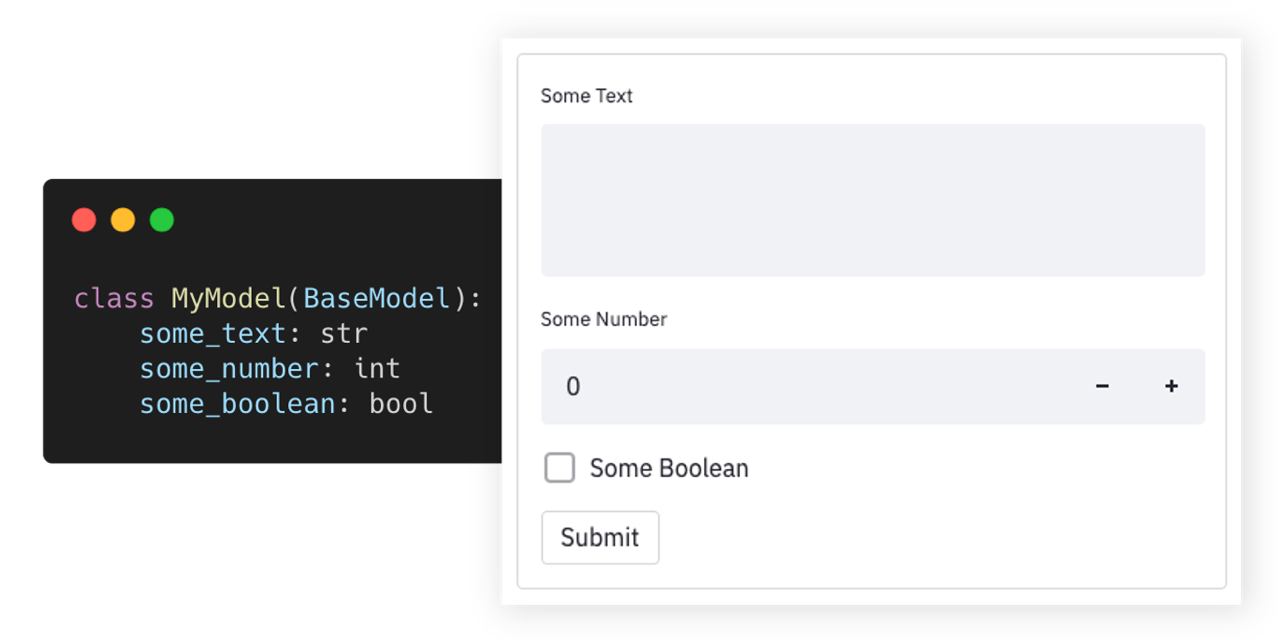
Auto-generate Streamlit UI elements from Pydantic models.





Getting Started • Documentation • Support • Report a Bug • Contribution • Changelog
Streamlit-pydantic makes it easy to auto-generate UI elements from Pydantic models or dataclasses. Just define your data model and turn it into a full-fledged UI form. It supports data validation, nested models, and field limitations. Streamlit-pydantic can be easily integrated into any Streamlit app.
Try out and explore various examples in our playground here.
Highlights
- 🪄 Auto-generated UI elements from Pydantic models & Dataclasses.
- 📇 Out-of-the-box data validation.
- 📑 Supports nested Pydantic models.
- 📏 Supports field limits and customizations.
- 🎈 Easy to integrate into any Streamlit app.
Getting Started
Installation
pip install streamlit-pydantic
Usage
-
Create a script (
my_script.py) with a Pydantic model and render it viapydantic_form:import streamlit as st import streamlit_pydantic as sp from pydantic import BaseModel class ExampleModel(BaseModel): some_text: str some_number: int some_boolean: bool data = sp.pydantic_form(key="my_sample_form", model=ExampleModel) if data: st.json(data.model_dump())
-
Run the Streamlit server on the Python script:
streamlit run my_script.py -
You can find additional examples in the examples section below.
Examples
👉 Try out and explore these examples in our playground here
The following collection of examples demonstrates how Streamlit Pydantic can be applied in more advanced scenarios. You can find additional - even more advanced - examples in the examples folder or on the playground.
Simple Form
import streamlit as st
import streamlit_pydantic as sp
from pydantic import BaseModel


class ExampleModel(BaseModel):
    some_text: str
    some_number: int
    some_boolean: bool

data = sp.pydantic_form(key="my_sample_form", model=ExampleModel)
if data:
    st.json(data.model_dump())
Date Validation
import streamlit as st
import streamlit_pydantic as sp
from pydantic import BaseModel, Field, HttpUrl
from pydantic_extra_types.color import Color

class ExampleModel(BaseModel):
    url: HttpUrl
    color: Color = Field("blue", format="text")
    email: str = Field(..., max_length=100, regex=r"^\S+@\S+$")

data = sp.pydantic_form(key="my_form", model=ExampleModel)
if data:
    st.json(data.model_dump_json())
Dataclasses Support
import dataclasses
import json

import streamlit as st
from pydantic.json import pydantic_encoder

import streamlit_pydantic as sp


@dataclasses.dataclass
class ExampleModel:
    some_number: int
    some_boolean: bool
    some_text: str = "default input"


data = sp.pydantic_form(key="my_dataclass_form", model=ExampleModel)
if data:
    st.json(dataclasses.asdict(data))
Complex Nested Model
from enum import Enum
from typing import Set

import streamlit as st
from pydantic import BaseModel, Field

import streamlit_pydantic as sp


class OtherData(BaseModel):
    text: str
    integer: int


class SelectionValue(str, Enum):
    FOO = "foo"
    BAR = "bar"


class ExampleModel(BaseModel):
    long_text: str = Field(
        ..., format="multi-line", description="Unlimited text property"
    )
    integer_in_range: int = Field(
        20,
        ge=10,
        le=30,
        multiple_of=2,
        description="Number property with a limited range.",
    )
    single_selection: SelectionValue = Field(
        ..., description="Only select a single item from a set."
    )
    multi_selection: Set[SelectionValue] = Field(
        ..., description="Allows multiple items from a set."
    )
    read_only_text: str = Field(
        "Lorem ipsum dolor sit amet",
        description="This is a ready only text.",
        readOnly=True,
    )
    single_object: OtherData = Field(
        ...,
        description="Another object embedded into this model.",
    )


data = sp.pydantic_form(key="my_form", model=ExampleModel)
if data:
    st.json(data.model_dump_json())
Render Input
from pydantic import BaseModel

import streamlit_pydantic as sp


class ExampleModel(BaseModel):
    some_text: str
    some_number: int = 10  # Optional
    some_boolean: bool = True  # Option


input_data = sp.pydantic_input(
    "model_input", model=ExampleModel, group_optional_fields="sidebar"
)
Render Output
import datetime

from pydantic import BaseModel, Field

import streamlit_pydantic as sp


class ExampleModel(BaseModel):
    text: str = Field(..., description="A text property")
    integer: int = Field(..., description="An integer property.")
    date: datetime.date = Field(..., description="A date.")


instance = ExampleModel(text="Some text", integer=40, date=datetime.date.today())
sp.pydantic_output(instance)
Custom Form
import streamlit as st
from pydantic import BaseModel

import streamlit_pydantic as sp


class ExampleModel(BaseModel):
    some_text: str
    some_number: int = 10
    some_boolean: bool = True


with st.form(key="pydantic_form"):
    data = sp.pydantic_input(key="my_custom_form_model", model=ExampleModel)
    submit_button = st.form_submit_button(label="Submit")
    obj = ExampleModel(data)

if data:
    st.json(obj.model_dump())
Support & Feedback
| Type | Channel |
|---|---|
| 🐛 Bug Reports |  |
| ✨ Feature Requests |  |
| 👩💻 Usage Questions |  |
| 📢 Announcements |  |
Documentation
The API documentation can be found here. To generate UI elements, you can use the high-level pydantic_form method. Or the more flexible lower-level pydantic_input and pydantic_output methods. See the examples section on how to use those methods.
Contribution
- Pull requests are encouraged and always welcome. Read our contribution guidelines and check out help-wanted issues.
- Submit Github issues for any feature request and enhancement, bugs, or documentation problems.
- By participating in this project, you agree to abide by its Code of Conduct.
- The development section below contains information on how to build and test the project after you have implemented some changes.
Development



This repo uses Rye for development. To get started, install Rye and sync the project:
rye sync
Run the playground app:
rye run playground
Run linting and type checks:
rye run checks
[!TIP] The linting and formatting is using ruff and type-checking is done with mypy. You can use the ruff and mypy extensions of your IDE to automatically run these checks during development.
Format the code:
rye run format
Run tests:
rye test
Licensed MIT.
Release history Release notifications | RSS feed

Download files
Download the file for your platform. If you're not sure which to choose, learn more about installing packages.
Source Distribution
Built Distribution
Filter files by name, interpreter, ABI, and platform.
If you're not sure about the file name format, learn more about wheel file names.
Copy a direct link to the current filters
File details
Details for the file streamlit_pydantic_sebastienbocquet-0.6.1.dev1.tar.gz.
File metadata
- Download URL: streamlit_pydantic_sebastienbocquet-0.6.1.dev1.tar.gz
- Upload date:
- Size: 125.7 kB
- Tags: Source
- Uploaded using Trusted Publishing? No
- Uploaded via: uv/0.9.18 {"installer":{"name":"uv","version":"0.9.18","subcommand":["publish"]},"python":null,"implementation":{"name":null,"version":null},"distro":null,"system":{"name":null,"release":null},"cpu":null,"openssl_version":null,"setuptools_version":null,"rustc_version":null,"ci":null}
File hashes
| Algorithm | Hash digest | |
|---|---|---|
| SHA256 |
6c333fd73f560881fc79558f5b7e15f4ab5660024b80b1ab0884071e55116651
|
|
| MD5 |
92fb8b53d854e8793648c30e0b53e963
|
|
| BLAKE2b-256 |
1fabd9514ef1c9b4291f1b63868529354b042366045708cfc5a6c47f32f0b2a8
|
File details
Details for the file streamlit_pydantic_sebastienbocquet-0.6.1.dev1-py3-none-any.whl.
File metadata
- Download URL: streamlit_pydantic_sebastienbocquet-0.6.1.dev1-py3-none-any.whl
- Upload date:
- Size: 18.9 kB
- Tags: Python 3
- Uploaded using Trusted Publishing? No
- Uploaded via: uv/0.9.18 {"installer":{"name":"uv","version":"0.9.18","subcommand":["publish"]},"python":null,"implementation":{"name":null,"version":null},"distro":null,"system":{"name":null,"release":null},"cpu":null,"openssl_version":null,"setuptools_version":null,"rustc_version":null,"ci":null}
File hashes
| Algorithm | Hash digest | |
|---|---|---|
| SHA256 |
b1e974143a1a7cd75d106c5d42970a23169083eb1b26618b29d9feeced02b918
|
|
| MD5 |
aa565a358b21bebaa732e0b94e6e58e9
|
|
| BLAKE2b-256 |
9bc8494fcc61ae858b122cacc54a8530f5bc1ddaae3507298c1d0d38530758ef
|






