
Streamlit STL Display Component
A Streamlit component to display STL files.
Installation
This component requires access to write files to the temporary directory.
pip install streamlit_stl
Example
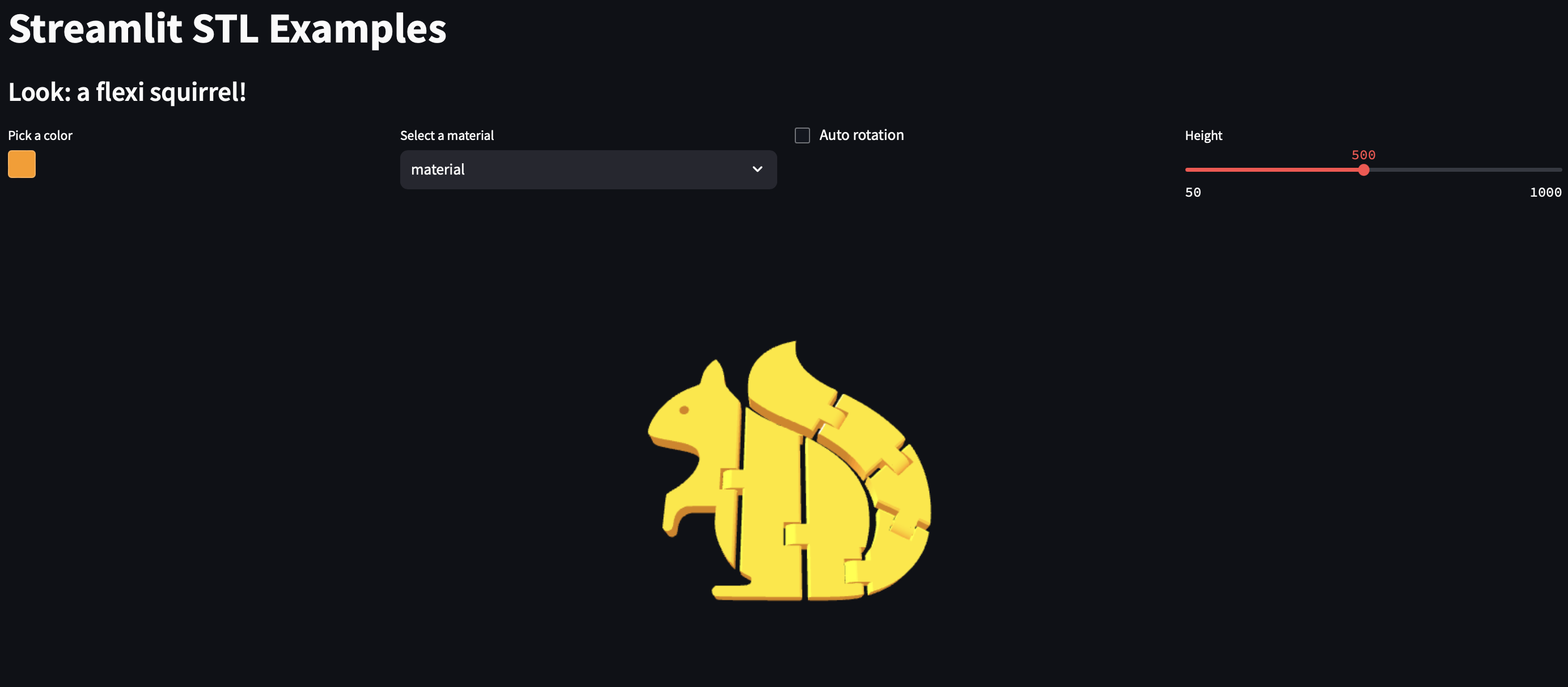
Look at the example for a streamlit Web App:

The original STL file is from Printables.
Usage
Display from file paths
import streamlit as st
from streamlit_stl import stl_from_file

success = stl_from_file(
    file_path=path_to_conf,          # Path to the STL file
    color='#FF9900',                 # Color of the STL file (hexadecimal value)
    material='material',             # Material of the STL file ('material', 'flat', or 'wireframe')
    auto_rotate=True,                # Enable auto-rotation of the STL model
    opacity=1,                       # Opacity of the STL model (0 to 1)
    shininess=100,                   # How shiny the specular highlight is, when using the 'material' style.
    cam_v_angle=60,                  # Vertical angle (in degrees) of the camera
    cam_h_angle=-90,                 # Horizontal angle (in degrees) of the camera
    cam_distance=None,               # Distance of the camera from the object (defaults to 3x bounding box size)
    height=500,                      # Height of the viewer frame
    max_view_distance=1000,          # Maximum viewing distance for the camera
    key=None                         # Streamlit component key
)
Display from file text
import streamlit as st
from streamlit_stl import stl_from_text

file_input = st.file_uploader("Or upload an STL file", type=["stl"])

if file_input is not None:
    success = stl_from_text(
        text=file_input.getvalue(),  # Content of the STL file as text
        color='#FF9900',             # Color of the STL file (hexadecimal value)
        material='material',         # Material of the STL file ('material', 'flat', or 'wireframe')
        auto_rotate=True,            # Enable auto-rotation of the STL model
        opacity=1,                   # Opacity of the STL model (0 to 1)
        shininess=100,               # How shiny the specular highlight is, when using the 'material' style.
        cam_v_angle=60,              # Vertical angle (in degrees) of the camera
        cam_h_angle=-90,             # Horizontal angle (in degrees) of the camera
        cam_distance=None,           # Distance of the camera from the object (defaults to 3x bounding box size)
        height=500,                  # Height of the viewer frame
        max_view_distance=1000,      # Maximum viewing distance for the camera
        key=None                     # Streamlit component key
    )
The functions return a boolean value indicating if the program was able to write and read the files.
The 'material' style is the default style, it uses the Phong shading model from Three.js.
License
Code is licensed under the GNU General Public License v3.0 (GPL-3.0)
1 maintainer

Release files for streamlit-stl 0.0.6
For a detailed explanation of source distributions (sdists) and built distributions (wheels), please see the package formats documentation.
Source distribution (sdist)
| File | Size | Uploaded | |
|---|---|---|---|
| streamlit_stl-0.0.6.tar.gz | 182.5 kB | Details |
Built distribution (wheel)
| File | Interpreter | ABI | Platform | Reset |
|---|---|---|---|---|
| streamlit_stl-0.0.6-py3-none-any.whl | Python 3 | none | any | Details |
Total release size: 366.5 kB
Release files / streamlit_stl-0.0.6.tar.gz
| Download URL | streamlit_stl-0.0.6.tar.gz |
|---|---|
| Size | 182.5 kB |
| Tags | Source |
|
SHA-256 checksum How to use checksums |
3d98fe0f2b92d24b3ee69ddd548fc71f6c2c9175f8bca8a1b78eed3230f67357
|
|
BLAKE2b-256 checksum How to use checksums |
3ddd4abcd57203bb8dd4c5d7bb11dab8168e7e1a1f809085a9b9bb9dc630aa6d
|
| Upload date | |
|
Uploaded using Trusted Publishing? What is trusted publishing? |
No |
| Uploaded via |
twine/5.1.1 CPython/3.12.4
|
Release files / streamlit_stl-0.0.6-py3-none-any.whl
| Download URL | streamlit_stl-0.0.6-py3-none-any.whl |
|---|---|
| Size | 184.0 kB |
| Tags | Python 3 |
|
SHA-256 checksum How to use checksums |
a7c2bdff758d72aaa3a478f84544fc0e3670e5c2c5afec2139c6c28f548494f1
|
|
BLAKE2b-256 checksum How to use checksums |
5acf73df3dc3b2d2cc02cf59892667dc4c68d1d169a6d15bdac6c9b1d4f64638
|
| Upload date | |
|
Uploaded using Trusted Publishing? What is trusted publishing? |
No |
| Uploaded via |
twine/5.1.1 CPython/3.12.4
|














