
A Streamlit component to display 3D models in STL format

Project description
Streamlit STL Display Component
A Streamlit component to display STL files.
Installation
This component requires access to write files to the temporary directory.
pip install streamlit_stl
Example
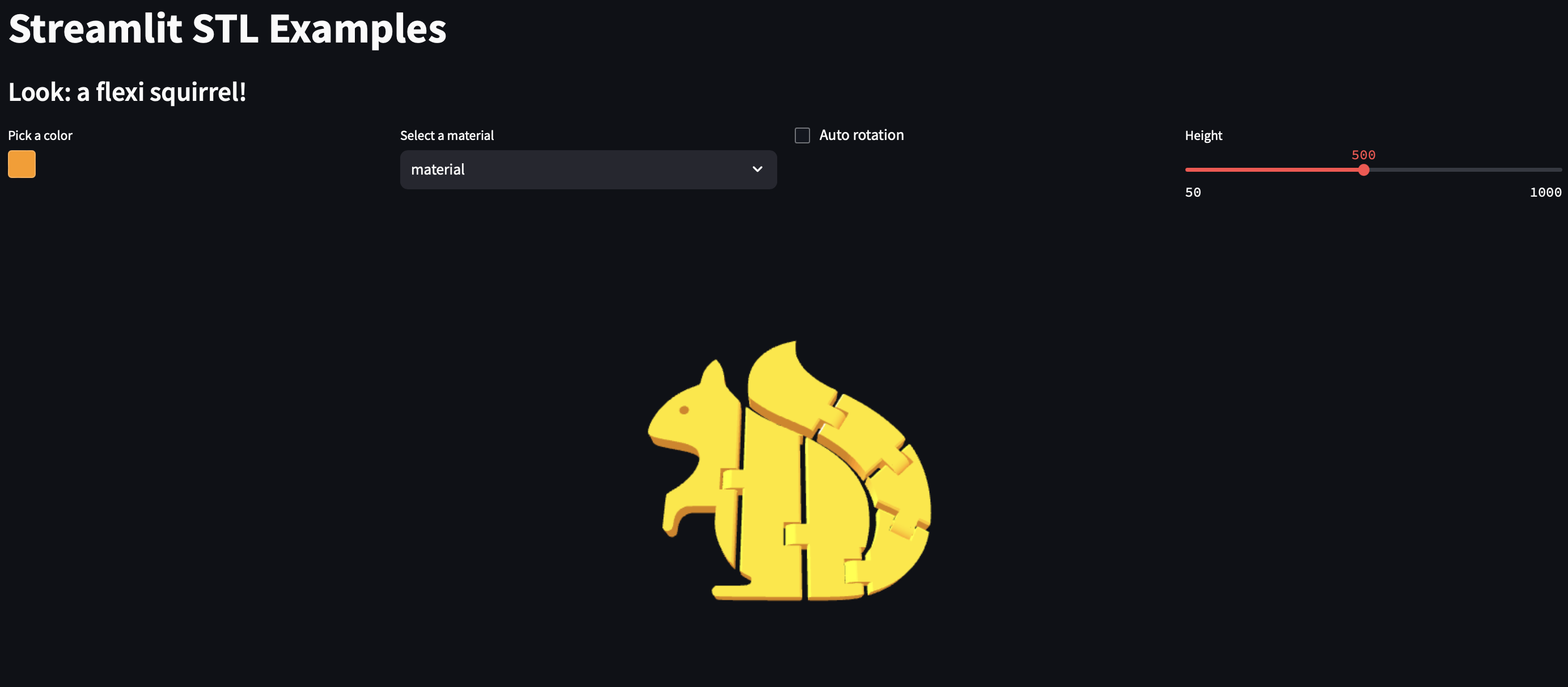
Look at the example for a streamlit Web App:

The original STL file is from Printables.
Usage
Display from file paths
import streamlit as st
from streamlit_stl import stl_from_file

success = stl_from_file(
    file_path=path_to_conf,          # Path to the STL file
    color='#FF9900',                 # Color of the STL file (hexadecimal value)
    material='material',             # Material of the STL file ('material', 'flat', or 'wireframe')
    auto_rotate=True,                # Enable auto-rotation of the STL model
    opacity=1,                       # Opacity of the STL model (0 to 1)
    cam_v_angle=30,                  # Vertical angle (in degrees) of the camera
    cam_h_angle=-90,                 # Horizontal angle (in degrees) of the camera
    cam_distance=None,               # Distance of the camera from the object (defaults to 3x bounding box size)
    height=500,                      # Height of the viewer frame
    max_view_distance=1000,          # Maximum viewing distance for the camera
    key=None                         # Streamlit component key
)
Display from file text
import streamlit as st
from streamlit_stl import stl_from_text

file_input = st.file_uploader("Or upload an STL file", type=["stl"])

if file_input is not None:
    success = stl_from_text(
        text=file_input.getvalue(),  # Content of the STL file as text
        color='#FF9900',             # Color of the STL file (hexadecimal value)
        material='material',         # Material of the STL file ('material', 'flat', or 'wireframe')
        auto_rotate=True,            # Enable auto-rotation of the STL model
        opacity=1,                   # Opacity of the STL model (0 to 1)
        cam_v_angle=30,              # Vertical angle (in degrees) of the camera
        cam_h_angle=-90,             # Horizontal angle (in degrees) of the camera
        cam_distance=None,           # Distance of the camera from the object (defaults to 3x bounding box size)
        height=500,                  # Height of the viewer frame
        max_view_distance=1000,      # Maximum viewing distance for the camera
        key=None                     # Streamlit component key
    )
The functions return a boolean value indicating if the program was able to write and read the files.
License
Code is licensed under the GNU General Public License v3.0 (GPL-3.0)


Download files
Download the file for your platform. If you're not sure which to choose, learn more about installing packages.
Source Distribution
Built Distribution
Filter files by name, interpreter, ABI, and platform.
If you're not sure about the file name format, learn more about wheel file names.
Copy a direct link to the current filters
File details
Details for the file streamlit_stl-0.0.3.tar.gz.
File metadata
- Download URL: streamlit_stl-0.0.3.tar.gz
- Upload date:
- Size: 178.2 kB
- Tags: Source
- Uploaded using Trusted Publishing? No
- Uploaded via: twine/6.0.1 CPython/3.12.6
File hashes
| Algorithm | Hash digest | |
|---|---|---|
| SHA256 |
8f3603c5324101ec8beba5081ef4da8afc38e49bd76dbe1d5d8ce20f88a43fd9
|
|
| MD5 |
71d9bdce2ce80d4dee121be3daca6e31
|
|
| BLAKE2b-256 |
6c5242801fe24ab2f193663acf587e3ff535f70704b872184bc8a9288965cdbe
|
File details
Details for the file streamlit_stl-0.0.3-py3-none-any.whl.
File metadata
- Download URL: streamlit_stl-0.0.3-py3-none-any.whl
- Upload date:
- Size: 179.1 kB
- Tags: Python 3
- Uploaded using Trusted Publishing? No
- Uploaded via: twine/6.0.1 CPython/3.12.6
File hashes
| Algorithm | Hash digest | |
|---|---|---|
| SHA256 |
acf385c5e369d03c01469bee14699e2c6bbe7a3533cc416defe0df998f533bdb
|
|
| MD5 |
23bad6f331c80c64dd07589c1b39b319
|
|
| BLAKE2b-256 |
a71342081087f1b58b112a44ed418ac6438e0fef0839b4cda242494782a5c587
|






