
Streams Explorer.

Project description
Streams Explorer
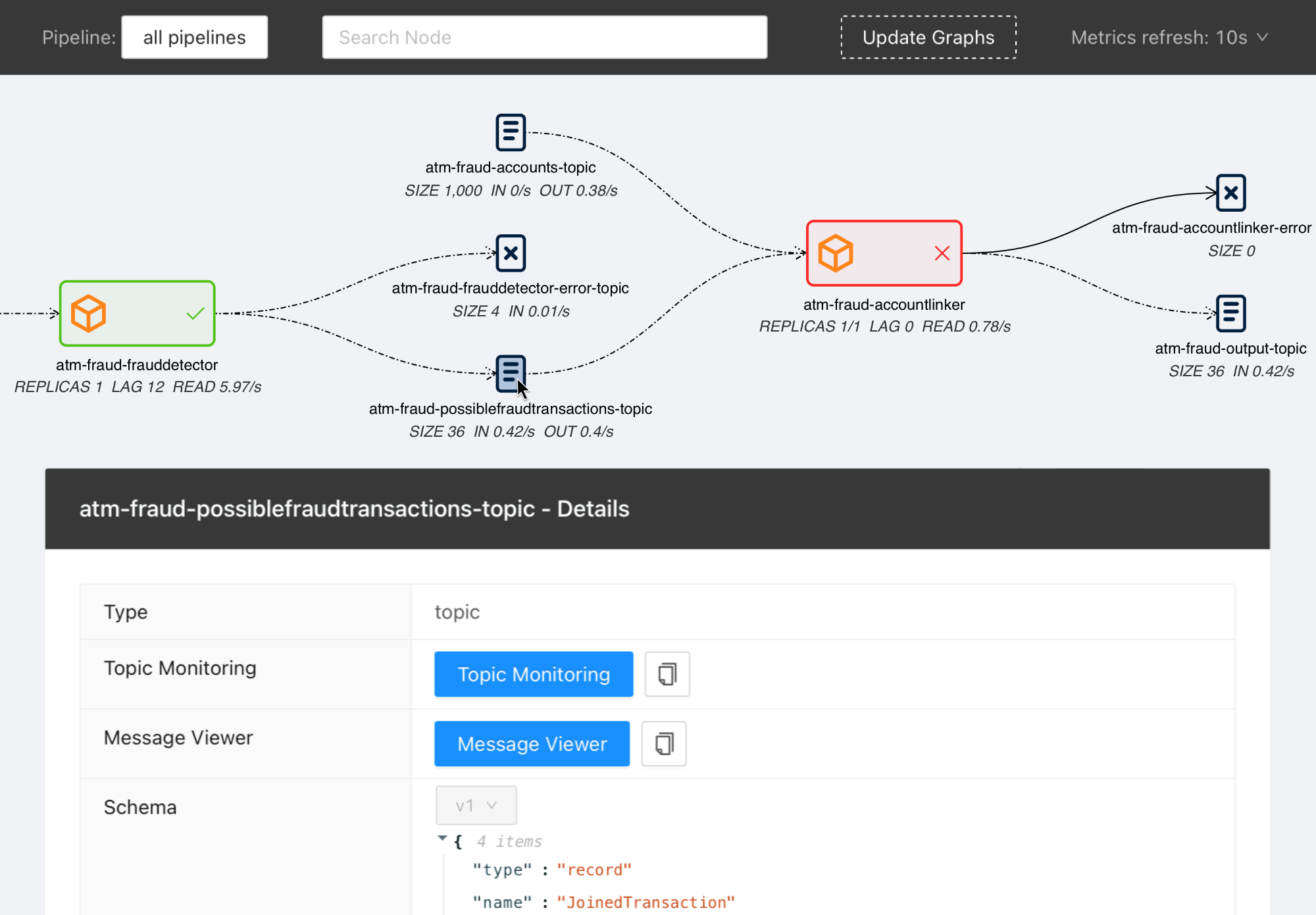
Explore Data Pipelines in Apache Kafka.
Contents
Features
- Visualization of streaming applications, topics, and connectors
- Monitor all or individual pipelines from multiple namespaces
- Inspection of Avro schema from schema registry
- Integration with streams-bootstrap and faust-bootstrap for deploying Kafka Streams applications
- Real-time metrics from Prometheus (consumer lag & read rate, replicas, topic size, messages in & out per second, connector tasks)
- Linking to external services for logging and analysis, such as Kibana, Grafana, AKHQ, Elasticsearch
- Customizable through Python plugins
Overview
Visit our introduction blogpost for a complete overview and demo of Streams Explorer.
Installation
Docker Compose
- Forward the ports to Prometheus. (Kafka Connect, Schema Registry, and other integrations are optional)
- Start the container
docker-compose up
Once the container is started visit http://localhost:3000
Deploying to Kubernetes cluster
- Add the Helm chart repository
helm repo add streams-explorer https://raw.githubusercontent.com/bakdata/streams-explorer/master/helm-chart/
- Install
helm upgrade --install --values helm-chart/values.yaml streams-explorer
Standalone
Backend
- Install dependencies
pip install -r requirements.txt
- Forward the ports to Prometheus. (Kafka Connect, Schema Registry, and other integrations are optional)
- Configure the backend in settings.yaml.
- Start the backend server
uvicorn main:app
Frontend
- Install dependencies
npm ci
- Start the frontend server
npm start
Visit http://localhost:3000
Configuration
Depending on your type of installation set the configuration for the backend server in this file:
- Docker Compose: docker-compose.yaml
- Kubernetes: helm-chart/values.yaml
- standalone: backend/settings.yaml
All configuration options can be written as environment variables using underscore notation and the prefix SE, e.g. SE_K8S__deployment__cluster=false.
The following configuration options are available:
General
graph_update_everyUpdate the graph every X seconds (integer, required, default:300)graph_layout_argumentsArguments passed to graphviz layout (string, required, default:-Grankdir=LR -Gnodesep=0.8 -Gpad=10)
Kafka Connect
kafkaconnect.urlURL of Kafka Connect server (string, default: None)kafkaconnect.displayed_informationConfiguration options of Kafka connectors displayed in the frontend (list of dict)
Kubernetes
k8s.deployment.clusterWhether streams-explorer is deployed to Kubernetes cluster (bool, required, default:false)k8s.deployment.contextName of cluster (string, optional if running in cluster, default:kubernetes-cluster)k8s.deployment.namespacesKubernetes namespaces (list of string, required, default:['kubernetes-namespace'])k8s.containers.ignoreName of containers that should be ignored/hidden (list of string, default:['prometheus-jmx-exporter'])k8s.displayed_informationDetails of pod that should be displayed (list of dict, default:[{'name': 'Labels', 'key': 'metadata.labels'}])k8s.labelsLabels used to set attributes of nodes (list of string, required, default:['pipeline'])k8s.pipeline.labelAttribute of nodes the pipeline name should be extracted from (string, required, default:pipeline)k8s.consumer_group_annotationAnnotation the consumer group name should be extracted from (string, required, default:consumerGroup)
Schema Registry
schemaregistry.urlURL of Schema Registry (string, default: None)
Prometheus
prometheus.urlURL of Prometheus (string, required, default:http://localhost:9090)
The following exporters are required to collect Kafka metrics for Prometheus:
AKHQ
akhq.urlURL of AKHQ (string, default:http://localhost:8080)akhq.clusterName of cluster (string, default:kubernetes-cluster)
Grafana
grafana.urlURL of Grafana (string, default:http://localhost:3000)grafana.dashboards.topicsPath to topics dashboard (string), sample dashboards for topics and consumer groups are included in the./grafanasubfoldergrafana.dashboards.consumergroupsPath to consumer groups dashboard (string)
Kibana
kibanalogs.urlURL of Kibana logs (string, default:http://localhost:5601)
Elasticsearch
for Kafka Connect Elasticsearch connector
esindex.urlURL of Elasticsearch index (string, default:http://localhost:5601/app/kibana#/dev_tools/console)
Plugins
plugins.pathPath to folder containing plugins relative to backend (string, required, default:./plugins)plugins.extractors.defaultWhether to load default extractors (bool, required, default:true)
Demo pipeline

ATM Fraud detection with streams-bootstrap
Plugin customization
It is possible to create your own linker, metric provider, and extractors in Python by implementing the LinkingService, MetricProvider, or Extractor classes. This way you can customize it to your specific setup and services. As an example we provide the DefaultLinker as LinkingService. The default MetricProvider supports Prometheus. Furthermore the following default Extractor plugins are included:
Release history Release notifications | RSS feed


Download files
Download the file for your platform. If you're not sure which to choose, learn more about installing packages.
Source Distribution
Built Distribution
Filter files by name, interpreter, ABI, and platform.
If you're not sure about the file name format, learn more about wheel file names.
Copy a direct link to the current filters
File details
Details for the file streams-explorer-1.1.10.tar.gz.
File metadata
- Download URL: streams-explorer-1.1.10.tar.gz
- Upload date:
- Size: 30.3 kB
- Tags: Source
- Uploaded using Trusted Publishing? No
- Uploaded via: python-requests/2.25.1
File hashes
| Algorithm | Hash digest | |
|---|---|---|
| SHA256 |
623740dacfaded769b88f153b1a930659b38f979402c989ceb0f4279d783c278
|
|
| MD5 |
5f62f31c6456e678bd5f7e627805c684
|
|
| BLAKE2b-256 |
e089f76fee5b08701cdb626ac95f49f641cb68af5f9e164fa4eb9d3fb1b4210e
|
File details
Details for the file streams_explorer-1.1.10-py3-none-any.whl.
File metadata
- Download URL: streams_explorer-1.1.10-py3-none-any.whl
- Upload date:
- Size: 31.6 kB
- Tags: Python 3
- Uploaded using Trusted Publishing? No
- Uploaded via: python-requests/2.25.1
File hashes
| Algorithm | Hash digest | |
|---|---|---|
| SHA256 |
b8160ddb64f43e00e0be120e9aac21fa6038b8b39a17c5bf210448881124c58c
|
|
| MD5 |
1f939f00d35a509b0999de7d1d79cdd9
|
|
| BLAKE2b-256 |
eaf0b2c649e946679879f7cb0b3e2c6f629e5b01176a9118689cdd2069ebed84
|






