
The Python strength program generator.

Project description



Install locally using pip install streprogen, or run live notebooks online.
Run code in your browser
If you don’t have Python installed, you can run the code in your browser.
Learn how to make strength training programs
Run code live: Essential Features
Run code live: Intermediate Features
Run code live: Advanced Features
Run code live: Custom optimization
Example strength training program library
Run code live: Example - Beginner 5x5
Run code live: Example - Beginner 5x5 modified
Run code live: Example - 3 day full body
Run code live: Example - 3 day split with periodization
Run code live: Example - Block periodization
Check out the example PDF output.
Multi-day meal planning
Run code live: Meal Planning
Instructions for live code: Click “Runtime”, then “Run all”. To download a saved file, click on the arrow on the top left, left click the file and “Download”. A downloaded .html file can be printed from your local browser.
Project summary
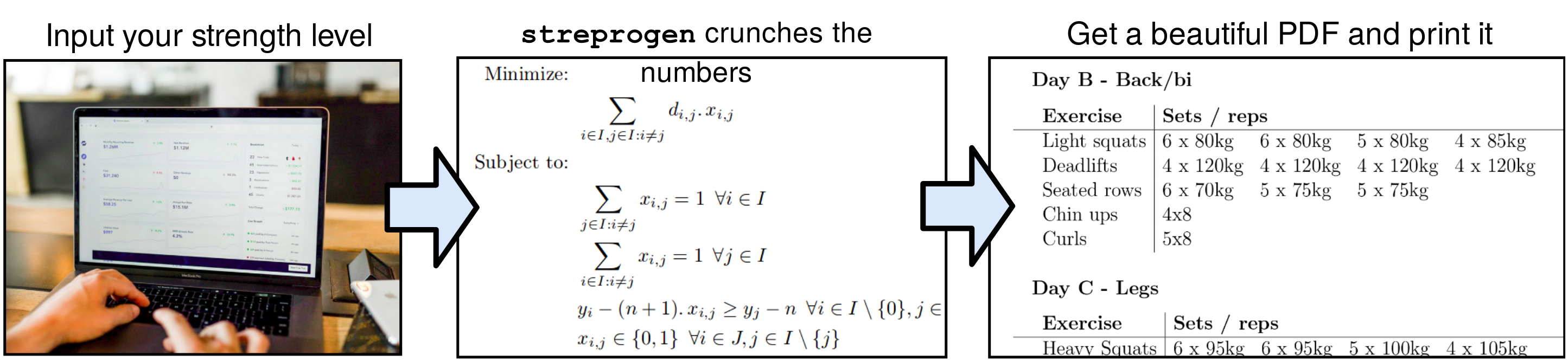
Streprogen (short for strength program generator) is a Python 3.6+ package which allows the user to easily create dynamic, flexible strength training programs. The main features are:
Sensible defaults: We aim for sensible default values for all input parameters, giving the novice strength athlete some guidance on parameter selection. The software will raise warnings for unreasonable input parameters, but will still run.
High level of customization: Every important parameter can be changed by the user. It is possible to create long-term training programs with several layers of periodization for advanced planning.
Simple interface: The software should be usable even by people with little Python knowledge.
Pretty output: Training programs may be saved as .txt, .html or .tex files. Print it and bring it to the gym.
Installation
Here’s how to install the software on your local machine.
Download Anaconda distribution of Python 3.x from the Anaconda Website.
Install streprogen from PyPI.
Windows: Open the Anaconda prompt from the start menu and run pip install streprogen.
Linux: Open the terminal and run pip install streprogen.
Open a Python Editor (such as Spyder, which comes with Anaconda).
Copy the example below and run it to get started.
Sample code
from streprogen import Program

# Create an 8-week program, rounding every exercise to nearest unit og 5kg
program = Program("My first program!", duration=8, units="kg", round_to=5)

with program.Day("Day A"):
    program.DynamicExercise("Bench press", start_weight=80, min_reps=3, max_reps=8)
    program.DynamicExercise("Squats", start_weight=100, min_reps=3, max_reps=8)

with program.Day("Day B"):
    program.DynamicExercise("Deadlifts", start_weight=100, min_reps=2, max_reps=7)
    program.StaticExercise("Curls", "3 x 10 @ 18kg")

# Render the program, then print it
program.render()
print(program)
----------------------------------------------------------------
Program: My first program!
Program parameters
duration: 8
reps_per_exercise: 25
intensity: 83
units: kg
----------------------------------------------------------------
Exercise information
Day A
Bench press 80kg -> 89.6kg
reps: [3, 8] weekly inc.: 1.5%
Squats 100kg -> 112kg
reps: [3, 8] weekly inc.: 1.5%
Day B
Deadlifts 100kg -> 112kg
reps: [2, 7] weekly inc.: 1.5%
Curls 3 x 10 @ 18kg
----------------------------------------------------------------
Program
Week 1
Day A
Bench press 8 x 60kg 7 x 65kg 7 x 65kg 7 x 65kg
Squats 8 x 75kg 7 x 80kg 7 x 80kg 7 x 80kg
Day B
Deadlifts 7 x 80kg 7 x 80kg 6 x 80kg 6 x 80kg 5 x 85kg
Curls 3 x 10 @ 18kg
Week 2
Day A
Bench press 7 x 65kg 7 x 65kg 6 x 65kg 5 x 70kg 5 x 70kg
Squats 7 x 80kg 7 x 80kg 6 x 85kg 5 x 85kg 5 x 85kg
Day B
Deadlifts 7 x 80kg 7 x 80kg 6 x 85kg 5 x 85kg 5 x 85kg
Curls 3 x 10 @ 18kg
Week 3
...
...Release history Release notifications | RSS feed


Download files
Download the file for your platform. If you're not sure which to choose, learn more about installing packages.
Source Distribution
Built Distribution
Filter files by name, interpreter, ABI, and platform.
If you're not sure about the file name format, learn more about wheel file names.
Copy a direct link to the current filters
File details
Details for the file streprogen-4.1.0.tar.gz.
File metadata
- Download URL: streprogen-4.1.0.tar.gz
- Upload date:
- Size: 77.3 kB
- Tags: Source
- Uploaded using Trusted Publishing? No
- Uploaded via: twine/6.1.0 CPython/3.12.9
File hashes
| Algorithm | Hash digest | |
|---|---|---|
| SHA256 |
d701f1a0913bfa5541cc6567e4bf142d6438f5cce0446d2cb32b1ce7a84a3e0e
|
|
| MD5 |
8aa819f71f597c73289d507ad9fa9d3e
|
|
| BLAKE2b-256 |
863b3f98accf017d1b76c68585c6bf30f2e741fcc30b9b3231e2190d92b22758
|
File details
Details for the file streprogen-4.1.0-py3-none-any.whl.
File metadata
- Download URL: streprogen-4.1.0-py3-none-any.whl
- Upload date:
- Size: 69.8 kB
- Tags: Python 3
- Uploaded using Trusted Publishing? No
- Uploaded via: twine/6.1.0 CPython/3.12.9
File hashes
| Algorithm | Hash digest | |
|---|---|---|
| SHA256 |
8a292fdd416da6f4d080496e2081e364a089b38f4ae78a4de582fbb6c6f01ab9
|
|
| MD5 |
1ade17fb6b76d416da9aa353584d3856
|
|
| BLAKE2b-256 |
d6af106eddc037d46dfff12d914316f5d789be8967c504f9eed6f379ba82efef
|






