

Python Stress Tool
A lightweight, scriptable performance benchmarking tool for Python with automated TPS reporting.


Features
-
Easy to Code and Perform
-
Ready-to-Present TPS Report
-
Dynamic Load Simulation with frequency_mode
OUTLINE
DEMONSTRATION
Just write your own callback functions based on the Worker Dispatcher library, then run it and generate the report file:
import stress_test

def each_task(id: int, config, task, metadata):
    response = requests.get('https://your.name/reserve-api/')
    return response

def main():
    results = stress_test.start({
        'task': {
            'list': 1000,
            'function': each_task,
        }
    })
    # Generate the TPS report if the stress test completes successfully.
    if results != False:
        file_path = stress_test.generate_report(file_path='./tps-report.xlsx')
        print("Report has been successfully generated at {}".format(file_path))

if __name__ == '__main__':
    main()
$ python3 main.py > log.txt 2>&1 &
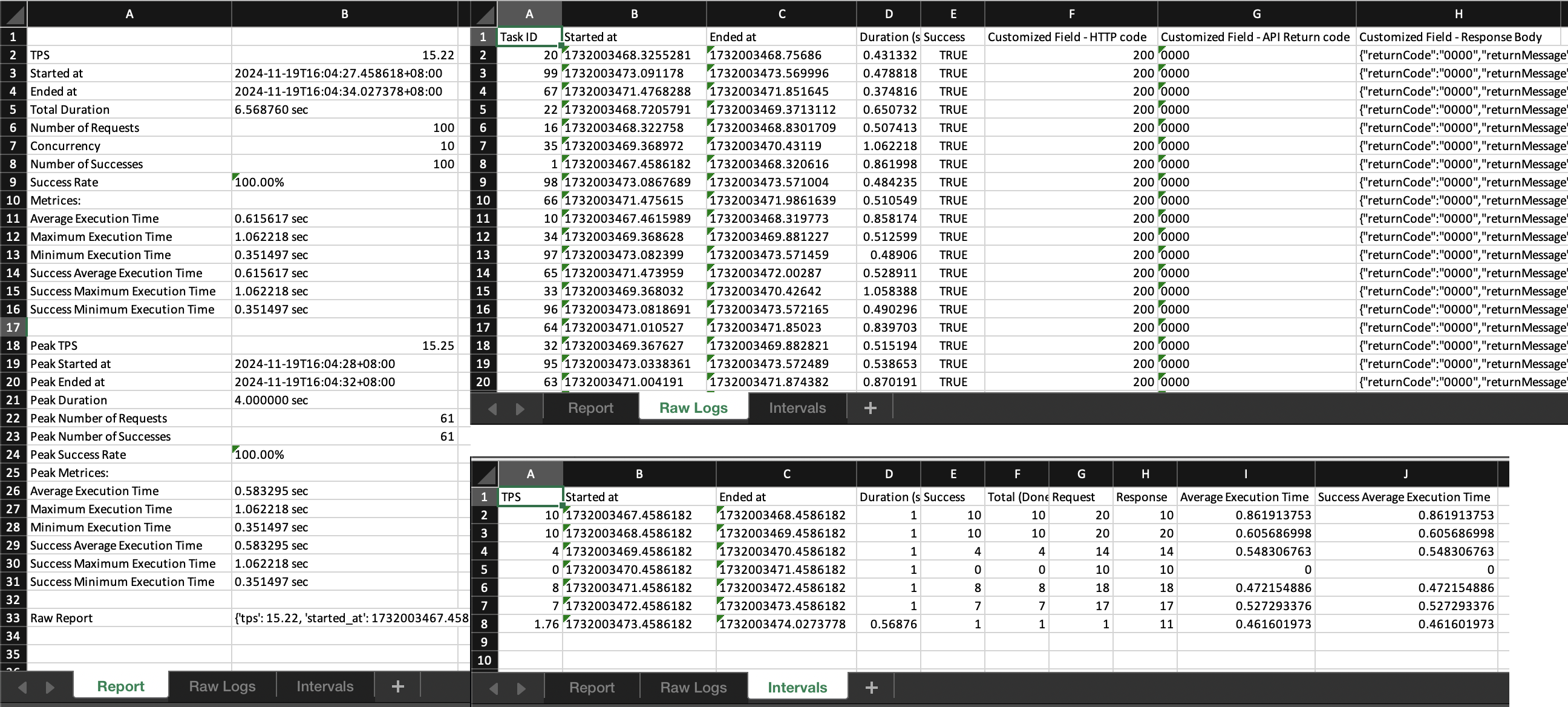
INTRODUCTION
This tool generates professional TPS report based on the execution result from the Worker Dispatcher library.
Dependencies:
- worker-dispatcher
- openpyxl
INSTALLATION
To install the current release:
$ pip install stress-tool
Import it in your Pythone code:
import stress_test
USAGE
By calling the start() method with the configuration parameters, the package will invoke Worker Dispatcher to dispatch tasks, managing threading or processing based on the provided settings. Once the tasks are completed, generate_report() can be called to produce a TPS report based on the result of Worker Dispatcher.
start()
Refers to worker_dispatcher.start().
generate_report()
An example configuration setting with all options is as follows:
def generate_report(config: dict={}, worker_dispatcher: object=None, file_path: str='./tps-report.xlsx', display_intervals: bool=True, interval: float=0, use_processing: bool=False, verbose: bool=False, debug: bool=False):
config
| Option | Type | Deafult | Description |
|---|---|---|---|
| raw_logs.fields | dict | None | Customized field settings for the Excel Raw Logs sheet. See Detailed Configuration below. |
raw_logs.fields Detailed Configuration
This setting allows you to map data from your task() function into custom columns in the Excel Raw Logs sheet.
- Key (Column Name): The header name that will appear in the Excel sheet.
- Value (Data Mapping): How to retrieve the data from the
metadatadictionary you filled during the test. It supports two types:- String: The dictionary key name you used in
metadata['your_key']. The tool will automatically fetch its value. - Lambda function: A function that receives the
metadatadictionary as its argument. Use this when you need to access object properties or perform logic (e.g.,lambda metadata: metadata.get('response').status_code).
- String: The dictionary key name you used in
Sample config
import stress_tool
import requests

# task.callback function
def task(id: int, config, task, metadata):
    try:
        response = metadata['response'] = requests.get('https://your.name/path/')
        try:
            api_return_code = metadata['api_return_code'] = response.json().get('returnCode')
            return True if api_return_code == "0000" else False
        except Exception as e:
            return False
    except requests.exceptions.ConnectTimeout:
        metadata['error'] = 'ConnectTimeout'
    except requests.exceptions.ReadTimeout:
        metadata['error'] = 'ReadTimeout'
    except requests.exceptions.RequestException as e:
        metadata['error'] = type(e).__name__
    return False

# Start stress test
results = stress_tool.start({
    # 'debug': True,
    'task': {
        'list': 60,
        'function': task,
    },
})

# Generate the report
file_path = stress_tool.generate_report(config={
    'raw_logs': {
        'fields': {
            'Customized Field - HTTP code': lambda metadata: metadata.get('response').status_code,
            'Customized Field - API Return code': 'api_return_code',
            'Customized Field - Response Body': lambda metadata: metadata.get('response').text,
        }
    },
})
display_intervals
Indicates whether to generate Intervals sheet.
interval
Based on Intervals sheet, specifies the number of seconds for each split.
print()
Refers to worker_dispatcher.print().
1 maintainer

Metadata
1 maintainer
Release files for stress-tool 1.2.2
For a detailed explanation of source distributions (sdists) and built distributions (wheels), please see the package formats documentation.
Source distribution (sdist)
| File | Size | Uploaded | |
|---|---|---|---|
| stress_tool-1.2.2.tar.gz | 487.2 kB | Details |
Built distribution (wheel)
| File | Interpreter | ABI | Platform | Reset |
|---|---|---|---|---|
| stress_tool-1.2.2-py3-none-any.whl | Python 3 | none | any | Details |
Total release size: 493.5 kB
Release files / stress_tool-1.2.2.tar.gz
| Download URL | stress_tool-1.2.2.tar.gz |
|---|---|
| Size | 487.2 kB |
| Tags | Source |
|
SHA-256 checksum How to use checksums |
f317aa72f34edbba5f5cd8bf9b182e2f3226c47c5a2c4caa8686b0254d9c1d9e
|
|
BLAKE2b-256 checksum How to use checksums |
0458bd4db209ab1c52deff9178612344c4da5b45bb09c37082616ea21e8f5e49
|
| Upload date | |
|
Uploaded using Trusted Publishing? What is trusted publishing? |
No |
| Uploaded via |
twine/6.2.0 CPython/3.9.25
|
Release files / stress_tool-1.2.2-py3-none-any.whl
| Download URL | stress_tool-1.2.2-py3-none-any.whl |
|---|---|
| Size | 6.3 kB |
| Tags | Python 3 |
|
SHA-256 checksum How to use checksums |
fff8e6237a9de047ed8a52373da17583f1a9c1ca035179637e6f7f3e175283db
|
|
BLAKE2b-256 checksum How to use checksums |
e1df71d970eb591db368ac2e30a4ef24de6fb0eec556cf4d7013a5187da9a172
|
| Upload date | |
|
Uploaded using Trusted Publishing? What is trusted publishing? |
No |
| Uploaded via |
twine/6.2.0 CPython/3.9.25
|














