
Stress test tool with statistical TPS reports based on Worker Dispatcher in Python

Project description

Python Stress Tool
Stress test tool with statistical TPS reports based on Worker Dispatcher in Python


Features
-
Based on Worker Dispatcher to managed workers
-
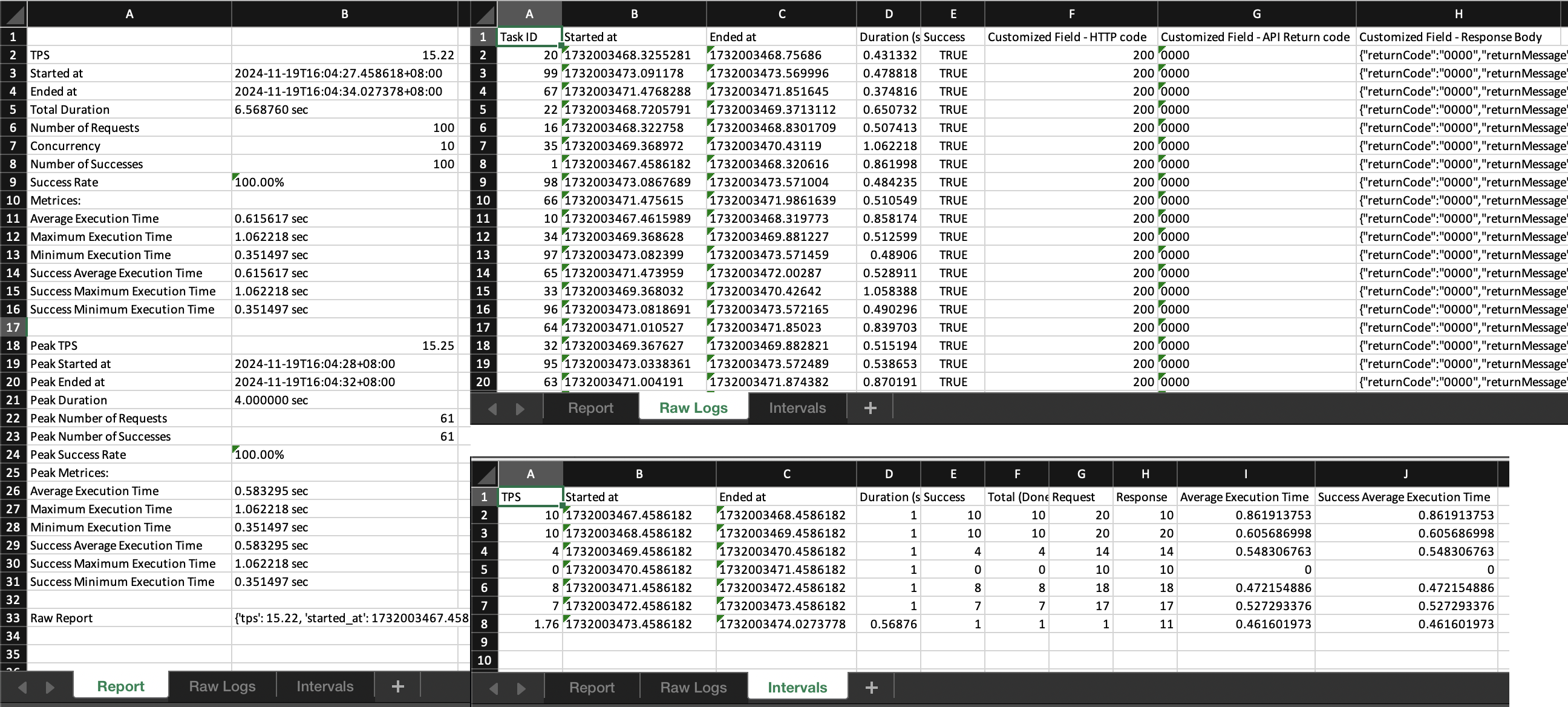
Statistical TPS Report in Excel sheets
-
Customized Config for the report
OUTLINE
DEMONSTRATION
Just write your own callback functions based on the Worker Dispatcher library, then run it and generate the report file:
import stress_test

def each_task(id: int, config, task, metadata):
    response = requests.get('https://your.name/reserve-api/')
    return response

def main():
    results = stress_test.start({
        'task': {
            'list': 1000,
            'function': each_task,
        }
    })
    # Generate the TPS report if the stress test completes successfully.
    if results != False:
        file_path = stress_test.generate_report(file_path='./tps-report.xlsx')
        print("Report has been successfully generated at {}".format(file_path))

if __name__ == '__main__':
    main()
INTRODUCTION
This tool generates professional TPS report based on the execution result from the Worker Dispatcher library.
Dependencies:
- worker-dispatcher
- openpyxl
INSTALLATION
To install the current release:
$ pip install stress-tool
Import it in your Pythone code:
import stress_test
USAGE
By calling the start() method with the configuration parameters, the package will invoke Worker Dispatcher to dispatch tasks, managing threading or processing based on the provided settings. Once the tasks are completed, generate_report() can be called to produce a TPS report based on the result of Worker Dispatcher.
start()
Refers to worker_dispatcher.start().
generate_report()
An example configuration setting with all options is as follows:
def generate_report(config: dict={}, worker_dispatcher: object=None, file_path: str='./tps-report.xlsx', display_intervals: bool=True, interval: float=0, use_processing: bool=False, verbose: bool=False, debug: bool=False):
config
| Option | Type | Deafult | Description |
|---|---|---|---|
| raw_logs.fields | dict | None | Customized field setting for the Raw Logs sheet. Each key represents the field name, and the corresponding value supports two types: - String: Treated as a key to look up in log.metadata (from the Worker Dispatcher) to retrieve the value. - Lambda function: A function that receives log.metadata as input and returns a computed value. |
Sample config
import stress_tool
import requests

# task.callback function
def task(id: int, config, task, metadata):
    try:
        response = metadata['response'] = requests.get('https://your.name/path/')
        try:
            api_return_code = metadata['api_return_code'] = response.json().get('returnCode')
            return True if api_return_code == "0000" else False
        except Exception as e:
            return False
    except requests.exceptions.ConnectionError:
        metadata['error'] = 'ConnectionError'
    return False

# Start stress test
results = stress_tool.start({
    # 'debug': True,
    'task': {
        'list': 60,
        'function': task,
    },
})

# Generate the report
file_path = stress_test.generate_report(config={
    'raw_logs': {
        'fields': {
            'Customized Field - HTTP code': lambda metadata: metadata.get('response').status_code,
            'Customized Field - API Return code': 'api_return_code',
            'Customized Field - Response Body': lambda metadata: metadata.get('response').text,
        }
    },
})
display_intervals
Indicates whether to generate Intervals sheet.
interval
Based on Intervals sheet, specifies the number of seconds for each split.
print()
Refers to worker_dispatcher.print().


Download files
Download the file for your platform. If you're not sure which to choose, learn more about installing packages.
Source Distribution
Built Distribution
Filter files by name, interpreter, ABI, and platform.
If you're not sure about the file name format, learn more about wheel file names.
Copy a direct link to the current filters
File details
Details for the file stress_tool-1.2.1.tar.gz.
File metadata
- Download URL: stress_tool-1.2.1.tar.gz
- Upload date:
- Size: 486.9 kB
- Tags: Source
- Uploaded using Trusted Publishing? No
- Uploaded via: twine/6.1.0 CPython/3.9.22
File hashes
| Algorithm | Hash digest | |
|---|---|---|
| SHA256 |
f2b3a4e4a6368a6e618b66b6de6f0c9fb24351ec9e60ddb8c95485bcb05b271c
|
|
| MD5 |
0ca74d494f9c4ae3f960fcc8ef76c09c
|
|
| BLAKE2b-256 |
52cac6893612c3746c05e392d76bf175ba2108c6d3c98c3a00d0ec4661265b59
|
File details
Details for the file stress_tool-1.2.1-py3-none-any.whl.
File metadata
- Download URL: stress_tool-1.2.1-py3-none-any.whl
- Upload date:
- Size: 6.0 kB
- Tags: Python 3
- Uploaded using Trusted Publishing? No
- Uploaded via: twine/6.1.0 CPython/3.9.22
File hashes
| Algorithm | Hash digest | |
|---|---|---|
| SHA256 |
e1586b417c5277fb64c20e2a19e1f2d4d1d621ec4d1a982fadd988c374d83397
|
|
| MD5 |
1a06d657c7dabda17a8a3fc87e298bf2
|
|
| BLAKE2b-256 |
6318cd427a7ee17ac039596eb09cf4e6770bc77926d7acb2d1bf8aca31c0bb00
|






