
sttop



Live speech-to-text monitor for the terminal — htop, but for what is being said.
Taps your microphone and your system audio output as two independent streams, transcribes both in real time, labels who is speaking, and appends every line to a Markdown file as it happens. Fully local: no network, no API keys, nothing leaves the machine.
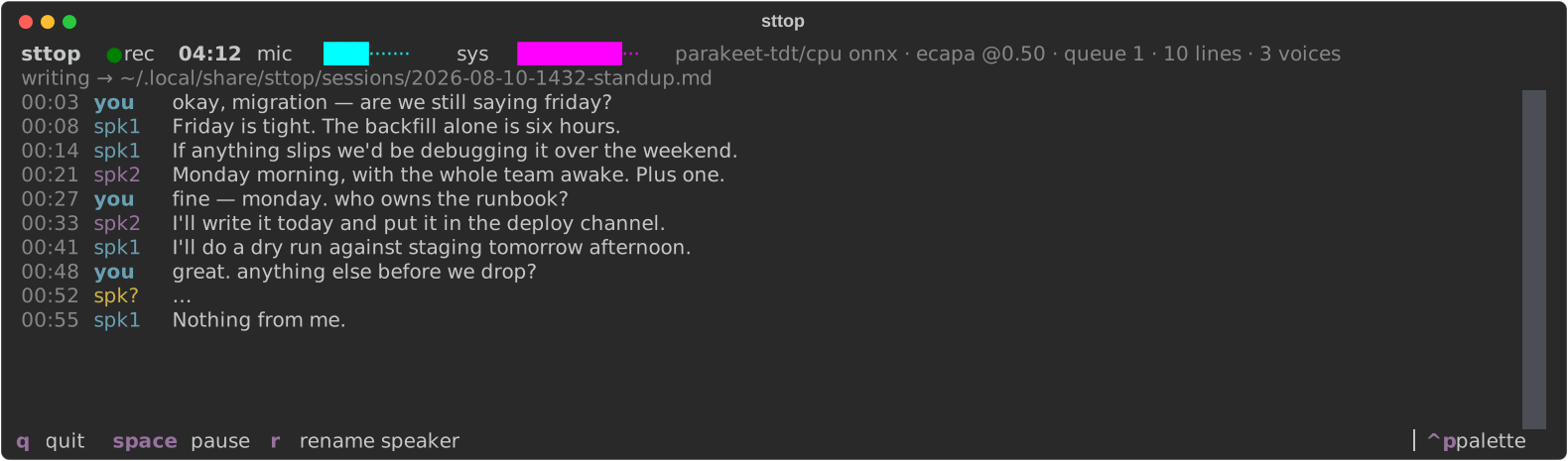
Why two streams
Capturing the mic and the speaker output separately means you are identified for free — anything on the mic is you, no model required, never wrong. Voice embeddings then only have to split the remote side into individual participants, which is a much easier problem than diarizing a single mixed track.
Install
uvx --index https://download.pytorch.org/whl/cpu sttop
The --index flag matters. Speaker labelling needs torch, and the stock PyPI torch
bundles CUDA — about 2.5GB of nvidia wheels that buy nothing here, since
CTranslate2 has no ROCm backend and CPU inference keeps up with live audio fine.
The flag points torch at the CPU builds and falls back to PyPI for everything else.
That is the whole install on Linux. There is nothing to apt install first: if
the machine has no ffmpeg, sttop fetches a static one into its own data
directory on first run, and pactl is optional — the audio server resolves the
default mic and monitor itself, so pactl is only needed to pick a source by
name. Run sttop doctor to see what it found.
macOS needs nothing installed either. The mic comes from AVFoundation and system audio from ScreenCaptureKit — no BlackHole, no Multi-Output Device, and your output device and volume keys keep working, because nothing is rerouted. It does need permission, granted once to the terminal you run sttop in:
System Settings → Privacy & Security → Screen & System Audio Recording
Restart the terminal afterwards; macOS only re-reads that permission at launch. Requires macOS 13 (Ventura) or newer — on anything older, or before the permission is granted, sttop records the mic only and says so rather than refusing to start.
To install it permanently rather than running it ad hoc:
uv tool install --index https://download.pytorch.org/whl/cpu sttop
From a checkout, uv sync reads the CPU index out of pyproject.toml already:
git clone https://github.com/v4rgas/sttop && cd sttop
uv sync
Use
uv run sttop                       # record with defaults
uv run sttop -t "standup"          # title the session (used in the filename)
uv run sttop --backend whisper -m small
uv run sttop devices --test        # list audio sources, record 1s from each
uv run sttop doctor                # check the audio deps, explain anything missing
uv run sttop sessions              # list past transcripts
uv run sttop config                # write ~/.config/sttop/config.toml
uv run sttop theme                 # show the detected terminal colour scheme
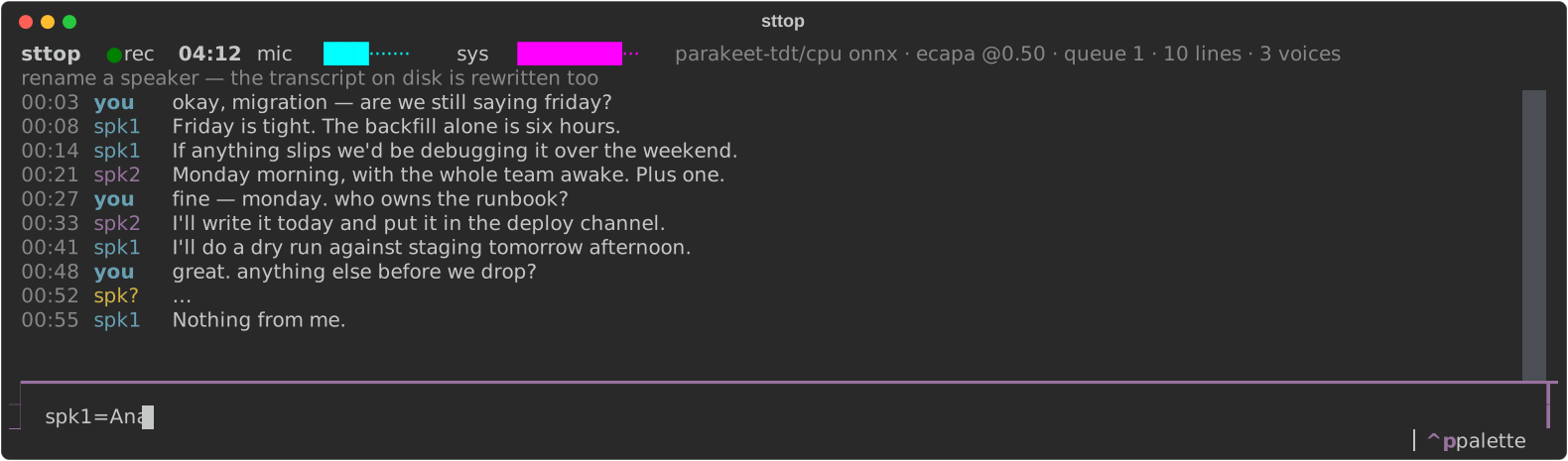
Keys: q quit · space pause · r rename a speaker.
A rename is retroactive — spk1=Ana relabels the live view and rewrites every
line already written to the Markdown file, so you can name people once you
recognise them rather than before you start.
Output
One Markdown file per session in ~/.local/share/sttop/sessions/, flushed after every
line — kill it mid-meeting and the transcript so far is already on disk.
# standup

- started: 2026-08-10 14:32:01 -04
- mic: `alsa_input.pci-0000_08_00.6.analog-stereo`
- system: `alsa_output.pci-0000_08_00.6.analog-stereo.monitor`
- backend: `parakeet-tdt/cpu onnx`

## Transcript

- `03:58` **you** — so the migration lands friday?

- `04:02` **spk1** — friday is tight, monday is safer
How it works
mic     (pulse / avfoundation)  ─┐
                                 ├─ webrtcvad ─→ queue ─→ parakeet ─→ ecapa ─→ journal.md
system  (monitor / ScreenCaptureKit) ─┘
The mic is always an ffmpeg subprocess. System audio is one too on Linux, where the monitor source is just another pulse device; on macOS it is an in-process ScreenCaptureKit stream, converted to the same 16 kHz mono frames before it reaches the segmenter, so everything downstream sees one format.
Audio is cut into utterances by voice-activity detection (a segment closes after 700 ms of silence, or at 15 s for a monologue), and only speech reaches the model.
One thread boundary, and it is the model. The two capture readers and the
consumer are asyncio tasks — they are blocking pipe I/O, which is what an event
loop is for — while transcription and voice embedding run in a single-worker
ThreadPoolExecutor. So the UI needs no cross-thread marshalling, shutdown is
ordinary task cancellation, and utterances stay in the order they were spoken. The
executor is single-worker on purpose: transcription is CPU-bound and already
internally parallel, so a second worker would only thrash the cache. When it falls
behind, the queue absorbs the lag — visible as queue N in the status bar — rather
than dropping audio.
Speaker labels come from online clustering of ECAPA-TDNN voice embeddings: each
utterance is embedded as overlapping windows, averaged, and matched against running
centroids by cosine similarity. A confident match (≥ threshold) joins that speaker;
a near miss (within margin below it) joins too, but without touching a settled
centroid; only a clearly distant voice opens a new speaker.
Opening a speaker is a much stronger claim than recognising one, so it takes more
evidence — which is what keeps one person from turning into eight. A short utterance
that matches nobody is held rather than acted on: two words embed to mostly noise,
and noise resembles nothing, including the next piece of noise. It becomes a speaker
only once something later looks like it. Until then the line reads spk?, which is
the honest answer. If you already know who is in the room, --speakers N caps the
count outright and the nearest voice always wins.
Assignments are greedy, but they are not final. Once two settled speakers look like
the same person (≥ merge_threshold) they are merged, and the losing label is
rewritten throughout the transcript — the file on disk is corrected, and the TUI notes
the relabelling rather than silently disagreeing with it. Deciding now and revising
when the evidence arrives is what keeps real-time labels from freezing an early
mistake. Segments under min_speech_s are too short to embed at all and inherit the
previous speaker, or show as spk?.
Backends
parakeet (default) — NVIDIA Parakeet TDT 0.6b v3 through onnxruntime. Multilingual
across 25 European languages with autodetection, punctuated output, and roughly 19×
real time on CPU. Needs neither torch nor the NeMo toolkit, since onnx-asr runs the
exported graph directly. On the same 11 s clip where whisper tiny produced a
hallucinated lead-in and lost its punctuation, Parakeet returned the sentence verbatim.
whisper — faster-whisper/CTranslate2, if you want Whisper's language coverage.
CTranslate2 ships CUDA and CPU backends only — there is no ROCm build, so on an AMD
GPU this runs on CPU no matter what torch reports. The device is detected at startup
(cuda if CTranslate2 sees one, else cpu) and shown in the status bar.
To push a Radeon card at the diarization half, resync torch against the ROCm index
(see the comment in pyproject.toml).
Config
~/.config/sttop/config.toml. Run sttop config to write a default with every
knob and its documentation in it; the comments come from the source, so the file
never drifts from the code. Anything you leave out keeps its default, and blank
means "you decide" wherever a default is picked for you.
sessions_dir = "~/.local/share/sttop/sessions"

[audio]
mic_source = ""        # substring match against source names; blank = default
system_source = ""     # blank = the default monitor; ignored on macOS
save_wav = false

[vad]
aggressiveness = 2     # 0 permissive .. 3 strict
silence_ms = 700
max_segment_s = 15.0

[stt]
backend = "parakeet"   # parakeet | whisper
model = ""             # blank = the backend's default model
device = "auto"        # whisper only
language = ""          # blank = autodetect

[ui]
theme = "auto"         # auto follows your terminal; or gruvbox, nord, ...

[diarize]
enabled = true
threshold = 0.30       # lower = fewer, broader speakers
margin = 0.10          # grey zone that attaches instead of opening a speaker
merge_threshold = 0.45 # two settled speakers this alike are one person
warmup = 3             # utterances before a speaker's centroid is trusted
new_speaker_min_s = 4.0 # shorter than this must be corroborated to open a speaker
max_speakers = 0       # 0 = no cap; same as --speakers N
Theming
By default sttop paints with the ansi-dark / ansi-light Textual themes, which
use only the terminal's own 16 ANSI colours — so it inherits whatever palette you
already have rather than imposing its own. Which of the two is picked by reading
COLORFGBG, and failing that by asking the terminal for its background colour over
OSC 11 (supported by ghostty, kitty, alacritty, wezterm, foot, xterm). If nothing
answers, it assumes dark. Run sttop theme to see what was detected.
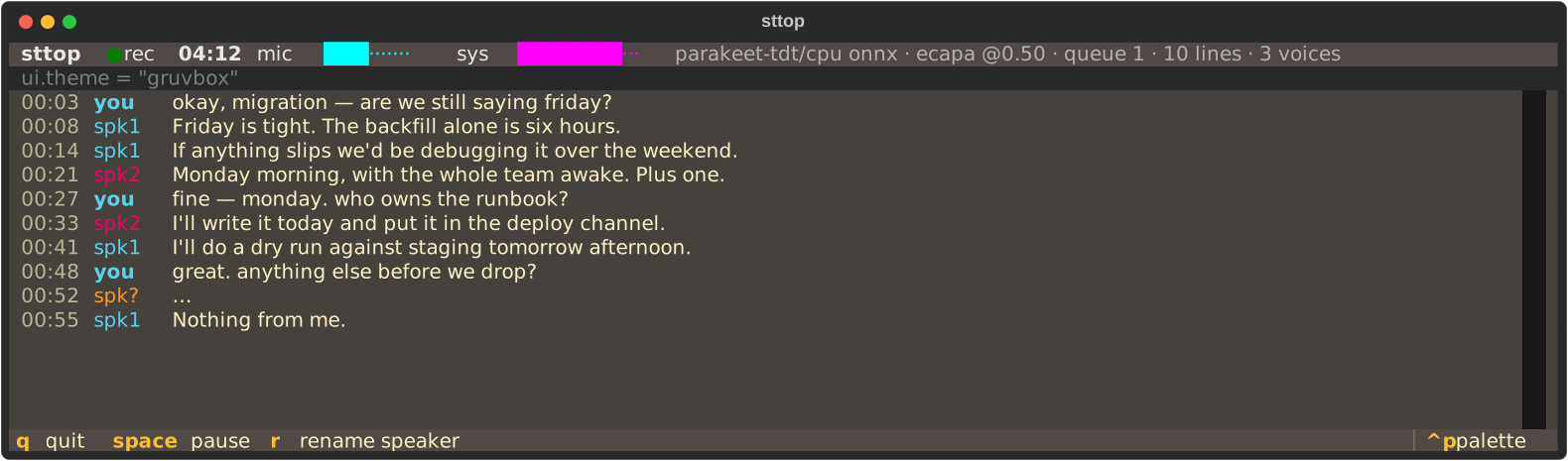
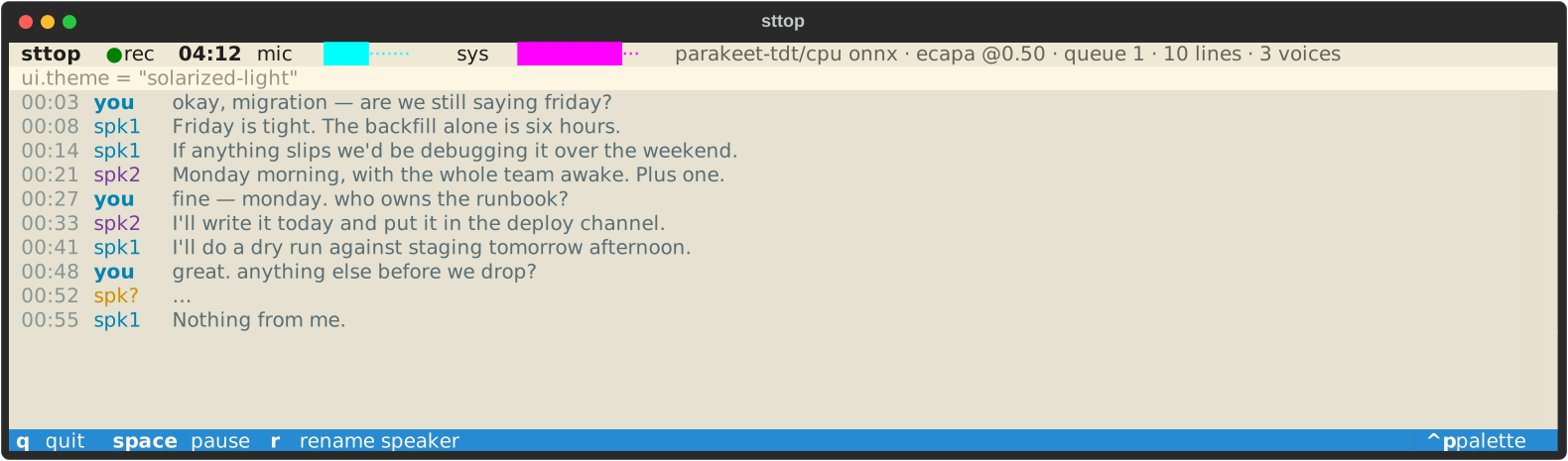
Set ui.theme to any Textual theme name (gruvbox, nord, catppuccin-mocha,
solarized-light, …) to override the terminal-following behaviour.
Tests
uv run --extra dev pytest
The audio-dependent path is exercised by tests/test_pipeline.py, which plays a speech
sample into the default sink and reads it back off the monitor. It needs real audio
hardware and downloads a model, so it is opt-in:
STTOP_INTEGRATION=1 uv run --extra dev pytest
Screenshots
The images above are rendered from the real widgets by
uv run --extra dev python scripts/screenshots.py
which drives sttop.tui with a scripted transcript instead of a live engine, so
docs/*.svg cannot drift from the UI it documents.
License
MIT
1 maintainer

Release files for sttop 0.5.0
For a detailed explanation of source distributions (sdists) and built distributions (wheels), please see the package formats documentation.
Source distribution (sdist)
| File | Size | Uploaded | |
|---|---|---|---|
| sttop-0.5.0.tar.gz | 182.3 kB | Details |
Built distribution (wheel)
| File | Interpreter | ABI | Platform | Reset |
|---|---|---|---|---|
| sttop-0.5.0-py3-none-any.whl | Python 3 | none | any | Details |
Total release size: 240.3 kB
Release files / sttop-0.5.0.tar.gz
| Download URL | sttop-0.5.0.tar.gz |
|---|---|
| Size | 182.3 kB |
| Tags | Source |
|
SHA-256 checksum How to use checksums |
2583f6437cba94909236c26da5f797493a01126802a61e524e813d70d7dbaae7
|
|
BLAKE2b-256 checksum How to use checksums |
914cf4e0740080ac53dc9bf14cda43723e0b7b2d76d8c29327dc0fcdfb028c99
|
| Upload date | |
|
Uploaded using Trusted Publishing? What is trusted publishing? |
Yes |
| Uploaded via |
twine/7.0.0 CPython/3.13.14
|
Provenance
Provenance describes where a file came from. On PyPI, provenance is shared via attestations, which provide a verifiable record of the build or publishing details. View details, limitations and caveats.


PyPI Publish Attestation
PyPI verified that this artifact, at this checksum, originated from the publisher listed below.
Signed by GitHub Actions, verified by PyPI on Aug 11, 2026.
Transparency logRelease files / sttop-0.5.0-py3-none-any.whl
| Download URL | sttop-0.5.0-py3-none-any.whl |
|---|---|
| Size | 58.0 kB |
| Tags | Python 3 |
|
SHA-256 checksum How to use checksums |
8eaac2ef636ab9b88225f78667e30c9dcc93a51ca86ab1316d93c31f5948b9d6
|
|
BLAKE2b-256 checksum How to use checksums |
7b254875c11fbe08b702510117f6007c4823ec935e3170f06f7edc9a2f2d4c90
|
| Upload date | |
|
Uploaded using Trusted Publishing? What is trusted publishing? |
Yes |
| Uploaded via |
twine/7.0.0 CPython/3.13.14
|
Provenance
Provenance describes where a file came from. On PyPI, provenance is shared via attestations, which provide a verifiable record of the build or publishing details. View details, limitations and caveats.
PyPI Publish Attestation
PyPI verified that this artifact, at this checksum, originated from the publisher listed below.
Signed by GitHub Actions, verified by PyPI on Aug 11, 2026.
Transparency log













