
A tiny Streamlit-inspired terminal UI experiment.
Verified details
These details have been verified by PyPIProject links
GitHub Statistics
Maintainers

Project description
stui

stui v0.5.0 is a tiny Streamlit-inspired framework for building
terminal-native Python apps. Write a short script, run it in your terminal, and
get a Textual UI with stateful controls.
It is built for local tools, demos, data scripts, model debug panels, SSH sessions, and headless environments where opening a browser, binding a port, or running a dashboard server is unnecessary ceremony. The public API is deliberately small and readable.
stui is not official Streamlit, is not affiliated with Streamlit, and is not a
Streamlit compatibility layer. The API intentionally feels familiar, but this
project keeps its own smaller surface area.
Preview
┌─ stui ───────────────────────────────────────────┐
│ stui demo                                        │
│                                                  │
│ x                                                │
│ [██░░░░░░░░░░░░] 10                              │
│                                                  │
│ [ Increment ]                                    │
│                                                  │
│ x = 10                                           │
│ count = 0                                        │
│                                                  │
│ q Quit   r Rerun   tab Focus next                │
└──────────────────────────────────────────────────┘
Install
Use Python 3.11 or newer.
Install the PyPI distribution named stui-terminal. The import package and CLI
are both still named stui:
python -m pip install stui-terminal
import stui as st
For local development from a checkout, use an editable install with the dev extra:
python3.11 -m venv .venv
. .venv/bin/activate
python -m pip install -e ".[dev]"
For runtime-only local use, install without the dev extra:
python -m pip install -e .
60-Second Quickstart
Create a file named app.py:
import stui as st

st.title("Hello from the terminal")

name = st.text_input("Name", "MarMar")
level = st.slider("Level", 1, 10, 5)

if st.button("Greet"):
    st.success(f"Hi {name}. Level {level} selected.")
Install and run it:
python -m pip install stui-terminal
stui run app.py
If the stui command is not on your PATH, use the module entry point:
python -m stui run app.py
Check your install and terminal details:
stui --version
stui doctor
Build Your First App
stui scripts rerun when users interact with widgets. Use
st.session_state for values that should survive reruns:
import stui as st

st.title("Counter")

if "count" not in st.session_state:
    st.session_state.count = 0

step = st.slider("Step", 1, 10, 1)

if st.button("Add"):
    st.session_state.count += step

if st.button("Reset"):
    st.session_state.count = 0

st.write("count =", st.session_state.count)
Run it with:
stui run app.py
Start from the included examples when you want a larger reference:
stui run examples/counter.py
stui run examples/inputs.py
stui run examples/data_display.py
stui run examples/dashboard.py
stui run examples/forms.py
stui run examples/layouts.py
stui run examples/charts.py
stui run examples/kitchen_sink.py
Those examples/... paths are repository files. Installed packages also expose
bundled examples that can be listed or copied:
stui examples
stui example list
stui example copy counter ./counter.py
stui run ./counter.py
stui init ./new_app.py
stui init ./dashboard.py --template dashboard
Copy-Paste Examples
Slider and Button
import stui as st

st.title("Slider and Button")

if "runs" not in st.session_state:
    st.session_state.runs = 0

threshold = st.slider("Threshold", 0.0, 1.0, 0.5, step=0.1)

if st.button("Run"):
    st.session_state.runs += 1
    st.success(f"Run {st.session_state.runs} at threshold {threshold}")
Inputs
import stui as st

st.title("Inputs")

name = st.text_input("Name", "MarMar")
batch = st.number_input("Batch size", min_value=1, max_value=128, value=16)
model = st.selectbox("Model", ["tiny", "base", "large"], index=1)
mode = st.radio("Mode", ["fast", "balanced", "careful"], index=1)
dry_run = st.checkbox("Dry run", value=True)

st.write("name =", name)
st.write("batch =", batch)
st.write("model =", model)
st.write("mode =", mode)
st.write("dry run =", dry_run)
Table and Dataframe
import stui as st

st.title("Runs")

rows = [
    {"name": "baseline", "accuracy": 0.81, "latency_ms": 42},
    {"name": "quantized", "accuracy": 0.79, "latency_ms": 24},
    {"name": "distilled", "accuracy": 0.77, "latency_ms": 18},
]

st.table(rows)
st.dataframe({"setting": ["device", "batch"], "value": ["cpu", 16]})
Progress and Status
import stui as st

st.title("Job Status")

complete = st.slider("Complete", 0, 100, 35)
st.progress(complete, text="current job")

if complete == 100:
    st.success("Done")
elif complete >= 75:
    st.warning("Almost there")
else:
    st.info("Running")
Why terminal-native?
Some useful Python apps do not need a browser runtime. stui keeps the
interface inside the terminal so it can fit naturally into:
- SSH sessions, remote machines, and headless boxes.
- Internal tools where opening ports or managing local server URLs is friction.
- Offline or locked-down environments where browser access is limited.
- Model, data, and DevOps workflows that already start from a shell.
That also keeps the boundary simple: stui does not start a web server, use
websockets, require port-forwarding, or depend on Streamlit at runtime.
Commands
# Install the package from PyPI.
python -m pip install stui-terminal

# Run an app.
stui run app.py
python -m stui run app.py

# List, copy, or create starter examples.
stui examples
stui example list
stui example copy counter ./counter.py
stui init ./new_app.py
stui init ./dashboard.py --template dashboard

# Print version and install/terminal diagnostics.
stui --version
stui doctor

# Install the project for local development from a checkout.
python3.11 -m venv .venv
. .venv/bin/activate
python -m pip install -e ".[dev]"

# Run the smoke-size example app.
stui run examples/basic.py

# Run the stateful counter example.
stui run examples/counter.py

# Run the deterministic model-parameter demo.
stui run examples/model_demo.py

# Run the test suite.
python3.11 -m pytest
Keyboard Shortcuts
q: quit the appr: rerun the scripttab: focus the next widgetshift+tab: focus the previous widgetenter: press the focused buttonspace: toggle the focused checkboxenterin text and number inputs: submit the edited valueenter,right, ordown: move a selectbox to the next choiceleftorup: move a selectbox to the previous choice- arrow keys in radio groups: choose another option
enterorspace: toggle a focused expanderleftorh: decrease the focused sliderrightorl: increase the focused sliderhome: set the focused slider to its minimum valueend: set the focused slider to its maximum value
Some lower-level editing and focus behavior comes from Textual and can vary by terminal. See Terminal Compatibility and the v1 compatibility gate for the current checklist.
API
Import the API as:
import stui as st
The public API is intentionally compact and Streamlit-inspired, not Streamlit-compatible.
| Area | APIs | Status in v0.5.0 |
|---|---|---|
| Text | st.title, st.header, st.subheader, st.caption, st.text, st.markdown, st.write, st.divider |
Stable candidate |
| Status | st.info, st.success, st.warning, st.error, st.exception |
Stable candidate |
| Display | st.code, st.json, st.progress, st.table, st.dataframe |
Static display helpers |
| Inputs | st.button, st.slider, st.text_input, st.checkbox, st.number_input, st.selectbox, st.radio |
Stateful widgets with keys and callbacks |
| Forms | st.form, st.form_submit_button |
Deferred commit to session_state until submit |
| Grouping | st.container, st.expander |
Terminal grouping; expanders toggle with Enter/Space |
| Metrics and charts | st.metric, st.bar_chart, st.line_chart |
Compact terminal summaries, not plotting replacements |
| State and flow | st.session_state, st.rerun, st.stop |
Stable candidate with rerun limits and explicit stop support |
| CLI and examples | stui run, stui examples, stui example copy, stui init, stui doctor, stui --version |
v0.5.0 documented DX surface |
Inputs support stable key values and optional callbacks where the function
signature documents them. Tables and charts are simple static displays and do
not require pandas or plotting dependencies.
Compatibility
stui is Streamlit-inspired, not Streamlit-compatible. Existing Streamlit apps
usually need small edits before they run in stui; unsupported calls should be
removed or replaced with the compact API above.
Runtime expectations:
- Python 3.11 or newer.
- Terminal UI powered by Textual and Rich.
- No Streamlit runtime dependency.
- No browser tab, local web server, websocket, or port-forwarding flow.
- Static table/dataframe display without dataframe editing or sorting.
- Common modern terminals should work best with UTF-8, color support, and a
normal interactive
TERMsuch asxterm-256color.
Common Mistakes
- Installing
stuiinstead ofstui-terminal. The PyPI package isstui-terminal; the import and CLI arestui. - Running
stui runfrom a different Python environment than the one where the package was installed. Trypython -m stui run app.py. - Expecting a browser dashboard.
stuirenders inside your terminal. - Reusing Streamlit-only APIs such as sidebars, file upload, caching decorators, or arbitrary components. They are not part of this small API.
- Assuming newer APIs are present in an older install. Check
python -c "import stui; print(stui.__version__)"before using forms, grouping primitives, metrics, charts, or packaged examples. - Doing slow network or model work at top level. Scripts rerun after interactions, so keep top-level work light and cache expensive work yourself.
- Forgetting stable
keyvalues when creating similar widgets in loops.
Troubleshooting
stui: command not found
Make sure you installed into the same Python environment that your shell is using:
python -m pip install stui-terminal
python -m stui --version
If python -m stui --version works but stui --version does not, your
environment's script directory is not on PATH. Running through
python -m stui ... is a reliable workaround.
Python Version
stui requires Python 3.11 or newer:
python --version
If that prints an older version, create a 3.11+ environment first:
python3.11 -m venv .venv
. .venv/bin/activate
python -m pip install stui-terminal
Terminal Rendering
stui renders a Textual app inside your terminal. For the best results, use a
modern terminal with UTF-8 and color support. If borders, focus rings, or block
characters look wrong, try another terminal app, make the window wider, and
check that TERM is set to a normal interactive terminal value such as
xterm-256color.
macOS Editable Install Quirk
If a local editable install appears to succeed but import stui or
stui --version cannot find the package on macOS, check whether the virtual
environment or editable-install .pth file was marked hidden:
chflags -R nohidden .venv
python -m pip install -e ".[dev]"
python -m stui --version
Examples
Counter
examples/counter.py shows a minimal stateful app with increment, decrement, and
reset controls.
stui run examples/counter.py
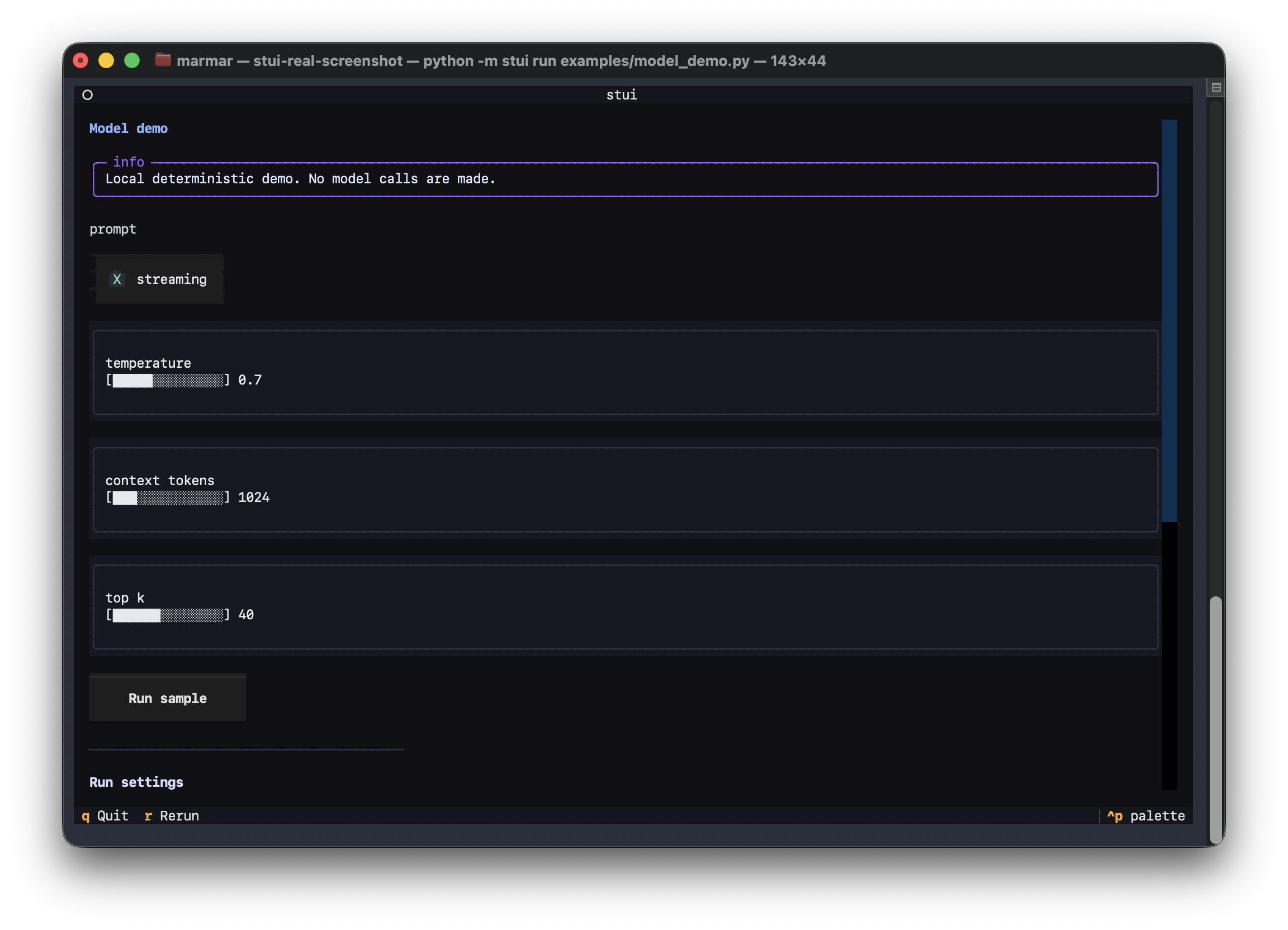
Model Demo
examples/model_demo.py shows a small model-parameter playground using text
input, checkbox, sliders, status messages, session state, and deterministic
scoring. It is intentionally local and fake: there are no network calls or model
dependencies.
stui run examples/model_demo.py
Inputs
examples/inputs.py shows text, numeric, selectbox, radio, checkbox, and button
controls together.
stui run examples/inputs.py
Data Display
examples/data_display.py shows tables, JSON, and code output.
stui run examples/data_display.py
Dashboard
examples/dashboard.py combines controls, progress, status messages, and a
small table into a compact terminal control panel.
stui run examples/dashboard.py
Forms
examples/forms.py shows the v0.4 form flow: form widget display values can
change during reruns, but keyed values commit to session_state on submit.
stui run examples/forms.py
Layouts
examples/layouts.py shows container and keyboard-toggleable expander patterns.
stui run examples/layouts.py
Charts
examples/charts.py shows metric, bar_chart, and line_chart helpers with
source data shown in a table.
stui run examples/charts.py
Kitchen Sink
examples/kitchen_sink.py exercises the stable API surface, including the
terminal-app primitives added in the 0.3 and 0.4 release lines.
stui run examples/kitchen_sink.py
Limitations
- No browser, web server, websocket, or port-forwarding runtime.
- No Streamlit dependency and no promise of Streamlit compatibility.
- Forms still rerun the Textual app when a form widget changes, but v0.4 keeps
pending form values out of
session_stateuntil submit. - Expanders are keyboard-toggleable with Enter/Space and persist their state; this is still a modest terminal grouping primitive, not a full layout system.
- Charts are compact terminal summaries, not plotting-library replacements.
st.bar_chartsupports signed values and zero-only data;st.line_chartis a simple static sparkline for numeric lists or dictionaries of numeric series. - No sidebars, file upload, browser components, or caching decorators yet.
- Tables are static display only; there is no full dataframe editing or sorting.
- Slider input supports numeric values only.
- Layout remains terminal-first and intentionally modest.
- The app reruns the script as interactions change state, so examples should keep top-level work lightweight.
- Error handling is still early and meant for development feedback.
- The package is an MVP and has not stabilized a long-term compatibility policy.
- Public announcement pushes are saved for v1.0.0, after PyPI install, docs, examples, CI, and terminal compatibility are verified together.
Roadmap
- v0.5: developer experience and documentation clarity: install, quickstart, first app, CLI commands, API table, keyboard behavior, feedback channels, and v1 readiness.
- v0.6: terminal compatibility and polish: tested terminal matrix, narrow-width behavior, clearer error recovery, and release-process hardening.
- v0.7: release-candidate cleanup: API signatures, examples, packaging verification, and final docs alignment.
- v1: a small stable API with no known state/rerun bugs, verified PyPI install, supported Python versions aligned with CI, and honest non-goals. Public launch announcements wait for v1.0.0.
See ROADMAP.md and docs/v1-readiness.md for the full path to v1.
Contributing
See CONTRIBUTING.md for the local development workflow and project boundaries.
Project details
Verified details
These details have been verified by PyPIProject links
GitHub Statistics
Maintainers
Release history Release notifications | RSS feed


Download files
Download the file for your platform. If you're not sure which to choose, learn more about installing packages.
Source Distribution
Built Distribution
Filter files by name, interpreter, ABI, and platform.
If you're not sure about the file name format, learn more about wheel file names.
Copy a direct link to the current filters
File details
Details for the file stui_terminal-0.5.0.tar.gz.
File metadata
- Download URL: stui_terminal-0.5.0.tar.gz
- Upload date:
- Size: 976.0 kB
- Tags: Source
- Uploaded using Trusted Publishing? Yes
- Uploaded via: twine/6.1.0 CPython/3.13.13
File hashes
| Algorithm | Hash digest | |
|---|---|---|
| SHA256 |
6b17868c7996e82d92a05793a65f054fb1839a123db85bf271ea131dc7a04bd1
|
|
| MD5 |
7496a96e53cc967ee20fe4df806124be
|
|
| BLAKE2b-256 |
4410303fb749fe9a523ab736db594995ba86ac2c0dffef7ba2823e982890ace1
|
Provenance
The following attestation bundles were made for stui_terminal-0.5.0.tar.gz:
Publisher:
publish.yml on marmar9615-cloud/stui-terminal
-
Statement:
-
Statement type:
https://in-toto.io/Statement/v1 -
Predicate type:
https://docs.pypi.org/attestations/publish/v1 -
Subject name:
stui_terminal-0.5.0.tar.gz -
Subject digest:
6b17868c7996e82d92a05793a65f054fb1839a123db85bf271ea131dc7a04bd1 - Sigstore transparency entry: 1520200501
- Sigstore integration time:
-
Permalink:
marmar9615-cloud/stui-terminal@3a10078df252f43548a4aa595a7bbc6d5cc6bae9 -
Branch / Tag:
refs/tags/v0.5.0 - Owner: https://github.com/marmar9615-cloud
-
Access:
public
-
Token Issuer:
https://token.actions.githubusercontent.com -
Runner Environment:
github-hosted -
Publication workflow:
publish.yml@3a10078df252f43548a4aa595a7bbc6d5cc6bae9 -
Trigger Event:
workflow_dispatch
-
Statement type:
File details
Details for the file stui_terminal-0.5.0-py3-none-any.whl.
File metadata
- Download URL: stui_terminal-0.5.0-py3-none-any.whl
- Upload date:
- Size: 36.2 kB
- Tags: Python 3
- Uploaded using Trusted Publishing? Yes
- Uploaded via: twine/6.1.0 CPython/3.13.13
File hashes
| Algorithm | Hash digest | |
|---|---|---|
| SHA256 |
82043fa74db08c1676771520c329f6838a8c491c4b539a62a2db46432d91e344
|
|
| MD5 |
b531ba19b91cd1fde882af017e410695
|
|
| BLAKE2b-256 |
a3dce4a591ceee6dded24e488ea050467b66d4d2353339e75bed5db9e225f64a
|
Provenance
The following attestation bundles were made for stui_terminal-0.5.0-py3-none-any.whl:
Publisher:
publish.yml on marmar9615-cloud/stui-terminal
-
Statement:
-
Statement type:
https://in-toto.io/Statement/v1 -
Predicate type:
https://docs.pypi.org/attestations/publish/v1 -
Subject name:
stui_terminal-0.5.0-py3-none-any.whl -
Subject digest:
82043fa74db08c1676771520c329f6838a8c491c4b539a62a2db46432d91e344 - Sigstore transparency entry: 1520200572
- Sigstore integration time:
-
Permalink:
marmar9615-cloud/stui-terminal@3a10078df252f43548a4aa595a7bbc6d5cc6bae9 -
Branch / Tag:
refs/tags/v0.5.0 - Owner: https://github.com/marmar9615-cloud
-
Access:
public
-
Token Issuer:
https://token.actions.githubusercontent.com -
Runner Environment:
github-hosted -
Publication workflow:
publish.yml@3a10078df252f43548a4aa595a7bbc6d5cc6bae9 -
Trigger Event:
workflow_dispatch
-
Statement type:






