
sub-tools 🎬


A toolkit for multilingual subtitles. A selected model transcribes the audio and translates the result; every answer is repaired and checked before it is accepted. Google Gemini is the default, with direct Anthropic and OpenAI APIs plus OpenRouter's model catalog available from the same pipeline.
✨ Features
- 🎯 Transcription straight from audio to SRT, with Google, OpenAI, or OpenRouter audio models
- 🧰 Automatic repair of malformed model output, with a retry when repair cannot save it
- ✅ Strict validation that refuses to ship a broken subtitle file
- 🌍 Multilingual translation that preserves the source timings
- 🔊 Dubbing: subtitles spoken back into a timing-aligned MP3 per language
- 📥 Support for HLS streams, direct file URLs, and local files
- 🎵 Audio fingerprinting using Shazam (macOS only)
- 📊 Progress tracking with rich terminal output
🚀 Quick Start
Prerequisites
- Python 3.10 or higher
- FFmpeg installed on your system
Installation
pip install sub-tools
For a source checkout, run the setup script from a shell. It installs uv when it is
missing, provisions a supported Python interpreter if needed, and syncs the project
environment:
./setup.sh
Usage
export GEMINI_API_KEY={your_api_key}

# Full pipeline: download video, extract audio, transcribe, and translate
sub-tools -i https://example.com/video.mp4 --languages en es fr

# Using HLS stream URL
sub-tools -i https://example.com/hls/video.m3u8 --languages en es fr

# Using local audio file (skip video/audio tasks)
sub-tools --tasks transcribe translate --audio-file audio.mp3 --languages en es fr

# Only transcribe without translation
sub-tools --tasks transcribe --audio-file audio.mp3 --languages en

# Dub existing subtitles only (uses the {language}.srt files already in the output directory)
sub-tools --tasks dub --audio-file audio.mp3 --languages es fr

# Specify custom tasks (available: video, audio, signature, transcribe, translate, dub)
sub-tools -i https://example.com/video.mp4 --tasks video audio transcribe translate --languages en es

# Specify a custom Gemini model for transcription and translation
sub-tools -i https://example.com/video.mp4 --languages en --model gemini-3.6-flash

# Use an OpenAI model instead of Gemini (reads OPENAI_API_KEY)
export OPENAI_API_KEY={your_api_key}
sub-tools -i https://example.com/video.mp4 --languages en es --provider openai --model gpt-5.6-luna

# Use an Anthropic model for text-only translation
export ANTHROPIC_API_KEY={your_api_key}
sub-tools --tasks translate --audio-file audio.mp3 --languages es --provider anthropic --model claude-sonnet-4-20250514

# Use any OpenRouter model, including a separate audio model for transcription
export OPENROUTER_API_KEY={your_api_key}
sub-tools --tasks transcribe translate --audio-file audio.mp3 --languages es \
  --provider openrouter --model anthropic/claude-sonnet-4 \
  --audio-model google/gemini-2.5-flash

# Dub: speak the translated subtitles into es.mp3 and fr.mp3
sub-tools --tasks transcribe translate dub --audio-file audio.mp3 --languages es fr

# Specify output directory (default: output)
sub-tools -i https://example.com/video.mp4 --languages en --output my-subtitles
Choosing a provider
Use --provider to choose google, anthropic, openai, or openrouter, and
--model to choose the model identifier. If --provider is omitted, the tool
infers OpenAI from gpt-* names, Anthropic from claude-* names, and Google
otherwise. Set the key for
the selected direct provider with its matching option or environment variable:
| Provider | CLI option | Environment variable |
|---|---|---|
| Google/Gemini | --gemini-api-key |
GEMINI_API_KEY |
| OpenAI | --openai-api-key |
OPENAI_API_KEY |
| Anthropic | --anthropic-api-key |
ANTHROPIC_API_KEY |
| OpenRouter | --openrouter-api-key |
OPENROUTER_API_KEY |
OpenRouter uses one OpenRouter key for all routed models. If you enable OpenRouter's BYOK, configure upstream provider keys in OpenRouter; they are not copied into this tool or sent as per-request credentials.
The same repair and validation loop runs for every provider.
Text-only models can use --audio-model for transcription while the selected
model handles translation text-only. OpenAI defaults to whisper-1; OpenRouter
defaults to an audio-capable Gemini model and also supports dedicated STT models
such as openai/whisper-large-v3 when they return segment timestamps. Browse
OpenRouter's model catalog for current audio and
transcription models.
Native Anthropic models are text-only: use them for translation when a source SRT already exists, or select the same Claude model through OpenRouter when audio input is required. OpenRouter's official Python SDK handles chat, STT, TTS, and its retry/routing behavior.
Pipeline Tasks
The tool operates as a multi-stage pipeline controlled by the --tasks parameter:
- video: Downloads media from URL (HLS or direct) →
video.mp4 - audio: Extracts audio track →
audio.mp3 - signature: Generates Shazam signature for fingerprinting (macOS only)
- transcribe: The model turns the audio into subtitles →
{source-language}.srt - translate: The model translates those subtitles into each target language →
{language}.srt - dub: Text-to-speech speaks each
{language}.srtinto a timing-aligned{language}.mp3
By default, all tasks except dub run. You can customize which tasks to run with --tasks.
Dubbing
Each subtitle cue is spoken by the selected provider's text-to-speech model (OpenAI:
gpt-4o-mini-tts, Gemini: gemini-2.5-flash-preview-tts, OpenRouter: a routed
speech model; native Anthropic has no TTS; override with --tts-model and
--tts-voice) and placed at the cue's start time over silence,
producing an MP3 the same length as the original recording. Speech that runs longer
than the original speaker took is sped up (at most 2×) rather than talking over the
next cue, and [sound effects] are not spoken. The dub uses the same provider as
--model.
📏 Transcription evaluation
The evaluator is deliberately separate from model execution: it scores generated SRT
files against a human reference so multiple runs can be compared on identical input.
The primary score is the published SubER method,
implemented by the pinned subtitle-edit-rate==0.4.0
package. SubER is reference-based and accounts for subtitle text, segmentation, and
timing; lower is better. It is a published academic method and reference
implementation, not an NIST certification.
The report also includes the package's automatic-segmentation lexical metrics for
SRTs with different cue boundaries: AS-WER, AS-CER, AS-BLEU, AS-TER, and
AS-chrF. AS-WER and AS-CER use the same substitution/insertion/deletion
edit-rate convention documented in NIST SCTK/SCLITE;
BLEU, TER, and chrF are provided by SacreBLEU through subtitle-edit-rate.
The report also includes the package's timing-aligned t-WER, t-CER, t-BLEU,
t-TER, and t-chrF diagnostics. This command does not invoke SCTK itself. The
evaluator is intentionally package-only: it does not add a custom score, timing
metric, coverage metric, or release gate.
The package documents the AS alignment family as the established automatic segmentation approach (Matusov et al., IWSLT 2005) and the t-BLEU timing-alignment approach (Cherry et al., Interspeech 2021). The implementation here calls the package APIs directly; it does not reimplement either alignment or any metric.
SubER is the primary score because it is the package's timing- and
segmentation-aware metric. AS-WER, AS-CER, and AS-TER are error rates (lower is
better); AS-BLEU and AS-chrF are similarity scores (higher is better). BLEU can be
low on very short samples because it requires n-gram matches, so it should be read
alongside the other metrics rather than used alone. The t-* metrics re-segment
the hypothesis using subtitle timings; they are supplemental diagnostics and do
not replace SubER's joint timing/segmentation score.
Give each hypothesis a stable name with NAME=PATH; repeat --hypothesis to compare
models or pipeline stages:
sub-tools-eval \
  --reference reference/en.srt \
  --hypothesis gemini-3.7-flash=output/gemini-3.7-flash/en.srt \
  --hypothesis gemini-3.6-flash=output/gemini-3.6-flash/en.srt \
  --output evals/transcription.json \
  --markdown evals/transcription.md
Only the reference and generated SRT files are inputs; no audio file or API key is required. Private or copyrighted recordings are intentionally not bundled in the package.
sub-tools-eval measures the text, segmentation, and timing quality of the assembled
SRT output, while sub-tools remains responsible for producing the SRT.
To compare models or settings, pass each generated file as a --hypothesis. The
Markdown report shows one row per variant; lower error rates and higher BLEU/chrF
indicate a closer match to the reference.
For the reproducible evaluation harness and commands, see evals/README.md.
Build Docker
docker build -t sub-tools .
docker run -v $(pwd)/output:/app/output sub-tools sub-tools --gemini-api-key GEMINI_API_KEY -i URL -l en
🤝 Contributing
Contributions are welcome! Please see CONTRIBUTING.md for detailed guidelines.
Quick Development Setup
# Clone and setup
git clone https://github.com/dohyeondk/sub-tools.git
cd sub-tools
./setup.sh  # installs uv and runs uv sync
🧪 Testing
uv run pytest -m "not slow"
The evaluation metrics have unit tests in tests/test_evaluation.py and do not require
an API key or an audio file.
📝 License
This project is licensed under the MIT License - see the LICENSE file for details.
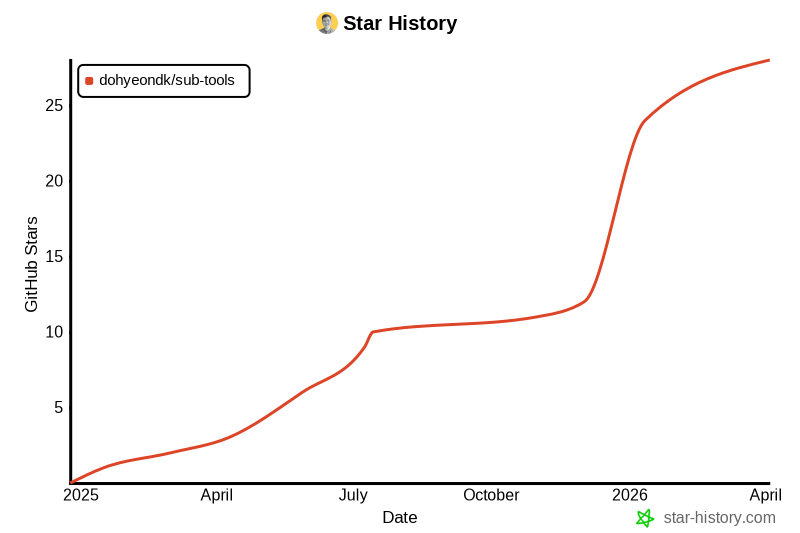
⭐ Star History
1 maintainer

Metadata
1 maintainer
Release files for sub-tools 0.10.0
For a detailed explanation of source distributions (sdists) and built distributions (wheels), please see the package formats documentation.
Source distribution (sdist)
| File | Size | Uploaded | Provenance | Actions |
|---|---|---|---|---|
| sub_tools-0.10.0.tar.gz | 10.2 MB | Without provenance | Details for sub_tools-0.10.0.tar.gz |
Built distribution (wheel)
| File | Interpreter | ABI | Platform | Actions Reset |
|---|---|---|---|---|
| sub_tools-0.10.0-py3-none-any.whl | Python 3 | none | any | Details for sub_tools-0.10.0-py3-none-any.whl |
Total release size: 10.3 MB
Release files / sub_tools-0.10.0.tar.gz
| Download URL | sub_tools-0.10.0.tar.gz |
|---|---|
| Size | 10.2 MB |
| Tags | Source |
|
SHA-256 checksum How to use checksums |
85f6fa4eeee0268bd8853dac1fb44e5e072fc688a0bb48cb347e603ba798aff6
|
|
BLAKE2b-256 checksum How to use checksums |
85b5e9648b1d9d3ba840bd2ad3ea92933347ba83a16f580aad3e5c13b2ab0924
|
| Upload date | |
|
Uploaded using Trusted Publishing? What is trusted publishing? |
No |
| Uploaded via |
uv/0.5.14
|
Release files / sub_tools-0.10.0-py3-none-any.whl
| Download URL | sub_tools-0.10.0-py3-none-any.whl |
|---|---|
| Size | 44.2 kB |
| Tags | Python 3 |
|
SHA-256 checksum How to use checksums |
7e0062ef9b64d9f5663c000ce625aac7153817a76a649bb448c75ac4bae4ab59
|
|
BLAKE2b-256 checksum How to use checksums |
6fa0a5e8e161e6874e4600c6537152b3e94d2050ce99bbecaa4da26bc5b9ad6b
|
| Upload date | |
|
Uploaded using Trusted Publishing? What is trusted publishing? |
No |
| Uploaded via |
uv/0.5.14
|
Security for sub-tools 0.10.0
Provenance
Provenance describes where a file came from. On PyPI, provenance is shared via attestations, which provide a verifiable record of the build or publishing details. View details, limitations and caveats.
No provenance found
None of the files in this release were uploaded with provenance metadata.
A note on package security
PyPI is a repository for distributing packages, not a service for auditing them. While third-party security researchers and our staff do their best to detect and remove malicious packages, PyPI cannot guarantee the quality, security or suitability of any given package.
To learn more about protecting yourself from malicious actors, visit our package security documentation.














