
subgraphsearch



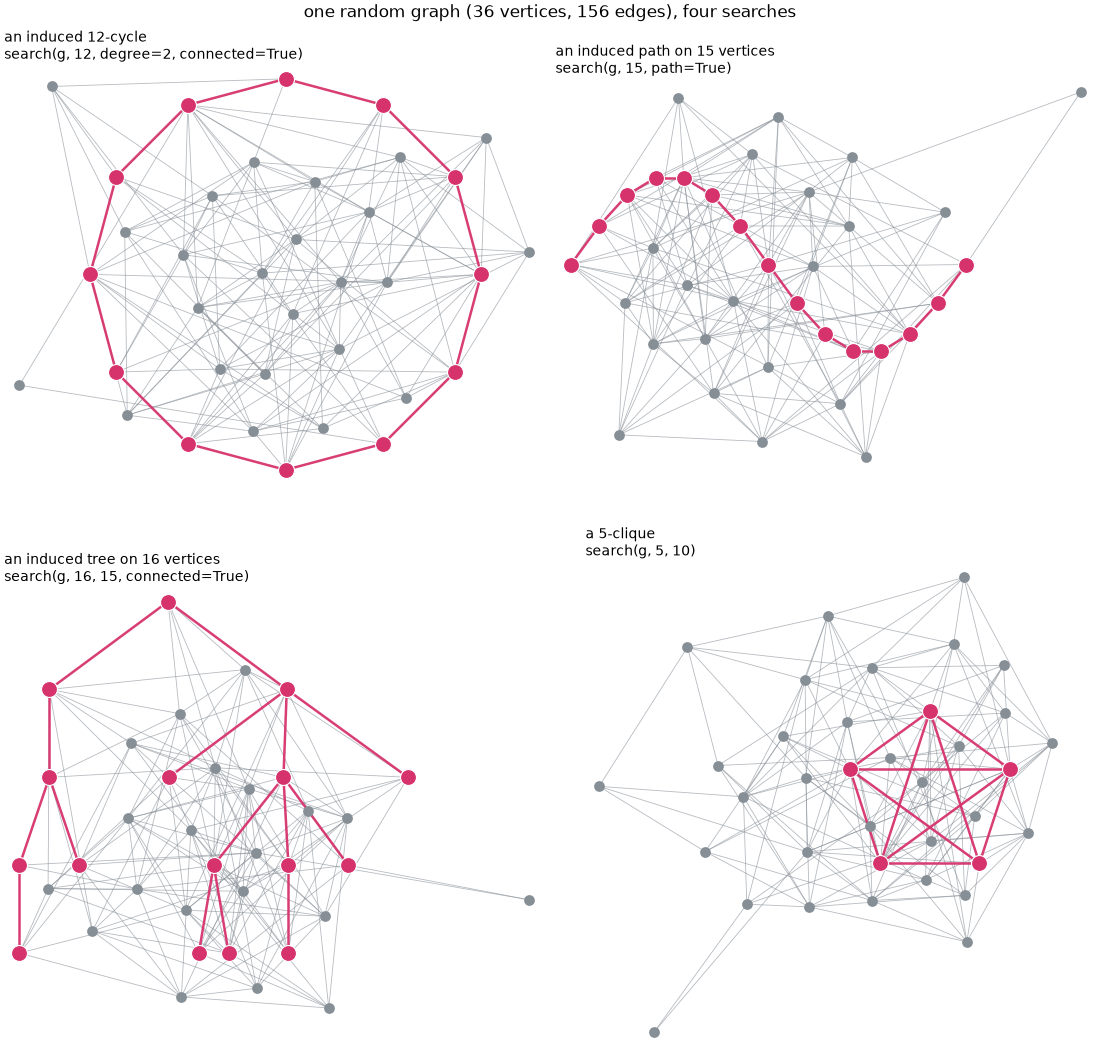
Find induced subgraphs with a given number of vertices and edges: cliques, independent sets and everything in between. It can also find regular subgraphs of a given degree, and subgraphs of a given total weight in weighted graphs.
Graphs can be built from block designs and other incidence structures, as well as switched with respect to the subgraphs a search finds. This produces other strongly regular graphs with the same parameters, such as all three Chang graphs from the triangular graph T(8).
A search can be required to include given vertices or confined to the neighborhood of chosen vertices, and reports near misses as well as exact solutions. Searches are fast, reproducible from a seed, and come with diagnostics for tuning them.
Install
subgraphsearch is on PyPI and requires Python 3.10 or later and NumPy 1.24 or later. With uv:
uv add subgraphsearch                # add the package to your project
uv add "subgraphsearch[all]"         # also plotting and conversions to networkx, igraph and SciPy
uv tool install subgraphsearch       # just the `subgraphsearch` command, on your PATH
uvx subgraphsearch info g.g6         # or run the command without installing it
With pip:
pip install subgraphsearch           # the package and the `subgraphsearch` command
pip install "subgraphsearch[all]"    # also plotting and conversions to networkx, igraph and SciPy
pipx install subgraphsearch          # just the command, in its own environment
pipx run subgraphsearch info g.g6    # or run the command without installing it
Prebuilt wheels cover Linux (including Alpine), macOS and Windows (including ARM), so installing needs no compiler.
To copy the quickstart notebook into the current directory and open it in JupyterLab:
uv run --with "subgraphsearch[all]" --with jupyterlab python -m subgraphsearch quickstart   # with uv
pip install "subgraphsearch[all]" jupyterlab && python -m subgraphsearch quickstart       # with pip
Python
import subgraphsearch as ss
from subgraphsearch import viz

g = ss.generate("exponential", 100, 0.6, seed=1)   # a random graph: 100 vertices, density 0.6

r = ss.search(g, size=11, edges=55)    # 11-cliques
r = ss.search(g, size=30, edges=340)   # 30 vertices spanning exactly 340 edges
r = ss.search(g, size=10, degree=4)    # 4-regular induced subgraphs

print(r.summary())
r.solutions()                                         # the distinct vertex sets found
viz.plot_graph(g, highlight=r.best.vertices)          # draw it
viz.plot_search_summary(r)                            # how the search went
viz.plot_graph_summary(g, highlight=r.best.vertices)  # degrees, spectrum, adjacency matrix
viz.save_html("result.html", r)                       # interactive viewer; viz.show(r) in Jupyter
In Jupyter, graphs and results display as summaries with small charts. The quickstart notebook is a full tour.
- What to search for:
edges=(an exact edge count),degree=(a regular subgraph), or a total weight in aWeightedGraph.fixed=names vertices the subgraph must contain, andmax_conflictinr.solutions(max_conflict=2)also returns near misses. - Graphs:
ss.Graph(n, edges),ss.read(path),g.write(path),g.complement(),g.induced(vs),g.switch(vs),g.common_neighborhood(vs),g.adjacency_matrix(),g.laplacian(),g.layout(), and from an incidence structure,ss.Graph.point_graph(blocks)andss.Graph.block_graph(blocks). - Random graphs:
ss.generate("exponential" | "power" | "geometric", n, density)andss.generate_weighted(n, mean_weight). - Weighted graphs:
ss.WeightedGraph(n, [(u, v, w), ...]),ss.WeightedGraph.read(path). - Many graphs per file:
ss.read_all(path),ss.read(path, index=3),ss.write_all(path, graphs). - Other libraries:
subgraphsearch.convert.{to,from}_{networkx,igraph,scipy,numpy}. - Tuning:
ss.sweep(g, size, edges, "div_dur", [0, 4, 16])withviz.plot_sweep. - Spectra:
viz.laplacian_spectrumandviz.spectral_summary. - Designs and switching:
ss.designs.FANO_PLANE,viz.plot_fano_plane(), andviz.plot_switchings(g, sets)to draw a graph switched with respect to each of several vertex sets.
Rust
The search, generators and formats are also a Rust library,
subgraphsearch-core, which needs Rust 1.87 or
later. Add it with cargo add subgraphsearch-core; its API is documented on
docs.rs.
use subgraphsearch_core::{Graph, SearchParams, search};

// find induced 4-vertex paths (3 edges) in a 12-cycle
let g = Graph::from_edges(12, (0..12).map(|i| (i, (i + 1) % 12))).unwrap();
let result = search(&g, &SearchParams::new(4, 3)).unwrap();
let found = result.experiments.iter().find(|e| e.success).unwrap();
assert_eq!(g.induced_edge_count(&found.vertices), 3);
Command line
The subgraphsearch command comes with the Python package (see Install); with a Rust
toolchain, cargo install subgraphsearch builds the same command from
crates.io.
subgraphsearch generate exponential -n 100 -d 0.6 -s 1 -o g.g6    # a random graph
subgraphsearch search g.g6 -k 11 -m 55                            # 11-cliques
subgraphsearch search g.g6 -k 30 -m 340 --max-conflict 2          # also report near misses
subgraphsearch search g.g6 -k 10 --degree 4                       # 4-regular subgraphs
subgraphsearch generate weighted -n 200 -d 0.65 -o w.mtx          # a weighted graph
subgraphsearch search w.mtx --weighted -k 15 -m 140               # total weight 140
subgraphsearch search many.g6 --all -k 10 -m 30 -q                # every graph in a file

subgraphsearch info g.g6                                          # statistics
subgraphsearch convert g.g6 g.dot --highlight 3,17,42             # draw a subgraph with Graphviz
subgraphsearch op complement g.g6 gc.g6                           # complements, induced subgraphs, ...
subgraphsearch incidence blocks.txt --on blocks -o b.g6           # a graph from a block design

subgraphsearch search g.g6 -k 11 -m 55 --json result.json         # save the full results
python -m subgraphsearch explore g.g6 --result result.json        # explore them in an interactive page
subgraphsearch search exits with status 2 when nothing is found.
| Option | Meaning | Default |
|---|---|---|
-k, --vertices |
subgraph vertices | required |
-m, --edges |
subgraph edges (total weight, with --weighted) |
required, unless --degree |
-d, --degree |
instead, a subgraph regular of this degree | |
--fixed |
vertices the subgraph must contain | none |
-n, --experiments |
independent restarts | 40 |
--moves |
maximum moves per experiment | 250 |
--div-freq, --div-dur |
make div-dur random moves at the start of every div-freq moves |
250, 4 |
-s, --seed |
random seed | 1 |
--weighted |
read edge weights; -m is then a total weight |
off |
How the search works
The subgraph induced by a set of vertices
consists of those vertices and every edge of the graph between them, so choosing the vertices
determines the edges. A clique is a set of
vertices that are all adjacent, an
independent set one with no edges
at all, and a graph is d-regular when every
vertex has exactly d neighbors.
Finding a k-vertex induced subgraph with exactly m edges is NP-hard (it includes finding
cliques), so subgraphsearch uses a randomized local search, specifically a tabu search: a
local search that forbids undoing recent moves for a while, so that it keeps exploring instead of
cycling. It cannot prove that no solution exists, but in practice it finds solutions quickly when
they are not too rare.
Moves
Write S for the current set of k vertices, e for the number of edges they induce, and
d_S(v) for the number of neighbors a vertex v has in S. The search minimizes the
conflict |e - m|; a conflict of 0 is a solution. Each move swaps one vertex u of S
for one outside vertex w. Keeping d_S(v) up to date for every vertex makes each swap cheap
to evaluate: the edge count becomes e - d_S(u) + d_S(w) - [u ~ w], where [u ~ w] is 1
if u and w are adjacent and 0 otherwise. Removing u loses its d_S(u) edges and
adding w gains its d_S(w), but an edge between them is counted in d_S(w) and leaves
with u. The search takes one of the best swaps at random.
Two refinements make this fast and effective:
- Restricted neighborhood. If the last move left the edge count unchanged, only swaps involving a vertex adjacent to exactly one of the two vertices just swapped are examined. Every other swap has the same value it had before the move, so the search concentrates on the swaps the move changed. This improves results as well as speed, and on large dense graphs it skips most of the work.
- Tabu moves. The two vertices just swapped are tabu for the next move: the vertex just added cannot be removed and the vertex just removed cannot be added back. Without this the search would often cycle between the same two subgraphs. Moves stay tabu for a single step, the shortest possible tabu tenure.
Diversification and restarts
Local search gets stuck in local minima. To shake it loose, the first --div-dur moves of every
--div-freq moves are made at random; these perturbations can improve the results considerably
(--div-dur 0 turns them off). Each experiment is an independent restart from random vertices.
Experiments run in parallel on all cores, and results still depend only on the seed.
Reading the results
Each experiment reports the best conflict it reached and the moves it needed:
- Success rate and moves to success show how hard a target is;
viz.plot_search_summaryplots both, and the next section explains how to use them to tune a search. - Relative cost is the mean number of moves per success, over successful experiments; true cost divides all moves made by the number of successes, so it also counts failures.
- Average conflict is the mean best conflict. Near misses are useful in their own right: with
--max-conflict nthe search doubles as an approximation algorithm, returning subgraphs withinnedges of the target.
Variants
- Weighted graphs (
--weighted): edges carry integer weights and the target is a total weight. With all weights 1 it behaves like the plain search. - Regular subgraphs (
--degree d): the conflict becomes the total deviation from regularity,Σ_{v∈S} |d_S(v) - d|. Each vertex's neighbor list is kept partitioned, subgraph neighbors first, so that swaps stay cheap to evaluate. The intended use is finding regular subgraphs of strongly regular graphs. A graph is strongly regular with parameters(n, k, λ, μ)when it hasnvertices, isk-regular, every two adjacent vertices have exactlyλcommon neighbors, and every two non-adjacent vertices exactlyμ; the 5-cycle, the Petersen graph and the Paley graphs are examples. Seidel switching a graph with respect to a vertex setSswaps edges and non-edges betweenSand the rest of the graph, leaving edges withinSand within the rest unchanged. Switching a strongly regular graph with respect to a suitable regular subgraph can give another strongly regular graph with the same parameters, sometimes one not isomorphic to the original: switching the 4×4 rook's graph,(16, 6, 2, 2), with respect to a 2-regular subgraph on 8 vertices gives the Shrikhande graph. The search can find cliques and independent sets too, but the plain search does that much faster. - Two phases (
--degree d --two-phase): first find a subgraph with the right number of edges (kd/2), then make it regular using only swaps that keep the edge count. It usually finds regular subgraphs about 1.5 to 3.5 times faster than--degreealone. With--fixed, it computes the edge target from the non-fixed vertices only, so it rarely succeeds; use--degreealone there. - Aspiration (
--aspiration, edge-count and weight searches only): the tabu search's aspiration criterion, which lifts the tabu on a move that would beat the best conflict so far. After each move it also considers the swaps involving the two vertices just swapped, and takes one of them whenever it would. It can help a search that stalls, but usually makes little difference.
Random graphs and operations
- exponential: Erdős–Rényi; each pair of vertices is an edge independently with probability equal to the density.
- geometric: a random geometric graph: random points in the unit square, joined when within a distance chosen so that the disc around a point covers a fraction of the square equal to the density. There is no wrap-around, so vertices near the edges have fewer neighbors and the actual density is lower.
- power: each vertex is joined to the same number of randomly chosen higher-numbered vertices. Degrees spread more widely than in exponential graphs but have no heavy tail, so despite the name these are not scale-free graphs. Power and geometric graphs only make sense for densities below about 0.5.
- weighted: random pairs of vertices have their weight increased by 1 until the mean weight per pair is reached, so weights above 1 are common once it approaches 1.
Graph operations help focus a search. Searching the
complement is equivalent, since k vertices
with m edges become k vertices with k(k-1)/2 - m, and for a dense graph the complement
is sparse and cheaper to work with. Inducing a subgraph on the common neighborhood of some vertices
restricts the search to vertices adjacent to all of them, and switch performs Seidel switching
(see Variants) with respect to a vertex set, such as a regular subgraph found by the
search.
Graphs can also be built from an
incidence structure, a set of points with a
family of subsets called blocks, such as a
block design. Its point graph joins two points when
exactly k blocks contain both, and its block graph joins two blocks when they share exactly
k points (subgraphsearch incidence, with one block per line; ss.Graph.point_graph and
ss.Graph.block_graph in Python). Many strongly regular graphs arise this way. The block graph of
all pairs from 8 points is the triangular graph
T(8), with parameters (28, 12, 6, 4), and switching it with respect to four disjoint pairs,
an independent set the search finds, gives one of the
Chang graphs: strongly regular with the same
parameters, but not isomorphic to T(8).
Choosing a search and its settings
Which search
| Goal | Search |
|---|---|
k vertices with exactly m edges |
-k k -m m (size=k, edges=m) |
a k-clique, a k-vertex independent set |
-m set to k(k-1)/2, or to 0 |
the densest (or sparsest) k vertices |
raise (or lower) -m until successes stop; the threshold is sharp |
| subgraphs close to a target | add --max-conflict n (r.solutions(max_conflict=n)) |
| subgraphs containing given vertices | --fixed, or for cliques, search their common neighborhood (below) |
regular subgraphs of degree d |
--degree d --two-phase, or --degree d alone with --fixed |
| a total weight in a weighted graph | --weighted -m w |
Some reformulations make a search easier:
- Restrict to a neighborhood. A subgraph whose vertices must all be adjacent to some vertices
F(a clique throughF, for example) lies in their common neighborhood. Searchingg.induced(nbrs), withnbrs = g.common_neighborhood(F), fork - |F|vertices, instead of fixingFin the whole graph, is typically about 3 times faster for cliques through a given vertex. Vertexiof the result isnbrs[i]of the original graph. - Search the complement of a dense graph.
kvertices withmedges becomekvertices withk(k-1)/2 - min the complement, which is sparse when the graph is dense. - Find the limit by bisection. To find the most edges
kvertices can span, search a few values ofm: the switch from always found to never found is abrupt (in a 100-vertex graph of density 0.6, for example, 30 vertices spanning 345 edges are easy to find and 350 are out of reach), and near-misses (--max-conflict) show how close a failed target came.
Settings
Tune a search on your own graph by trying a few settings; ss.sweep runs one search per value of
a setting, and viz.plot_sweep compares them. As a rule:
- Spend the budget on experiments, not long runs. Most successful experiments succeed early,
and an experiment that has stalled rarely recovers, so the defaults are many short runs: 40
experiments of up to 250 moves. When successes come quickly, runs of 50 to 250 moves can find
solutions 4 to 17 times faster than runs of 1000. To tune this for your target, run a pilot
search with generous
--moves(say 5000), look at the moves successful experiments needed (the success-time distribution, orviz.plot_run_time_distribution), and set--movesto two or three times the median, using the rest of the time for more--experiments. Raise--movesif successes cluster near the limit; do not go far below the size of the subgraph, since a random start may need aboutkswaps to reach a solution. - Use more experiments to find more solutions. The success rate estimates how hard a target is,
and more experiments find more distinct solutions, although many repeat
(
r.solutions()lists each once). - Leave diversification at its defaults. Short bursts of random moves make little difference.
Bursts of
kto2krandom moves help long runs that stall, because they act as restarts within an experiment, but shorter runs with more experiments do the same more simply.--div-dur 0gives a pure local search. - Aspiration rarely makes a difference; try it on searches that stall.
- Seeds: results depend only on the seed and the settings, not on the number of threads, so a search can be repeated exactly; change the seed for independent runs.
Performance
Wall-clock times on an Apple M3 Max laptop with 16 cores, using all of them, for searches started from Python (the command runs the same engine). Settings are given as experiments × maximum moves per experiment.
An experiment stops at its first solution, so the moves actually made, not the maximum, determine the time.
| Search | Settings | Moves made | Time | Successes |
|---|---|---|---|---|
| 11-cliques in a random graph on 100 vertices, density 0.6 | 40 × 250 (defaults) | 1,652 | 0.4 ms | 40 of 40 |
| 30 vertices spanning 346 edges in the same graph, near the limit | 60 × 2000 | 81,539 | 14 ms | 21 of 60 |
| 13-cliques in a random graph on 1,000 vertices, density 0.5 | 200 × 2000 | 12,042 | 12 ms | 200 of 200 |
| 14-cliques in the same graph | 200 × 2000 | 134,267 | 135 ms | 182 of 200 |
| 15-cliques in the same graph | 200 × 2000 | 396,104 | 394 ms | 4 of 200 |
| 8-regular subgraphs on 20 vertices of the Paley graph on 61 vertices | 100 × 2000, two phases | 183,319 | 49 ms | 11 of 100 |
| 15 vertices of total weight 140 in a weighted graph on 1,000 vertices | 40 × 3000 | 634 | 1 ms | 40 of 40 |
A search that misses its target makes every move it is allowed, so its time is the cost of a move times the number of moves. The cost of a move grows in proportion to the number of vertices, and a little less than in proportion to the size of the subgraph.
Here are 40 × 250 = 10,000 moves looking for 30 vertices in random graphs of density 0.5:
| Graph | All 16 cores | One thread |
|---|---|---|
| 100 vertices | 1.7 ms | 20 ms |
| 1,000 vertices | 19 ms | 230 ms |
| 10,000 vertices (25 million edges) | 210 ms | 2.4 s |
On 1,000 vertices, the same 10,000 moves take 14 ms for 20-vertex subgraphs and 61 ms for 100-vertex
subgraphs. Experiments run in parallel, so on 16 cores a search is 11 to 12 times faster than on
one thread (--threads 1). Once every core is busy, which 40 experiments already ensure here, the
time grows in proportion to the total number of moves: 160 experiments take four times as long.
A graph on 10,000 vertices with 25 million edges takes about 330 MB of memory. Generating it takes 0.24 s, writing it as graph6 0.05 s, and reading it back 0.28 s.
Graph formats
| Format | Name | Extensions | Read | Write | Use |
|---|---|---|---|---|---|
| graph6 | graph6 |
.g6 |
✓ | ✓ | dense or medium graphs; the default |
| sparse6 | sparse6 |
.s6 |
✓ | ✓ | sparse graphs |
| Matrix Market | mtx |
.mtx |
✓ | ✓ | SciPy, MATLAB, Julia; edge weights |
| edge list | edgelist |
.edges, .csv, .tsv |
✓ | ✓ | anything; edge weights |
| Graphviz | dot |
.dot, .gv |
✓ | drawing, with a highlighted subgraph | |
| GraphML | graphml |
.graphml |
✓ | Gephi, Cytoscape, yEd | |
| adjacency lists | lists, wlists |
.txt (lists) |
✓ | ✓ | plain text, one line of neighbors per vertex |
graph6 is the most compact format for dense graphs and sparse6 for sparse ones; both are standard
in combinatorics (nauty, SageMath, networkx, House of Graphs). They can also hold many graphs, one
per line: subgraphsearch info lists them, search --all searches each one, and --index N
picks one. Edge lists keep isolated vertices with a # vertices: N header.
Edge weights (integers from 1 to 255) are an edge list's third column or a Matrix Market file's values. Formats without weights read as weight 1, and writing a weighted graph to one is an error.
Development
cargo test --release                              # Rust tests
uv run pytest                                     # Python tests (build the CLI first)
uv run python examples/make_quickstart.py         # rebuild the quickstart notebooks
uv run python examples/make_figures.py            # redraw the README figures
License
MIT
1 maintainer

Metadata
1 maintainer
Release files for subgraphsearch 0.2.0
For a detailed explanation of source distributions (sdists) and built distributions (wheels), please see the package formats documentation.
Source distribution (sdist)
| File | Size | Uploaded | Provenance | Actions |
|---|---|---|---|---|
| subgraphsearch-0.2.0.tar.gz | 119.1 kB | With provenance | Details for subgraphsearch-0.2.0.tar.gz |
Built distributions (wheels)
Total release size: 8.0 MB
Release files / subgraphsearch-0.2.0.tar.gz
| Download URL | subgraphsearch-0.2.0.tar.gz |
|---|---|
| Size | 119.1 kB |
| Tags | Source |
|
SHA-256 checksum How to use checksums |
3db676028cc249028983a7efcbe011804ba4b8c76bae6badc52108cb9c069eea
|
|
BLAKE2b-256 checksum How to use checksums |
d00dc754f40a979ab4d98a40bf56cd347d44eaa65a0f5d6b9ae0030f7b3a94b4
|
| Upload date | |
|
Uploaded using Trusted Publishing? What is trusted publishing? |
Yes |
| Uploaded via |
twine/7.0.0 CPython/3.13.16
|
Provenance
Provenance describes where a file came from. On PyPI, provenance is shared via attestations, which provide a verifiable record of the build or publishing details. View details, limitations and caveats.


PyPI Publish Attestation
PyPI verified that this artifact, at this checksum, originated from the publisher listed below.
Signed by GitHub Actions, verified by PyPI on Nov 8, 2026.
Transparency logRelease files / subgraphsearch-0.2.0-cp310-abi3-win_arm64.whl
| Download URL | subgraphsearch-0.2.0-cp310-abi3-win_arm64.whl |
|---|---|
| Size | 821.2 kB |
| Tags | CPython 3.10 Windows ARM64 abi3 |
|
SHA-256 checksum How to use checksums |
3e16f95de11ecdc00a4cea6414156becb3d530641bfda8353c4b6f0c6cdfe968
|
|
BLAKE2b-256 checksum How to use checksums |
d44f60ddee4af9ee15117d3c31f387b188b275c0a47435cb639e114e46ee72ae
|
| Upload date | |
|
Uploaded using Trusted Publishing? What is trusted publishing? |
Yes |
| Uploaded via |
twine/7.0.0 CPython/3.13.16
|
Provenance
Provenance describes where a file came from. On PyPI, provenance is shared via attestations, which provide a verifiable record of the build or publishing details. View details, limitations and caveats.
PyPI Publish Attestation
PyPI verified that this artifact, at this checksum, originated from the publisher listed below.
Signed by GitHub Actions, verified by PyPI on Nov 8, 2026.
Transparency logRelease files / subgraphsearch-0.2.0-cp310-abi3-win_amd64.whl
| Download URL | subgraphsearch-0.2.0-cp310-abi3-win_amd64.whl |
|---|---|
| Size | 870.1 kB |
| Tags | CPython 3.10 Windows x86-64 abi3 |
|
SHA-256 checksum How to use checksums |
768a50bb0b354a871b75136eb68e672be73613a086305d70dfeea585e4670785
|
|
BLAKE2b-256 checksum How to use checksums |
391db618a7a03ca2067cc919b2d25214f0cb42e0927793ce8ebfb38b1e70f7e6
|
| Upload date | |
|
Uploaded using Trusted Publishing? What is trusted publishing? |
Yes |
| Uploaded via |
twine/7.0.0 CPython/3.13.16
|
Provenance
Provenance describes where a file came from. On PyPI, provenance is shared via attestations, which provide a verifiable record of the build or publishing details. View details, limitations and caveats.
PyPI Publish Attestation
PyPI verified that this artifact, at this checksum, originated from the publisher listed below.
Signed by GitHub Actions, verified by PyPI on Nov 8, 2026.
Transparency logRelease files / subgraphsearch-0.2.0-cp310-abi3-musllinux_1_2_x86_64.whl
| Download URL | subgraphsearch-0.2.0-cp310-abi3-musllinux_1_2_x86_64.whl |
|---|---|
| Size | 1.2 MB |
| Tags | CPython 3.10 Linux musl 1.2+ x86-64 abi3 |
|
SHA-256 checksum How to use checksums |
83890c6705eba8d4a7bc1602b65eadf2ac18d3c3d17644d040762ceaddd366cd
|
|
BLAKE2b-256 checksum How to use checksums |
3dda99e971f607f98a53949285ffd3754c6c60aa624986bff2d43c88d71ab79c
|
| Upload date | |
|
Uploaded using Trusted Publishing? What is trusted publishing? |
Yes |
| Uploaded via |
twine/7.0.0 CPython/3.13.16
|
Provenance
Provenance describes where a file came from. On PyPI, provenance is shared via attestations, which provide a verifiable record of the build or publishing details. View details, limitations and caveats.
PyPI Publish Attestation
PyPI verified that this artifact, at this checksum, originated from the publisher listed below.
Signed by GitHub Actions, verified by PyPI on Nov 8, 2026.
Transparency logRelease files / subgraphsearch-0.2.0-cp310-abi3-musllinux_1_2_aarch64.whl
| Download URL | subgraphsearch-0.2.0-cp310-abi3-musllinux_1_2_aarch64.whl |
|---|---|
| Size | 1.1 MB |
| Tags | CPython 3.10 Linux musl 1.2+ ARM64 abi3 |
|
SHA-256 checksum How to use checksums |
7464da1a6595f7f074f15f1e481d2b369dc6da22f4437c92ed63f56feb5f86f4
|
|
BLAKE2b-256 checksum How to use checksums |
09158be180dd5d5a96ebd69ed021831ba519615f0417ed60df92d364a6437f4d
|
| Upload date | |
|
Uploaded using Trusted Publishing? What is trusted publishing? |
Yes |
| Uploaded via |
twine/7.0.0 CPython/3.13.16
|
Provenance
Provenance describes where a file came from. On PyPI, provenance is shared via attestations, which provide a verifiable record of the build or publishing details. View details, limitations and caveats.
PyPI Publish Attestation
PyPI verified that this artifact, at this checksum, originated from the publisher listed below.
Signed by GitHub Actions, verified by PyPI on Nov 8, 2026.
Transparency logRelease files / subgraphsearch-0.2.0-cp310-abi3-manylinux2014_x86_64.manylinux_2_17_x86_64.whl
| Download URL | subgraphsearch-0.2.0-cp310-abi3-manylinux2014_x86_64.manylinux_2_17_x86_64.whl |
|---|---|
| Size | 990.9 kB |
| Tags | CPython 3.10 Linux glibc 2.17+ x86-64 abi3 |
|
SHA-256 checksum How to use checksums |
5c89bd2ced721291a094edab342106986cb477d1c12ce28c040f282392dd0fd1
|
|
BLAKE2b-256 checksum How to use checksums |
a2f627240e042a8ff739f1b327db2d1fa1771ea12ee11d9967659bce9adcef51
|
| Upload date | |
|
Uploaded using Trusted Publishing? What is trusted publishing? |
Yes |
| Uploaded via |
twine/7.0.0 CPython/3.13.16
|
Provenance
Provenance describes where a file came from. On PyPI, provenance is shared via attestations, which provide a verifiable record of the build or publishing details. View details, limitations and caveats.
PyPI Publish Attestation
PyPI verified that this artifact, at this checksum, originated from the publisher listed below.
Signed by GitHub Actions, verified by PyPI on Nov 8, 2026.
Transparency logRelease files / subgraphsearch-0.2.0-cp310-abi3-manylinux2014_aarch64.manylinux_2_17_aarch64.whl
| Download URL | subgraphsearch-0.2.0-cp310-abi3-manylinux2014_aarch64.manylinux_2_17_aarch64.whl |
|---|---|
| Size | 967.7 kB |
| Tags | CPython 3.10 Linux glibc 2.17+ ARM64 abi3 |
|
SHA-256 checksum How to use checksums |
b3a4207bd3a2009d90f5fdb7953dc25af73513269200aac0a29a3de0f160fe24
|
|
BLAKE2b-256 checksum How to use checksums |
e12ffdcbae3eba73b48daa3e996bbe391d441c7cc4734e3d6e22595a650a2707
|
| Upload date | |
|
Uploaded using Trusted Publishing? What is trusted publishing? |
Yes |
| Uploaded via |
twine/7.0.0 CPython/3.13.16
|
Provenance
Provenance describes where a file came from. On PyPI, provenance is shared via attestations, which provide a verifiable record of the build or publishing details. View details, limitations and caveats.
PyPI Publish Attestation
PyPI verified that this artifact, at this checksum, originated from the publisher listed below.
Signed by GitHub Actions, verified by PyPI on Nov 8, 2026.
Transparency logRelease files / subgraphsearch-0.2.0-cp310-abi3-macosx_11_0_arm64.whl
| Download URL | subgraphsearch-0.2.0-cp310-abi3-macosx_11_0_arm64.whl |
|---|---|
| Size | 902.2 kB |
| Tags | CPython 3.10 abi3 macOS 11.0+ ARM64 |
|
SHA-256 checksum How to use checksums |
90f32838efb4d84910ce538638b03b95e0f3e2a50a731ec17ce2210ccb76da49
|
|
BLAKE2b-256 checksum How to use checksums |
44c250053152fba330a8a382e3a5043f30c8af1ebd46a6c83f25e9c19f62b767
|
| Upload date | |
|
Uploaded using Trusted Publishing? What is trusted publishing? |
Yes |
| Uploaded via |
twine/7.0.0 CPython/3.13.16
|
Provenance
Provenance describes where a file came from. On PyPI, provenance is shared via attestations, which provide a verifiable record of the build or publishing details. View details, limitations and caveats.
PyPI Publish Attestation
PyPI verified that this artifact, at this checksum, originated from the publisher listed below.
Signed by GitHub Actions, verified by PyPI on Nov 8, 2026.
Transparency logRelease files / subgraphsearch-0.2.0-cp310-abi3-macosx_10_12_x86_64.whl
| Download URL | subgraphsearch-0.2.0-cp310-abi3-macosx_10_12_x86_64.whl |
|---|---|
| Size | 931.5 kB |
| Tags | CPython 3.10 abi3 macOS 10.12+ x86-64 |
|
SHA-256 checksum How to use checksums |
e2fdc91bdb820c57a659246adce9dc802c303dbff885a8b6a7fc112d8eef0282
|
|
BLAKE2b-256 checksum How to use checksums |
0f133e337a14f18fe852083d324a7855049e76b2ba9e7e6a8dc52f407b7477f3
|
| Upload date | |
|
Uploaded using Trusted Publishing? What is trusted publishing? |
Yes |
| Uploaded via |
twine/7.0.0 CPython/3.13.16
|
Provenance
Provenance describes where a file came from. On PyPI, provenance is shared via attestations, which provide a verifiable record of the build or publishing details. View details, limitations and caveats.
PyPI Publish Attestation
PyPI verified that this artifact, at this checksum, originated from the publisher listed below.
Signed by GitHub Actions, verified by PyPI on Nov 8, 2026.
Transparency logSecurity for subgraphsearch 0.2.0
Provenance
Provenance describes where a file came from. On PyPI, provenance is shared via attestations, which provide a verifiable record of the build or publishing details. View details, limitations and caveats.
Full provenance
All 9 files in this release have been uploaded with provenance metadata.
Attestation for subgraphsearch-0.2.0.tar.gz
PyPI Publish Attestation
PyPI verified that this artifact, at this checksum, originated from the publisher listed below.
Signed by GitHub Actions, verified by PyPI on Nov 8, 2026.
Transparency logA note on package security
PyPI is a repository for distributing packages, not a service for auditing them. While third-party security researchers and our staff do their best to detect and remove malicious packages, PyPI cannot guarantee the quality, security or suitability of any given package.
To learn more about protecting yourself from malicious actors, visit our package security documentation.














