
🔬 sudiviz





X-ray vision for your cloud infrastructure
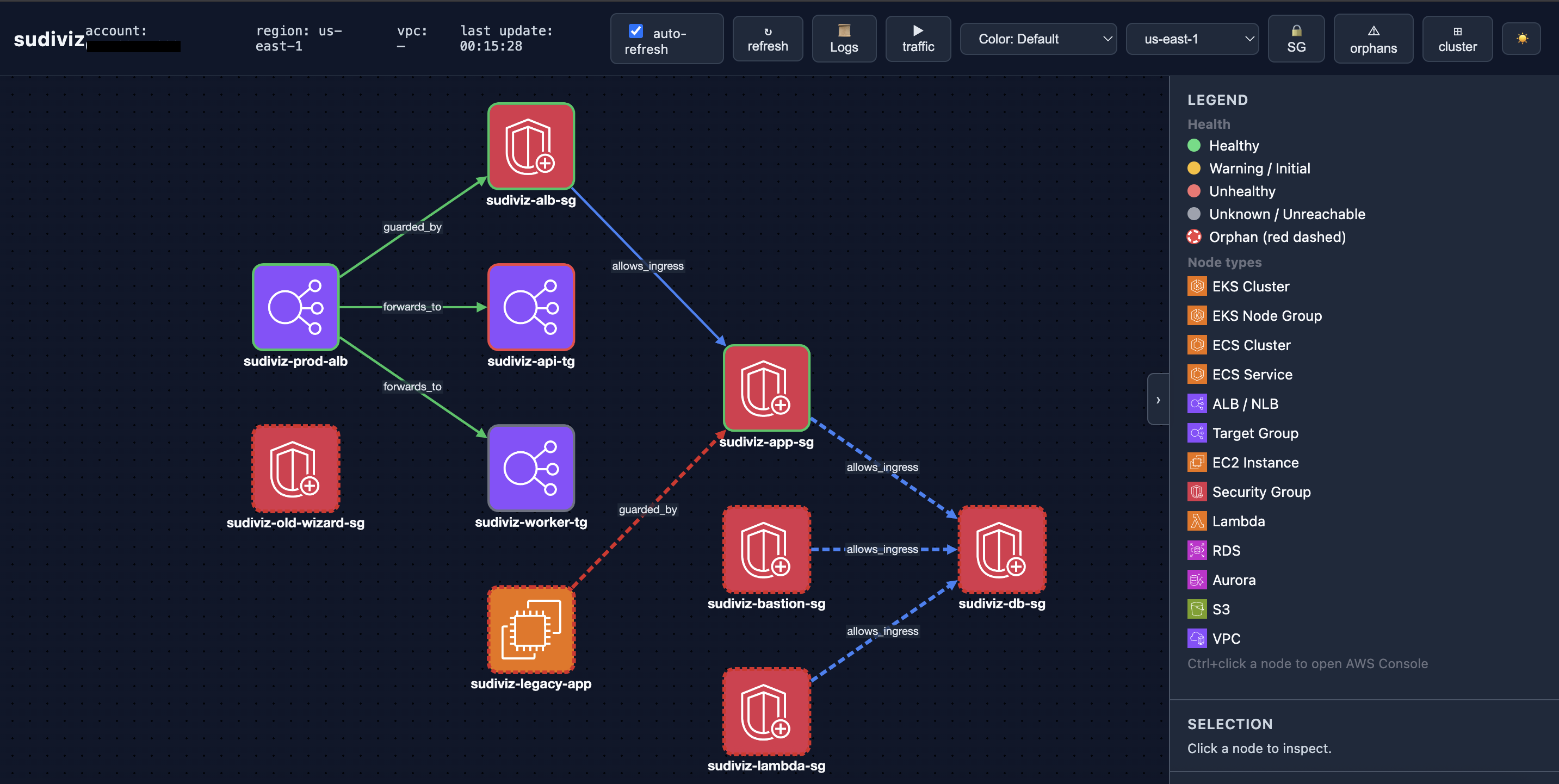
sudiviz visualizes your live AWS infrastructure as an interactive graph — across multiple regions. Auto-detects misconfigurations, unhealthy targets, and orphan resources — then fixes them with one command.
🚀 Zero AI tokens | 💸 Zero cost | 🐍 Pure Python | 🌍 Multi-region
📦 Quick Start
pip install 'sudiviz[all]'

# Diagnose your infrastructure
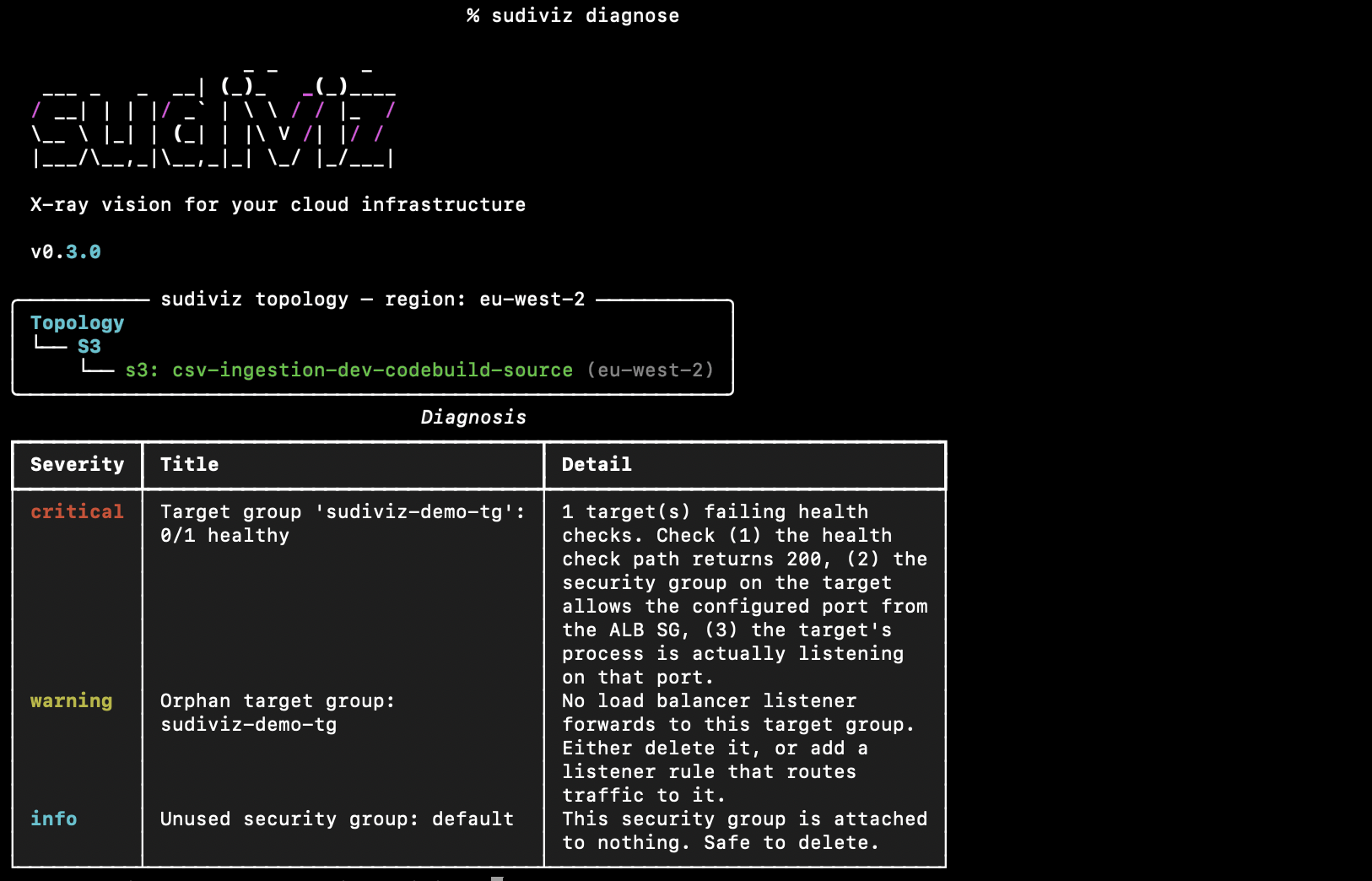
sudiviz diagnose

# Explain findings in plain English (via Bedrock)
sudiviz explain

# Interactive web visualization
sudiviz graph --output web --open

# Auto-fix issues
sudiviz fix --apply
Auth: Uses standard boto3 credentials (
~/.aws/credentials, env vars, SSO, or instance profile)
✨ Features
| Feature | Description |
|---|---|
| Live Topology | Real-time graph of ALB → Target Groups → EC2 → Security Groups |
| AWS Resource Icons | Each node displays a colour-coded AWS-style icon (ALB, EC2, RDS, S3, ECS, EKS, Lambda, SG…) |
| Multi-Region | Switch between AWS regions (us-east-1, us-west-2, eu-west-1, ap-northeast-1…) from a dropdown — no restart needed |
| Health Detection | Unhealthy targets, failing health checks, orphan resources |
| Auto-Fix | One-click remediation with sudiviz fix --apply |
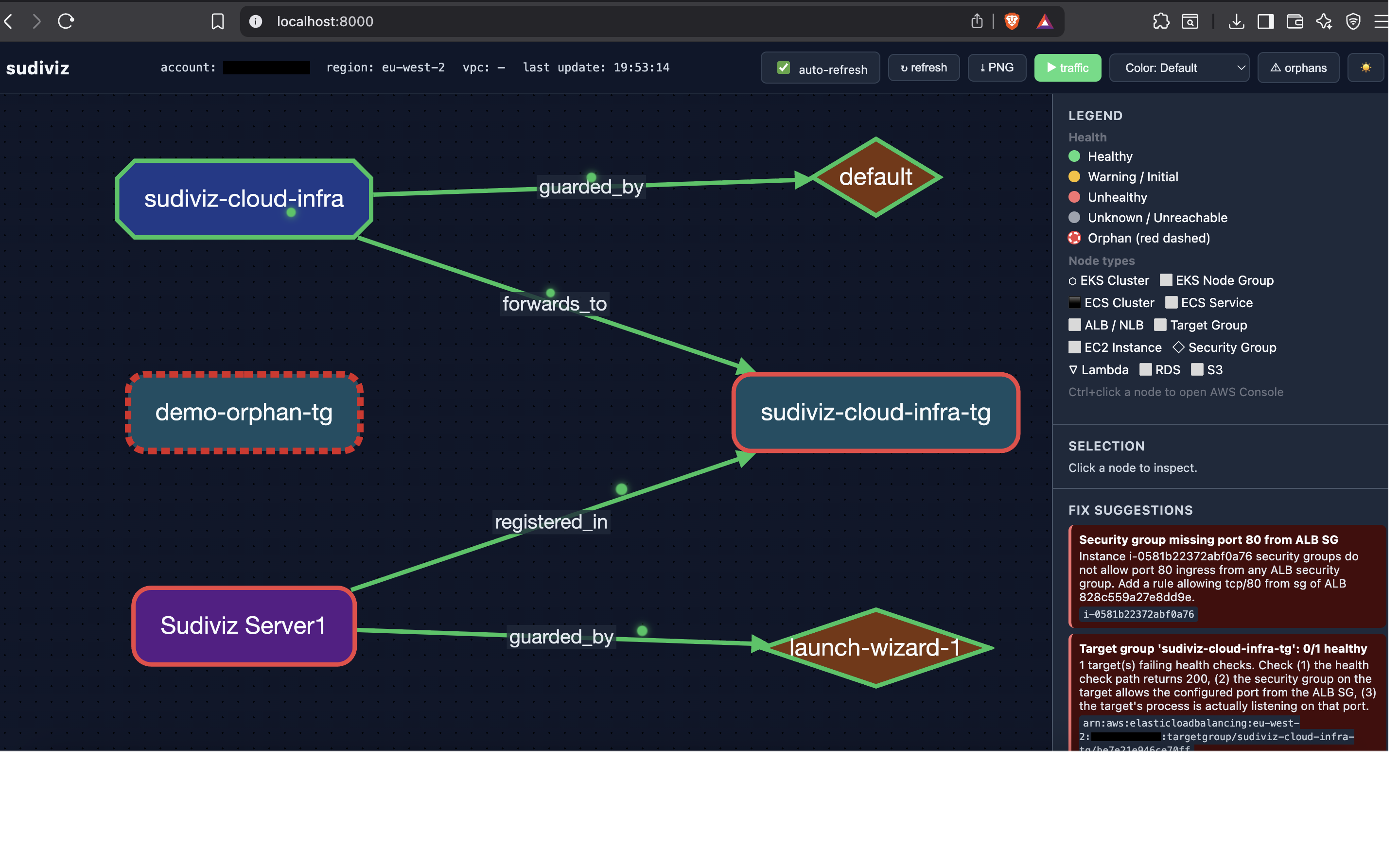
| Traffic Animation | Visualize request flow with animated pulses |
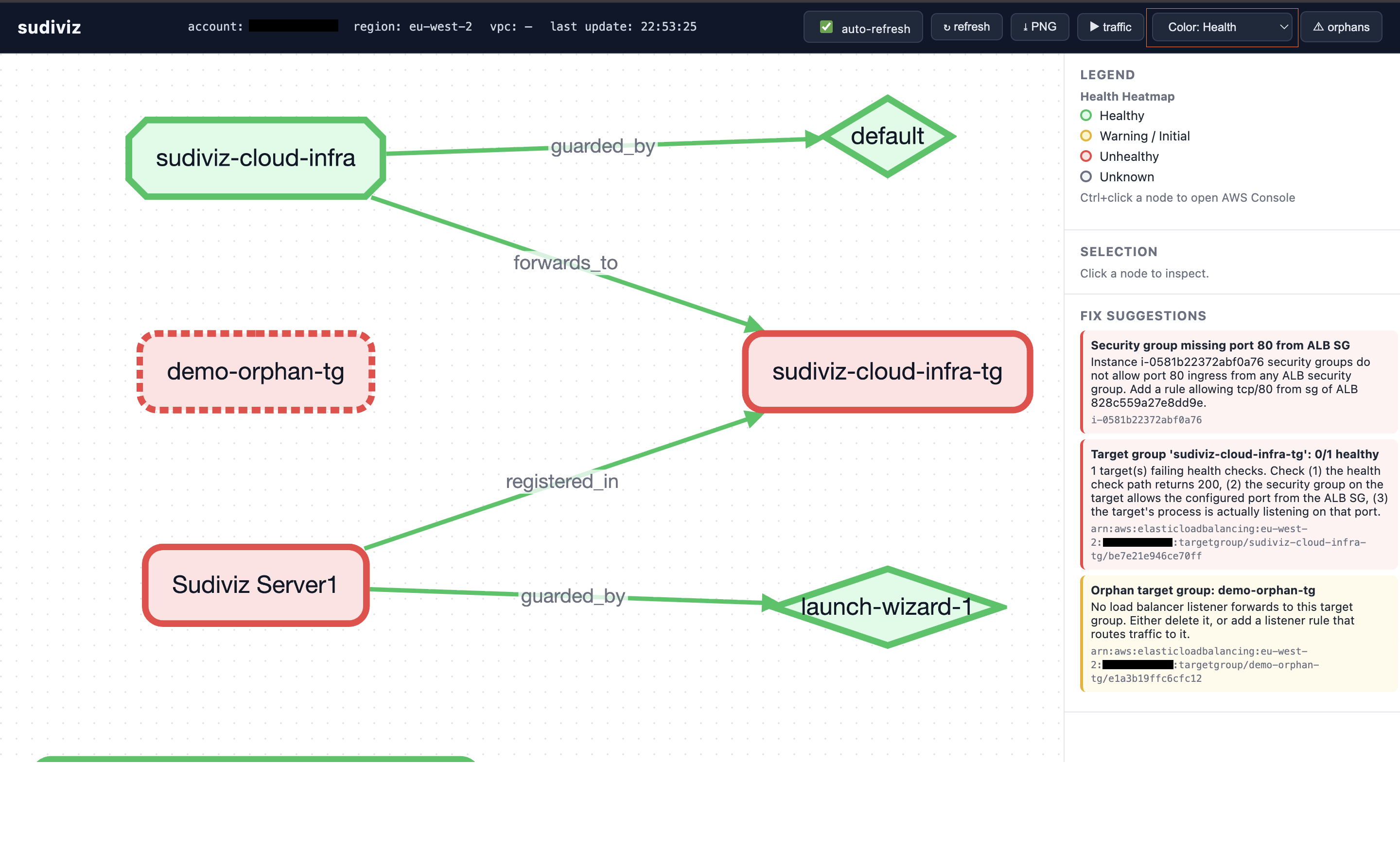
| Health Heatmaps | Color-code infrastructure by health status |
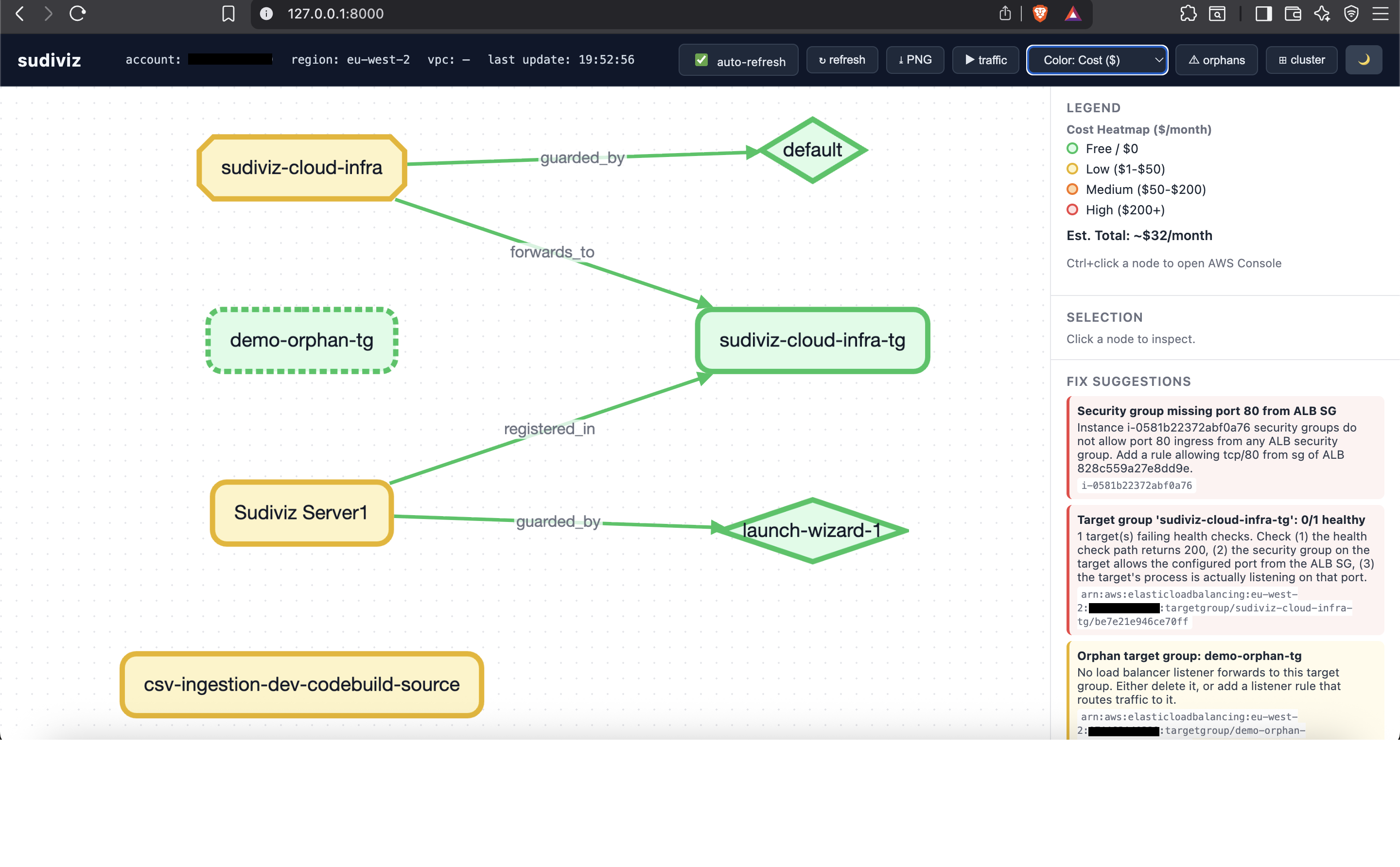
| Cost Heatmap | FinOps view — visualize estimated monthly costs per resource |
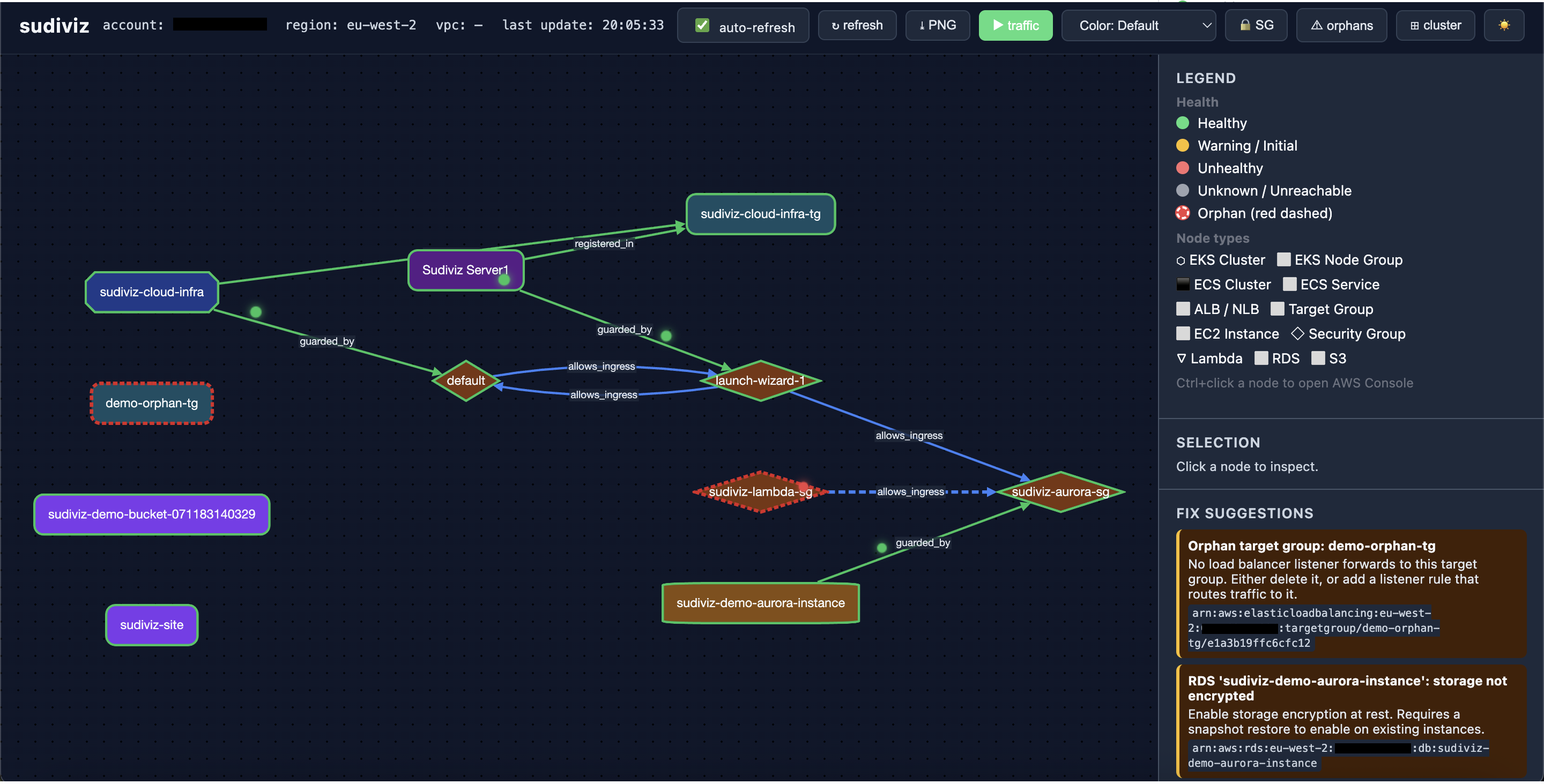
| Security Group Flows | Visualize ingress/egress rules between security groups (blue = ingress, purple = egress) |
| CloudWatch Integration | One-click links to metrics and logs for each resource |
| Dark/Light Mode | Toggle theme in web UI |
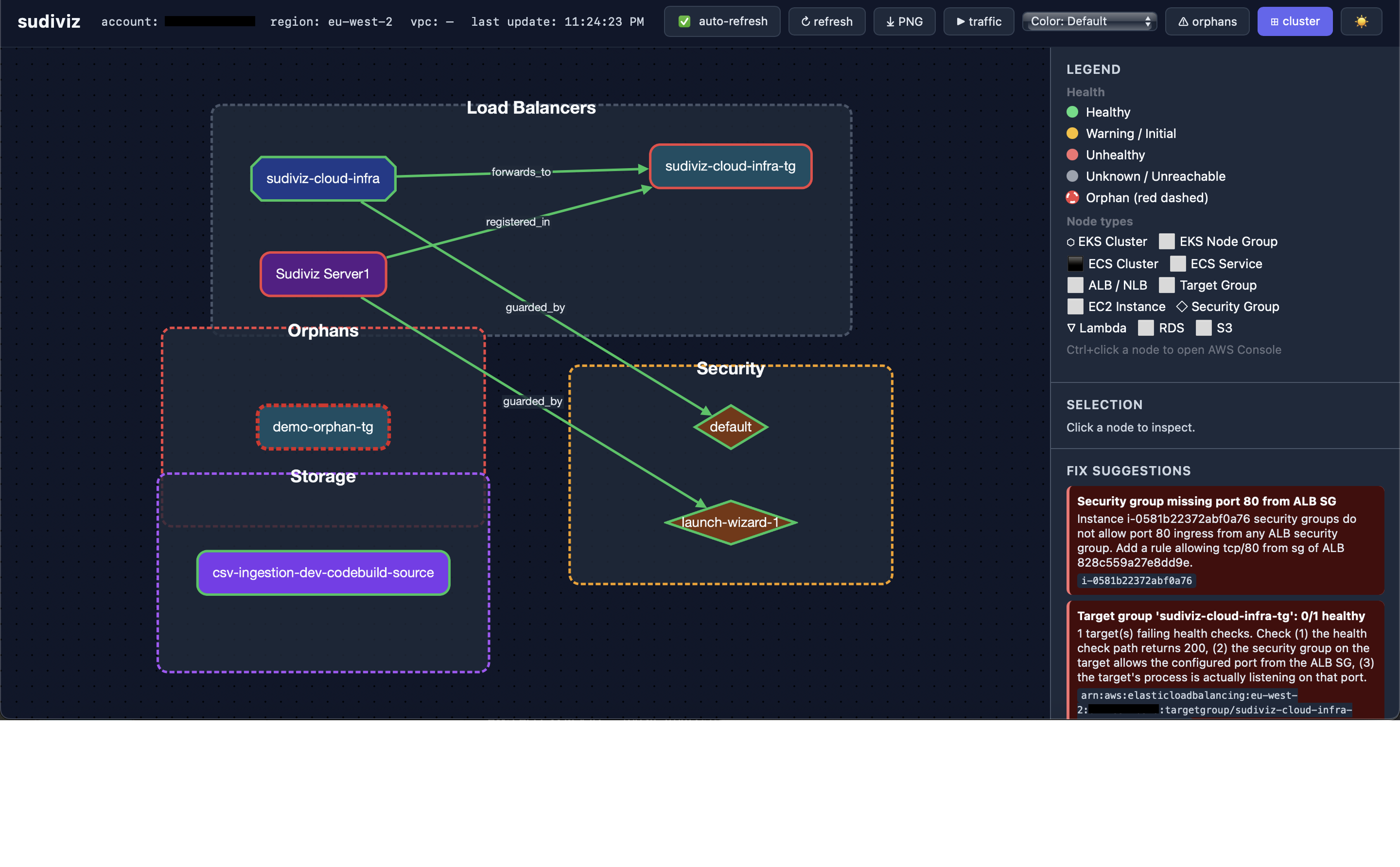
| Cluster Grouping | Group resources by service type (Load Balancers, ECS, Security, etc.) |
| Terraform Drift | Compare live AWS vs Terraform state |
| Multi-Service | ALB, EC2, ECS, EKS, RDS, Lambda, S3, Security Groups |
| Explain | Send diagnostic findings to Amazon Bedrock (Nova Lite) for root-cause analysis and prioritised action plans |
| MCP Server | AI agents can discover, diagnose, and fix infrastructure via natural language |
🎨 Visualization Modes
Terminal
sudiviz diagnose --region us-east-1
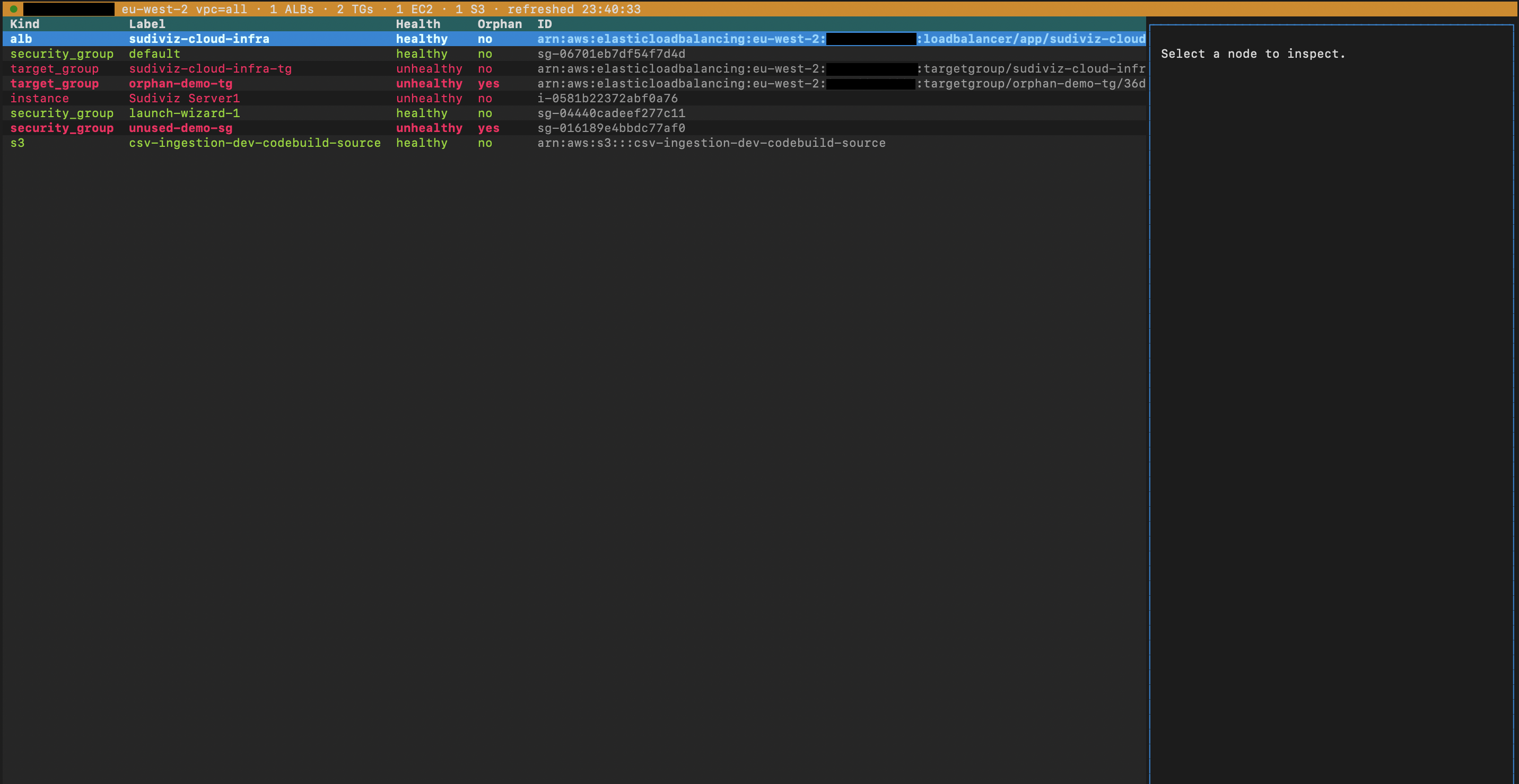
TUI (Interactive Terminal)
sudiviz tui
Web (Cytoscape.js)
sudiviz graph --output web --port 8000 --open

# Specify a default region (switch regions live from the UI dropdown)
sudiviz graph --output web --region us-east-1 --port 8000 --open
PNG Export
sudiviz graph --output png --file topology.png
🔧 Auto-Fix
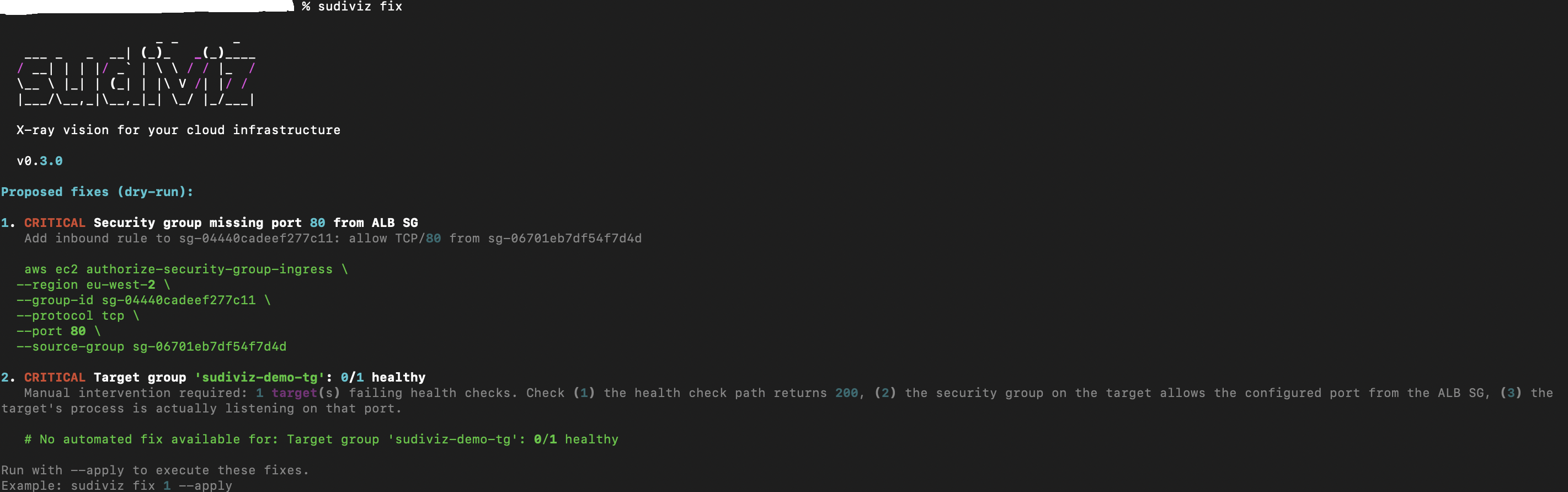
sudiviz fix                    # Preview fixes (dry-run)
sudiviz fix --apply            # Apply all fixes
sudiviz fix 1 --apply          # Apply specific fix
sudiviz fix --apply --force    # Include destructive operations
Supported fixes:
- Security group missing ingress rules
- S3 public access / encryption
- RDS public accessibility
- Orphan target groups (with
--force) - Unused security groups (with
--force)
🧠 Explain (Amazon Bedrock)
Sends diagnostic findings to Amazon Bedrock (Nova Lite) for holistic, AI-powered analysis — root causes, connected dots across findings, and a prioritised action plan.
# General analysis of all findings
sudiviz explain

# Ask a specific question
sudiviz explain "why is my target group unhealthy?"
sudiviz explain "why do I have no resources in us-east-2?"

# With AWS options
sudiviz explain --region us-east-1 --profile prod
Requirements:
- AWS credentials with
bedrock:InvokeModelWithResponseStreampermission (orAmazonBedrockFullAccessmanaged policy) - Amazon Nova Lite model access enabled in your region
Cost: ~$0.0001–0.0004 per invocation (Amazon Nova Lite pricing: $0.06/1M input tokens, $0.24/1M output tokens)
🤖 MCP Server (Agentic AI)
sudiviz ships an MCP server so AI agents (Claude Desktop, Claude Code, Cursor, etc.) can discover, diagnose, and remediate your infrastructure via natural language.
pip install 'sudiviz[mcp]'

# Start the MCP server (stdio transport)
sudiviz-mcp
Add to Claude Desktop (~/Library/Application Support/Claude/claude_desktop_config.json):
{
  "mcpServers": {
    "sudiviz": {
      "command": "sudiviz-mcp",
      "env": { "AWS_PROFILE": "production" }
    }
  }
}
Add to Claude Code (.mcp.json in your project root):
{
  "mcpServers": {
    "sudiviz": {
      "command": "sudiviz-mcp"
    }
  }
}
Available MCP tools:
| Tool | Description |
|---|---|
sudiviz_discover |
Discover live AWS resources (ALB, EC2, RDS, Lambda, S3, …) |
sudiviz_diagnose |
Discover + analyze for issues (orphans, unhealthy, misconfig) |
sudiviz_graph |
Generate Cytoscape.js topology JSON |
sudiviz_fix |
Generate or apply remediation commands |
sudiviz_drift |
Compare Terraform state vs live AWS |
sudiviz_costs |
Estimate monthly costs by service and resource |
sudiviz_list_resources |
List resources by type (alb, instance, rds, …) |
MCP Resources (read live data without calling a tool):
| Resource URI | Description |
|---|---|
infra://aws/{region}/topology |
Live topology graph as Cytoscape JSON |
infra://aws/{region}/health |
Health status summary with issue counts |
infra://aws/{region}/costs |
Estimated monthly cost breakdown |
MCP Prompts (guided multi-step workflows):
| Prompt | Description |
|---|---|
diagnose-infrastructure |
Discover, diagnose, and recommend fixes |
cost-optimization |
Find cost-saving opportunities |
security-audit |
Check for open SGs, public DBs, unencrypted storage |
incident-triage |
Trace unhealthy resources through dependency chain |
Example conversations with your AI agent:
- "Show me all orphan resources in us-east-1"
- "What's our estimated monthly spend?"
- "Fix the unhealthy targets on my ALB"
- "Check for Terraform drift against my state file"
- "Run a security audit on eu-west-1"
- "Triage the incident — what's unhealthy and why?"
🔒 Security
sudiviz is built with security in mind. Every release is scanned for vulnerabilities.
| Check | Status |
|---|---|
| Bandit SAST | ✅ No issues |
| XSS Protection | ✅ HTML sanitization enabled |
| Dependency CVEs | ✅ All patched |
| Hardcoded Secrets | ✅ None |
| Shell Injection | ✅ No shell=True |
| Code Injection | ✅ No eval() |
Run security scan locally:
pip install bandit[toml]
bandit -c pyproject.toml -r sudiviz/
🔄 Terraform Drift
terraform show -json > tfstate.json
sudiviz drift --tfstate tfstate.json
📊 CI Integration
# Fail CI on critical issues
sudiviz diagnose --json | jq '.diagnosis.fixes[] | select(.severity=="critical")'

# Drift detection gate
sudiviz drift --tfstate tfstate.json --json
| Exit Code | Meaning |
|---|---|
0 |
No issues |
1 |
Drift detected |
2 |
Critical issues found |
📸 More Screenshots
Click to expand
AWS Resource Icons + Multi-Region Topology
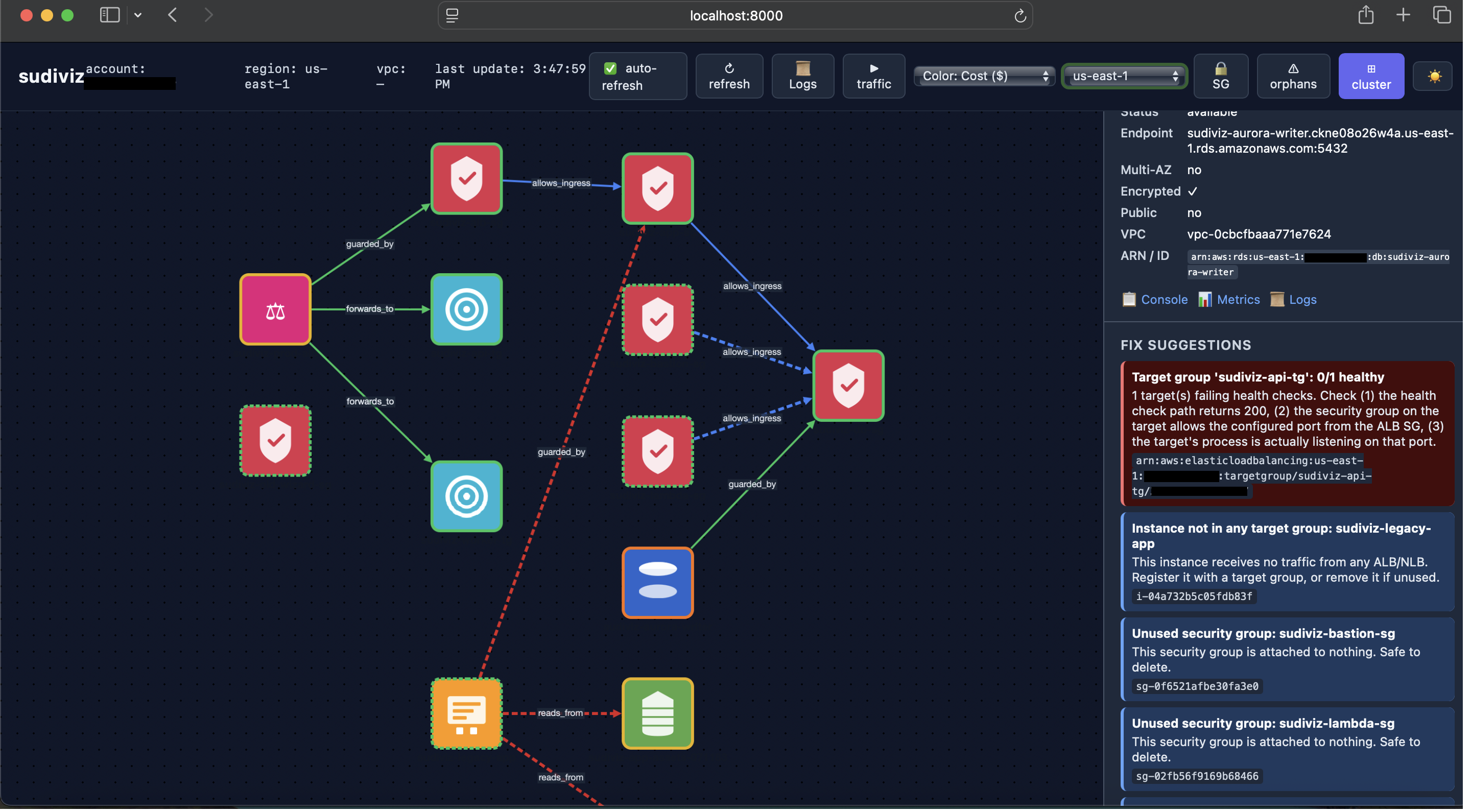
Each node shows a colour-coded AWS icon. Switch regions live from the dropdown in the top bar (us-east-1, us-east-2, eu-west-1, us-west-2 and more).
Security Group Ingress/Egress Flows (Dark Mode)
Terminal TUI
Diagnose Output
Auto-Fix Preview
Traffic Flow Animation (Dark Mode)
Health Heatmap
Cluster Grouping (Dark Mode)
Cost Heatmap (FinOps)
🆚 Comparison
| Feature | sudiviz | Hava.io | Cloudcraft |
|---|---|---|---|
| Live data | ✅ | ❌ | ❌ |
| AWS resource icons | ✅ | ✅ | ✅ |
| Multi-region switcher | ✅ | ✅ | ✅ |
| Auto-fix | ✅ | ❌ | ❌ |
| AI explain | ✅ | ❌ | ❌ |
| Traffic animation | ✅ | ❌ | ❌ |
| Health heatmaps | ✅ | ❌ | ❌ |
| Cost heatmap | ✅ | ❌ | ❌ |
| Cluster grouping | ✅ | ❌ | ❌ |
| Terraform drift | ✅ | ❌ | ❌ |
| Orphan detection | ✅ | ❌ | ❌ |
| MCP / AI agent | ✅ | ❌ | ❌ |
| Price | ✅ Free | $29/mo | $49/mo |
| License | ✅ GPL-3.0 | N/A | N/A |
🔐 IAM Permissions
Read-only (sudiviz diagnose):
ReadOnlyAccessAWS managed policy
AI Explain (sudiviz explain):
AmazonBedrockFullAccess(or a scoped inline policy forbedrock:InvokeModel+bedrock:InvokeModelWithResponseStream)
Write (sudiviz fix --apply):
AmazonEC2FullAccessElasticLoadBalancingFullAccessAmazonS3FullAccessAmazonRDSFullAccess
📖 Documentation
AWS Services Discovered
| Service | What's collected |
|---|---|
| ALB / NLB | Load balancers, listeners, rules |
| Target Groups | Health status per target |
| EC2 | State, IPs, security groups |
| Security Groups | Ingress/egress rules |
| ECS | Clusters, services, task counts |
| EKS | Clusters, node groups |
| RDS | Instances, encryption, public access |
| Lambda | Functions, VPC config |
| S3 | Buckets, encryption, public access |
Diagnostic Rules
| Check | Severity |
|---|---|
| Unhealthy targets | critical |
| SG missing port from ALB | critical |
| S3 public access open | critical |
| RDS publicly accessible | warning |
| Storage not encrypted | warning |
| Orphan target group | warning |
| Unused security group | info |
Architecture
sudiviz/
├── cli.py           # Typer commands
├── mcp_server.py    # MCP server for AI agents
├── tui.py           # Textual TUI
├── web.py           # FastAPI + WebSocket
├── discovery/       # AWS discovery (boto3)
├── graph/           # NetworkX + analyzers
├── remediation/     # Auto-fix engine
└── web_templates/   # Cytoscape.js UI
📝 License
GPL-3.0-or-later — see LICENSE
Built by @pydevsg
1 maintainer

Metadata
1 maintainer
Release files for sudiviz 1.9.0
For a detailed explanation of source distributions (sdists) and built distributions (wheels), please see the package formats documentation.
Source distribution (sdist)
| File | Size | Uploaded | |
|---|---|---|---|
| sudiviz-1.9.0.tar.gz | 111.6 kB | Details |
Built distribution (wheel)
| File | Interpreter | ABI | Platform | Reset |
|---|---|---|---|---|
| sudiviz-1.9.0-py3-none-any.whl | Python 3 | none | any | Details |
Total release size: 223.1 kB
Release files / sudiviz-1.9.0.tar.gz
| Download URL | sudiviz-1.9.0.tar.gz |
|---|---|
| Size | 111.6 kB |
| Tags | Source |
|
SHA-256 checksum How to use checksums |
ac39a7bc808e2e30068a7d6dcb20bc31f819a9d60bded7d155bee289e884cf21
|
|
BLAKE2b-256 checksum How to use checksums |
146fd2083c5034ee5bade2f6a14b9912248c88ee82907d091b5808970bfb9e30
|
| Upload date | |
|
Uploaded using Trusted Publishing? What is trusted publishing? |
Yes |
| Uploaded via |
twine/7.0.0 CPython/3.13.14
|
Provenance
Provenance describes where a file came from. On PyPI, provenance is shared via attestations, which provide a verifiable record of the build or publishing details. View details, limitations and caveats.


PyPI Publish Attestation
PyPI verified that this artifact, at this checksum, originated from the publisher listed below.
Signed by GitHub Actions, verified by PyPI on Sep 6, 2026.
Transparency logRelease files / sudiviz-1.9.0-py3-none-any.whl
| Download URL | sudiviz-1.9.0-py3-none-any.whl |
|---|---|
| Size | 111.5 kB |
| Tags | Python 3 |
|
SHA-256 checksum How to use checksums |
81e73df9e04a763230d28a0f6329535f1e64d3ed331300847c4091071d9529ad
|
|
BLAKE2b-256 checksum How to use checksums |
1f9fb0800077b65009045d1ef57f9d505b38a2d5e9463de777817d193a3d08df
|
| Upload date | |
|
Uploaded using Trusted Publishing? What is trusted publishing? |
Yes |
| Uploaded via |
twine/7.0.0 CPython/3.13.14
|
Provenance
Provenance describes where a file came from. On PyPI, provenance is shared via attestations, which provide a verifiable record of the build or publishing details. View details, limitations and caveats.
PyPI Publish Attestation
PyPI verified that this artifact, at this checksum, originated from the publisher listed below.
Signed by GitHub Actions, verified by PyPI on Sep 6, 2026.
Transparency log













