
Supabase client for Python.


Project description
supabase-py










Supabase client for Python. This mirrors the design of supabase-js
Status
- Alpha: We are testing Supabase with a closed set of customers
- Public Alpha: Anyone can sign up over at app.supabase.io. But go easy on us, there are a few kinks.
- Public Beta: Stable enough for most non-enterprise use-cases
- Public: Production-ready
We are currently in Public Alpha. Watch "releases" of this repo to get notified of major updates.

Installation
Recomended: First activate your virtual environment, with your favourites system. For example, we like poetry and conda!
PyPi installation
Now install the package. (for > Python 3.7)
pip install supabase
Local installation
You can also installing from after cloning this repo. Install like below to install in Development Mode, which means when you edit the source code the changes will be reflected in your python module.
pip install -e .
Usage
It's usually best practice to set your api key environment variables in some way that version control doesn't track them, e.g don't put them in your python modules! Set the key and url for the supabase instance in the shell, or better yet, use a dotenv file. Heres how to set the variables in the shell.
export SUPABASE_URL="my-url-to-my-awesome-supabase-instance"
export SUPABASE_KEY="my-supa-dupa-secret-supabase-api-key"
We can then read the keys in the python source code.
import os
from supabase import create_client, Client

url: str = os.environ.get("SUPABASE_URL")
key: str = os.environ.get("SUPABASE_KEY")
supabase: Client = create_client(url, key)
Use the supabase client to interface with your database.
Running Tests
Currently the test suites are in a state of flux. We are expanding our clients tests to ensure things are working, and for now can connect to this test instance, that is populated with the following table:
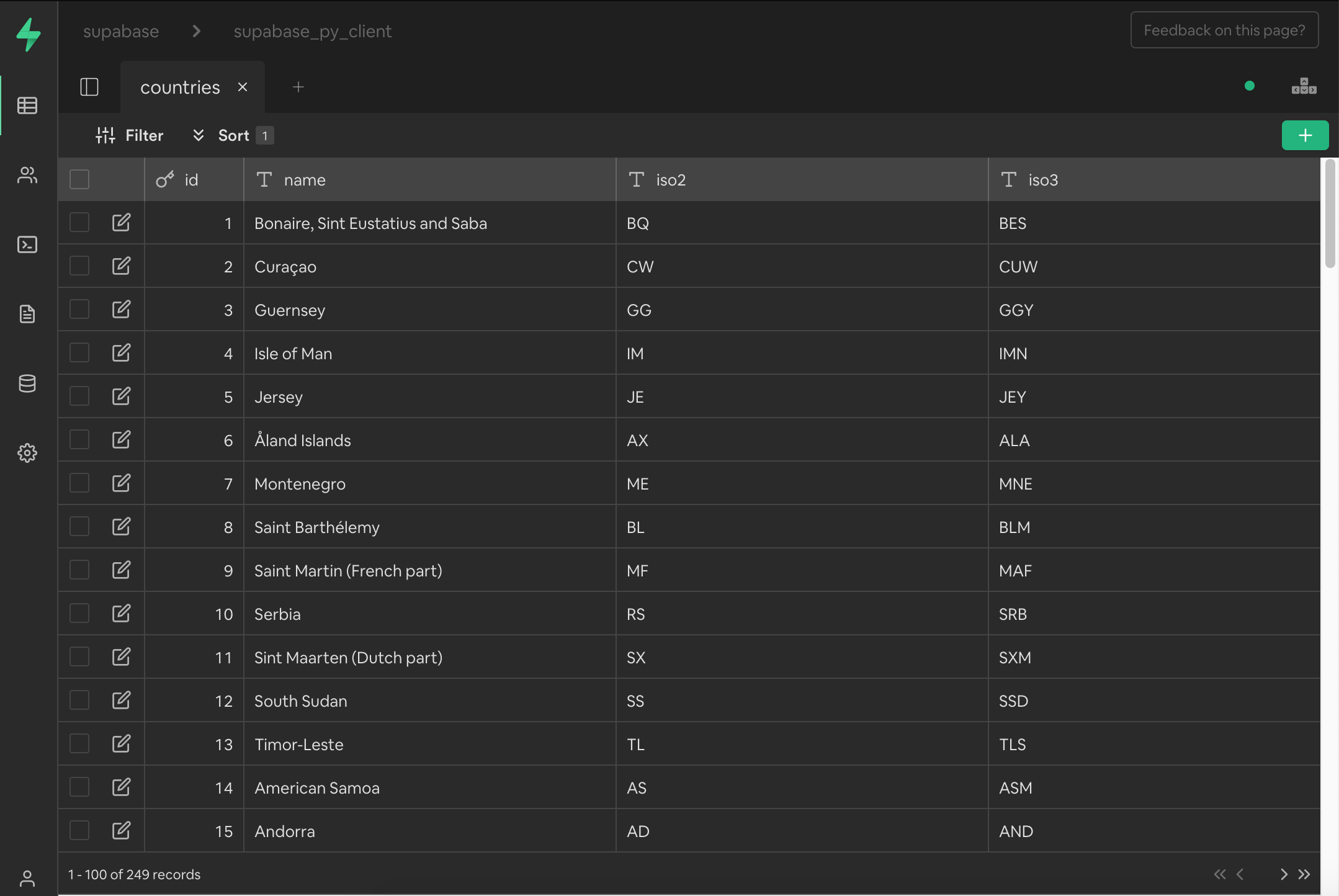
The above test database is a blank supabase instance that has populated the countries table with the built in countries script that can be found in the supabase UI. You can launch the test scripts and point to the above test database by running
./test.sh
See issues for what to work on
Rough roadmap:
- Wrap Postgrest-py
- Wrap Realtime-py
- Wrap Gotrue-py
Client Library
This is a sample of how you'd use supabase-py. Functions and tests are WIP
Authenticate
from supabase import create_client, Client

url: str = os.environ.get("SUPABASE_TEST_URL")
key: str = os.environ.get("SUPABASE_TEST_KEY")
supabase: Client = create_client(url, key)
# Create a random user login email and password.
random_email: str = "3hf82fijf92@supamail.com"
random_password: str = "fqj13bnf2hiu23h"
user = supabase.auth.sign_up(email=random_email, password=random_password)
Sign-in
from supabase import create_client, Client

url: str = os.environ.get("SUPABASE_TEST_URL")
key: str = os.environ.get("SUPABASE_TEST_KEY")
supabase: Client = create_client(url, key)
# Sign in using the user email and password.
random_email: str = "3hf82fijf92@supamail.com"
random_password: str = "fqj13bnf2hiu23h"
user = supabase.auth.sign_in(email=random_email, password=random_password)
Managing Data
Insertion of Data
from supabase import create_client, Client

url: str = os.environ.get("SUPABASE_TEST_URL")
key: str = os.environ.get("SUPABASE_TEST_KEY")
supabase: Client = create_client(url, key)
data = supabase.table("countries").insert({"name":"Germany"}).execute()
assert len(data.data) > 0
Selection of Data
from supabase import create_client, Client

url: str = os.environ.get("SUPABASE_TEST_URL")
key: str = os.environ.get("SUPABASE_TEST_KEY")
supabase: Client = create_client(url, key)
data = supabase.table("countries").select("*").execute()
# Assert we pulled real data.
assert len(data.data) > 0
Update of Data
from supabase import create_client, Client

url: str = os.environ.get("SUPABASE_TEST_URL")
key: str = os.environ.get("SUPABASE_TEST_KEY")
supabase: Client = create_client(url, key)
data = supabase.table("countries").update({"country": "Indonesia", "capital_city": "Jakarta"}).eq("id", 1).execute()
Deletion of Data
from supabase import create_client, Client

url: str = os.environ.get("SUPABASE_TEST_URL")
key: str = os.environ.get("SUPABASE_TEST_KEY")
supabase: Client = create_client(url, key)
data = supabase.table("countries").delete().eq("id", 1).execute()
Realtime Changes
Realtime changes are unfortunately still a WIP. Feel free to file PRs to realtime-py
See Supabase Docs for full list of examples
Project details
Release history Release notifications | RSS feed


Download files
Download the file for your platform. If you're not sure which to choose, learn more about installing packages.
Source Distribution
Built Distribution
Filter files by name, interpreter, ABI, and platform.
If you're not sure about the file name format, learn more about wheel file names.
Copy a direct link to the current filters
File details
Details for the file supabase-0.5.6.tar.gz.
File metadata
- Download URL: supabase-0.5.6.tar.gz
- Upload date:
- Size: 10.8 kB
- Tags: Source
- Uploaded using Trusted Publishing? No
- Uploaded via: twine/3.8.0 pkginfo/1.8.2 readme-renderer/35.0 requests/2.27.1 requests-toolbelt/0.9.1 urllib3/1.26.9 tqdm/4.64.0 importlib-metadata/4.11.3 keyring/23.5.0 rfc3986/2.0.0 colorama/0.4.4 CPython/3.9.12
File hashes
| Algorithm | Hash digest | |
|---|---|---|
| SHA256 |
55981300f46fac46bee70edfcfabe1a90966ba9d0f4245f6216795c1b2fd14a4
|
|
| MD5 |
512b9d35e03700ba1f15e70b60f7ce74
|
|
| BLAKE2b-256 |
9901bb54d27fd5a8be3aaa5dda8c6efb82db1a94bcfde72d4330d9c7299329e3
|
File details
Details for the file supabase-0.5.6-py3-none-any.whl.
File metadata
- Download URL: supabase-0.5.6-py3-none-any.whl
- Upload date:
- Size: 9.8 kB
- Tags: Python 3
- Uploaded using Trusted Publishing? No
- Uploaded via: twine/3.8.0 pkginfo/1.8.2 readme-renderer/35.0 requests/2.27.1 requests-toolbelt/0.9.1 urllib3/1.26.9 tqdm/4.64.0 importlib-metadata/4.11.3 keyring/23.5.0 rfc3986/2.0.0 colorama/0.4.4 CPython/3.9.12
File hashes
| Algorithm | Hash digest | |
|---|---|---|
| SHA256 |
aaa1f272eca93288c57913f1c21812488654434d5366a7251bc2cd4d9c51455c
|
|
| MD5 |
d08f251e681347b2331120e2cc0220db
|
|
| BLAKE2b-256 |
486f20c4811b3596b337b2ce65267bf0c0f661f92bb4e1e0c0d28abf6259e089
|






