






Supercat provides deep learning tools for super-resolution of 2D CT images and 3D rock volumes. It supports diffusion and regression models, training on DeepRock datasets, and porosity analysis of images and generated predictions.
Installation
Supercat requires Python 3.10, 3.11, or 3.12. Install from PyPI:
pip install supercat-sr
The distribution is named supercat-sr because the name supercat was already taken on PyPI. The module, the commands and the imports are all still supercat.
To work from a local checkout instead:
git clone https://github.com/rbturnbull/supercat.git
cd supercat
python3.11 -m venv .venv
source .venv/bin/activate
python -m pip install -e .
Check the available commands:
supercat --help
supercat-tools --help
supercat-tools train --help
Usage
The examples below use placeholder dataset, image, and checkpoint paths. Replace these with your own files. Prediction requires a trained model checkpoint that matches the input dimensionality.
Generate a prediction
Generate a 3D prediction from a MATLAB volume:
supercat \
    --input /path/to/volume.mat \
    --output results/prediction.tif \
    --checkpoint /path/to/checkpoint.pt \
    --size 100
supercat-tools predict exposes the same prediction command. Prediction uses CUDA when available and otherwise runs on the CPU. Output directories are created automatically.
Input and output formats
2D inputs: .png, .jpg, or .jpeg, converted to grayscale.
3D inputs: .mat files containing a three-dimensional array named temp.
Image intensities are expected on a 0–255 scale and normalized to [-1, 1].
Use .tif for image or volume output, or .pt to save the prediction as a PyTorch tensor. TIFF output is converted to unsigned 8-bit intensities; tensor output retains the model’s values.
Prediction options
Option |
Default |
Purpose |
|---|---|---|
--input |
Required |
Input image or volume path. |
--output |
Required |
Destination for the prediction. |
--checkpoint |
Required |
Trained model checkpoint. |
--size |
100 |
Default prediction tile size for all spatial dimensions. |
--size-i, --size-j, --size-k |
0 |
Override individual dimensions; zero uses --size. |
--overlap |
10 |
Default tile overlap in pixels or voxels. |
--overlap-i, --overlap-j, --overlap-k |
0 |
Override individual overlaps; zero uses --overlap. |
--num-sampling-steps |
250 |
Diffusion sampling steps per prediction. |
--seed |
42 |
Random seed for diffusion sampling. |
--single-crop |
Disabled |
Predict only the center tile. |
The current prediction command resizes the input to the requested spatial size before running the model. For example, --size 100 resizes a 3D volume to 100 × 100 × 100 voxels. Choose a size compatible with your model and intended output resolution. The training option --scale is not a prediction option. Diffusion sampling options apply when a diffusion checkpoint is loaded.
Train a model
Train a 3D diffusion model using paired DeepRock images:
supercat-tools train \
    --deeprock /path/to/deeprock \
    --dim 3 \
    --scale 4 \
    --use-diffusion \
    --epochs 40 \
    --batch-size 1 \
    --learning-rate 0.0001 \
    --results-dir results/diffusion3d
For 2D training, use --dim 2 with the corresponding 2D dataset. To train a regression model, pass --no-use-diffusion. Training augmentation is enabled by default; disable it with --no-augment.
Dataset layout
Pass the directory containing the rock category folders to --deeprock. The loaders search for sandstone, carbonate, coal, and sand; provide training and validation pairs for the categories you use.
For 3D data at scale 4, the layout for one category is:
deeprock/
    sandstone3D/
        sandstone3D_train_HR/
            sample.mat
        sandstone3D_train_LR_default_X4/
            samplex4.mat
        sandstone3D_valid_HR/
            sample.mat
        sandstone3D_valid_LR_default_X4/
            samplex4.mat
Each MATLAB file must contain an array named temp. The 3D loader upsamples the low-resolution volume by --scale using cubic interpolation before passing it to the model; the resulting shape must match the high-resolution volume.
For 2D data at scale 4, the layout is:
deeprock/
    sandstone2D/
        sandstone2D_train_HR/
            sample.png
        sandstone2D_train_BI_unknown_X4/
            sample.png
        sandstone2D_valid_HR/
            sample.png
        sandstone2D_valid_BI_unknown_X4/
            sample.png
The 2D loader uses the same filename for each pair and reads the images at their stored sizes. Prepare the low-resolution inputs at the spatial size expected by your model. For other scales, replace X4 in directory names and x4 in 3D filenames with the selected scale.
Training options
Option |
Default |
Purpose |
|---|---|---|
--dim |
3 |
Spatial dimensionality: 2 or 3. |
--scale |
4 |
Select the dataset’s downsampling scale. |
--epochs |
40 |
Number of training epochs. |
--learning-rate |
0.0001 |
Optimizer learning rate. |
--batch-size |
1 |
Number of samples per batch. |
--num-workers |
4 |
Number of data-loading workers. |
--results-dir |
./results |
Training output directory. |
--use-diffusion / --no-use-diffusion |
Enabled |
Select diffusion or regression training. |
--augment / --no-augment |
Enabled |
Apply training data augmentation. |
--wandb / --no-wandb |
Disabled |
Enable Weights & Biases logging. |
Use supercat-tools train --help for the full option list, including model presets, U-Net selection, transformer dimensions, and checkpoint options.
Pretrain on images or videos
Pretraining creates low-resolution/high-resolution pairs from ordinary images or videos. Each sample is converted to grayscale, downsampled by --scale, and interpolated back to its original spatial size to form the model input. The original sample provides the training target.
Provide separate training and validation directories. Files are discovered recursively, so no DeepRock category layout or precomputed image pairs are needed.
Image pretraining
Train a 2D model from directories of PNG or JPEG images:
supercat-pretrain-image train \
    --training /path/to/images/train \
    --validation /path/to/images/valid \
    --dim 2 \
    --scale 4 \
    --min-size 224 \
    --max-size 224 \
    --epochs 40 \
    --results-dir results/pretrain-image
The image dataset uses bicubic interpolation to create the degraded input. Setting --min-size and --max-size to the same value produces samples with a consistent spatial size; use an even size compatible with your model.
Video pretraining
Train a 3D model using clips from video files:
supercat-pretrain-movie train \
    --training /path/to/videos/train \
    --validation /path/to/videos/valid \
    --dim 3 \
    --scale 4 \
    --min-size 100 \
    --max-size 100 \
    --max-training-items 1000 \
    --max-validation-items 100 \
    --epochs 40 \
    --results-dir results/pretrain-movie
The video dataset discovers .mp4, .avi, .mov, and .mkv files. It treats the frame axis as the third spatial dimension and uses trilinear interpolation to create the degraded input. A working video decoding backend is required, such as imageio[ffmpeg] or an ffmpeg executable on PATH.
Pretraining options
Option |
Default |
Purpose |
|---|---|---|
--training |
Required |
Directory of training images or videos. |
--validation |
Required |
Directory of validation images or videos. |
--scale |
4 |
Downsampling factor used to create degraded inputs. |
--augment / --no-augment |
Enabled |
Apply random cropping and augmentation to training samples. |
--min-size |
16 |
Pad dimensions smaller than this size; zero disables padding. |
--max-size |
Images: 224; videos: 100 |
Crop dimensions larger than this size; zero disables cropping. |
--max-training-items |
All videos |
Limit the number of training videos; video pretraining only. |
--max-validation-items |
All videos |
Limit the number of validation videos; video pretraining only. |
For images, size limits apply to height and width. For videos, they also apply to the frame count. Validation uses centered crops without augmentation. The item limits count video files, not individual frames.
Both commands also accept the model and training options described above, including --no-use-diffusion for regression training. Inspect the complete options with:
supercat-pretrain-image train --help
supercat-pretrain-movie train --help
Calculate porosity
Calculate porosity for a supported input image or volume:
supercat-tools porosity --input /path/to/volume.mat
The tool uses Otsu’s threshold to classify pixels or voxels below the threshold as void space, then prints the void fraction as a value between 0 and 1. It accepts the input formats listed above; TIFF and PyTorch tensor outputs must be converted to a supported input format before using this command.
Sample a porosity distribution
Generate multiple diffusion predictions and record the porosity of each:
supercat-tools porosity-distribution \
    --input /path/to/volume.mat \
    --output results/porosity.csv \
    --checkpoint /path/to/diffusion-checkpoint.pt \
    --size 100 \
    --num-sampling-steps 250 \
    --seed 42 \
    --count 50
This tool requires a diffusion checkpoint with two output channels. Its input must already match the requested spatial dimensions: for this example, a 100 × 100 × 100 volume. It does not perform the input resizing used by supercat.
The output CSV contains seed,porosity columns. --count defaults to 50 and selects consecutive seeds starting at --seed. Seeds already present in the output file are skipped, so repeating a command resumes an interrupted run. Pass --overwrite to replace an existing CSV. Individual prediction images are not saved by this tool.
Results
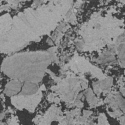
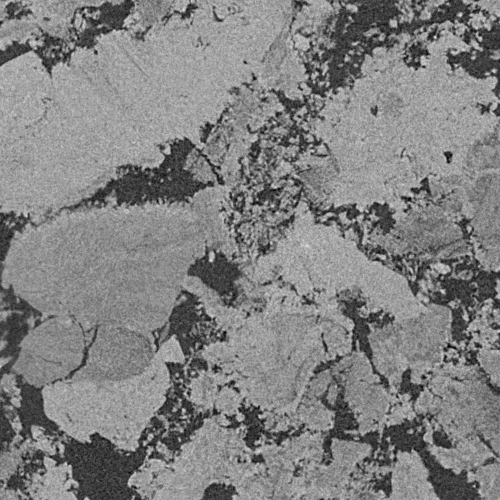
Test results for the Supercat model are presented at unimelbmdap.github.io/supercat-results, which shows super-resolution outputs for two- and three-dimensional micro-CT images of rocks.
For example, a carbonate slice from the 2D test set upscaled by a factor of four with the WiDiT diffusion model:
Low-resolution input (125 × 125) |
Supercat prediction (500 × 500) |
|---|---|
|
|
The results use the DeepRock-SR 2D and 3D datasets introduced by Wang, Armstrong and Mostaghimi:
Wang, Y. D., Armstrong, R. T. & Mostaghimi, P. (2020). Boosting Resolution and Recovering Texture of 2D and 3D Micro-CT Images with Deep Learning. Water Resources Research, 56(1), e2019WR026052.
Wang, Y. D., Armstrong, R. & Mostaghimi, P. (2019). A Diverse Super Resolution Dataset of Digital Rocks (DeepRock-SR): Sandstone, Carbonate, and Coal. Digital Rocks Portal.
Credits
Robert Turnbull, Jonathan Garber, Jay Black, Wenbin Fei, Tingxuan Wang, Yu Hsien Chiang
Publication details to follow
Created using torchapp (https://github.com/rbturnbull/torchapp)
Logo derived from https://thenounproject.com/icon/cat-113020/
1 maintainer

Metadata
1 maintainer
Release files for supercat-sr 0.4.0
For a detailed explanation of source distributions (sdists) and built distributions (wheels), please see the package formats documentation.
Source distribution (sdist)
| File | Size | Uploaded | |
|---|---|---|---|
| supercat_sr-0.4.0.tar.gz | 24.6 kB | Details |
Built distribution (wheel)
| File | Interpreter | ABI | Platform | Reset |
|---|---|---|---|---|
| supercat_sr-0.4.0-py3-none-any.whl | Python 3 | none | any | Details |
Total release size: 47.5 kB
Release files / supercat_sr-0.4.0.tar.gz
| Download URL | supercat_sr-0.4.0.tar.gz |
|---|---|
| Size | 24.6 kB |
| Tags | Source |
|
SHA-256 checksum How to use checksums |
3c3c7e673fdfffddce9bb3041487dc2a71ed782d21d9bbf54594b6c61512d8a3
|
|
BLAKE2b-256 checksum How to use checksums |
559c6ca2cc195ee56ca3470fda1952d3dee66faba048e4cec2e0b6221c51d854
|
| Upload date | |
|
Uploaded using Trusted Publishing? What is trusted publishing? |
No |
| Uploaded via |
poetry/2.4.1 CPython/3.13.1 Darwin/25.6.0
|
Release files / supercat_sr-0.4.0-py3-none-any.whl
| Download URL | supercat_sr-0.4.0-py3-none-any.whl |
|---|---|
| Size | 22.9 kB |
| Tags | Python 3 |
|
SHA-256 checksum How to use checksums |
2268bda765f8760adb2e8b3b676bb17e9d41034e7c496a53ff9e6e6774b51724
|
|
BLAKE2b-256 checksum How to use checksums |
a5b227ae58e113f7525b6cae59106f9a4b7b16ab88dda7d11f26a3694b978f15
|
| Upload date | |
|
Uploaded using Trusted Publishing? What is trusted publishing? |
No |
| Uploaded via |
poetry/2.4.1 CPython/3.13.1 Darwin/25.6.0
|













