
SuperNanno
Nano, but modern.
A professional terminal text editor built with Python, Textual, and Tree-sitter.






Overview
SuperNanno is a modern, keyboard-driven terminal text editor inspired by Nano, rebuilt from the ground up using contemporary Python tooling and a service-oriented, event-driven architecture.
Built on the Textual TUI framework and powered by Tree-sitter for incremental syntax parsing, SuperNanno delivers a rich editing experience without sacrificing the speed and portability that make terminal editors indispensable.
Designed with long-term maintainability, modularity, and developer ergonomics as first-class concerns, SuperNanno is not just an editor: It's a well-engineered application.
Screenshots
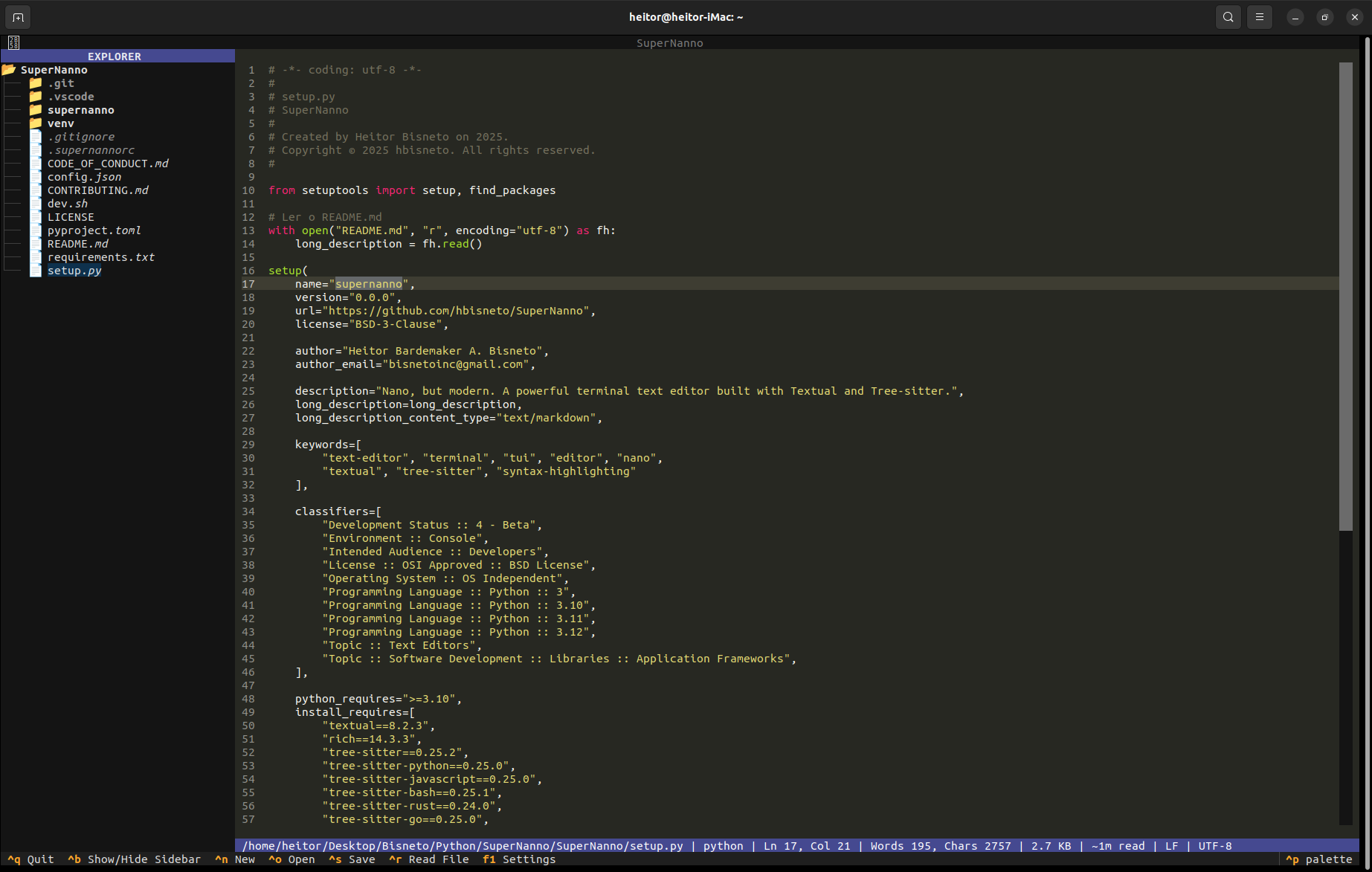
Main Editor
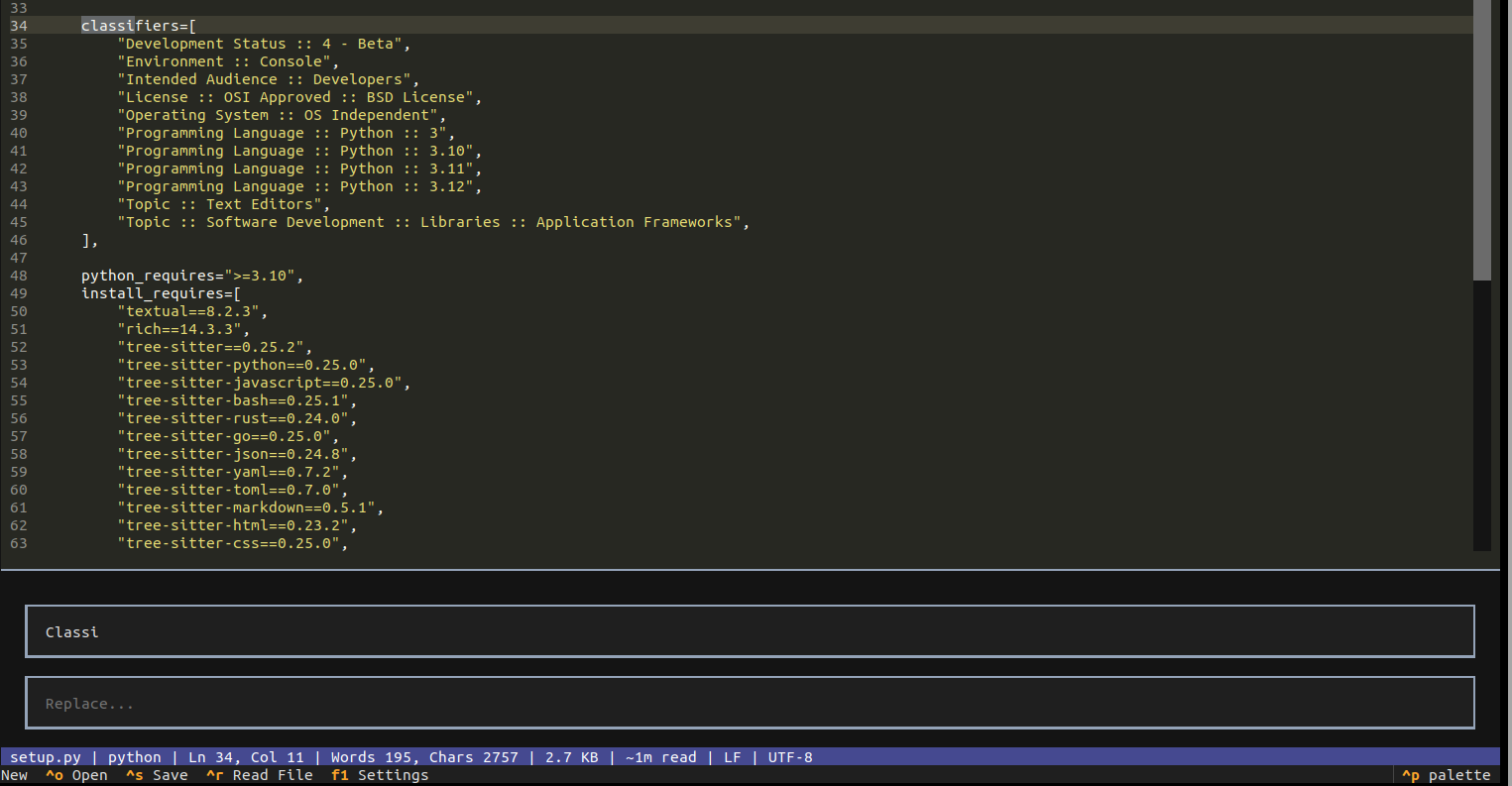
Search & Replace
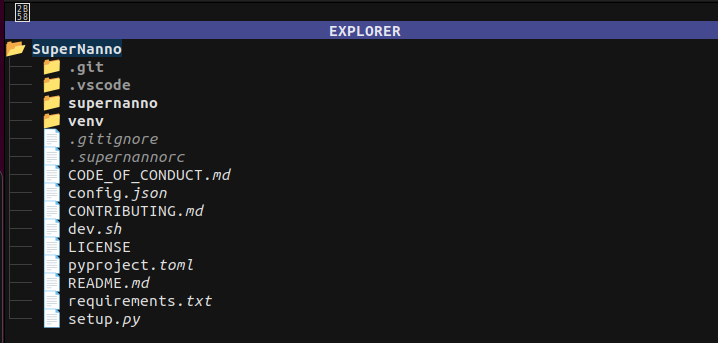
Sidebar File Explorer
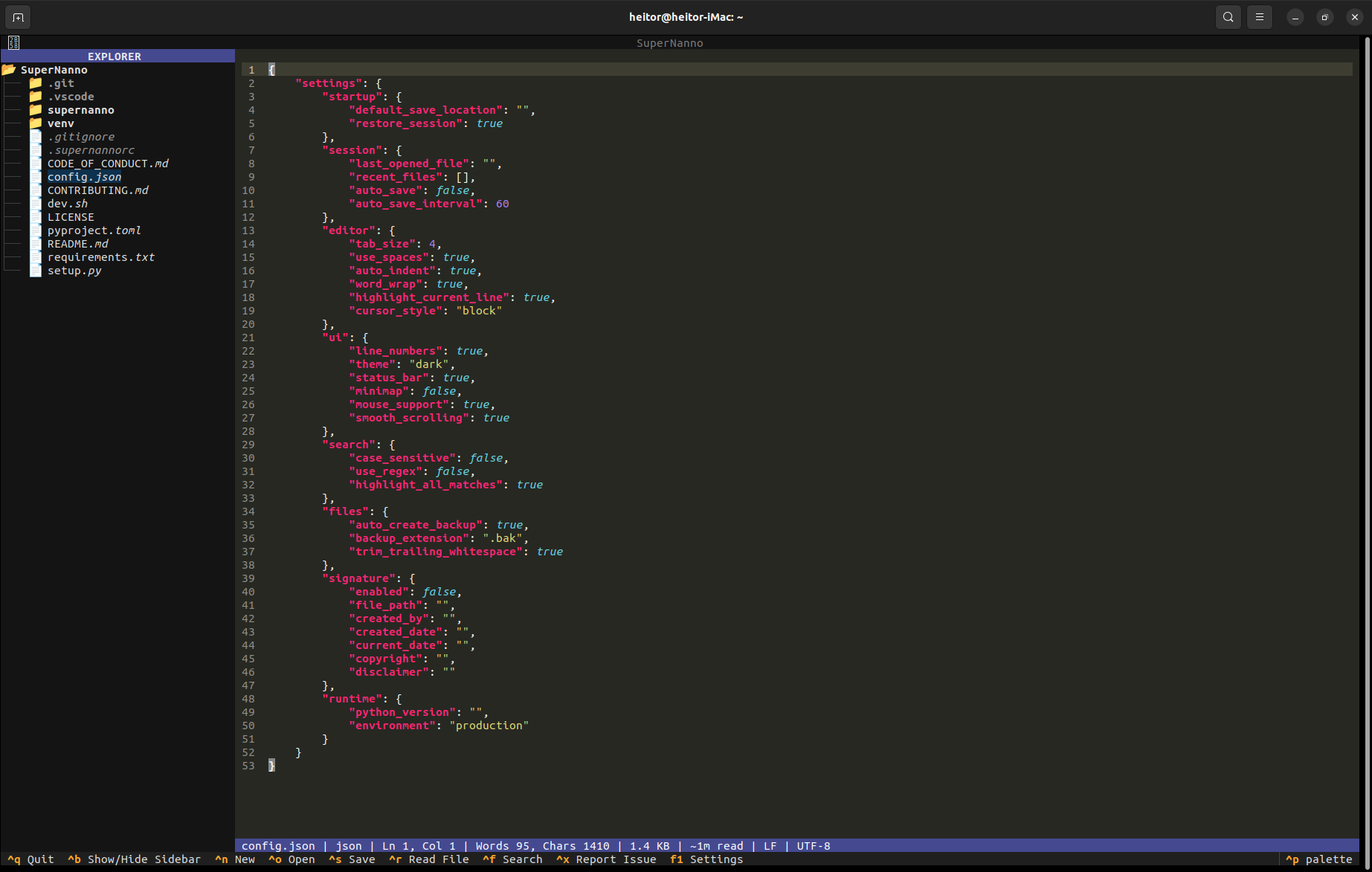
Intelligent Status System

Tree-sitter Syntax Highlighting
Why SuperNanno?
Most terminal editors fall into two categories: minimal tools that lack features, or complex environments with steep learning curves. SuperNanno occupies the space between: Familiar like Nano, capable like a modern IDE.
| Nano | SuperNanno | Vim/Neovim | |
|---|---|---|---|
| Terminal-native | ✅ | ✅ | ✅ |
| Zero config required | ✅ | ✅ | ❌ |
| Tree-sitter syntax highlighting | ❌ | ✅ | ✅ |
| Built-in search & replace | ✅ | ✅ | ✅ |
| Sidebar file explorer | ❌ | ✅ | plugin |
| Session restore | ❌ | ✅ | plugin |
| Structured logging | ❌ | ✅ | ❌ |
| Diagnostic reporting | ❌ | ✅ | ❌ |
| Mouse support | limited | ✅ | limited |
| Python-extensible | ❌ | ✅ | ❌ |
Features
Editor Core
- Full-featured editing with advanced cursor movement, selection handling, and smooth scrolling
- Mouse support with intuitive click-to-position and scroll interaction
- Auto-indentation, tab-to-spaces conversion, and trailing whitespace trimming
- Configurable tab size, cursor style, word wrap, and line number display
- Highlight current line for focused editing
Syntax Highlighting
- Tree-sitter incremental parsing for fast, accurate, language-aware highlighting
- Pygments fallback for unsupported extensions and edge cases
- 16 languages supported out of the box (see Supported Languages)
- Language auto-detection from file extension
Search & Replace Engine
- Strategy Pattern architecture with swappable search modes
- Literal, case-sensitive, and regex-based search strategies
- Highlight all matches, navigate between results
- Find and replace with confirmation flow
Sidebar File Explorer
- Integrated directory tree with click-to-open workflow
- Toggle visibility with
Ctrl+B - Responsive layout that adapts to terminal size
Session & Backup
- Session Manager persists the last opened file across restarts
- Automatic session restore on launch (configurable)
- Backup System creates
.bakcopies before overwriting files - Configurable backup directory and extension
Observability
- Structured JSON Logging with correlation IDs on every event
- ErrorService: Centralized error handler that classifies exceptions by semantic category, assigns a unique
correlation_id, generates a deduplication fingerprint, and reports to the status bar - Diagnostic Service: Generates formatted GitHub Issue reports on
Ctrl+X, complete with exception type, traceback, category labels, and fingerprint
Configuration
- Async Config Watcher: Monitors
config.jsonat runtime and hot-reloads changes without restarting - RC parser for
.supernannorcdeclarative settings - Settings UI accessible via
F1 - Live configuration reload with exponential backoff on failure
Design & UX
- Modern Textual-based TUI with dark theme and clean layout
- Multi-level status bar with contextual feedback (success, warning, error, diagnostic)
- Keyboard-driven workflow with full mouse support as a complement
- Startup markdown viewer for README/documentation display on launch
Supported Languages
Tree-sitter parsers are bundled for the following languages:
| Language | Parser | Notes |
|---|---|---|
| Python | tree-sitter-python |
|
| JavaScript | tree-sitter-javascript |
|
| Bash | tree-sitter-bash |
|
| Rust | tree-sitter-rust |
|
| Go | tree-sitter-go |
|
| JSON | tree-sitter-json |
|
| YAML | tree-sitter-yaml |
|
| TOML | tree-sitter-toml |
|
| Markdown | tree-sitter-markdown |
|
| HTML | tree-sitter-html |
|
| CSS | tree-sitter-css |
|
| Java | tree-sitter-java |
|
| SQL | tree-sitter-sql |
|
| XML | tree-sitter-xml |
|
| Regex | tree-sitter-regex |
Languages without a bundled grammar fall back to Pygments for best-effort highlighting.
Installation
PyPI (Stable)
pip install supernanno
Or with pipx for isolated installation (recommended):
pipx install supernanno
Developer Setup
git clone https://github.com/hbisneto/SuperNanno.git
cd SuperNanno
bash dev.sh
The dev.sh interactive installer supports five installation modes:
| Option | Mode | Description |
|---|---|---|
1 |
Stable Channel | Latest release from PyPI |
2 |
Local Developer Mode | Editable install from source (pipx install --editable .) |
3 |
Dev Channel | Latest build from TestPyPI |
4 |
Specific Dev Version | Pinned version from TestPyPI |
5 |
Specific Stable Version | Pinned version from PyPI |
Editable Install (Manual)
pip install -e .
Requirements
- Python 3.10, 3.11, or 3.12
pipx(recommended for isolated installs)- See
requirements.txtfor the full dependency list
Usage
Basic
# Open a file
supernanno my_file.py

# Open with no file (new buffer)
supernanno
Line and Search Navigation
# Jump to line 42 on open
supernanno +42 main.py

# Open and search for a term immediately
supernanno +/TODO app.py
Flags
# Read-only mode
supernanno -v config.json

# Enable automatic backups with custom directory
supernanno -B -C ~/backups/ project.py
Help & Version
supernanno --help
supernanno --version
Keyboard Shortcuts
| Shortcut | Action |
|---|---|
Ctrl + N |
New file |
Ctrl + O |
Open file |
Ctrl + S |
Save file |
Ctrl + F |
Find / Search |
Ctrl + H |
Find & Replace |
Ctrl + B |
Toggle sidebar |
Ctrl + R |
Insert file |
Ctrl + X |
Generate diagnostic report |
Ctrl + Q |
Quit editor |
F1 |
Open settings |
Configuration
SuperNanno supports two configuration layers that work together:
Declarative Settings: .supernannorc
Located in the project root or the user config directory. Uses a simple set key [value] syntax:
set backup
set backupdir ~/.config/Bisneto/SuperNanno/Backup
set restoresession
set sidebar
set tabsize 4
set indenttype spaces
Runtime Configuration: config.json
Full structured configuration file with live reload support:
{
  "settings": {
    "startup": {
      "default_save_location": "",
      "restore_session": true
    },
    "session": {
      "last_opened_file": "",
      "recent_files": [],
      "auto_save": false,
      "auto_save_interval": 60
    },
    "editor": {
      "tab_size": 4,
      "use_spaces": true,
      "auto_indent": true,
      "word_wrap": true,
      "highlight_current_line": true,
      "cursor_style": "block"
    },
    "ui": {
      "line_numbers": true,
      "theme": "dark",
      "status_bar": true,
      "mouse_support": true,
      "smooth_scrolling": true
    },
    "search": {
      "case_sensitive": false,
      "use_regex": false,
      "highlight_all_matches": true
    },
    "files": {
      "auto_create_backup": true,
      "backup_extension": ".bak",
      "trim_trailing_whitespace": true
    }
  }
}
Changes to config.json are detected by the async watcher and applied live! No restart required!
Configuration Directories
| Platform | Path |
|---|---|
| Linux | ~/.config/Bisneto/SuperNanno/ |
| macOS | ~/Library/Application Support/Bisneto/SuperNanno/ |
| Windows | %APPDATA%\Bisneto\SuperNanno\ |
Architecture
SuperNanno is built on a service-oriented, event-driven architecture designed for resilience, observability, and clean separation of concerns.
Design Principles
- AppContext as application facade: All services, state, and cross-cutting concerns are accessed through a single
AppContextinstance, avoiding global state and tight coupling - Event-driven UI: User interactions are dispatched as Textual events, with dedicated handler modules (one file per concern where possible)
- Service layer isolation: Business logic lives in
services/andcore/, completely independent of the Textual widget tree - Best-effort resilience: Logging, config watching, backup, and diagnostics are always wrapped in defensive exception handling; secondary failures never crash the editor
- Structured observability: Every significant action emits a structured JSON log entry with
action,correlation_id,path, and contextual metadata - Strategy Pattern for search: Search strategies (literal, case-sensitive, regex) are registered in a
SearchRegistryand selected at runtime without conditionals in the call site
Project Structure
SuperNanno/
├── .supernannorc               # Declarative Configuration
├── config.json                 # Runtime Configuration (Live Reload)
├── dev.sh                      # Interactive Developer Installer
├── install.sh                  # Interactive Stable Installer
├── pyproject.toml
├── requirements.txt
├── setup.py
└── supernanno/
    ├── app.py                  # Application Entry Point
    ├── cli/                    # Argument Parsing & CLI Models
    │   ├── constants.py
    │   ├── models.py
    │   └── parser.py
    ├── core/                   # Business Logic, Independent Of UI
    │   ├── editor.py
    │   ├── file_manager.py
    │   ├── logger.py
    │   ├── status.py
    │   └── structured_logger.py
    ├── events/                 # Textual Event Handlers (One File Per Event)
    │   ├── button_pressed.py
    │   ├── cursor_watcher.py
    │   ├── directory_tree_selected.py
    │   ├── input_changed.py
    │   ├── input_submitted.py
    │   ├── key.py
    │   ├── list_view_selected.py
    │   ├── mount.py
    │   ├── text_area_changed.py
    │   └── unmount.py
    ├── handlers/               # High-Level User Action Handlers
    │   ├── file.py
    │   ├── quit.py
    │   └── toggle_sidebar.py
    ├── search/                 # Search Subsystem (Strategy Pattern)
    │   ├── controller.py
    │   ├── engine.py
    │   ├── models.py
    │   ├── registry.py
    │   └── strategies.py
    ├── services/               # Application Services
    │   ├── app_context.py      # Central Application Façade
    │   ├── config_applier.py
    │   ├── config_manager.py
    │   ├── error_service.py    # Centralized Error Handling & Classification
    │   ├── issue_service.py    # GitHub Diagnostic Report Generator
    │   ├── log_service.py
    │   ├── paths.py
    │   ├── rc_parser.py
    │   └── session_manager.py
    ├── states/                 # Application State Machine
    │   ├── base.py
    │   └── search.py
    ├── style.tcss              # Textual CSS Styles
    ├── tests/
    │   └── test_issue_service.py
    └── ui/                     # Widget Layout And UI Components
        ├── bindings.py
        ├── layout.py
        ├── search_bar.py
        ├── settings/
        │   └── screen.py
        └── startup_view.py
Error & Diagnostic Pipeline
When an exception occurs anywhere in the application:
ErrorService.handle()is called with the exception and semantic context- A unique
correlation_id(8-char hex) is generated for traceability - The exception is classified into a semantic category (e.g.,
FILE_PERMISSION_ERROR,CONFIG_PARSE_ERROR,UI_STATE_ERROR) - An MD5 fingerprint is computed from the exception type and traceback for deduplication
- The full context is written to the structured JSON log
- The status bar displays
[correlation_id] ExceptionType — press CTRL+X to report IssueServicecan then format a complete GitHub Issue report from this state
This pipeline ensures every error is traceable, categorized, and actionable.
Technical Highlights
- Async runtime: Built on Python's
asynciovia Textual; config watcher and I/O operations are non-blocking - Atomic file writes:
FileManageruses a write-to-temp-then-rename strategy to prevent data loss on save - RC parser:
.supernannorcis parsed at startup and merged withconfig.jsonfor a unified settings model - Structured logging: Every log entry is a JSON object with
level,action,timestamp,correlation_id, and optionalpath,exc, andextrafields; no unstructuredprint()calls in service code - Config watcher with exponential backoff: The async file watcher retries on I/O failure with increasing delay, avoiding log spam on transient errors
- Session state: Last opened file is persisted per-session and can be restored automatically on next launch
Privacy
SuperNanno was built with privacy as a core, non-negotiable principle.
- Operates entirely offline by default
- No telemetry of any kind
- No analytics, no crash reporting to third parties
- No hidden network requests
- All logs, sessions, backups, and configuration files remain local to your machine
- The only optional network activity is
IssueService, which only fires when you explicitly pressCtrl+Xand choose to submit a report
Running Tests
# Run all tests
pytest tests/ -v

# Run a specific test file
pytest tests/test_issue_service.py -v

# From the package root
python -m pytest tests/ -v
Tests are written to be independent of the Textual widget tree wherever possible. Unit tests are preferred over integration tests.
Roadmap
Completed
- Tree-sitter syntax highlighting with Pygments fallback
- Sidebar file explorer
- Session persistence and restore
- Structured JSON logging
- Diagnostic reporting with GitHub issue generation
- Async configuration watcher with live reload
- Backup system
- Settings UI screen
- Search & replace with strategy pattern
Planned
- Plugin system
- Integrated terminal pane
- Git integration (diff, status, commit)
- Theme marketplace
- Multi-tab editing
- Package manager for grammars and themes
Contributing
Contributions are welcome and appreciated. Please read the following documents before submitting pull requests or opening issues:
CONTRIBUTING.md: Development workflow, architecture guidelines, PR processCODE_OF_CONDUCT.md: Community standards
Quick Contributor Reference
- All logic should flow through
AppContext: Avoid bypassing the service layer - Use
ctx.errors.handle()instead of rawtry/exceptin service code - Use
ctx.logs.info()/ctx.logs.error()for structured logging - New top-level modules require a discussion first
- Commit messages follow conventional commit style (
feat:,fix:,docs:,refactor:)
License
BSD 3-Clause License
Copyright © 2026 Heitor Bardemaker A. Bisneto
See LICENSE for the full text.
Acknowledgments
- Textual: Modern Python TUI framework by Textualize
- Tree-sitter: Incremental, error-tolerant parsing system
- Rich: Advanced terminal rendering library
Links
- Homepage: https://hbisneto.github.io/SuperNanno
- Repository: https://github.com/hbisneto/SuperNanno
- Bug Reports & Issues: https://github.com/hbisneto/SuperNanno/issues
- PyPI: https://pypi.org/project/supernanno/
Built with care for developers who ❤️ the terminal.
1 maintainer

Release files for supernanno 0.1.23
For a detailed explanation of source distributions (sdists) and built distributions (wheels), please see the package formats documentation.
Source distribution (sdist)
| File | Size | Uploaded | |
|---|---|---|---|
| supernanno-0.1.23.tar.gz | 66.9 kB | Details |
Built distribution (wheel)
| File | Interpreter | ABI | Platform | Reset |
|---|---|---|---|---|
| supernanno-0.1.23-py3-none-any.whl | Python 3 | none | any | Details |
Total release size: 144.0 kB
Release files / supernanno-0.1.23.tar.gz
| Download URL | supernanno-0.1.23.tar.gz |
|---|---|
| Size | 66.9 kB |
| Tags | Source |
|
SHA-256 checksum How to use checksums |
c588719a9dc32a53dec3a8a9d5fc5dfc5b4acca6e98c1fbea5b72e5d7641c1a0
|
|
BLAKE2b-256 checksum How to use checksums |
41b9cbdf29ccf124928211180745a94156c84a11356532c3e0ee0e670ce61047
|
| Upload date | |
|
Uploaded using Trusted Publishing? What is trusted publishing? |
No |
| Uploaded via |
twine/5.1.1 CPython/3.9.0
|
Release files / supernanno-0.1.23-py3-none-any.whl
| Download URL | supernanno-0.1.23-py3-none-any.whl |
|---|---|
| Size | 77.1 kB |
| Tags | Python 3 |
|
SHA-256 checksum How to use checksums |
ddea620eef5ce6e96cbd524deddc1a52f7e13b1ca9d500bc52edfe9e9d8a2183
|
|
BLAKE2b-256 checksum How to use checksums |
70d49497015dad57ed22ca95e3adaa3721a19aa96ce7a27f3449a2d08df25de2
|
| Upload date | |
|
Uploaded using Trusted Publishing? What is trusted publishing? |
No |
| Uploaded via |
twine/5.1.1 CPython/3.9.0
|














