
Nano, but modern. A powerful terminal text editor built with Textual and Tree-sitter.

Project description
SuperNanno
Nano, but modern.
A professional terminal text editor built with Python, Textual, and Tree-sitter.






Overview
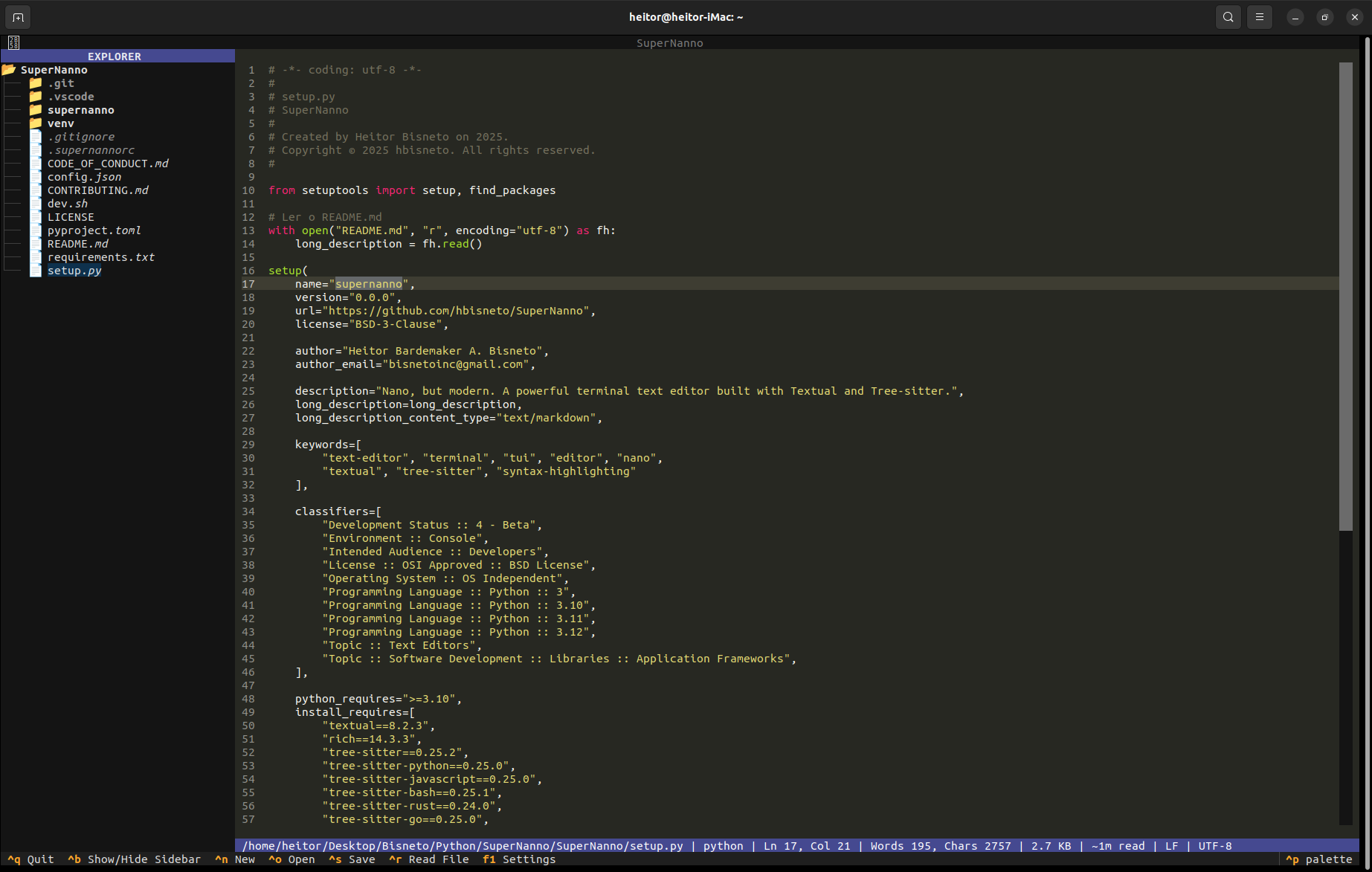
SuperNanno is a modern, keyboard-driven terminal text editor inspired by Nano, rebuilt from the ground up using contemporary Python tooling and a service-oriented, event-driven architecture.
Built on the Textual TUI framework and powered by Tree-sitter for incremental syntax parsing, SuperNanno delivers a rich editing experience without sacrificing the speed and portability that make terminal editors indispensable.
Designed with long-term maintainability, modularity, and developer ergonomics as first-class concerns, SuperNanno is not just an editor: It's a well-engineered application.
Screenshots
Main Editor
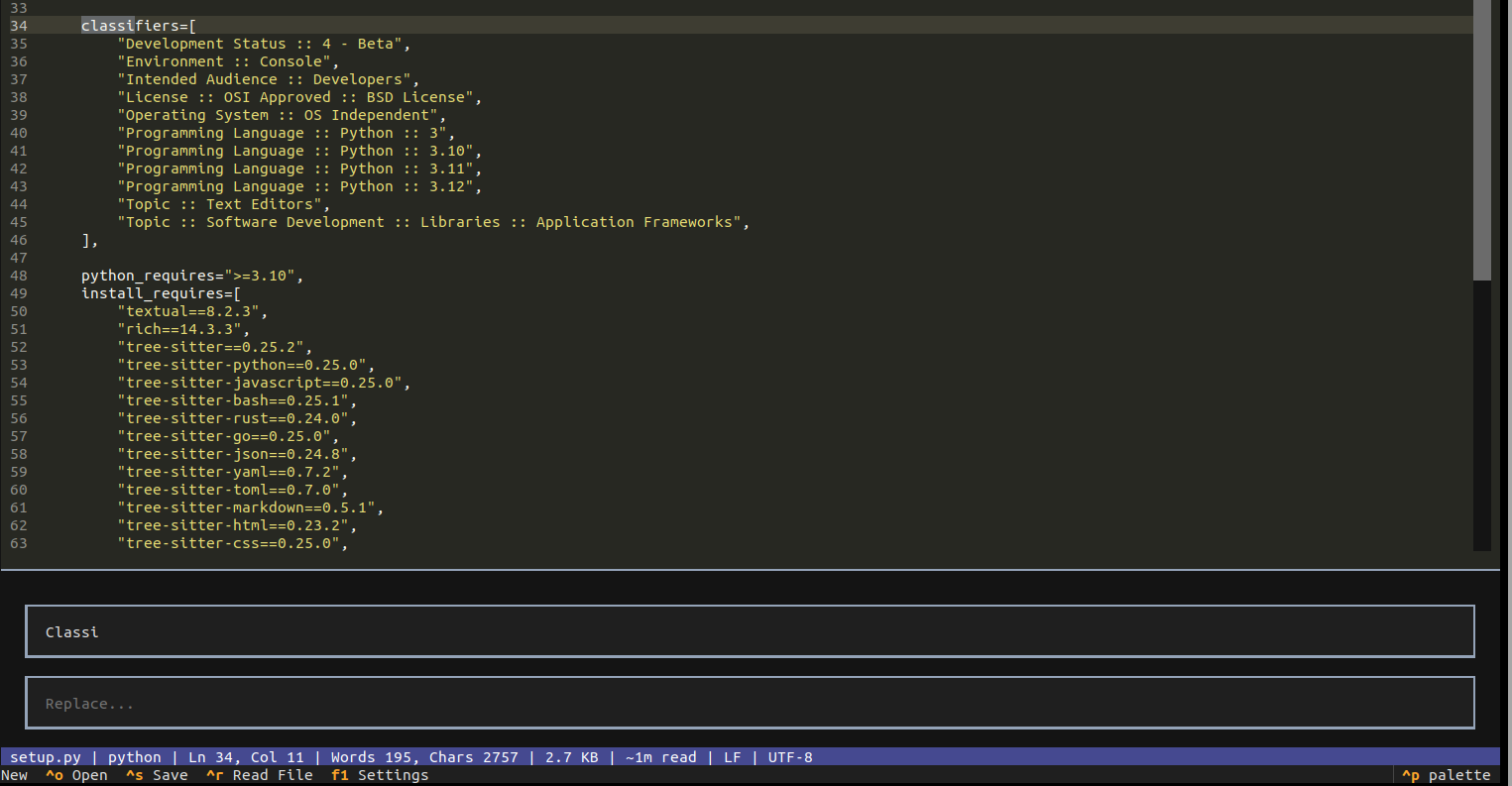
Search & Replace
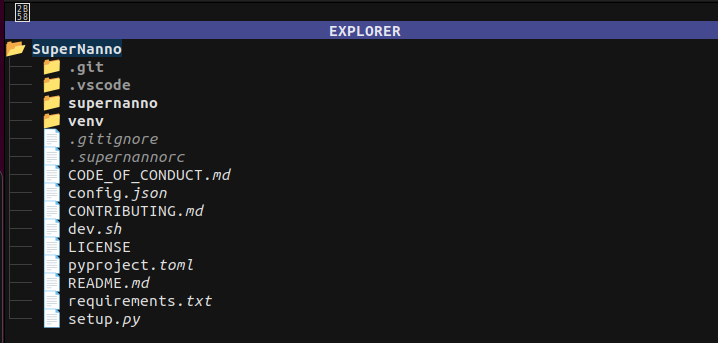
Sidebar File Explorer
Intelligent Status System

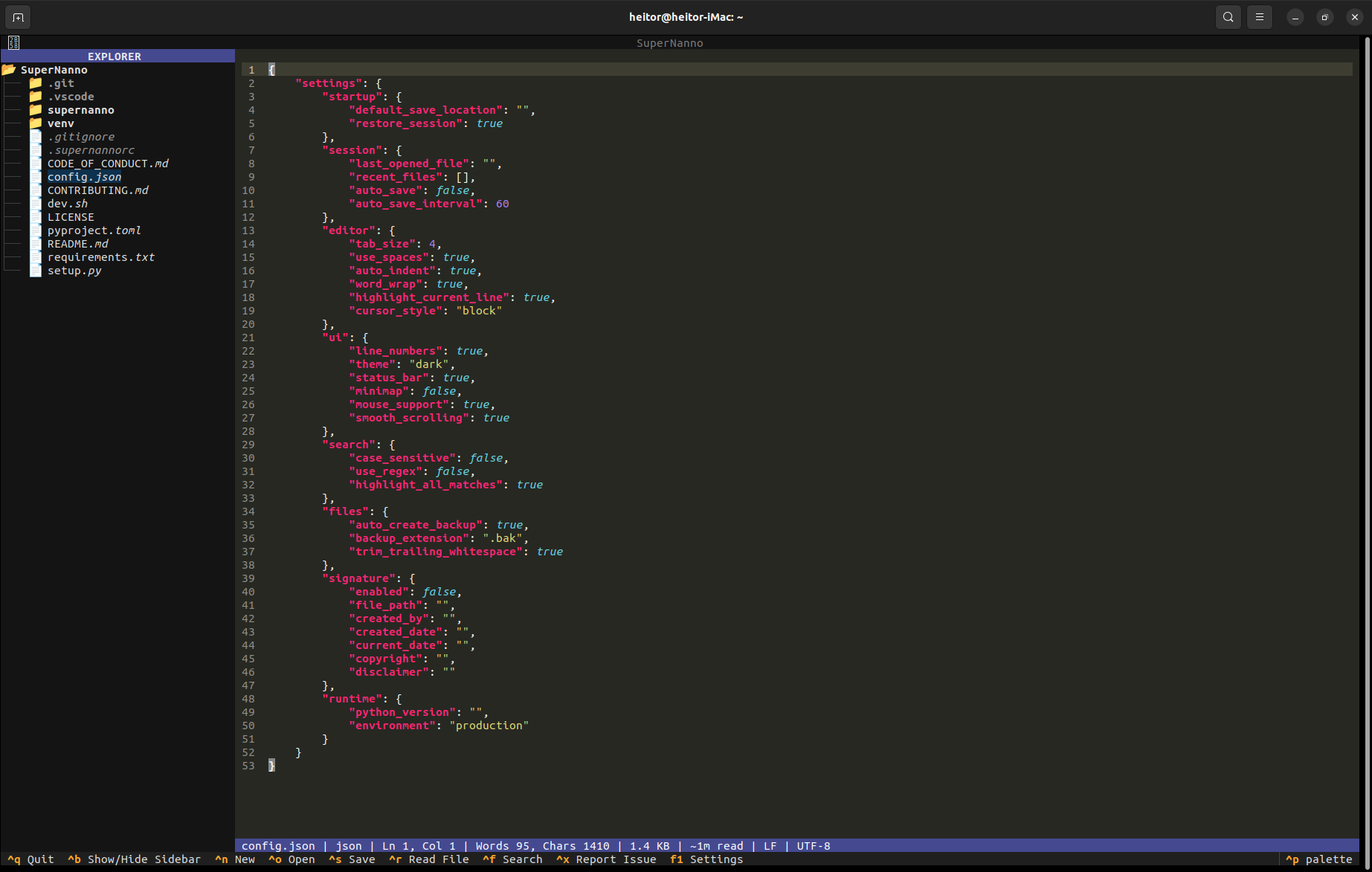
Tree-sitter Syntax Highlighting
Why SuperNanno?
Most terminal editors fall into two categories: minimal tools that lack features, or complex environments with steep learning curves. SuperNanno occupies the space between: Familiar like Nano, capable like a modern IDE.
| Nano | SuperNanno | Vim/Neovim | |
|---|---|---|---|
| Terminal-native | ✅ | ✅ | ✅ |
| Zero config required | ✅ | ✅ | ❌ |
| Tree-sitter syntax highlighting | ❌ | ✅ | ✅ |
| Built-in search & replace | ✅ | ✅ | ✅ |
| Sidebar file explorer | ❌ | ✅ | plugin |
| Session restore | ❌ | ✅ | plugin |
| Structured logging | ❌ | ✅ | ❌ |
| Diagnostic reporting | ❌ | ✅ | ❌ |
| Mouse support | limited | ✅ | limited |
| Python-extensible | ❌ | ✅ | ❌ |
Features
Editor Core
- Full-featured editing with advanced cursor movement, selection handling, and smooth scrolling
- Mouse support with intuitive click-to-position and scroll interaction
- Auto-indentation, tab-to-spaces conversion, and trailing whitespace trimming
- Configurable tab size, cursor style, word wrap, and line number display
- Highlight current line for focused editing
Syntax Highlighting
- Tree-sitter incremental parsing for fast, accurate, language-aware highlighting
- Pygments fallback for unsupported extensions and edge cases
- 16 languages supported out of the box (see Supported Languages)
- Language auto-detection from file extension
Search & Replace Engine
- Strategy Pattern architecture with swappable search modes
- Literal, case-sensitive, and regex-based search strategies
- Highlight all matches, navigate between results
- Find and replace with confirmation flow
Sidebar File Explorer
- Integrated directory tree with click-to-open workflow
- Toggle visibility with
Ctrl+B - Responsive layout that adapts to terminal size
Session & Backup
- Session Manager persists the last opened file across restarts
- Automatic session restore on launch (configurable)
- Backup System creates
.bakcopies before overwriting files - Configurable backup directory and extension
Observability
- Structured JSON Logging with correlation IDs on every event
- ErrorService: Centralized error handler that classifies exceptions by semantic category, assigns a unique
correlation_id, generates a deduplication fingerprint, and reports to the status bar - Diagnostic Service: Generates formatted GitHub Issue reports on
Ctrl+X, complete with exception type, traceback, category labels, and fingerprint
Configuration
- Async Config Watcher: Monitors
config.jsonat runtime and hot-reloads changes without restarting - RC parser for
.supernannorcdeclarative settings - Settings UI accessible via
F1 - Live configuration reload with exponential backoff on failure
Design & UX
- Modern Textual-based TUI with dark theme and clean layout
- Multi-level status bar with contextual feedback (success, warning, error, diagnostic)
- Keyboard-driven workflow with full mouse support as a complement
- Startup markdown viewer for README/documentation display on launch
Supported Languages
Tree-sitter parsers are bundled for the following languages:
| Language | Parser | Notes |
|---|---|---|
| Python | tree-sitter-python |
|
| JavaScript | tree-sitter-javascript |
|
| Bash | tree-sitter-bash |
|
| Rust | tree-sitter-rust |
|
| Go | tree-sitter-go |
|
| JSON | tree-sitter-json |
|
| YAML | tree-sitter-yaml |
|
| TOML | tree-sitter-toml |
|
| Markdown | tree-sitter-markdown |
|
| HTML | tree-sitter-html |
|
| CSS | tree-sitter-css |
|
| Java | tree-sitter-java |
|
| SQL | tree-sitter-sql |
|
| XML | tree-sitter-xml |
|
| Regex | tree-sitter-regex |
Languages without a bundled grammar fall back to Pygments for best-effort highlighting.
Installation
PyPI (Stable)
pip install supernanno
Or with pipx for isolated installation (recommended):
pipx install supernanno
Developer Setup
git clone https://github.com/hbisneto/SuperNanno.git
cd SuperNanno
bash dev.sh
The dev.sh interactive installer supports five installation modes:
| Option | Mode | Description |
|---|---|---|
1 |
Stable Channel | Latest release from PyPI |
2 |
Local Developer Mode | Editable install from source (pipx install --editable .) |
3 |
Dev Channel | Latest build from TestPyPI |
4 |
Specific Dev Version | Pinned version from TestPyPI |
5 |
Specific Stable Version | Pinned version from PyPI |
Editable Install (Manual)
pip install -e .
Requirements
- Python 3.10, 3.11, or 3.12
pipx(recommended for isolated installs)- See
requirements.txtfor the full dependency list
Usage
Basic
# Open a file
supernanno my_file.py

# Open with no file (new buffer)
supernanno
Line and Search Navigation
# Jump to line 42 on open
supernanno +42 main.py

# Open and search for a term immediately
supernanno +/TODO app.py
Flags
# Read-only mode
supernanno -v config.json

# Enable automatic backups with custom directory
supernanno -B -C ~/backups/ project.py
Help & Version
supernanno --help
supernanno --version
Keyboard Shortcuts
| Shortcut | Action |
|---|---|
Ctrl + N |
New file |
Ctrl + O |
Open file |
Ctrl + S |
Save file |
Ctrl + F |
Find / Search |
Ctrl + H |
Find & Replace |
Ctrl + B |
Toggle sidebar |
Ctrl + R |
Insert file |
Ctrl + X |
Generate diagnostic report |
Ctrl + Q |
Quit editor |
F1 |
Open settings |
Configuration
SuperNanno supports two configuration layers that work together:
Declarative Settings: .supernannorc
Located in the project root or the user config directory. Uses a simple set key [value] syntax:
set backup
set backupdir ~/.config/Bisneto/SuperNanno/Backup
set restoresession
set sidebar
set tabsize 4
set indenttype spaces
Runtime Configuration: config.json
Full structured configuration file with live reload support:
{
  "settings": {
    "startup": {
      "default_save_location": "",
      "restore_session": true
    },
    "session": {
      "last_opened_file": "",
      "recent_files": [],
      "auto_save": false,
      "auto_save_interval": 60
    },
    "editor": {
      "tab_size": 4,
      "use_spaces": true,
      "auto_indent": true,
      "word_wrap": true,
      "highlight_current_line": true,
      "cursor_style": "block"
    },
    "ui": {
      "line_numbers": true,
      "theme": "dark",
      "status_bar": true,
      "mouse_support": true,
      "smooth_scrolling": true
    },
    "search": {
      "case_sensitive": false,
      "use_regex": false,
      "highlight_all_matches": true
    },
    "files": {
      "auto_create_backup": true,
      "backup_extension": ".bak",
      "trim_trailing_whitespace": true
    }
  }
}
Changes to config.json are detected by the async watcher and applied live! No restart required!
Configuration Directories
| Platform | Path |
|---|---|
| Linux | ~/.config/Bisneto/SuperNanno/ |
| macOS | ~/Library/Application Support/Bisneto/SuperNanno/ |
| Windows | %APPDATA%\Bisneto\SuperNanno\ |
Architecture
SuperNanno is built on a service-oriented, event-driven architecture designed for resilience, observability, and clean separation of concerns.
Design Principles
- AppContext as application facade: All services, state, and cross-cutting concerns are accessed through a single
AppContextinstance, avoiding global state and tight coupling - Event-driven UI: User interactions are dispatched as Textual events, with dedicated handler modules (one file per concern where possible)
- Service layer isolation: Business logic lives in
services/andcore/, completely independent of the Textual widget tree - Best-effort resilience: Logging, config watching, backup, and diagnostics are always wrapped in defensive exception handling; secondary failures never crash the editor
- Structured observability: Every significant action emits a structured JSON log entry with
action,correlation_id,path, and contextual metadata - Strategy Pattern for search: Search strategies (literal, case-sensitive, regex) are registered in a
SearchRegistryand selected at runtime without conditionals in the call site
Project Structure
SuperNanno/
├── .supernannorc               # Declarative Configuration
├── config.json                 # Runtime Configuration (Live Reload)
├── dev.sh                      # Interactive Developer Installer
├── install.sh                  # Interactive Stable Installer
├── pyproject.toml
├── requirements.txt
├── setup.py
└── supernanno/
    ├── app.py                  # Application Entry Point
    ├── cli/                    # Argument Parsing & CLI Models
    │   ├── constants.py
    │   ├── models.py
    │   └── parser.py
    ├── core/                   # Business Logic, Independent Of UI
    │   ├── editor.py
    │   ├── file_manager.py
    │   ├── logger.py
    │   ├── status.py
    │   └── structured_logger.py
    ├── events/                 # Textual Event Handlers (One File Per Event)
    │   ├── button_pressed.py
    │   ├── cursor_watcher.py
    │   ├── directory_tree_selected.py
    │   ├── input_changed.py
    │   ├── input_submitted.py
    │   ├── key.py
    │   ├── list_view_selected.py
    │   ├── mount.py
    │   ├── text_area_changed.py
    │   └── unmount.py
    ├── handlers/               # High-Level User Action Handlers
    │   ├── file.py
    │   ├── quit.py
    │   └── toggle_sidebar.py
    ├── search/                 # Search Subsystem (Strategy Pattern)
    │   ├── controller.py
    │   ├── engine.py
    │   ├── models.py
    │   ├── registry.py
    │   └── strategies.py
    ├── services/               # Application Services
    │   ├── app_context.py      # Central Application Façade
    │   ├── config_applier.py
    │   ├── config_manager.py
    │   ├── error_service.py    # Centralized Error Handling & Classification
    │   ├── issue_service.py    # GitHub Diagnostic Report Generator
    │   ├── log_service.py
    │   ├── paths.py
    │   ├── rc_parser.py
    │   └── session_manager.py
    ├── states/                 # Application State Machine
    │   ├── base.py
    │   └── search.py
    ├── style.tcss              # Textual CSS Styles
    ├── tests/
    │   └── test_issue_service.py
    └── ui/                     # Widget Layout And UI Components
        ├── bindings.py
        ├── layout.py
        ├── search_bar.py
        ├── settings/
        │   └── screen.py
        └── startup_view.py
Error & Diagnostic Pipeline
When an exception occurs anywhere in the application:
ErrorService.handle()is called with the exception and semantic context- A unique
correlation_id(8-char hex) is generated for traceability - The exception is classified into a semantic category (e.g.,
FILE_PERMISSION_ERROR,CONFIG_PARSE_ERROR,UI_STATE_ERROR) - An MD5 fingerprint is computed from the exception type and traceback for deduplication
- The full context is written to the structured JSON log
- The status bar displays
[correlation_id] ExceptionType — press CTRL+X to report IssueServicecan then format a complete GitHub Issue report from this state
This pipeline ensures every error is traceable, categorized, and actionable.
Technical Highlights
- Async runtime: Built on Python's
asynciovia Textual; config watcher and I/O operations are non-blocking - Atomic file writes:
FileManageruses a write-to-temp-then-rename strategy to prevent data loss on save - RC parser:
.supernannorcis parsed at startup and merged withconfig.jsonfor a unified settings model - Structured logging: Every log entry is a JSON object with
level,action,timestamp,correlation_id, and optionalpath,exc, andextrafields; no unstructuredprint()calls in service code - Config watcher with exponential backoff: The async file watcher retries on I/O failure with increasing delay, avoiding log spam on transient errors
- Session state: Last opened file is persisted per-session and can be restored automatically on next launch
Privacy
SuperNanno was built with privacy as a core, non-negotiable principle.
- Operates entirely offline by default
- No telemetry of any kind
- No analytics, no crash reporting to third parties
- No hidden network requests
- All logs, sessions, backups, and configuration files remain local to your machine
- The only optional network activity is
IssueService, which only fires when you explicitly pressCtrl+Xand choose to submit a report
Running Tests
# Run all tests
pytest tests/ -v

# Run a specific test file
pytest tests/test_issue_service.py -v

# From the package root
python -m pytest tests/ -v
Tests are written to be independent of the Textual widget tree wherever possible. Unit tests are preferred over integration tests.
Roadmap
Completed
- Tree-sitter syntax highlighting with Pygments fallback
- Sidebar file explorer
- Session persistence and restore
- Structured JSON logging
- Diagnostic reporting with GitHub issue generation
- Async configuration watcher with live reload
- Backup system
- Settings UI screen
- Search & replace with strategy pattern
Planned
- Plugin system
- Integrated terminal pane
- Git integration (diff, status, commit)
- Theme marketplace
- Multi-tab editing
- Package manager for grammars and themes
Contributing
Contributions are welcome and appreciated. Please read the following documents before submitting pull requests or opening issues:
CONTRIBUTING.md: Development workflow, architecture guidelines, PR processCODE_OF_CONDUCT.md: Community standards
Quick Contributor Reference
- All logic should flow through
AppContext: Avoid bypassing the service layer - Use
ctx.errors.handle()instead of rawtry/exceptin service code - Use
ctx.logs.info()/ctx.logs.error()for structured logging - New top-level modules require a discussion first
- Commit messages follow conventional commit style (
feat:,fix:,docs:,refactor:)
License
BSD 3-Clause License
Copyright © 2026 Heitor Bardemaker A. Bisneto
See LICENSE for the full text.
Acknowledgments
- Textual: Modern Python TUI framework by Textualize
- Tree-sitter: Incremental, error-tolerant parsing system
- Rich: Advanced terminal rendering library
Links
- Homepage: https://hbisneto.github.io/SuperNanno
- Repository: https://github.com/hbisneto/SuperNanno
- Bug Reports & Issues: https://github.com/hbisneto/SuperNanno/issues
- PyPI: https://pypi.org/project/supernanno/
Built with care for developers who ❤️ the terminal.
Release history Release notifications | RSS feed


Download files
Download the file for your platform. If you're not sure which to choose, learn more about installing packages.
Source Distribution
Built Distribution
Filter files by name, interpreter, ABI, and platform.
If you're not sure about the file name format, learn more about wheel file names.
Copy a direct link to the current filters
File details
Details for the file supernanno-0.0.23.tar.gz.
File metadata
- Download URL: supernanno-0.0.23.tar.gz
- Upload date:
- Size: 63.3 kB
- Tags: Source
- Uploaded using Trusted Publishing? No
- Uploaded via: twine/5.1.1 CPython/3.9.0
File hashes
| Algorithm | Hash digest | |
|---|---|---|
| SHA256 |
12ccc88b43fca102e1731d0c800ca7bd3ade49ff0b214913765eee119f10d7ed
|
|
| MD5 |
f5233b8593a913896c0ecc73c28bf3d3
|
|
| BLAKE2b-256 |
9bf5fe05f1b833420e7be71753b6fff2c31bb51eebef711915619cdbffec5a9d
|
File details
Details for the file supernanno-0.0.23-py3-none-any.whl.
File metadata
- Download URL: supernanno-0.0.23-py3-none-any.whl
- Upload date:
- Size: 73.4 kB
- Tags: Python 3
- Uploaded using Trusted Publishing? No
- Uploaded via: twine/5.1.1 CPython/3.9.0
File hashes
| Algorithm | Hash digest | |
|---|---|---|
| SHA256 |
a2f0801329a50cee7da4c97746fbc83debe0aefcfaee93760ba691e4506da082
|
|
| MD5 |
99233295188a3be8d0885ab9fca2661a
|
|
| BLAKE2b-256 |
03778ad52ca6943741449b92a0d12d2e835a970bf7d4fc1f82364d8531b22482
|






