



Introduction
This project provides collection of utilities for smooth integration of FastAPI framework with Google Cloud Platform services as logging and tracing.
The key features of this project are:
- Logging to Cloud Logging
- Tracing to Cloud Logging
- Error Reporting via Cloud Logging
- Custom middleware for configuration of logging
- Custom exception handlers treating HTTP and validation exceptions
- Custom routes for documentation and favicon
- Custom responses with statuses
success,warninganderrorand standardized error messages
Quick Start
This section shows how to use the utilities provided by this project:
"""File main.py with FastAPI app"""
import os
from fastapi.exceptions import RequestValidationError
from starlette.exceptions import HTTPException
from fastapi import FastAPI, Request, Query

# import surquest modules and objects
from surquest.fastapi.utils.route import Route  # custom routes for documentation and FavIcon
from surquest.fastapi.utils.GCP.tracer import Tracer
from surquest.fastapi.utils.GCP.logging import Logger
from surquest.fastapi.schemas.responses import Response
from surquest.fastapi.utils.GCP.middleware import LoggingMiddleware
from surquest.fastapi.utils.GCP.catcher import (
    catch_validation_exceptions,
    catch_http_exceptions,
)

PATH_PREFIX = os.getenv('PATH_PREFIX','')

app = FastAPI(
    title="Exchange Rates ETL",
    openapi_url=F"{PATH_PREFIX}/openapi.json"
)

# add middleware
app.add_middleware(LoggingMiddleware)

# exception handlers
app.add_exception_handler(HTTPException, catch_http_exceptions)
app.add_exception_handler(RequestValidationError, catch_validation_exceptions)

# custom routes to documentation and favicon
app.add_api_route(path=F"{PATH_PREFIX}/", endpoint=Route.get_documentation, include_in_schema=False)
app.add_api_route(path=PATH_PREFIX, endpoint=Route.get_favicon, include_in_schema=False)

# custom route to illustrate logging and tracing
@app.get(F"{PATH_PREFIX}/users")
async def get_users(
    age: int = Query(
        default=18,
        description="Minimal age of the user",
        example=30,

    ),
):

    with Tracer.start_span("Generate users"):

        users = [
            {"name": "John Doe", "age": 30, "email": "john@doe.com"},
            {"name": "Will Smith", "age": 42, "email": "will@smith.com"}
        ]

        Logger.info('Found %s users', len(users), extra={"users": users})

    with Tracer.start_span("Filtering users"):

        output = []
        excluded = []
        Logger.debug(F"Filtering users by age > {age}")

        for user in users:

            if user["age"] > age:
                output.append(user)
            else:
                excluded.append(user)

        Logger.debug(
            'Number of excluded users: %s', len(excluded),
            extra={"excluded": excluded}
        )

    return Response.set(data=output)
The endpoint /users will return the following standard response:
{
  "info": {
    "status": "success"
  },
  "data": [
    {
      "name": "John Doe",
      "age": 30,
      "email": "john@doe.com"
    },
    {
      "name": "Will Smith",
      "age": 42,
      "email": "will@smith.com"
    }
  ]
}
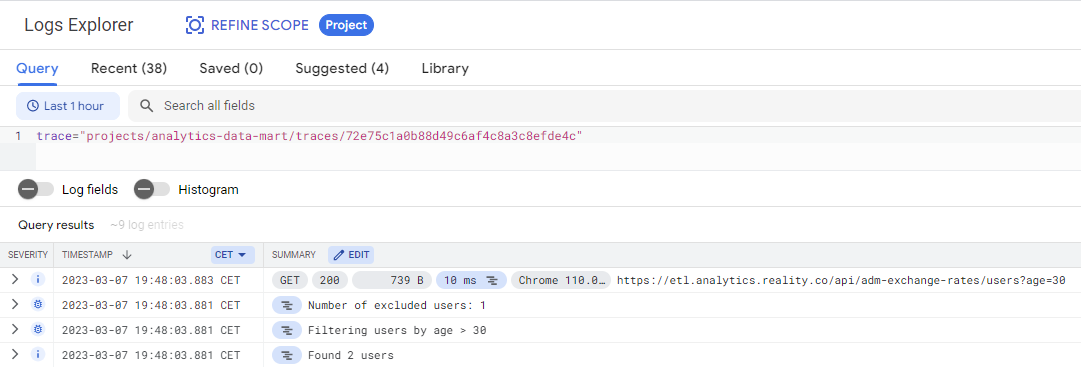
and the logs will are available in Google Cloud Platform console within Stackdriver Logging:
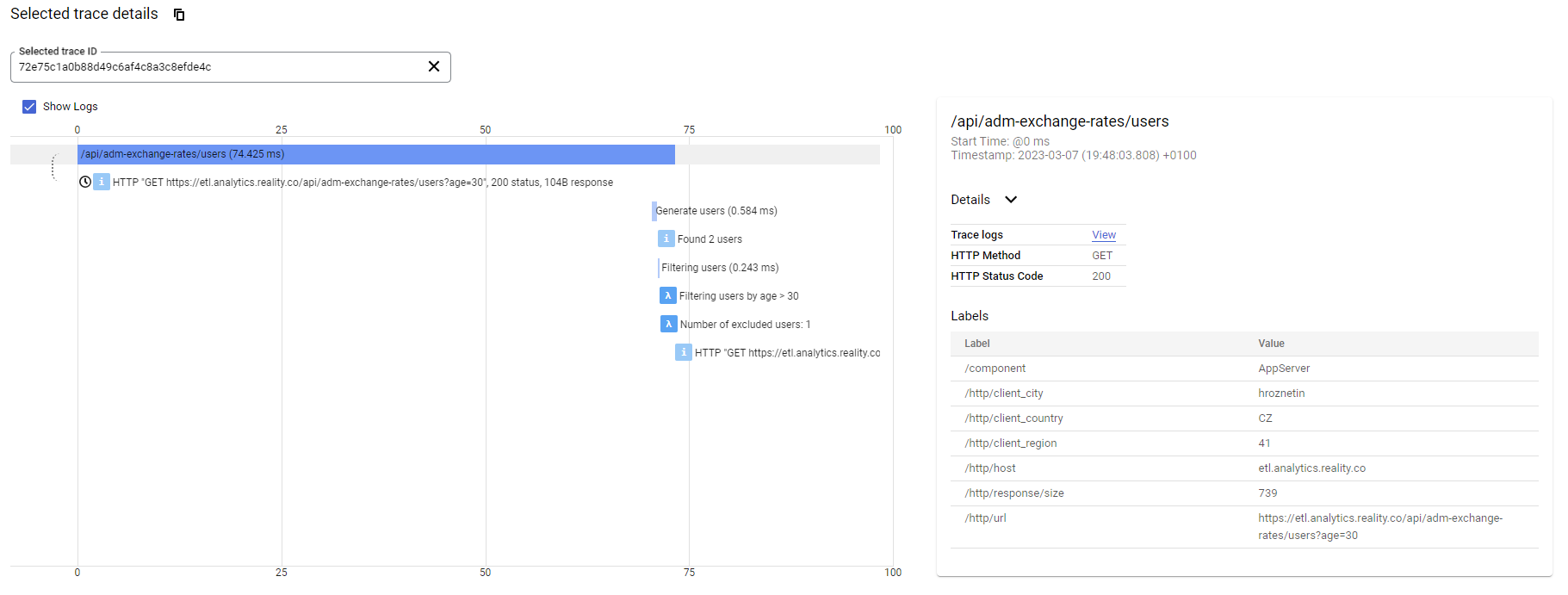
as well as the traces are available in Google Cloud Platform console within Stackdriver Trace:
API Gateway Integration
This package also provides a FastAPI extension that generates OpenAPI specifications compatible with Google Cloud API Gateway. By default, it generates an OpenAPI 3.0.0 specification, which is the current standard. If you are using legacy systems, you can also output a Swagger 2.0 (OpenAPI 2.0) specification by passing openapi_version="2.0" to the gateway options.
from fastapi import FastAPI
from pydantic import BaseModel
from surquest.fastapi.utils.GCP.api_gateway import (
    GCPGateway, cloud_run_backend, SecurityDefinition,
)

app = FastAPI(title="My Service", version="1.0.0")


class Item(BaseModel):
    name: str
    price: float


@app.get("/items/{item_id}", tags=["public", "items"])
def get_item(item_id: int):
    return {"id": item_id}


@app.post("/items", tags=["admin", "items"])
def create_item(item: Item):
    return item


@app.get("/internal/health", tags=["internal"])
def health():
    return {"ok": True}


# OpenAPI 3.0.0 output by default:
GCPGateway(
    app,
    backend=cloud_run_backend(
        address="https://my-service-abc-uc.a.run.app",
        deadline=30.0,
    ),
    host="my-gateway-xxxx.uc.gateway.dev",
    security_definitions=[
        SecurityDefinition(name="api_key", in_="query", key_name="key"),
    ],
    default_security=[{"api_key": []}],
    # openapi_version="2.0" # Option for Swagger 2.0 output
    # docs_url="/gateway-docs", # Option to mount a Swagger UI dedicated to the gateway spec
    # openapi_url="/gateway-openapi.json" # Option to mount the gateway spec JSON endpoint
)
Generated Endpoints
The extension automatically creates the following endpoints:
GET /spec/apiGateway/yaml— full specGET /spec/apiGateway/json— full specGET /spec/apiGateway/yaml?include_tags=public&include_tags=items— only public+items endpointsGET /spec/apiGateway/yaml?exclude_tags=internal— exclude internal endpointsGET /spec/apiGateway/yaml?exclude_responses=true— exclude responses and nested component schema definitions (creates a lightweight spec)GET /spec/apiGateway/yaml?exclude_parameters_schemas=true— exclude all schemas for parameters and request body (simplifies them to basic string/object)
If docs_url or openapi_url parameters are specified during GCPGateway initialization, the extension also provides:
- Custom Swagger UI for the spec (e.g.,
GET /gateway-docs) - Raw JSON endpoint for the spec (e.g.,
GET /gateway-openapi.json)
You can then deploy it with gcloud by extracting the output of the spec:
curl "http://localhost:8000/spec/apiGateway/yaml?exclude_tags=internal&exclude_responses=true&exclude_parameters_schemas=true" > openapi.yaml

gcloud api-gateway api-configs create my-config \
  --api=my-api --openapi-spec=openapi.yaml \
  --backend-auth-service-account=sa@project.iam.gserviceaccount.com
Local development
You are more than welcome to contribute to this project. To make your start easier we have prepared a docker image with all the necessary tools to run it as interpreter for Pycharm or to run tests.
Build docker image
docker build `
     --tag surquest/fastapi/utils `
     --file package.base.dockerfile `
     --target test .
Run tests
docker run --rm -it `
 -v "${pwd}:/opt/project" `
 -e "GOOGLE_APPLICATION_CREDENTIALS=/opt/project/credentials/keyfile.json" `
 -w "/opt/project/test" `
 surquest/fastapi/utils pytest
1 maintainer

Download files
Download the file for your platform. If you're not sure which to choose, learn more about installing packages.
Source Distribution
Built Distribution
Filter files by name, interpreter, ABI, and platform.
If you're not sure about the file name format, learn more about wheel file names.
Copy a direct link to the current filters
File details
Details for the file surquest_fastapi_utils-0.2.12.tar.gz.
File metadata
- Download URL: surquest_fastapi_utils-0.2.12.tar.gz
- Upload date:
- Size: 117.0 kB
- Tags: Source
- Uploaded using Trusted Publishing? No
- Uploaded via:
twine/6.1.0 CPython/3.13.13
File hashes
| Algorithm | Hash digest | |
|---|---|---|
| SHA256 |
5a2bf1586648d9cfd27c21bff41e06014628c2a80188d42e5641fa9bd9072e49
|
|
| MD5 |
15efafce562d67225895a9a86b9e1001
|
|
| BLAKE2b-256 |
fc2afa6a705880ed587bdd744d22b128184d7d4beadd7e18a7ba392ce2ad7691
|
File details
Details for the file surquest_fastapi_utils-0.2.12-py2.py3-none-any.whl.
File metadata
- Download URL: surquest_fastapi_utils-0.2.12-py2.py3-none-any.whl
- Upload date:
- Size: 24.1 kB
- Tags: Python 2, Python 3
- Uploaded using Trusted Publishing? No
- Uploaded via:
twine/6.1.0 CPython/3.13.13
File hashes
| Algorithm | Hash digest | |
|---|---|---|
| SHA256 |
ea5cd2f6318b40f4b7a674566859de7b18e1e08529a36506639e3c95647db80e
|
|
| MD5 |
7333e9cd73e25674164ae804fd2edf82
|
|
| BLAKE2b-256 |
f112796e644fb21b9bd7e91d3c8ac7e0aa7a1b16d8e71e3b9a365783639ac20e
|














