
This project provides collection of utilities for FastAPI framework as: Catcher, Middleware, etc.

Project description



Introduction
This project provides collection of utilities for smooth integration of FastAPI framework with Google Cloud Platform services as logging and tracing.
The key features of this project are:
- Logging to Cloud Logging
- Tracing to Cloud Logging
- Error Reporting via Cloud Logging
- Custom middleware for configuration of logging
- Custom exception handlers treating HTTP and validation exceptions
- Custom routes for documentation and favicon
- Custom responses with statuses
success,warninganderrorand standardized error messages
Quick Start
This section shows how to use the utilities provided by this project:
"""File main.py with FastAPI app"""
import os
from fastapi.exceptions import RequestValidationError
from starlette.exceptions import HTTPException
from fastapi import FastAPI, Request, Query

# import surquest modules and objects
from surquest.fastapi.utils.route import Route  # custom routes for documentation and FavIcon
from surquest.fastapi.utils.GCP.tracer import Tracer
from surquest.fastapi.utils.GCP.logging import Logger
from surquest.fastapi.schemas.responses import Response
from surquest.fastapi.utils.GCP.middleware import LoggingMiddleware
from surquest.fastapi.utils.GCP.catcher import (
    catch_validation_exceptions,
    catch_http_exceptions,
)

PATH_PREFIX = os.getenv('PATH_PREFIX','')

app = FastAPI(
    title="Exchange Rates ETL",
    openapi_url=F"{PATH_PREFIX}/openapi.json"
)

# add middleware
app.add_middleware(LoggingMiddleware)

# exception handlers
app.add_exception_handler(HTTPException, catch_http_exceptions)
app.add_exception_handler(RequestValidationError, catch_validation_exceptions)

# custom routes to documentation and favicon
app.add_api_route(path=F"{PATH_PREFIX}/", endpoint=Route.get_documentation, include_in_schema=False)
app.add_api_route(path=PATH_PREFIX, endpoint=Route.get_favicon, include_in_schema=False)

# custom route to illustrate logging and tracing
@app.get(F"{PATH_PREFIX}/users")
async def get_users(
    age: int = Query(
        default=18,
        description="Minimal age of the user",
        example=30,

    ),
):

    with Tracer.start_span("Generate users"):

        users = [
            {"name": "John Doe", "age": 30, "email": "john@doe.com"},
            {"name": "Will Smith", "age": 42, "email": "will@smith.com"}
        ]

        Logger.info('Found %s users', len(users), extra={"users": users})

    with Tracer.start_span("Filtering users"):

        output = []
        excluded = []
        Logger.debug(F"Filtering users by age > {age}")

        for user in users:

            if user["age"] > age:
                output.append(user)
            else:
                excluded.append(user)

        Logger.debug(
            'Number of excluded users: %s', len(excluded),
            extra={"excluded": excluded}
        )

    return Response.set(data=output)
The endpoint /users will return the following standard response:
{
  "info": {
    "status": "success"
  },
  "data": [
    {
      "name": "John Doe",
      "age": 30,
      "email": "john@doe.com"
    },
    {
      "name": "Will Smith",
      "age": 42,
      "email": "will@smith.com"
    }
  ]
}
and the logs will are available in Google Cloud Platform console within Stackdriver Logging:
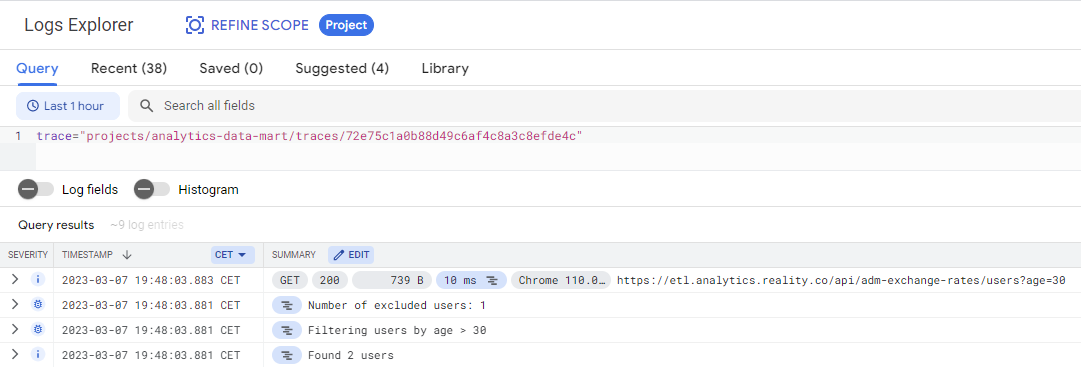
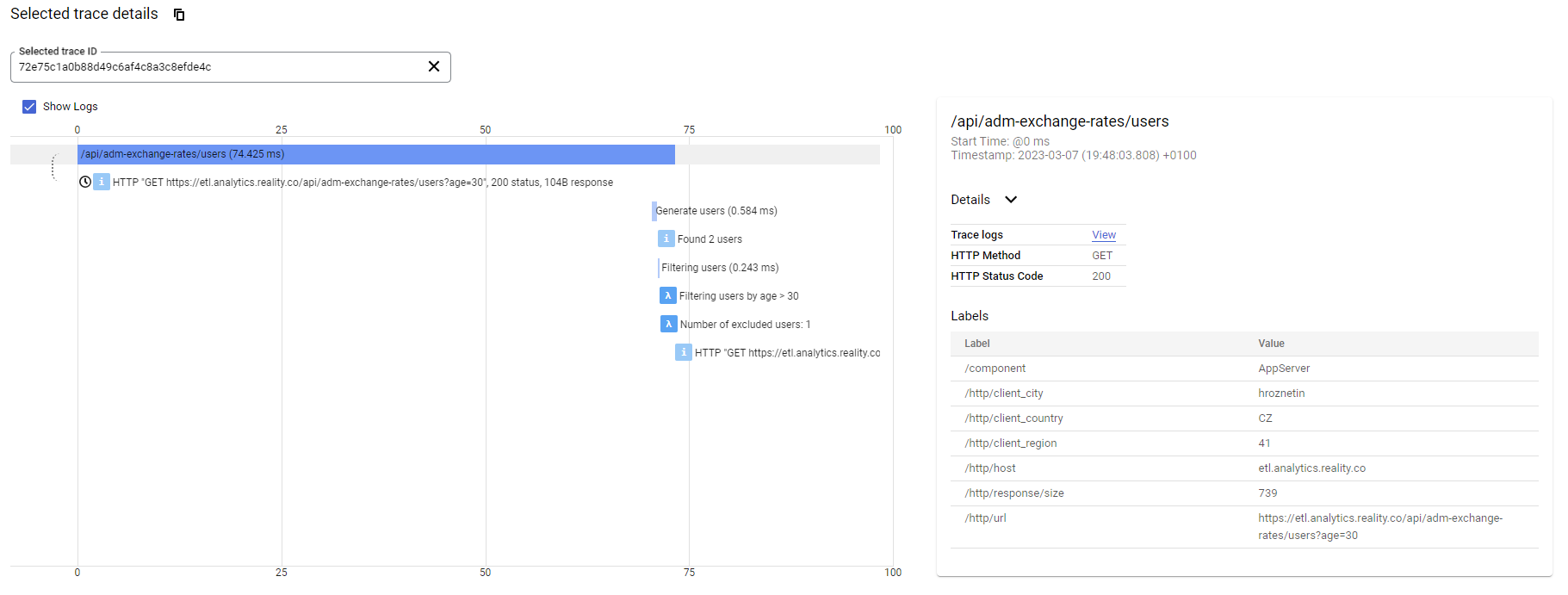
as well as the traces are available in Google Cloud Platform console within Stackdriver Trace:
Local development
You are more than welcome to contribute to this project. To make your start easier we have prepared a docker image with all the necessary tools to run it as interpreter for Pycharm or to run tests.
Build docker image
docker build `
     --tag surquest/fastapi/utils `
     --file package.base.dockerfile `
     --target test .
Run tests
docker run --rm -it `
 -v "${pwd}:/opt/project" `
 -e "GOOGLE_APPLICATION_CREDENTIALS=/opt/project/credentials/keyfile.json" `
 -w "/opt/project/test" `
 surquest/fastapi/utils pytest
Release history Release notifications | RSS feed

Download files
Download the file for your platform. If you're not sure which to choose, learn more about installing packages.
Source Distribution
Built Distribution
Filter files by name, interpreter, ABI, and platform.
If you're not sure about the file name format, learn more about wheel file names.
Copy a direct link to the current filters
File details
Details for the file surquest_fastapi_utils-0.2.8.tar.gz.
File metadata
- Download URL: surquest_fastapi_utils-0.2.8.tar.gz
- Upload date:
- Size: 111.4 kB
- Tags: Source
- Uploaded using Trusted Publishing? No
- Uploaded via: twine/6.2.0 CPython/3.9.25
File hashes
| Algorithm | Hash digest | |
|---|---|---|
| SHA256 |
df6107ada81d5783f65913f23b54903626e8421ebc45068646d07c897fe6fc29
|
|
| MD5 |
c0b3ba1340255f5fc22f8783aa8533f5
|
|
| BLAKE2b-256 |
de915b13b3ed3b81721d8c5f951912b0e258b3aa51dfec532e3907a3dc7a414b
|
File details
Details for the file surquest_fastapi_utils-0.2.8-py2.py3-none-any.whl.
File metadata
- Download URL: surquest_fastapi_utils-0.2.8-py2.py3-none-any.whl
- Upload date:
- Size: 16.1 kB
- Tags: Python 2, Python 3
- Uploaded using Trusted Publishing? No
- Uploaded via: twine/6.2.0 CPython/3.9.25
File hashes
| Algorithm | Hash digest | |
|---|---|---|
| SHA256 |
a95231e49181060bcc535e19d1beb56af12b0daea95663966b75dd3756251536
|
|
| MD5 |
00cff652f18d5ff6cbfb37d271411908
|
|
| BLAKE2b-256 |
c8d71e2eb585998c8faa04b34d33b8d6e894ee7b9a1eedcc4e6aaa3c84981ae8
|






