
SVG helpers


Tools to help make SVG graphics with python. No dependencies.
Install
pip install svg-helpers
Getting started
The goal is to be as close as is practical to writing SVG directly in python.
Start with make_svg then add elements with add_element. All
elements have the add_element method so they can be nested.
import svg_helpers

width = 150
height = width * 2 / 3
r = height * 3 / 10

svg = svg_helpers.make_svg(width=width, height=height)
group = svg.add_element("g")
group.add_element(
    "rect", width=width, height=height, fill="white", stroke="#eee"
)
group.add_element("circle", cx=width / 2, cy=height / 2, r=r, fill="#bc002d")
svg.save("japan.svg")

Though with something as simple as this, consider just using f-string formatting. It can sometimes be difficult to get the quotes right, though.
print(f"""
<svg xmlns="http://www.w3.org/2000/svg" width="{width}" height="{height}">
  <g>
    <rect width="{width}" height="{height}" fill="white" stroke="#eee" />
    <circle cx="{width/2}" cy="{height/2}" r="{r}" fill="#bc002d" />
  </g>
</svg>
""")
Names always match the SVG names. For example, svg rect elements
have an x and y property, so use x and y to make a rect.
Underscores in attribute names become dashes (stroke_width=1 →
stroke-width="1"), and a trailing underscore is stripped so you can
escape Python keywords (class_="hi" → class="hi",
from_="0" → from="0").
For attribute names that aren't valid Python keyword arguments at all
(e.g. xlink:href, inkscape:groupmode), pass them via ** unpack
or as an explicit attrib= dict. Both forms produce identical output:
svg.add_element("use", **{"xlink:href": "#circle"})
svg.add_element("use", attrib={"xlink:href": "#circle"})
Adding raw markup
Adding elements from strings can be helpful for text, especially when
it has <tspan> elements in it:
from svg_helpers import make_svg

width = 500
height = 100
noun = "banana"

svg = make_svg(width=width, height=height)
svg.add_from_string("""
<style>
  .small {
    font: italic 24px serif;
  }
  .small > tspan {
    font: bold 20px sans-serif;
    fill: red;
  }
</style>
""")
svg.add_element(
    "rect", width=width, height=height, fill="white", stroke="#eee"
)
svg.add_from_string(
    f'<text x="{width / 2}" y="{height / 2}" text-anchor="middle" class="small">'
    f"You are <tspan>not</tspan> a {noun}!"
    "</text>"
)
svg.save("banana.svg")

Shapes from shapely
If you have shapely installed, you
can pass any geometry directly to add_shape and it'll be drawn as
a <path> (or a group of paths for compound shapes):
import math
import random

import shapely

from svg_helpers import make_svg

random.seed(0)

n = 7
r = 50
r2 = math.pi * r / n
svg = make_svg(width=200, height=200, viewBox="-100 -100 200 200")
circles = [shapely.Point(0, 0).buffer(r)]
for i in range(n):
    angle = 2 * math.pi * (i / n)
    x = r * math.cos(angle)
    y = r * math.sin(angle)
    circles.append(shapely.Point(x, y).buffer(r2 * (0.5 + random.random())))

union = shapely.unary_union(circles)
shape = union.exterior.buffer(10)
svg.add_shape(shape, fill_opacity=0.5, stroke="black", precision=1)
svg.save("cloud.svg")

For shapes with many points, pass precision=N to round coordinates
and strip trailing zeros:
svg.add_shape(big_polygon, precision=2, fill="red")
Recipes
The svg_helpers.recipes module is a grab-bag of higher-level helpers
for patterns that come up enough to be worth reusing. They're
reachable via element.recipes.add_<name>(...), or by importing the
underlying make_<name> factory directly.
Recipes should be considered less stable than the core: they may change or be removed. If you depend on one and want it stable, copy it into your project.
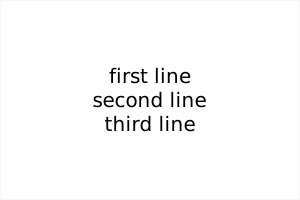
recipes.make_text (and parent.recipes.add_text) lays out multi-line
text using <tspan> children, with vertical_align of "top",
"middle", or "bottom":
from svg_helpers import make_svg

svg = make_svg(width=300, height=200)
svg.add_element("rect", width=300, height=200, fill="white", stroke="#eee")
svg.recipes.add_text(
    "first line\nsecond line\nthird line",
    x=150,
    y=100,
    vertical_align="middle",
    text_anchor="middle",
    font_family="sans-serif",
    font_size=20,
)
svg.save("text.svg")
Animation
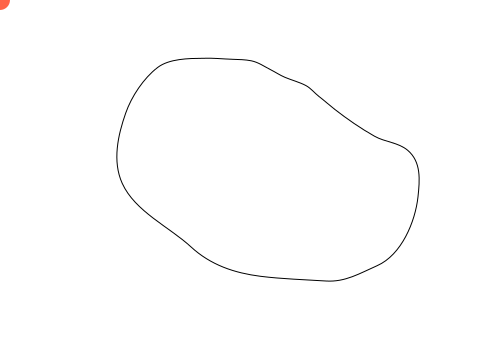
Here's an example with animation:
import svg_helpers

svg = svg_helpers.make_svg(width=500, height=350, viewBox="0 0 500 350")

motion_path_d = (
    "M202.4,58.3c-13.8,0.1-33.3,0.4-44.8,9.2"
    "c-14,10.7-26.2,29.2-31.9,45.6c-7.8,22.2-13.5,48-3.5,70.2"
    "c12.8,28.2,47.1,43.6,68.8,63.6c19.6,18.1,43.4,26.1,69.5,29.4"
    "c21.7,2.7,43.6,3.3,65.4,4.7c19.4,1.3,33.9-7.7,51.2-15.3"
    "c24.4-10.7,38.2-44,40.9-68.9c1.8-16.7,3.4-34.9-10.3-46.5"
    "c-9.5-8-22.6-8.1-33.2-14.1c-13.7-7.7-27.4-17.2-39.7-26.8"
    "c-5.4-4.2-10.4-8.8-15.8-12.9c-4.5-3.5-8.1-8.3-13.2-11"
    "c-6.2-3.3-14.3-5.4-20.9-8.2c-5-2.1-9.5-5.2-14.3-7.6"
    "c-6.5-3.3-12.1-7.4-19.3-8.9c-6-1.2-12.4-1.3-18.6-1.5"
    "C222.5,59,212.5,57.8,202.4,58.3"
)
svg.add_element(
    "path",
    id="motionPath",
    fill="none",
    stroke="black",
    stroke_miterlimit=10,
    d=motion_path_d,
)
circle = svg.add_element("circle", r=10, cx=0, cy=0, fill="tomato")
animate = circle.add_element(
    "animateMotion",
    dur="5s",
    fill="freeze",
    repeatCount="indefinite",
)
animate.add_element("mpath", href="#motionPath")

svg.save("animated.svg")
Putting it together
This example combines <defs>, a <linearGradient>, a <filter>
(drop shadow), an exemplar <g> reused via <use>, and an
<animateTransform>:
import svg_helpers

width = 600
height = 60
n_shapes = 10

svg = svg_helpers.make_svg(width=width, height=height)
defs = svg.add_element("defs")

# Orange to pink gradient
grad = defs.add_element(
    "linearGradient", id="grad", x1="0%", y1="0%", x2="100%", y2="0%"
)
grad.add_element("stop", offset="0%", stop_color="#ff8a3d")
grad.add_element("stop", offset="100%", stop_color="#ff3d96")

# Drop shadow
shadow = defs.add_element(
    "filter", id="shadow", x="-50%", y="-50%", width="200%", height="200%"
)
shadow.add_element(
    "feGaussianBlur", in_="SourceAlpha", stdDeviation=2, result="blur"
)
shadow.add_element("feOffset", in_="blur", dx=2, dy=2, result="offset")
merge = shadow.add_element("feMerge")
merge.add_element("feMergeNode", in_="offset")
merge.add_element("feMergeNode", in_="SourceGraphic")

# Reusable element
exemplar = defs.add_element("g", id="exemplar")
exemplar.add_element(
    "rect",
    x=-12,
    y=-12,
    width=24,
    height=24,
    fill="url(#grad)",
    filter="url(#shadow)",
)
exemplar.add_element(
    "animateTransform",
    attributeName="transform",
    type="rotate",
    from_="0",
    to="360",
    dur="6s",
    repeatCount="indefinite",
)

svg.add_element("rect", fill="#82c8e5", width="600", height=60)

# Use "use" to tile exemplar
for i in range(n_shapes):
    svg.add_element(
        "use",
        href="#exemplar",
        x=30 + i * (width - 60) / (n_shapes - 1),
        y=height / 2,
    )

svg.save("banner.svg")

More examples
More examples are available in examples/.
Alternatives
This library is basically just a wrapper around the standard library
xml.etree. It doesn't check that what you produce is actually valid
SVG.
If you want something more fully-featured:
Goals
- Friendly syntax that's as close as is practical to writing SVG directly.
- No dependencies. Can import just about anywhere, and other projects can import it without importing fifteen billion other packages.
License
MIT.
1 maintainer

Metadata
1 maintainer
Release files for svg-helpers 1.0.0
For a detailed explanation of source distributions (sdists) and built distributions (wheels), please see the package formats documentation.
Source distribution (sdist)
| File | Size | Uploaded | Provenance | |
|---|---|---|---|---|
| svg_helpers-1.0.0.tar.gz | 87.9 kB | Without provenance | Details |
Built distribution (wheel)
| File | Interpreter | ABI | Platform | Reset |
|---|---|---|---|---|
| svg_helpers-1.0.0-py3-none-any.whl | Python 3 | none | any | Details |
Total release size: 102.2 kB
Release files / svg_helpers-1.0.0.tar.gz
| Download URL | svg_helpers-1.0.0.tar.gz |
|---|---|
| Size | 87.9 kB |
| Tags | Source |
|
SHA-256 checksum How to use checksums |
344273bdb32fdd2196cc81c813291b2c4521b94c4d596a4e30f679a861107f08
|
|
BLAKE2b-256 checksum How to use checksums |
8f3862ce7a615db7a3eacb243e7148430c7e5c691f766531d606c19553133f4a
|
| Upload date | |
|
Uploaded using Trusted Publishing? What is trusted publishing? |
No |
| Uploaded via |
uv/0.11.11 {"installer":{"name":"uv","version":"0.11.11","subcommand":["publish"]},"python":null,"implementation":{"name":null,"version":null},"distro":{"name":"macOS","version":null,"id":null,"libc":null},"system":{"name":null,"release":null},"cpu":null,"openssl_version":null,"setuptools_version":null,"rustc_version":null,"ci":null}
|
Release files / svg_helpers-1.0.0-py3-none-any.whl
| Download URL | svg_helpers-1.0.0-py3-none-any.whl |
|---|---|
| Size | 14.3 kB |
| Tags | Python 3 |
|
SHA-256 checksum How to use checksums |
b3eb6e90b9a03cdcdbcdf0c1ef134eb90cd9e04e638451ad67a08b5e81eca4b1
|
|
BLAKE2b-256 checksum How to use checksums |
1e26d10630501cc5c1526f7215367fbf057f57a1f8700508df416cdf3fb477d0
|
| Upload date | |
|
Uploaded using Trusted Publishing? What is trusted publishing? |
No |
| Uploaded via |
uv/0.11.11 {"installer":{"name":"uv","version":"0.11.11","subcommand":["publish"]},"python":null,"implementation":{"name":null,"version":null},"distro":{"name":"macOS","version":null,"id":null,"libc":null},"system":{"name":null,"release":null},"cpu":null,"openssl_version":null,"setuptools_version":null,"rustc_version":null,"ci":null}
|
Security for svg-helpers 1.0.0
Provenance
Provenance describes where a file came from. On PyPI, provenance is shared via attestations, which provide a verifiable record of the build or publishing details. View details, limitations and caveats.
No provenance found
None of the files in this release were uploaded with provenance metadata.
A note on package security
PyPI is a repository for distributing packages, not a service for auditing them. While third-party security researchers and our staff do their best to detect and remove malicious packages, PyPI cannot guarantee the quality, security or suitability of any given package.
To learn more about protecting yourself from malicious actors, visit our package security documentation.














