
Tools to help make SVG graphics with Python.

Project description
SVG helpers


Tools to help make SVG graphics with python. No dependencies.
Install
pip install svg-helpers
Getting started
The goal is to be as close as is practical to writing SVG directly in python.
Start with make_svg then add elements with add_element. All
elements have the add_element method so they can be nested.
import svg_helpers

width = 150
height = width * 2 / 3
r = height * 3 / 10

svg = svg_helpers.make_svg(width=width, height=height)
group = svg.add_element("g")
group.add_element(
    "rect", width=width, height=height, fill="white", stroke="#eee"
)
group.add_element("circle", cx=width / 2, cy=height / 2, r=r, fill="#bc002d")
svg.save("japan.svg")

Though with something as simple as this, consider just using f-string formatting. It can sometimes be difficult to get the quotes right, though.
print(f"""
<svg xmlns="http://www.w3.org/2000/svg" width="{width}" height="{height}">
  <g>
    <rect width="{width}" height="{height}" fill="white" stroke="#eee" />
    <circle cx="{width/2}" cy="{height/2}" r="{r}" fill="#bc002d" />
  </g>
</svg>
""")
Names always match the SVG names. For example, svg rect elements
have an x and y property, so use x and y to make a rect.
Underscores in attribute names become dashes (stroke_width=1 →
stroke-width="1"), and a trailing underscore is stripped so you can
escape Python keywords (class_="hi" → class="hi",
from_="0" → from="0").
For attribute names that aren't valid Python keyword arguments at all
(e.g. xlink:href, inkscape:groupmode), pass them via ** unpack
or as an explicit attrib= dict. Both forms produce identical output:
svg.add_element("use", **{"xlink:href": "#circle"})
svg.add_element("use", attrib={"xlink:href": "#circle"})
Adding raw markup
Adding elements from strings can be helpful for text, especially when
it has <tspan> elements in it:
from svg_helpers import make_svg

width = 500
height = 100
noun = "banana"

svg = make_svg(width=width, height=height)
svg.add_from_string("""
<style>
  .small {
    font: italic 24px serif;
  }
  .small > tspan {
    font: bold 20px sans-serif;
    fill: red;
  }
</style>
""")
svg.add_element(
    "rect", width=width, height=height, fill="white", stroke="#eee"
)
svg.add_from_string(
    f'<text x="{width / 2}" y="{height / 2}" text-anchor="middle" class="small">'
    f"You are <tspan>not</tspan> a {noun}!"
    "</text>"
)
svg.save("banana.svg")

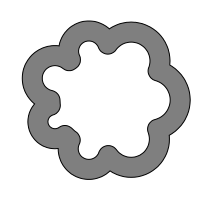
Shapes from shapely
If you have shapely installed, you
can pass any geometry directly to add_shape and it'll be drawn as
a <path> (or a group of paths for compound shapes):
import math
import random

import shapely

from svg_helpers import make_svg

random.seed(0)

n = 7
r = 50
r2 = math.pi * r / n
svg = make_svg(width=200, height=200, viewBox="-100 -100 200 200")
circles = [shapely.Point(0, 0).buffer(r)]
for i in range(n):
    angle = 2 * math.pi * (i / n)
    x = r * math.cos(angle)
    y = r * math.sin(angle)
    circles.append(shapely.Point(x, y).buffer(r2 * (0.5 + random.random())))

union = shapely.unary_union(circles)
shape = union.exterior.buffer(10)
svg.add_shape(shape, fill_opacity=0.5, stroke="black", precision=1)
svg.save("cloud.svg")
For shapes with many points, pass precision=N to round coordinates
and strip trailing zeros:
svg.add_shape(big_polygon, precision=2, fill="red")
Recipes
The svg_helpers.recipes module is a grab-bag of higher-level helpers
for patterns that come up enough to be worth reusing. They're
reachable via element.recipes.add_<name>(...), or by importing the
underlying make_<name> factory directly.
Recipes should be considered less stable than the core: they may change or be removed. If you depend on one and want it stable, copy it into your project.
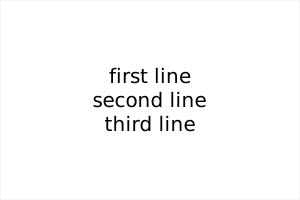
recipes.make_text (and parent.recipes.add_text) lays out multi-line
text using <tspan> children, with vertical_align of "top",
"middle", or "bottom":
from svg_helpers import make_svg

svg = make_svg(width=300, height=200)
svg.add_element("rect", width=300, height=200, fill="white", stroke="#eee")
svg.recipes.add_text(
    "first line\nsecond line\nthird line",
    x=150,
    y=100,
    vertical_align="middle",
    text_anchor="middle",
    font_family="sans-serif",
    font_size=20,
)
svg.save("text.svg")
Animation
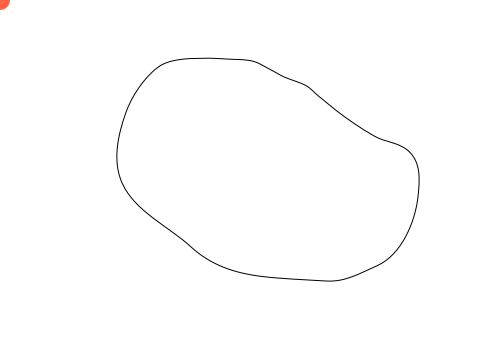
Here's an example with animation:
import svg_helpers

svg = svg_helpers.make_svg(width=500, height=350, viewBox="0 0 500 350")

motion_path_d = (
    "M202.4,58.3c-13.8,0.1-33.3,0.4-44.8,9.2"
    "c-14,10.7-26.2,29.2-31.9,45.6c-7.8,22.2-13.5,48-3.5,70.2"
    "c12.8,28.2,47.1,43.6,68.8,63.6c19.6,18.1,43.4,26.1,69.5,29.4"
    "c21.7,2.7,43.6,3.3,65.4,4.7c19.4,1.3,33.9-7.7,51.2-15.3"
    "c24.4-10.7,38.2-44,40.9-68.9c1.8-16.7,3.4-34.9-10.3-46.5"
    "c-9.5-8-22.6-8.1-33.2-14.1c-13.7-7.7-27.4-17.2-39.7-26.8"
    "c-5.4-4.2-10.4-8.8-15.8-12.9c-4.5-3.5-8.1-8.3-13.2-11"
    "c-6.2-3.3-14.3-5.4-20.9-8.2c-5-2.1-9.5-5.2-14.3-7.6"
    "c-6.5-3.3-12.1-7.4-19.3-8.9c-6-1.2-12.4-1.3-18.6-1.5"
    "C222.5,59,212.5,57.8,202.4,58.3"
)
svg.add_element(
    "path",
    id="motionPath",
    fill="none",
    stroke="black",
    stroke_miterlimit=10,
    d=motion_path_d,
)
circle = svg.add_element("circle", r=10, cx=0, cy=0, fill="tomato")
animate = circle.add_element(
    "animateMotion",
    dur="5s",
    fill="freeze",
    repeatCount="indefinite",
)
animate.add_element("mpath", href="#motionPath")

svg.save("animated.svg")
Putting it together
This example combines <defs>, a <linearGradient>, a <filter>
(drop shadow), an exemplar <g> reused via <use>, and an
<animateTransform>:
import svg_helpers

width = 600
height = 60
n_shapes = 10

svg = svg_helpers.make_svg(width=width, height=height)
defs = svg.add_element("defs")

# Orange to pink gradient
grad = defs.add_element(
    "linearGradient", id="grad", x1="0%", y1="0%", x2="100%", y2="0%"
)
grad.add_element("stop", offset="0%", stop_color="#ff8a3d")
grad.add_element("stop", offset="100%", stop_color="#ff3d96")

# Drop shadow
shadow = defs.add_element(
    "filter", id="shadow", x="-50%", y="-50%", width="200%", height="200%"
)
shadow.add_element(
    "feGaussianBlur", in_="SourceAlpha", stdDeviation=2, result="blur"
)
shadow.add_element("feOffset", in_="blur", dx=2, dy=2, result="offset")
merge = shadow.add_element("feMerge")
merge.add_element("feMergeNode", in_="offset")
merge.add_element("feMergeNode", in_="SourceGraphic")

# Reusable element
exemplar = defs.add_element("g", id="exemplar")
exemplar.add_element(
    "rect",
    x=-12,
    y=-12,
    width=24,
    height=24,
    fill="url(#grad)",
    filter="url(#shadow)",
)
exemplar.add_element(
    "animateTransform",
    attributeName="transform",
    type="rotate",
    from_="0",
    to="360",
    dur="6s",
    repeatCount="indefinite",
)

svg.add_element("rect", fill="#82c8e5", width="600", height=60)

# Use "use" to tile exemplar
for i in range(n_shapes):
    svg.add_element(
        "use",
        href="#exemplar",
        x=30 + i * (width - 60) / (n_shapes - 1),
        y=height / 2,
    )

svg.save("banner.svg")

More examples
More examples are available in examples/.
Alternatives
This library is basically just a wrapper around the standard library
xml.etree. It doesn't check that what you produce is actually valid
SVG.
If you want something more fully-featured:
Goals
- Friendly syntax that's as close as is practical to writing SVG directly.
- No dependencies. Can import just about anywhere, and other projects can import it without importing fifteen billion other packages.
License
MIT.
Release history Release notifications | RSS feed


Download files
Download the file for your platform. If you're not sure which to choose, learn more about installing packages.
Source Distribution
Built Distribution
Filter files by name, interpreter, ABI, and platform.
If you're not sure about the file name format, learn more about wheel file names.
Copy a direct link to the current filters
File details
Details for the file svg_helpers-1.0.0.tar.gz.
File metadata
- Download URL: svg_helpers-1.0.0.tar.gz
- Upload date:
- Size: 87.9 kB
- Tags: Source
- Uploaded using Trusted Publishing? No
- Uploaded via: uv/0.11.11 {"installer":{"name":"uv","version":"0.11.11","subcommand":["publish"]},"python":null,"implementation":{"name":null,"version":null},"distro":{"name":"macOS","version":null,"id":null,"libc":null},"system":{"name":null,"release":null},"cpu":null,"openssl_version":null,"setuptools_version":null,"rustc_version":null,"ci":null}
File hashes
| Algorithm | Hash digest | |
|---|---|---|
| SHA256 |
344273bdb32fdd2196cc81c813291b2c4521b94c4d596a4e30f679a861107f08
|
|
| MD5 |
eaa10188f802b644144fa25903f9dd3e
|
|
| BLAKE2b-256 |
8f3862ce7a615db7a3eacb243e7148430c7e5c691f766531d606c19553133f4a
|
File details
Details for the file svg_helpers-1.0.0-py3-none-any.whl.
File metadata
- Download URL: svg_helpers-1.0.0-py3-none-any.whl
- Upload date:
- Size: 14.3 kB
- Tags: Python 3
- Uploaded using Trusted Publishing? No
- Uploaded via: uv/0.11.11 {"installer":{"name":"uv","version":"0.11.11","subcommand":["publish"]},"python":null,"implementation":{"name":null,"version":null},"distro":{"name":"macOS","version":null,"id":null,"libc":null},"system":{"name":null,"release":null},"cpu":null,"openssl_version":null,"setuptools_version":null,"rustc_version":null,"ci":null}
File hashes
| Algorithm | Hash digest | |
|---|---|---|
| SHA256 |
b3eb6e90b9a03cdcdbcdf0c1ef134eb90cd9e04e638451ad67a08b5e81eca4b1
|
|
| MD5 |
50f0dc1a8ad5fa57a332df97b2cf0b0b
|
|
| BLAKE2b-256 |
1e26d10630501cc5c1526f7215367fbf057f57a1f8700508df416cdf3fb477d0
|






