
Generate simple SVG snippets for use in Jupyter.
Verified details
These details have been verified by PyPIProject links
GitHub Statistics
Maintainers

Project description
svg_snip
svg_snip is a Python package that provides a collection of functions for generating SVG snippets. These functions are designed to simplify the creation of SVG elements, such as rectangles, circles, lines, text and more. You can use this to display procedurally generated SVG graphics in your Jupyter notebook.
With an optional install of ipywidgets and ipycanvas, also as an interactive visualization tool, which generates SVG snippets in the backend and performs the rendering in the frontend.
Installation
Using pip (recommended)
You can install svg_snip from PyPI using pip:
pip install svg_snip
From source
You can also install directly from the GitHub repository:
pip install git+https://github.com/aaichert/svg_snip.git
Optional extras
The core package only requires numpy and supports SVG generation without Jupyter or Pillow.
Pillowis optional and enables embedding PIL images into SVG withsvg_snip.Composer.image().IPython,ipywidgets, andipycanvasare optional and enable Jupyter display helpers.
Install optional extras as needed:
pip install svg_snip[pillow]
pip install svg_snip[jupyter]
pip install svg_snip[full]
Or clone and install locally:
git clone https://github.com/aaichert/svg_snip
cd svg_snip
pip install -e .
Basic Usage
from svg_snip.Composer import Composer
from svg_snip.Elements import circle
svg = Composer([200,200])
svg.add(circle, cx=100, cy=100, r=10, stroke='blue')
print(svg.render())
produces:
<svg width="200" height="200" viewBox="0 0 200 200" xmlns="http://www.w3.org/2000/svg">
  <circle cx="100.00" cy="100.00" r="10.00" stroke="blue" />
</svg>
Displaying SVG in Jupyter
from svg_snip.Composer import Composer
from svg_snip.Elements as e2d
svg = Composer([250,200])
svg.add(e2d.rect, x=0, y=25, width=250, height= 50, fill='blue')
svg.add(e2d.rect, x=0, y=125, width=250, height= 50, fill='blue')
svg.add(e2d.heart, x=10, y=100, size=100, angle=-45, fill='red')

svg.display(debug=True)
produces:
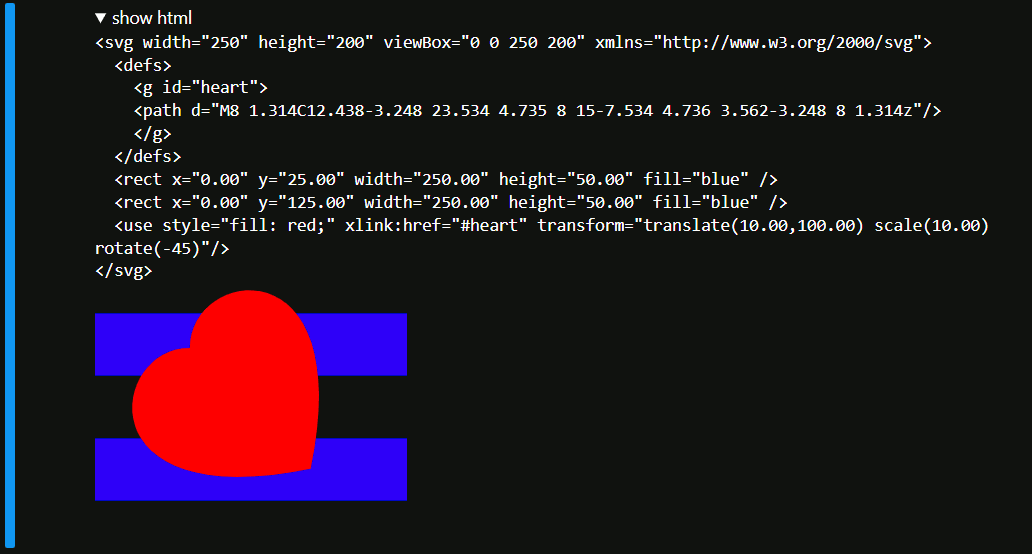
This example also demonstrates, that the library is able to correctly collect <defs> for later reference.
Groups
Here is an example that defins a Group. You can add SVG elements to the Group just like you would to a Composer.
This allows you to define complex objects once and re-use them as needed.
You can pass additional attributes, such as a transform to the group
g = Group()
g.add(e2d.rect, x=20, y=20, width=30, height=30, fill='blue')
svg.add(g, transform=f'rotate({10} 50 50)')
Extending the functionality
All you need to call Composer.add is a function that returns a string. Of course the string should be valid <svg>.
Here is a simple example which adds two lines that form an X to an SVG:
def x(x=0, y=0):
    return f""" \
<line x1="{x-5}" y1="{y-5}" x2="{x+5}" y2="{y+5}" stroke-width="2"/>
<line x1="{x-5}" y1="{y+5}" x2="{x+5}" y2="{y-5}" stroke-width="2"/>
"""
You can then use the x function along any other element from svg_snip.Elements, e.g. draw the green x on a white rect
from svg_snip.Composer import Composer
from svg_snip.Elements import rect

svg = Composer((100,100))
svg.add(rect, x=0, y=0, width=100, height=100, fill='white')
svg.add(x, x=50, y=50)
svg.display()
Interactive Visualization in Jupyter
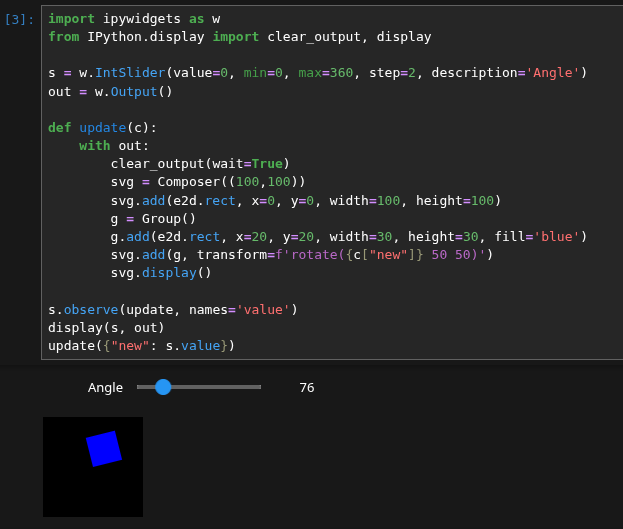
Here is an example using ipywidgets to create a slider that can affect the visualization interactively. Jupyter is decently fast with updating short HTML fragments. You loose most time running the python kernel in the backend and sending resulting text to the frontend.
For debugging and scientific visualizations, this is easily fast enough.
import ipywidgets as w
from IPython.display import clear_output, display

s = w.IntSlider(value=0, min=0, max=360, step=2, description='Angle')
out = w.Output()

def update(c):
    with out:
        clear_output(wait=True)
        svg = Composer((100,100))
        svg.add(e2d.rect, x=0, y=0, width=100, height=100)
        g = Group()
        g.add(e2d.rect, x=20, y=20, width=30, height=30, fill='blue')
        svg.add(g, transform=f'rotate({c["new"]} 50 50)')
        svg.display()

s.observe(update, names='value')
display(s, out)
update({"new": s.value})
Recommended Additional Packages
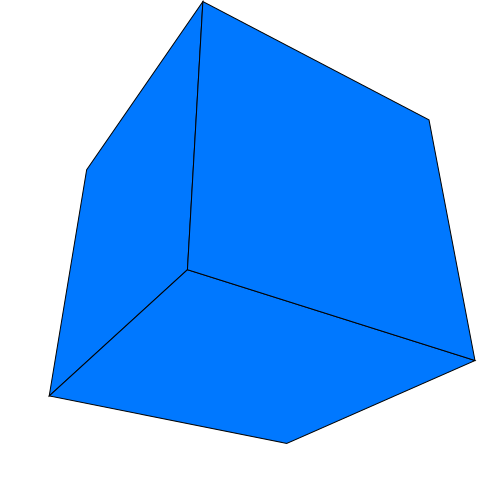
The package ProjectiveGeometry23 can be used for simple 3D graphics.
Please see example_3D_cube.ipynb for more information on how to make advanced use of this library. You can rotate this cube interactively when you run the Jupyter notebook.
Here is an example on how to use the library for vector-overlays on existing raster images, e.g. for scientific publication.

The package html_snippets is in an earlier development stage. However, it supports generating animations based on SVG frames for use in HTML documents.
from html_snippets import html_animation_css
import numpy as np

from svg_snip.Composer import Composer
import svg_snip.Elements as e2d
import svg_snip.Elements3D as e3d

from ProjectiveGeometry23.central_projection import ProjectionMatrix
from ProjectiveGeometry23.homography import rotation_x, rotation_z

P_lookat = ProjectionMatrix.perspective_look_at(
    eye=np.array([0, 0, 250]),
    center=np.array([0, 0, 0]),
    image_size=(300, 300),
    fovy_rad=0.7
)

def generate_svg_cube(angle_x, angle_z):
    svg = Composer((300,300))
    svg.add(e2d.rect, fill='white', width=300, height=300)
    svg.add(e3d.wire_cube, min=[-50,-50,-50], max=[50,50,50], stroke='black')
    T = rotation_x(angle_x) @ rotation_z(angle_z)
    return svg.render(P=P_lookat.P @ T)

# Generate an animation
frames = [generate_svg_cube(1,angle) for angle in np.linspace(0, np.pi / 2, 50)]
html_header, html_body = html_animation_css(frames, frame_duration_sec=0.05)
# Store as HTML file
with open('example_animation.html', 'w') as file:
    file.write(html_header+html_body)
License
This project is licensed under the Apache 2.0 license.
Project details
Verified details
These details have been verified by PyPIProject links
GitHub Statistics
Maintainers


Download files
Download the file for your platform. If you're not sure which to choose, learn more about installing packages.
Source Distribution
Built Distribution
Filter files by name, interpreter, ABI, and platform.
If you're not sure about the file name format, learn more about wheel file names.
Copy a direct link to the current filters
File details
Details for the file svg_snip-1.1.9.tar.gz.
File metadata
- Download URL: svg_snip-1.1.9.tar.gz
- Upload date:
- Size: 131.1 kB
- Tags: Source
- Uploaded using Trusted Publishing? Yes
- Uploaded via: twine/6.1.0 CPython/3.13.12
File hashes
| Algorithm | Hash digest | |
|---|---|---|
| SHA256 |
2b8255d57f2aa0b5d3211d2dd9e9afc3fbcd30b3a86daddbe00db81b9c111f8e
|
|
| MD5 |
23412006cbfe9fb4d53f6215f0b4aa06
|
|
| BLAKE2b-256 |
4ce155cd82a2a6c4f17a6ecc029ca21a217db7eab1ea127fb940dd0e58a78817
|
Provenance
The following attestation bundles were made for svg_snip-1.1.9.tar.gz:
Publisher:
publish.yml on aaichert/svg_snip
-
Statement:
-
Statement type:
https://in-toto.io/Statement/v1 -
Predicate type:
https://docs.pypi.org/attestations/publish/v1 -
Subject name:
svg_snip-1.1.9.tar.gz -
Subject digest:
2b8255d57f2aa0b5d3211d2dd9e9afc3fbcd30b3a86daddbe00db81b9c111f8e - Sigstore transparency entry: 1562774500
- Sigstore integration time:
-
Permalink:
aaichert/svg_snip@f3aed6e265adc91a26910f9792f42c973313b6ec -
Branch / Tag:
refs/tags/v1.1.9 - Owner: https://github.com/aaichert
-
Access:
public
-
Token Issuer:
https://token.actions.githubusercontent.com -
Runner Environment:
github-hosted -
Publication workflow:
publish.yml@f3aed6e265adc91a26910f9792f42c973313b6ec -
Trigger Event:
push
-
Statement type:
File details
Details for the file svg_snip-1.1.9-py3-none-any.whl.
File metadata
- Download URL: svg_snip-1.1.9-py3-none-any.whl
- Upload date:
- Size: 24.0 kB
- Tags: Python 3
- Uploaded using Trusted Publishing? Yes
- Uploaded via: twine/6.1.0 CPython/3.13.12
File hashes
| Algorithm | Hash digest | |
|---|---|---|
| SHA256 |
f2f1041df560ec0d8cd2c8722c722488f92245a034e9d4d8ef8a13728003b7da
|
|
| MD5 |
7119226176e412531556914352b962fc
|
|
| BLAKE2b-256 |
6fd29160a9d4426c4696488740bf324f058d6e152142b9f26613191206d6e3d1
|
Provenance
The following attestation bundles were made for svg_snip-1.1.9-py3-none-any.whl:
Publisher:
publish.yml on aaichert/svg_snip
-
Statement:
-
Statement type:
https://in-toto.io/Statement/v1 -
Predicate type:
https://docs.pypi.org/attestations/publish/v1 -
Subject name:
svg_snip-1.1.9-py3-none-any.whl -
Subject digest:
f2f1041df560ec0d8cd2c8722c722488f92245a034e9d4d8ef8a13728003b7da - Sigstore transparency entry: 1562774557
- Sigstore integration time:
-
Permalink:
aaichert/svg_snip@f3aed6e265adc91a26910f9792f42c973313b6ec -
Branch / Tag:
refs/tags/v1.1.9 - Owner: https://github.com/aaichert
-
Access:
public
-
Token Issuer:
https://token.actions.githubusercontent.com -
Runner Environment:
github-hosted -
Publication workflow:
publish.yml@f3aed6e265adc91a26910f9792f42c973313b6ec -
Trigger Event:
push
-
Statement type:






