

svgdigitizer


Extract (x,y) data points from SVG files
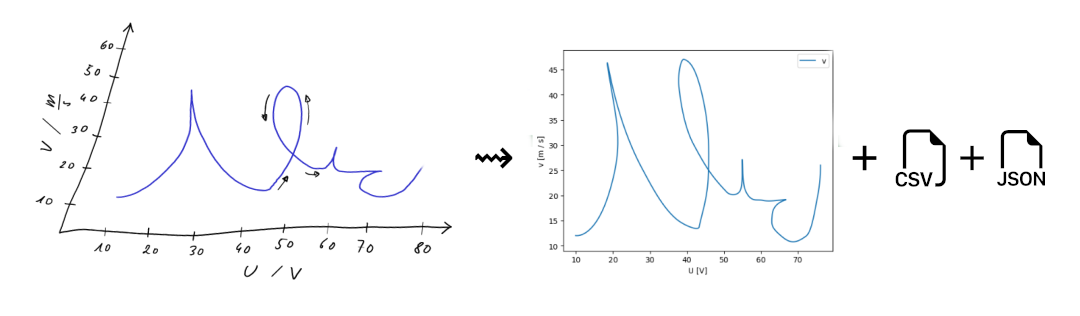
The svgdigitizer allows recovering data from a curve in a figure, plotted in a 2D coordinate system, which is usually found in scientific publications.
The data is accessible either with a command line interface or the API from a specifically prepared scaled vector graphics (SVG) file. The data can be stored as a frictionless datapackage (CSV and JSON) which can be used with unitpackage to access the plots metadata or create a database of such datapackages.
Features
The svgdigitizer has additional features compared to other plot digitizers, such as:
- supports multiple y (x) values per x (y) value
- usage of splines allows for very precise retracing of distinct features
- splines can be digitized with specific sampling intervals
- supports plots with distorted/skewed axis
- extracts units from axis labels
- reconstruct time series with a given scan rate
- supports scale bars
- supports scaling factors
- extracts metadata associated with the plot in the SVG
- saves data as frictionless datapackage (CSV + JSON) allowing for FAIR data usage
- inclusion of metadata in the datapackage
- Python API to interact with the retraced data
Refer to our documentation for more details.
Installation
This package is available on PyPI and can be installed with pip:
pip install svgdigitizer
The package is also available on conda-forge and can be installed with conda
conda install -c conda-forge svgdigitizer
or mamba
mamba install -c conda-forge svgdigitizer
Please consult our documentation for more detailed installation instructions.
Command Line Interface
The CLI allows creating SVG files from PDFs and allows digitizing the processed SVG files. Certain plot types have specific commands to recover different kinds of metadata. Refer to the CLI documentation for more information.
$ svgdigitizer
Usage: svgdigitizer [OPTIONS] COMMAND [ARGS]...

  The svgdigitizer suite.

Options:
  --help  Show this message and exit.

Commands:
  cv        Digitize a cylic voltammogram and create a frictionless datapackage.
  digitize  Digitize a 2D plot and create a frictionless datapackage.
  figure    Alias of the `digitize` command. (DEPRECATED: Use `digitize` instead.)
  paginate  Render PDF pages as individual SVG files with linked PNG images.
  plot      Display a plot of the data traced in an SVG.

$ svgdigitizer digitize doc/files/others/looping_scan_rate.svg --sampling-interval 0.01
API
You can also use the svgdigitizer package directly from Python, to access properties of the SVG or additional properties associated with the figure.
>>> from svgdigitizer.svg import SVG
>>> from svgdigitizer.svgplot import SVGPlot
>>> from svgdigitizer.svgfigure import SVGFigure


>>> figure = SVGFigure(SVGPlot(SVG(open('doc/files/others/looping.svg', 'rb')), sampling_interval=0.01))
Examples:
figure.df provides a dataframe of the digitized curve.
figure.plot() shows a plot of the digitized curve.
figure.metadadata provides a dict with metadata of the original plot, such as original units of the axis.
The svgdigitizer can be enhanced with submodules, which are designed to digitize specific plot types, such as the submodule electrochemistry.cv.
This submodule allows digitizing cyclic voltammograms commonly found in the field of electrochemistry.
>>> from svgdigitizer.svg import SVG
>>> from svgdigitizer.svgplot import SVGPlot
>>> from svgdigitizer.electrochemistry.cv import CV

>>> cv_svg = 'doc/files/mustermann_2021_svgdigitizer_1/mustermann_2021_svgdigitizer_1_f2a_blue.svg'
>>> cv = CV(SVGPlot(SVG(open(cv_svg, 'rb')), sampling_interval=0.01))
The resulting cv object has the same properties as the figure object above.
Contributing and support
Contributions are welcome! Please read our contributing guidelines to learn how to set up a development environment, run the tests and submit a pull request.
- Report bugs and request features in the issue tracker.
- Ask usage questions by opening an issue with the
questionlabel.
Everyone participating in this project is expected to follow our Code of Conduct.
2 maintainers


Metadata
2 maintainers
Release files for svgdigitizer 0.15.0
For a detailed explanation of source distributions (sdists) and built distributions (wheels), please see the package formats documentation.
Source distribution (sdist)
| File | Size | Uploaded | Provenance | Actions |
|---|---|---|---|---|
| svgdigitizer-0.15.0.tar.gz | 119.7 kB | Without provenance | Details for svgdigitizer-0.15.0.tar.gz |
Built distribution (wheel)
| File | Interpreter | ABI | Platform | Actions Reset |
|---|---|---|---|---|
| svgdigitizer-0.15.0-py3-none-any.whl | Python 3 | none | any | Details for svgdigitizer-0.15.0-py3-none-any.whl |
Total release size: 240.7 kB
Release files / svgdigitizer-0.15.0.tar.gz
| Download URL | svgdigitizer-0.15.0.tar.gz |
|---|---|
| Size | 119.7 kB |
| Tags | Source |
|
SHA-256 checksum How to use checksums |
9f41103b8dca25d1a6a6057f6e50e0b1c93d592eb5bce2546b39fcd9feb50683
|
|
BLAKE2b-256 checksum How to use checksums |
8672fba31ecda46482c444018c8166ec0d596c51fce84b4b64d41d376cbfe63e
|
| Upload date | |
|
Uploaded using Trusted Publishing? What is trusted publishing? |
No |
| Uploaded via |
twine/6.2.0 CPython/3.14.5
|
Release files / svgdigitizer-0.15.0-py3-none-any.whl
| Download URL | svgdigitizer-0.15.0-py3-none-any.whl |
|---|---|
| Size | 121.0 kB |
| Tags | Python 3 |
|
SHA-256 checksum How to use checksums |
37757eceac8a08d1e1fbc956c4484b15dbad3cfc65b6397693f390f28f60e2e8
|
|
BLAKE2b-256 checksum How to use checksums |
d854e848ae25eac266c3c9f209bc6af53b53ce0c383f225ab860f22626ec7723
|
| Upload date | |
|
Uploaded using Trusted Publishing? What is trusted publishing? |
No |
| Uploaded via |
twine/6.2.0 CPython/3.14.5
|
Security for svgdigitizer 0.15.0
Provenance
Provenance describes where a file came from. On PyPI, provenance is shared via attestations, which provide a verifiable record of the build or publishing details. View details, limitations and caveats.
No provenance found
None of the files in this release were uploaded with provenance metadata.
A note on package security
PyPI is a repository for distributing packages, not a service for auditing them. While third-party security researchers and our staff do their best to detect and remove malicious packages, PyPI cannot guarantee the quality, security or suitability of any given package.
To learn more about protecting yourself from malicious actors, visit our package security documentation.














