
Swarm-Contrastive Decomposition 🧠



A Python package for decomposition of neurophysiological time series signals using a Particle Swarm Optimised Independence Estimator for Blind Source Separation.
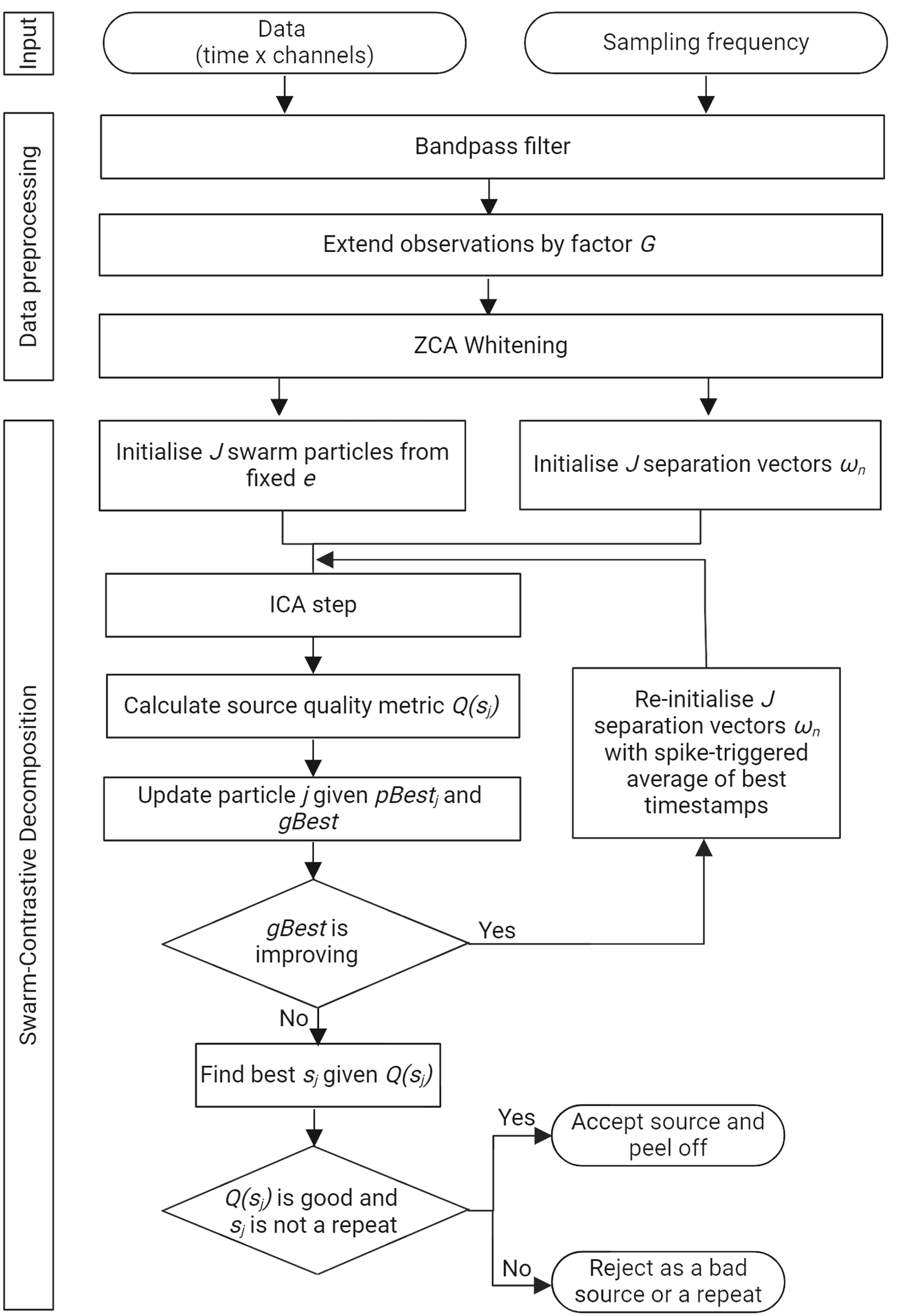
Table of Contents 📚
- Installation
- Quick Start
- Usage
- Editing Results in SCD Edition
- Configuration
- Test Data
- Contributing
- License
- Citation
- Contact
Installation 🛠️
From PyPI (Recommended)
pip install swarm-contrastive-decomposition
From GitHub (Latest Development Version)
pip install git+https://github.com/AgneGris/swarm-contrastive-decomposition.git
From Source
git clone https://github.com/AgneGris/swarm-contrastive-decomposition
cd swarm-contrastive-decomposition
pip install -e .
Verify Installation
python -c "import scd; print(f'SCD version: {scd.__version__}')"
Quick Start 🚀
import scd

# Train with default configuration
dictionary, timestamps = scd.train("path/to/your/data.mat")

# Save results
scd.save_results("data/output/emg.pkl", dictionary)
The saved file can be opened directly in SCD Edition to inspect and edit the motor units — see Editing Results in SCD Edition.
Usage
Basic Usage
import scd

# Use a predefined configuration
dictionary, timestamps = scd.train(
    "path/to/your/data.mat",
    config_name="surface"  # or "default", "intramuscular"
)

scd.save_results("output.pkl", dictionary)
With Configuration Overrides
import scd

# Override specific parameters
dictionary, timestamps = scd.train(
    "path/to/your/data.mat",
    config_name="surface",
    max_iterations=100,  # override for quick testing
    output_final_source_plot=True
)
Step-by-Step Control
import scd

# Load configuration
config = scd.load_config("surface")

# Load data
neural_data = scd.load_data("path/to/your/data.mat", device=config.device)

# Preprocess
neural_data_preprocessed = scd.preprocess_data(neural_data, config)

# Train model
dictionary, timestamps = scd.train_model(neural_data_preprocessed, config)

# Save results, storing the signal as loaded so the file can be edited in SCD Edition
scd.save_results("output.pkl", dictionary, neural_data=neural_data)
In this workflow train_model does not see the loaded signal, so pass it to save_results yourself if you want to edit the results later. Pass the tensor returned by load_data; preprocess_data records what it did (trimming, bad channels) in dictionary["preprocessing_config"], and SCD Edition reproduces it.
Supported Data Formats
.mat— MATLAB files, including HDF5-based v7.3 files (specify the variable name withkeyparameter).npy— NumPy arrays
# For .mat files with custom variable name
dictionary, timestamps = scd.train("data.mat", key="emg_data")

# For .npy files
dictionary, timestamps = scd.train("data.npy")
Data should have shape (time, channels) or (channels, time) — the loader will automatically transpose if needed.
Editing Results in SCD Edition ✏️
SCD Edition is the companion desktop app for this package: it can run the same decomposition from a GUI, and it lets you inspect motor unit action potentials, add or delete discharges, remove outliers, recalculate filters and visualise discharge behaviour. You do not need to decompose inside the app — decompose here, then open the .pkl written by save_results with Load Decomposition in the app's Edition tab.
For that to work the app needs the signal you decomposed, so by default train stores it in the results under dictionary["data"] and save_results writes it to disk. This makes the output file larger by channels × samples × 4 bytes — 26 MB for the bundled test recording (64 channels, 10 s at 10 240 Hz), but around 3 GB for 5 minutes of 256 channels at the same rate. If you do not intend to edit the results, turn it off:
dictionary, timestamps = scd.train("data.mat", config_name="surface", save_data=False)
or set "save_data": false in your config. Without the signal, SCD Edition still opens the file and lets you edit and save spike trains, but MUAP display and filter recalculation are unavailable.
What is stored:
| Key | Content |
|---|---|
data |
The signal exactly as load_data returned it — full length, all channels, before trimming and bad-channel replacement — as a float32 array of shape (channels, samples) |
preprocessing_config |
Filter settings, extension factor, whitening, plus bad_channels, start_time and end_time, so the trimming and channel replacement done by preprocess_data can be reproduced |
w_mat, filters, peel_off_sequence |
Whitening matrix, separation vectors and peel-off history needed to replay the decomposition |
Because the stored signal is the untouched recording, rejected channels are kept and flagged rather than overwritten, and timestamps are stored relative to the trimmed window with the offset recorded, so they line up with the full signal in the editor.
The silhouette (SIL) is not the same number in the two tools
Both tools report a silhouette per motor unit, but they are computed differently and should not be compared or thresholded interchangeably.
This package (dictionary["silhouettes"]) |
SCD Edition (MU properties, Quality chart) | |
|---|---|---|
| When | During decomposition, at the iteration that accepted the unit; frozen in the output | After loading and after every edit, from the unit's current spikes |
| Source | The source of that iteration: computed from the peeled EMG (earlier units removed), restricted to the decomposition window, edge-masked, clamped (adapt_clamp), squared (square_sources_spike_det) |
The full-length source recomputed on load (spike-triggered-average filter on the whole recording, z-scored on the decomposition window), squared; not clamped or edge-masked |
| Points | Every peak of the squared source at least reset_peak_separation_ms apart — spikes and baseline peaks |
Spikes: the unit's current timestamps. Baseline: every peak lower than the smallest spike |
| Classes | Two-class k-medians on peak heights (k-means with use_mean_when_clustering); spikes are the upper cluster |
No clustering — the spike set is whatever the unit currently has |
| Score | For each peak, a = distance to its own centroid, b = distance to the other centroid; SIL = mean over all peaks of (b − a) / max(a, b). With use_pairwise_silhouette the mean distance to the other peaks replaces the centroid distance (a true silhouette) |
Only spike amplitudes enter: d_s = Σ (s − mean_spikes)², d_b = Σ (s − mean_baseline)²; SIL = (d_b − d_s) / max(d_b, d_s) (motor_unit_toolbox.get_silhouette_measure, the formulation of Negro et al., 2016). Squared distances, summed; the baseline enters only through its mean |
| Threshold | acceptance_silhouette (0.85 default, 0.8 in surface) decides whether a source is accepted |
SIL ≥ 0.9 marks a unit as reliable in the Quality chart |
In practice the two values are often close for well-separated units — on the bundled test recording they agree to within 0.01 — but they diverge when the baseline peaks are numerous or spread out (this package averages over them, the toolbox ignores their spread), when a unit has been edited (only SCD Edition's value follows the edits), and whenever the two sources differ (window vs full recording, peeled vs recomputed filter). SCD Edition keeps this package's values under scd_metadata["silhouettes"] for reference but does not display them; the Decomposition tab's SIL Threshold is this package's acceptance_silhouette, not the Quality-chart SIL.
Configuration ⚙️
Configurations are defined in scd/configs.json. Available presets:
| Config Name | Use Case | Sampling Rate | Description |
|---|---|---|---|
default |
General purpose | 10240 Hz | Balanced settings for most EMG data |
surface |
Surface EMG | 10240 Hz | Optimized for surface recordings |
intramuscular |
Intramuscular EMG | 10240 Hz | Higher iterations for fine-wire recordings |
Configuration Parameters
| Parameter | Description | Default |
|---|---|---|
device |
"cuda" for GPU or "cpu"; automatically selected when omitted |
CUDA when available, otherwise CPU |
acceptance_silhouette |
Quality threshold for source acceptance | 0.85 |
extension_factor |
Leave unset to derive 1000 / kept channels automatically. Set it to override. Never capped — see Choosing the Extension Factor |
derived |
bad_channels |
Channel indices to reject. Replaced with noise at the estimated baseline amplitude of the good channels before decomposition, and excluded from the kept-channel count used to derive extension_factor |
null |
low_pass_cutoff |
Low-pass filter cutoff frequency (Hz) | 4400 |
high_pass_cutoff |
High-pass filter cutoff frequency (Hz) | 10 |
sampling_frequency |
Sampling frequency of your signal (Hz) | 10240 |
start_time |
Start time for signal trimming (s). Use 0 for beginning |
0 |
end_time |
End time for signal trimming (s). Use -1 for entire signal |
-1 |
max_iterations |
Maximum decomposition iterations | 200 |
peel_off_window_size_ms |
Window size for spike-triggered average (ms). peel_off_window_size in samples is derived automatically as ms × fs / 1000 |
20 |
reset_peak_separation_ms |
Minimum distance between two detected peaks in the source signal (ms), converted to samples as ms × fs / 1000 |
4.0 |
edge_mask_size_ms |
Masked region at each end of the signal during optimisation (ms), converted to samples as ms × fs / 1000. Set edge_mask_size instead to pin a raw sample count |
19.5 |
output_final_source_plot |
Generate plot of final sources | false |
use_coeff_var_fitness |
Use coefficient of variation fitness. true for EMG, false for intracortical |
true |
remove_bad_fr |
Filter sources with firing rates < 2 Hz or > 100 Hz | true |
adapt_clamp |
Adaptively clamp each source using its personal-best spike statistics; falls back to hard ±30 σ when no spike history exists. Set to false to always use the fixed ±30 σ hard clamp |
true |
save_data |
Store the signal as loaded in the results so the output can be edited in SCD Edition. Costs channels × samples × 4 bytes of disk; set false if you will not edit |
true |
Custom Configuration
Add your own configuration to scd/configs.json:
{
    "my_experiment": {
        "device": "cuda",
        "acceptance_silhouette": 0.80,
        "extension_factor": 30,
        "sampling_frequency": 2048,
        ...
    }
}
Then use it:
dictionary, timestamps = scd.train("data.mat", config_name="my_experiment")
Choosing the Extension Factor
K is chosen so that the extended observation matrix has on the order of 1000 rows:
K ≈ 1000 / M M = kept channels = total channels − bad_channels
This is the default. If extension_factor is absent from your config, SCD derives it from the channel count of the data you pass in and logs the value it used:
INFO - extension_factor not set; using 16 (1000 / 63 kept channels)
Set extension_factor explicitly in your config to override it with any value you like — the derived default applies only when it is unset. All three built-in presets set it explicitly.
To compute the same number yourself:
from scd import recommended_extension_factor

K = recommended_extension_factor(num_channels=64, bad_channels=[56])   # 16
Whatever you set is used as-is: SCD never rejects or adjusts an extension factor. Note that larger K costs time and memory, as the covariance and whitening stages scale roughly with (K · M)² and (K · M)³ respectively, and that whitening runs on CPU.
Changed in 0.2.3
trainnow stores the loaded signal indictionary["data"]by default so the output can be edited in SCD Edition. Output files grow bychannels × samples × 4 bytes; setsave_data=Falseto keep the previous behaviour.save_resultsaccepts a string path and an optionalneural_dataargument for the step-by-step workflow.dictionary["preprocessing_config"]additionally recordsbad_channels,start_time,end_timeandsquare_sources_spike_det.- New helper
signal_to_arrayconverts a loaded tensor to the stored(channels, samples)float32 layout.
Changed in 0.2.0
This release contains breaking changes. Configs written for 0.1.x may need editing — Config rejects unknown keys, so a removed parameter left in a config file raises TypeError on load.
No extension factor is rejected any more. Versions 0.1.7 and 0.1.8 validated extension_factor against a temporal-separation bound K ≤ T − L and raised a ValueError when it was exceeded. That bound is uninformative: SCD's assumed MUAP duration (peel_off_window_size_ms, 20 ms) equals the minimum ISI at max_firing_rate_hz = 50, so it evaluates to zero at every sampling rate. In practice it blocked valid configurations, particularly at lower sampling rates such as 2048 Hz, where the standard 1000 / M choice exceeds it.
| Removed | Reason |
|---|---|
compute_extension_factor_bounds() |
Both bounds it returned are unreachable in practice |
max_firing_rate_hz |
Only ever fed the removed checks |
final_peak_separation |
Referenced nowhere |
Changed defaults:
extension_factorwas a fixed100, which silently produced badly over-extended runs for any config that omitted the key. It is now unset by default and derived as1000 / kept channels.edge_mask_sizeis now specified in ms asedge_mask_size_msand scaled by the sampling rate; it was a raw sample count tuned for 10 240 Hz. Setedge_mask_sizeto pin a sample count instead.- Rejected channels are replaced with baseline noise rather than zeroed. Zeroing left exactly-zero rows in the extended matrix, making the covariance rank-deficient and letting whitening amplify those directions. Amplitude comes from
estimate_baseline_noise, a MAD-based estimate of the noise floor between discharges.
Runs using bad_channels will give different results than 0.1.x. Note also that scd-edition scales its channel fill by the pooled standard deviation of the good channels, which includes MUAP activity; pass noise_std explicitly to replace_bad_channels_with_noise to reproduce its output.
Test Data 🧪
The source repository includes test data to verify a development installation:
- File:
data/input/emg.mat - Type: Surface EMG
- Sampling rate: 10240 Hz
- Configuration: Use
"surface"config
import scd

# Run with test data
dictionary, timestamps = scd.train(
    "data/input/emg.mat",
    config_name="surface"
)

print(f"Found {len(dictionary)} motor units")
Contributing 🤝
We welcome contributions! Here's how you can contribute:
- Fork the repository
- Create a feature branch (
git checkout -b feature/newfeature) - Commit your changes (
git commit -m 'Add some newfeature') - Push to the branch (
git push origin feature/newfeature) - Open a pull request
License 📜
This project is licensed under the BSD 3-Clause License.
Citation
If you use this code in your research, please cite our paper:
@article{grison2024particle,
  author={Grison, Agnese and Clarke, Alexander Kenneth and Muceli, Silvia and Ibáñez, Jaime and Kundu, Aritra and Farina, Dario},
  journal={IEEE Transactions on Biomedical Engineering},
  title={A Particle Swarm Optimised Independence Estimator for Blind Source Separation of Neurophysiological Time Series},
  year={2025},
  volume={72},
  number={1},
  pages={227--237},
  doi={10.1109/TBME.2024.3446806},
  keywords={Recording; Time series analysis; Sorting; Vectors; Measurement; Electrodes; Probes; Independent component analysis; particle swarm optimisation; blind source separation; intramuscular electromyography; intracortical recording}
}

@article{grison2025unlocking,
  title={Unlocking the full potential of high-density surface EMG: novel non-invasive high-yield motor unit decomposition},
  author={Grison, Agnese and Mendez Guerra, Irene and Clarke, Alexander Kenneth and Muceli, Silvia and Ib{\'a}{\~n}ez, Jaime and Farina, Dario},
  journal={The Journal of Physiology},
  volume={603},
  number={8},
  pages={2281--2300},
  year={2025},
  publisher={Wiley Online Library}
}
Contact
For questions or inquiries:
Agnese Grison
📧 agnese.grison@outlook.it
1 maintainer

Metadata
1 maintainer
Release files for swarm-contrastive-decomposition 0.2.3
For a detailed explanation of source distributions (sdists) and built distributions (wheels), please see the package formats documentation.
Source distribution (sdist)
| File | Size | Uploaded | |
|---|---|---|---|
| swarm_contrastive_decomposition-0.2.3.tar.gz | 39.3 kB | Details |
Built distribution (wheel)
| File | Interpreter | ABI | Platform | Reset |
|---|---|---|---|---|
| swarm_contrastive_decomposition-0.2.3-py3-none-any.whl | Python 3 | none | any | Details |
Total release size: 72.0 kB
Release files / swarm_contrastive_decomposition-0.2.3.tar.gz
| Download URL | swarm_contrastive_decomposition-0.2.3.tar.gz |
|---|---|
| Size | 39.3 kB |
| Tags | Source |
|
SHA-256 checksum How to use checksums |
08ad36a37c2cd9cadebd85b6f96d41d01634db96eb682ea515ba522281595b0b
|
|
BLAKE2b-256 checksum How to use checksums |
5bf0816e59e95b88e546ca307ffac68f0dddce7b9b77f5cffd66f542fbe3b7d8
|
| Upload date | |
|
Uploaded using Trusted Publishing? What is trusted publishing? |
No |
| Uploaded via |
twine/7.0.0 CPython/3.13.12
|
Release files / swarm_contrastive_decomposition-0.2.3-py3-none-any.whl
| Download URL | swarm_contrastive_decomposition-0.2.3-py3-none-any.whl |
|---|---|
| Size | 32.6 kB |
| Tags | Python 3 |
|
SHA-256 checksum How to use checksums |
043f9e4bce275da93534c7c18fedb15c9e41b3f1ba14e863e17621015ca1f9ca
|
|
BLAKE2b-256 checksum How to use checksums |
30889075b0d0244643695201c2e220bb39223b2f98a44862078ea9853c7fda2d
|
| Upload date | |
|
Uploaded using Trusted Publishing? What is trusted publishing? |
No |
| Uploaded via |
twine/7.0.0 CPython/3.13.12
|














