
Swarm
Black-box optimisation tool written in Rust. Clean API for solving complex single-objective and multi-objective optimisation problems using powerful metaheuristic algorithms. Swarm has the following features:
- NSGA-II for single/multi-objective problems.
- Particle Swarm Optimisation (PSO) for single-objective problems.
- Optional Parallel Execution (massively improves performance for expensive blackbox functions).
- Flexible Function Support.
Getting Started
Rust
To use Swarm in your project, add it as a dependency in your Cargo.toml:
[dependencies]
swarm = "0.1.2"  # (replace with current version)
This by default includes the parallel feature. This allows the use of solve_par which is very useful for computationally expensive objective functions. To disable it (for more lightweight build, or if parallel not necessary) use default-features = false.
Python
pip install swarm_py
Examples in Rust
All functions provided to Swarm must be of the signature:
FnMut(&[f64]) -> (Vec<f64>, Option<Vec<f64>>)
- The first argument is a reference to a vector of f64 values representing the variables. Variable types are currently limited to f64.
- The first return vector contains the objective values.
- The second return vector contains the constraint values (if any).
- For parallel execution, the function must also be thread-safe (i.e.,
Fn + Sync + Send).
Single-Objective Optimisation with Particle Swarm (PSO)
Problem: Minimise f(x, y) = (x² + y - 11)² + (x + y² - 7)²
use swarm::{error::Result, pso::PsoParams, Optimiser, Variable};

// Define the function (can also use closure)
fn himmelblau(x: &[f64]) -> (Vec<f64>, Option<Vec<f64>>) {
    let f = (x[0].powi(2) + x[1] - 11.0).powi(2) + (x[0] + x[1].powi(2) - 7.0).powi(2);
    (vec![f], None)
}

fn main() -> Result<(), Box<dyn std::error::Error>> {
    // 1. Define the search space for the variables
    let vars = vec![Variable(-5.0, 5.0), Variable(-5.0, 5.0)];

    // 2. Configure the optimiser
    let optimiser = Optimiser::Pso {
        n_particles: 100,
        params: PsoParams::default(),
        constraint_handler: None,
        seed: None,
    };

    // 3. Find the minimum
    let max_iter = 200;
    let result = optimiser.solve(&mut himmelblau, &vars, max_iter)?;
    // Note: 1. You can also call the pso function directly.
    // Note: 2. You can pass a closure directly.
    // Note: 3. For parallel execution use `solve_par`
    // (if feature `parallel` is enabled)

    // 4. Get the best solution found
    let best = &result.solutions[0];
    println!("Min at x = {:.4?}, f(x) = {:.4}", best.x, best.f[0]);
    Ok(())
}
Multi-Objective Optimisation with NSGA-II
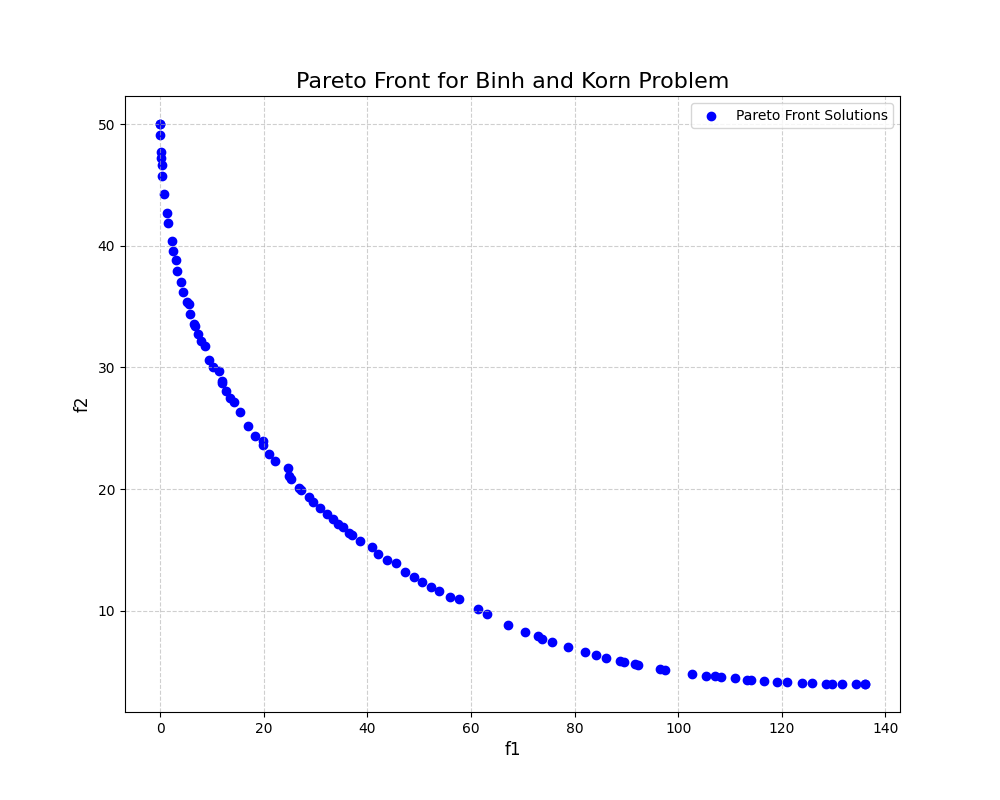
This example solves the constrained Binh and Korn problem. NSGA-II is ideal for this as it finds a set of trade-off solutions, known as the Pareto Front, rather than a single point.
Problem: Minimise two objectives, f1(x, y) and f2(x, y), subject to two constraints.
use swarm::{Optimiser, Variable, SbxParams, PmParams};

// Define the problem (can also use closure)
fn binh_and_korn(x: &[f64]) -> (Vec<f64>, Option<Vec<f64>>) {
    // Objectives
    let f1 = 4.0 * x[0].powi(2) + 4.0 * x[1].powi(2);
    let f2 = (x[0] - 5.0).powi(2) + (x[1] - 5.0).powi(2);

    // Constraints
    let g1 = (x[0] - 5.0).powi(2) + x[1].powi(2) - 25.0;
    let g2 = 7.7 - (x[0] - 8.0).powi(2) - (x[1] + 3.0).powi(2);

    (vec![f1, f2], Some(vec![g1, g2]))
}

fn main() -> Result<(), Box<dyn std::error::Error>> {
    // 1. Define the search space
    let vars = vec![Variable(0.0, 5.0), Variable(0.0, 3.0)];

    // 2. Configure the NSGA-II optimiser
    let optimiser = Optimiser::Nsga {
        pop_size: 50,
        crossover: SbxParams::default(),
        mutation: PmParams::default(),
        seed: None,
    };

    // 3. Solve the problem
    let result = optimiser.solve(&mut binh_and_korn, &vars, 250)?;

    // 4. Get the Pareto front
    println!("Found {} solutions on the Pareto front.", result.solutions.len());

    Ok(())
}
After running the Binh and Korn example and plotting the solutions, you should see a Pareto front similar to the one shown below.
Examples in Python
Similar to the Rust examples all blackbox functions must have signatures of the form:
def blackbox(x: list[float]) -> tuple[list[float], list[float] | None]
Here's the same Binh and Korn example in Python:
import swarm_py as sp

def binh_and_korn_problem(x):
    f1 = 4.0 * x[0]**2 + 4.0 * x[1]**2
    f2 = (x[0] - 5.0)**2 + (x[1] - 5.0)**2

    g1 = (x[0] - 5.0)**2 + x[1]**2 - 25.0
    g2 = 7.7 - (x[0] - 8.0)**2 - (x[1] + 3.0)**2
    return ([f1, f2], [g1, g2])

if __name__ == "__main__":
    # Define variable bounds and optimisation settings
    variables = [sp.Variable(0, 5), sp.Variable(0, 3)]

    # Configure the NSGA-II optimiser
    # Other properties are default unless specified
    optimiser = sp.Optimiser.nsga(pop_size=100)

    # Run the optimisation
    result = optimiser.solve(binh_and_korn_problem, variables, 250)

    # For parallel execution, use the following:
    result = optimiser.solve_par(binh_and_korn_problem, variables, 250)

    print(result.solutions)
Performance (Python)
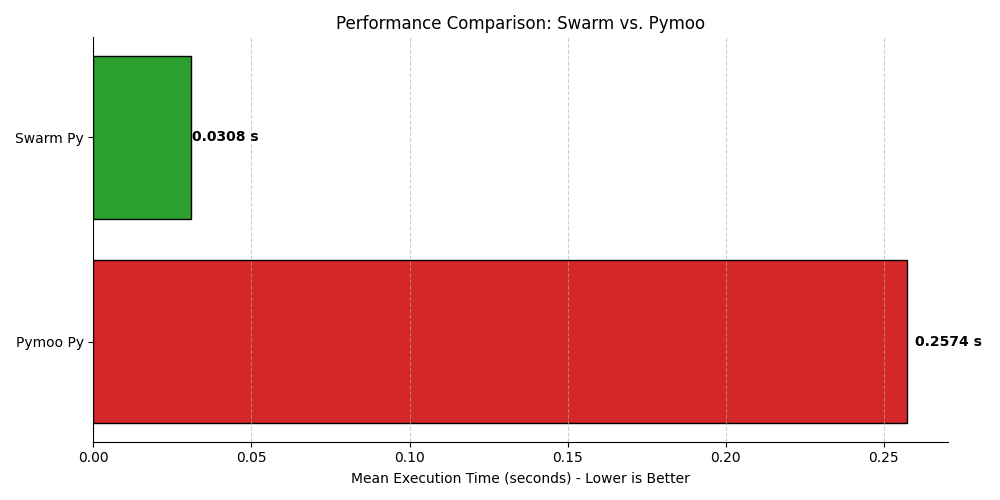
Serial Execution
Comparing to the same configuration Pymoo NSGA-II optimiser for the ZDT1 problem:
Parallel Execution
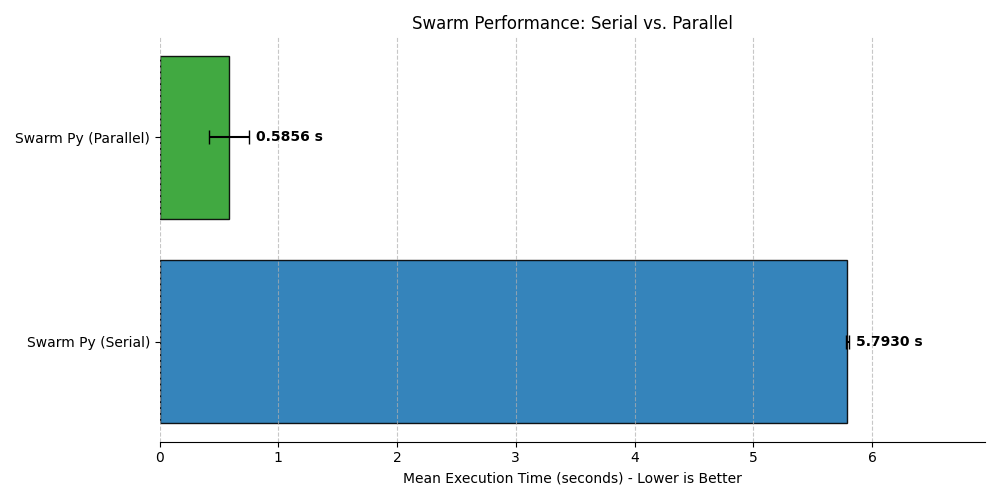
For expensive blackbox functions it makes sense to run swarm in parallel. If we simulate an expensive blackbox function by adding a sleep delay to the ZDT1 problem, i.e.,
def expensive_blackbox(x):
    time.sleep(0.0005)  # Artificial delay
    n_vars = len(x)
    f1 = x[0]
    g = 1.0 + 9.0 * sum(x[1:]) / (n_vars - 1)
    h = 1.0 - np.sqrt(f1 / (g + 1e-8))
    f2 = g * h
    return ([f1, f2], None)
then running swarm with NSGA-II in parallel is a massive improvement:
Build python from source
These instructions assume that Python3 and Cargo are installed on your system. To set up this project, follow these steps:
- Clone the repository:
git clone https://github.com/alexlovric/swarm.git
cd swarm/swarm_py
- Create a virtual environment and install build system:
python3 -m venv .venv
source .venv/bin/activate # In windows /Scripts/activate
python3 -m pip install -r requirements.txt
- Build the release binary:
maturin develop --release
- Build the python wheel:
maturin build --release
License
MIT License - See LICENSE for details.
Support
If you'd like to support the project consider:
- Identifying the features you'd like to see implemented or bugs you'd like to fix and open an issue.
- Contributing to the code by resolving existing issues, I'm happy to have you.
- Donating to help me continue development, Buy Me a Coffee
1 maintainer

Metadata
1 maintainer
Release files for swarm-py 0.1.2
For a detailed explanation of source distributions (sdists) and built distributions (wheels), please see the package formats documentation.
Built distributions (wheels)
| File | Reset | |||
|---|---|---|---|---|
| swarm_py-0.1.2-cp38-abi3-win_amd64.whl | CPython 3.8 | abi3 | Windows x86-64 | Details |
| swarm_py-0.1.2-cp38-abi3-manylinux_2_17_x86_64.manylinux2014_x86_64.whl | CPython 3.8 | abi3 | Linux glibc 2.17+ x86-64 | Details |
| swarm_py-0.1.2-cp38-abi3-macosx_11_0_arm64.whl | CPython 3.8 | abi3 | macOS 11.0+ ARM64 | Details |
| swarm_py-0.1.2-cp38-abi3-macosx_10_12_x86_64.whl | CPython 3.8 | abi3 | macOS 10.12+ x86-64 | Details |
Total release size: 1.4 MB
Release files / swarm_py-0.1.2-cp38-abi3-win_amd64.whl
| Download URL | swarm_py-0.1.2-cp38-abi3-win_amd64.whl |
|---|---|
| Size | 258.3 kB |
| Tags | CPython 3.8 Windows x86-64 abi3 |
|
SHA-256 checksum How to use checksums |
ed2d3ceacacc846c68f7a9d5f867e19a7129d524ad11c985d2099d86836155d4
|
|
BLAKE2b-256 checksum How to use checksums |
321b3cddfb56654855da9e58c2763da65560e20ca864b9825fdd0db9aa9e1b68
|
| Upload date | |
|
Uploaded using Trusted Publishing? What is trusted publishing? |
No |
| Uploaded via |
maturin/1.9.1
|
Release files / swarm_py-0.1.2-cp38-abi3-manylinux_2_17_x86_64.manylinux2014_x86_64.whl
| Download URL | swarm_py-0.1.2-cp38-abi3-manylinux_2_17_x86_64.manylinux2014_x86_64.whl |
|---|---|
| Size | 425.6 kB |
| Tags | CPython 3.8 Linux glibc 2.17+ x86-64 abi3 |
|
SHA-256 checksum How to use checksums |
6b347c4f5f814e35031cda50e2438cbfbe42a0727d3b8f034486ab9f52c90523
|
|
BLAKE2b-256 checksum How to use checksums |
7ced60b6d48daf44fcefbbdb76dfa335067af7b8229da8231eab194b114d8471
|
| Upload date | |
|
Uploaded using Trusted Publishing? What is trusted publishing? |
No |
| Uploaded via |
maturin/1.9.1
|
Release files / swarm_py-0.1.2-cp38-abi3-macosx_11_0_arm64.whl
| Download URL | swarm_py-0.1.2-cp38-abi3-macosx_11_0_arm64.whl |
|---|---|
| Size | 376.3 kB |
| Tags | CPython 3.8 abi3 macOS 11.0+ ARM64 |
|
SHA-256 checksum How to use checksums |
8fe83e0fda2d7a2eb503bfb7c32d0c999b20c38b7c973a109e7cf582ee112657
|
|
BLAKE2b-256 checksum How to use checksums |
ce72091aeabc7b16c61f0fe6be18c3f7578b1e99725f4632a831e9e73512eef2
|
| Upload date | |
|
Uploaded using Trusted Publishing? What is trusted publishing? |
No |
| Uploaded via |
maturin/1.9.1
|
Release files / swarm_py-0.1.2-cp38-abi3-macosx_10_12_x86_64.whl
| Download URL | swarm_py-0.1.2-cp38-abi3-macosx_10_12_x86_64.whl |
|---|---|
| Size | 383.6 kB |
| Tags | CPython 3.8 abi3 macOS 10.12+ x86-64 |
|
SHA-256 checksum How to use checksums |
fb260a1ed4a14bc1e1303d57d4c12ecd51e0f08afd0f9ecbb7a8a8137791c7b9
|
|
BLAKE2b-256 checksum How to use checksums |
0c40ef37c2dfba02cc04b2d5f8050b0b770cd1792299dae55e8b60c995247f99
|
| Upload date | |
|
Uploaded using Trusted Publishing? What is trusted publishing? |
No |
| Uploaded via |
maturin/1.9.1
|














