
Fast blackbox optimisation tool written in rust, wrapped in python

Project description
Swarm
Black-box optimisation tool written in Rust. Clean API for solving complex single-objective and multi-objective optimisation problems using powerful metaheuristic algorithms. Swarm has the following features:
- NSGA-II for single/multi-objective problems.
- Particle Swarm Optimisation (PSO) for single-objective problems.
- Optional Parallel Execution (massively improves performance for expensive blackbox functions).
- Flexible Function Support.
Getting Started
To use Swarm in your project, add it as a dependency in your Cargo.toml:
[dependencies]
swarm = "0.1.2"  # (replace with current version)
This by default includes the parallel feature. This allows the use of solve_par which is very useful for computationally expensive objective functions. To disable it (for more lightweight build, or if parallel not necessary) use default-features = false.
Examples in Rust
All functions provided to Swarm must be of the signature:
FnMut(&[f64]) -> (Vec<f64>, Option<Vec<f64>>)
- The first argument is a reference to a vector of f64 values representing the variables. Variable types are currently limited to f64.
- The first return vector contains the objective values.
- The second return vector contains the constraint values (if any).
- For parallel execution, the function must also be thread-safe (i.e.,
Fn + Sync + Send).
Single-Objective Optimisation with Particle Swarm (PSO)
Problem: Minimise f(x, y) = (x² + y - 11)² + (x + y² - 7)²
use swarm::{error::Result, pso::PsoParams, Optimiser, Variable};

// Define the function (can also use closure)
fn himmelblau(x: &[f64]) -> (Vec<f64>, Option<Vec<f64>>) {
    let f = (x[0].powi(2) + x[1] - 11.0).powi(2) + (x[0] + x[1].powi(2) - 7.0).powi(2);
    (vec![f], None)
}

fn main() -> Result<(), Box<dyn std::error::Error>> {
    // 1. Define the search space for the variables
    let vars = vec![Variable(-5.0, 5.0), Variable(-5.0, 5.0)];

    // 2. Configure the optimiser
    let optimiser = Optimiser::Pso {
        n_particles: 100,
        params: PsoParams::default(),
        constraint_handler: None,
        seed: None,
    };

    // 3. Find the minimum
    let max_iter = 200;
    let result = optimiser.solve(&mut himmelblau, &vars, max_iter)?;
    // Note: 1. You can also call the pso function directly.
    // Note: 2. You can pass a closure directly.
    // Note: 3. For parallel execution use `solve_par`
    // (if feature `parallel` is enabled)

    // 4. Get the best solution found
    let best = &result.solutions[0];
    println!("Min at x = {:.4?}, f(x) = {:.4}", best.x, best.f[0]);
    Ok(())
}
Multi-Objective Optimisation with NSGA-II
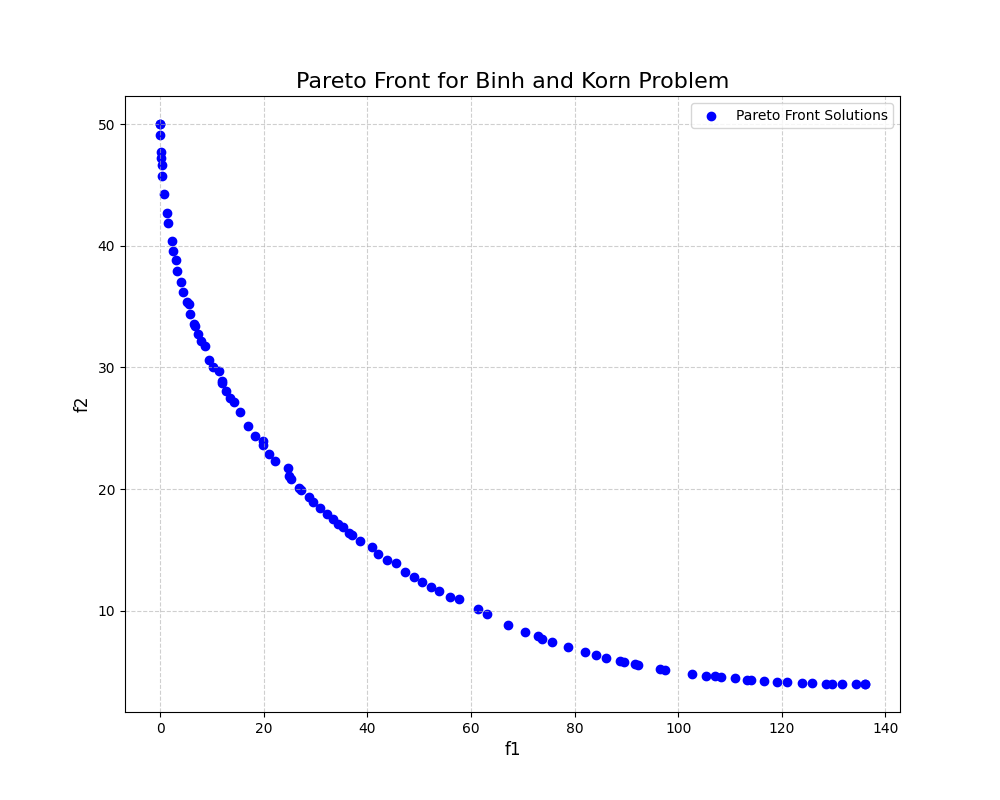
This example solves the constrained Binh and Korn problem. NSGA-II is ideal for this as it finds a set of trade-off solutions, known as the Pareto Front, rather than a single point.
Problem: Minimise two objectives, f1(x, y) and f2(x, y), subject to two constraints.
use swarm::{Optimiser, Variable, SbxParams, PmParams};

// Define the problem (can also use closure)
fn binh_and_korn(x: &[f64]) -> (Vec<f64>, Option<Vec<f64>>) {
    // Objectives
    let f1 = 4.0 * x[0].powi(2) + 4.0 * x[1].powi(2);
    let f2 = (x[0] - 5.0).powi(2) + (x[1] - 5.0).powi(2);

    // Constraints
    let g1 = (x[0] - 5.0).powi(2) + x[1].powi(2) - 25.0;
    let g2 = 7.7 - (x[0] - 8.0).powi(2) - (x[1] + 3.0).powi(2);

    (vec![f1, f2], Some(vec![g1, g2]))
}

fn main() -> Result<(), Box<dyn std::error::Error>> {
    // 1. Define the search space
    let vars = vec![Variable(0.0, 5.0), Variable(0.0, 3.0)];

    // 2. Configure the NSGA-II optimiser
    let optimiser = Optimiser::Nsga {
        pop_size: 50,
        crossover: SbxParams::default(),
        mutation: PmParams::default(),
        seed: None,
    };

    // 3. Solve the problem
    let result = optimiser.solve(&mut binh_and_korn, &vars, 250)?;

    // 4. Get the Pareto front
    println!("Found {} solutions on the Pareto front.", result.solutions.len());

    Ok(())
}
After running the Binh and Korn example and plotting the solutions, you should see a Pareto front similar to the one shown below.
Examples in Python
Similar to the Rust examples all blackbox functions must have signatures of the form:
def blackbox(x: list[float]) -> tuple[list[float], list[float] | None]
Here's the same Binh and Korn example in Python:
import swarm_py as sp

def binh_and_korn_problem(x):
    f1 = 4.0 * x[0]**2 + 4.0 * x[1]**2
    f2 = (x[0] - 5.0)**2 + (x[1] - 5.0)**2

    g1 = (x[0] - 5.0)**2 + x[1]**2 - 25.0
    g2 = 7.7 - (x[0] - 8.0)**2 - (x[1] + 3.0)**2
    return ([f1, f2], [g1, g2])

if __name__ == "__main__":
    # Define variable bounds and optimisation settings
    variables = [sp.Variable(0, 5), sp.Variable(0, 3)]

    # Configure the NSGA-II optimiser
    # Other properties are default unless specified
    optimiser = sp.Optimiser.nsga(pop_size=100)

    # Run the optimisation
    result = optimiser.solve(binh_and_korn_problem, variables, 250)

    # For parallel execution, use the following:
    result = optimiser.solve_par(binh_and_korn_problem, variables, 250)

    print(result.solutions)
Performance (Python)
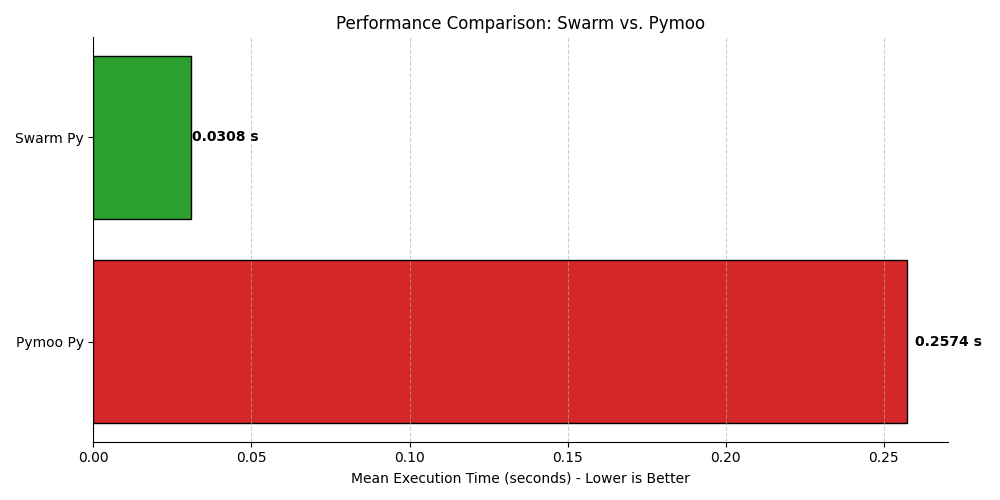
Serial Execution
Comparing to the same configuration Pymoo NSGA-II optimiser for the ZDT1 problem:
Parallel Execution
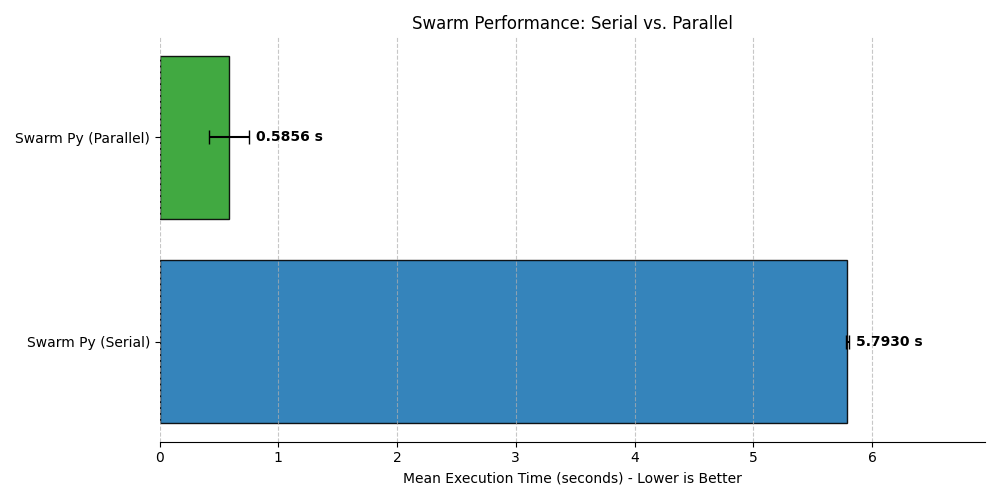
For expensive blackbox functions it makes sense to run swarm in parallel. If we simulate an expensive blackbox function by adding a sleep delay to the ZDT1 problem, i.e.,
def expensive_blackbox(x):
    time.sleep(0.0005)  # Artificial delay
    n_vars = len(x)
    f1 = x[0]
    g = 1.0 + 9.0 * sum(x[1:]) / (n_vars - 1)
    h = 1.0 - np.sqrt(f1 / (g + 1e-8))
    f2 = g * h
    return ([f1, f2], None)
then running swarm with NSGA-II in parallel is a massive improvement:
Build python from source
These instructions assume that Python3 and Cargo are installed on your system. To set up this project, follow these steps:
- Clone the repository:
git clone https://github.com/alexlovric/swarm.git
cd swarm/swarm_py
- Create a virtual environment and install build system:
python3 -m venv .venv
source .venv/bin/activate # In windows /Scripts/activate
python3 -m pip install -r requirements.txt
- Build the release binary:
maturin develop --release
- Build the python wheel:
maturin build --release
License
MIT License - See LICENSE for details.
Support
If you'd like to support the project consider:
- Identifying the features you'd like to see implemented or bugs you'd like to fix and open an issue.
- Contributing to the code by resolving existing issues, I'm happy to have you.
- Donating to help me continue development, Buy Me a Coffee
Release history Release notifications | RSS feed


Download files
Download the file for your platform. If you're not sure which to choose, learn more about installing packages.
Source Distributions
Built Distributions
Filter files by name, interpreter, ABI, and platform.
If you're not sure about the file name format, learn more about wheel file names.
Copy a direct link to the current filters
File details
Details for the file swarm_py-0.1.1-cp38-abi3-win_amd64.whl.
File metadata
- Download URL: swarm_py-0.1.1-cp38-abi3-win_amd64.whl
- Upload date:
- Size: 258.5 kB
- Tags: CPython 3.8+, Windows x86-64
- Uploaded using Trusted Publishing? No
- Uploaded via: maturin/1.9.1
File hashes
| Algorithm | Hash digest | |
|---|---|---|
| SHA256 |
85c5f6b23274db6664f4daf3058bff3a39dadbeb016565cff1c025f1b683549c
|
|
| MD5 |
32b3f667934b65ef6038ce9b26e0ea26
|
|
| BLAKE2b-256 |
4ea8e03c1196eeef7ba407768cae24f00bd7d1a639f28b7973109db55df940d7
|
File details
Details for the file swarm_py-0.1.1-cp38-abi3-manylinux_2_17_x86_64.manylinux2014_x86_64.whl.
File metadata
- Download URL: swarm_py-0.1.1-cp38-abi3-manylinux_2_17_x86_64.manylinux2014_x86_64.whl
- Upload date:
- Size: 425.7 kB
- Tags: CPython 3.8+, manylinux: glibc 2.17+ x86-64
- Uploaded using Trusted Publishing? No
- Uploaded via: maturin/1.9.1
File hashes
| Algorithm | Hash digest | |
|---|---|---|
| SHA256 |
ea3cd89d86cf3c1a79cddcab2d159249e3c297c77058b28aeb50ab5e2897746f
|
|
| MD5 |
c6c0162b7b937d0c1d5a5ea90cd263f2
|
|
| BLAKE2b-256 |
6b21b582a815e5b8413655ef8c41095c3d59c73a1e4de3b819e57eab3cfb5717
|
File details
Details for the file swarm_py-0.1.1-cp38-abi3-macosx_11_0_arm64.whl.
File metadata
- Download URL: swarm_py-0.1.1-cp38-abi3-macosx_11_0_arm64.whl
- Upload date:
- Size: 376.0 kB
- Tags: CPython 3.8+, macOS 11.0+ ARM64
- Uploaded using Trusted Publishing? No
- Uploaded via: maturin/1.9.1
File hashes
| Algorithm | Hash digest | |
|---|---|---|
| SHA256 |
da6db8bcb8e43a521573491dd27360d1f9a4448eb30ab1539f112738ba91dbc2
|
|
| MD5 |
c64dbbd6a3d06f5768d85f223dd8ef88
|
|
| BLAKE2b-256 |
7fda39dc1d9f1adf269142f97a721ec47eb672056af4999a92239cd7afa0dfa2
|
File details
Details for the file swarm_py-0.1.1-cp38-abi3-macosx_10_12_x86_64.whl.
File metadata
- Download URL: swarm_py-0.1.1-cp38-abi3-macosx_10_12_x86_64.whl
- Upload date:
- Size: 383.4 kB
- Tags: CPython 3.8+, macOS 10.12+ x86-64
- Uploaded using Trusted Publishing? No
- Uploaded via: maturin/1.9.1
File hashes
| Algorithm | Hash digest | |
|---|---|---|
| SHA256 |
19947c3c62b657672ed7a380d786bd4b7fb2f0d26b24846213af948a69eaaab9
|
|
| MD5 |
22dac5e3c76cff1f0a5c2b4b13ed5220
|
|
| BLAKE2b-256 |
86a6f56ebf5a9d4af3356698f3a9a32121ed1687381170fa0db71a1c5d90b68a
|






