







SwarmSort
Reliable multi-object tracking-by-detection: fast, accurate, and easy — perfect for top-view microscopy with hundreds of objects 🎯
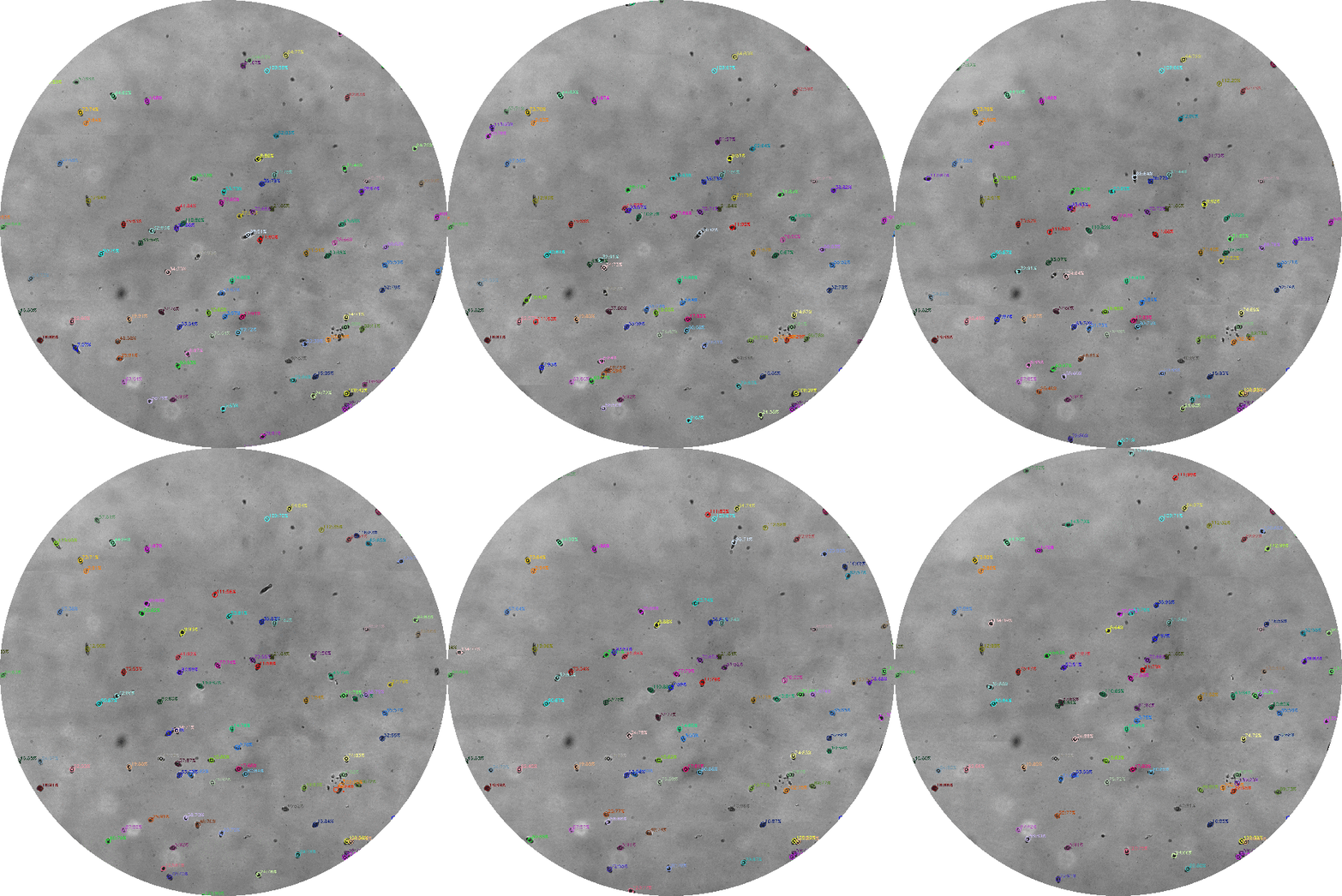
Real-time tracking of 150 paramecia at 80 FPS |
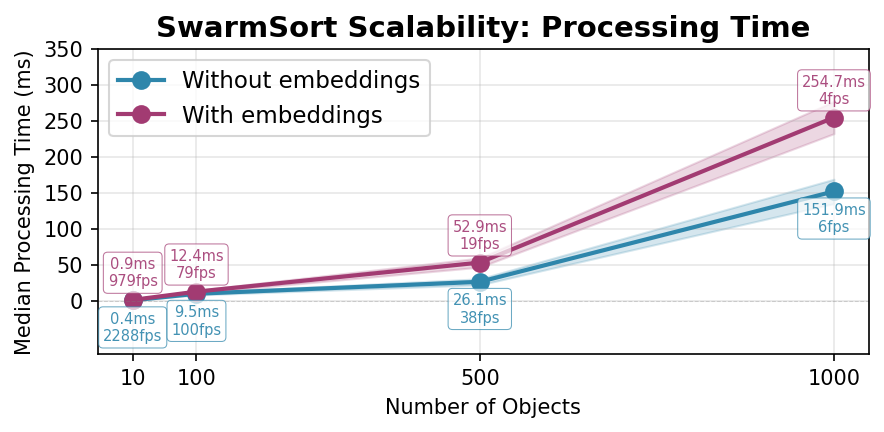
Real time performances for up to 500 individuals |
Core Capabilities
SwarmSort solves the data association problem in multi-object tracking by:
- Maintaining temporal consistency of object identities across frames using motion prediction, appearance and uncertainty
- Handling occlusions and collisions through re-identification with visual embeddings
- optional lightweight gpu based embedding integrated for more accuracy and speed
- Preventing ID switches in dense scenarios using uncertainty-aware cost computation and embedding freezing
- Fast! The library achieves real-time performance (80-100 FPS for 100 objects) through Numba JIT compilation, vectorized operations, and optional GPU acceleration.
Key Features
Advanced Tracking Algorithms
- Uncertainty-based cost system - Adaptive association costs based on track age, local density, and detection reliability
- Smart collision handling - Density-based embedding freezing prevents ID switches in crowded scenarios
- Re-identification capability - Recovers lost tracks using visual embeddings and motion prediction
- Hybrid assignment strategy - Combines greedy matching for obvious associations with Hungarian algorithm for complex cases
- Dual Kalman filter options - Simple constant velocity or OC-SORT style acceleration model
- Occlusion handling - Maintains tracks through temporary occlusions using motion prediction
Real-time performance
- Numba JIT compilation - Critical mathematical functions compiled to machine code
- Vectorized operations - Batch processing using NumPy for efficient computation
- GPU acceleration - Optional CUDA support via CuPy for embedding extraction
- Memory efficient - Bounded memory usage with automatic cleanup of stale tracks
Flexible Integration
- Detector agnostic - Works with any object detection source (YOLO, Detectron2, custom detectors)
- Configurable parameters - Fine-tune behavior for specific species (microscopy, crowds ..)
- Multiple embedding methods - Support for various visual feature extractors
- Comprehensive API - Access to track states, lifecycle management, and detailed statistics
Production Ready
- Extensive test coverage - 200+ unit tests covering edge cases and error conditions
- Cross-platform support - Tested on Linux, Windows, macOS
- Detailed documentation - Complete API reference with practical examples
Citation
If you use SwarmSort in your research, please cite:
@software{swarmsort,
    title={SwarmSort: High-Performance Multi-Object Tracking},
    author={Charles Fosseprez},
    year={2025},
    url={https://github.com/cfosseprez/swarmsort},
    doi={10.5281/zenodo.17051857}
}
📖 Documentation
📦 Installation
# Option 1: Install from PyPI
pip install swarmsort

# Option 2: Install from PyPI with gpu embedding support
pip install swarmsort[gpu]

# Option 3: Install from GitHub
pip install git+https://github.com/cfosseprez/swarmsort.git
Quick Start
Your First Tracker in 30 Seconds
import numpy as np
from swarmsort import SwarmSortTracker, Detection

# Step 1: Create a tracker (it's that simple!)
tracker = SwarmSortTracker()

# Step 2: Tell the tracker what you detected this frame
# In real use, these would come from your object detector (YOLO, etc.)
detections = [
    Detection(position=[100, 200], confidence=0.9),  # A person at position (100, 200)
    Detection(position=[300, 400], confidence=0.8),  # Another person at (300, 400)
]

# Step 3: Get tracking results - SwarmSort handles all the complexity!
tracked_objects = tracker.update(detections)

# Step 4: Use the results - each object has a unique ID that persists across frames
for obj in tracked_objects:
    print(f"Person {obj.id} is at position {obj.position} with {obj.confidence:.0%} confidence")
    # Output: Person 1 is at position [100. 200.] with 90% confidence
Real-World Example: Tracking Paramecia in Video
import cv2
from swarmsort import SwarmSortTracker, Detection

tracker = SwarmSortTracker()

# Process a video file
video = cv2.VideoCapture('microscopy.mp4')

while True:
    ret, frame = video.read()
    if not ret:
        break

    # Get detections from your favorite detector
    # For this example, let's say we detected 2 people:
    detections = [
        Detection(
            position=[320, 240],  # Center of bounding box
            confidence=0.95,
            bbox=[300, 220, 340, 260]  # x1, y1, x2, y2
        ),
        Detection(
            position=[150, 180],
            confidence=0.87,
            bbox=[130, 160, 170, 200]
        )
    ]

    # SwarmSort assigns consistent IDs across frames
    tracked = tracker.update(detections)

    # Draw results on frame
    for person in tracked:
        if person.bbox is not None:
            x1, y1, x2, y2 = person.bbox.astype(int)
            # Each Paramecium keeps the same ID and color throughout the video!
            color = (0, 255, 0)  # Green for tracked objects
            cv2.rectangle(frame, (x1, y1), (x2, y2), color, 2)
            cv2.putText(frame, f"ID: {person.id}", (x1, y1-10),
                       cv2.FONT_HERSHEY_SIMPLEX, 0.5, color, 2)

    cv2.imshow('Tracking Results', frame)
    if cv2.waitKey(1) == ord('q'):
        break
🔌 Direct Integration with YOLO and Other Detectors
SwarmSort seamlessly integrates with popular object detectors through optimized conversion utilities:
YOLO v8/v11 Integration
from ultralytics import YOLO
from swarmsort import yolo_to_detections, SwarmSortTracker, SwarmSortConfig

# Initialize YOLO detector
model = YOLO('yolov8n.pt')  # or yolov11n.pt, yolov8x.pt, etc.

# Initialize SwarmSort tracker
tracker = SwarmSortTracker(SwarmSortConfig(
    max_distance=150,
    uncertainty_weight=0.3
))

# Process video stream
cap = cv2.VideoCapture('video.mp4')
while True:
    ret, frame = cap.read()
    if not ret:
        break

    # Detect objects with YOLO
    results = model.predict(frame, conf=0.5)

    # Convert YOLO output to SwarmSort format (optimized, zero-copy when possible)
    detections = yolo_to_detections(
        results[0],
        confidence_threshold=0.5,
        class_filter=[0, 1, 2]  # Only track persons, bicycles, cars
    )

    # Track objects
    tracked_objects = tracker.update(detections)

    # Draw results
    for obj in tracked_objects:
        if obj.bbox is not None:
            x1, y1, x2, y2 = obj.bbox.astype(int)
            cv2.rectangle(frame, (x1, y1), (x2, y2), (0, 255, 0), 2)
            cv2.putText(frame, f"ID:{obj.id}", (x1, y1-10),
                       cv2.FONT_HERSHEY_SIMPLEX, 0.5, (0, 255, 0), 2)
Custom Detector Integration
from swarmsort import numpy_to_detections, prepare_detections

# If your detector outputs numpy arrays
boxes = np.array([[100, 100, 200, 200],  # [x1, y1, x2, y2] format
                  [300, 150, 400, 250]])
confidences = np.array([0.9, 0.85])

# Convert to SwarmSort format
detections = numpy_to_detections(
    boxes=boxes,
    confidences=confidences,
    format='xyxy'  # Supports: 'xyxy', 'xywh', 'cxcywh'
)

# Or with embeddings from your own feature extractor
embeddings = your_feature_extractor(image_patches)  # Shape: (N, embedding_dim)
detections = numpy_to_detections(boxes, confidences, embeddings=embeddings)
Universal Auto-Conversion
from swarmsort import prepare_detections

# Automatically detects format and converts + verifies
detections = prepare_detections(
    any_detection_data,  # YOLO results, numpy arrays, or Detection objects
    source_format='auto',  # Auto-detects format
    confidence_threshold=0.5,
    auto_fix=True  # Fixes common issues (clips bounds, normalizes, etc.)
)

# The prepare_detections function:
# ✓ Auto-detects input format (YOLO, numpy, etc.)
# ✓ Converts to SwarmSort Detection format
# ✓ Validates all inputs
# ✓ Auto-fixes common issues (out-of-bounds, NaN values, etc.)
# ✓ Optimized with vectorized operations
Batch Processing for Maximum Speed
# Process entire video in batches (useful for offline analysis)
from swarmsort import yolo_to_detections_batch

# Get all YOLO predictions at once
results = model.predict('video.mp4', stream=True)
all_detections = yolo_to_detections_batch(list(results))

# Track through all frames
all_tracks = []
for frame_detections in all_detections:
    tracked = tracker.update(frame_detections)
    all_tracks.append(tracked)
Using Visual Features (Embeddings) for Better Tracking
Embeddings help the tracker recognize objects by their appearance, not just position. This is super useful when:
- Objects move quickly or unpredictably
- Multiple similar objects are close together
- Objects temporarily disappear and reappear
SwarmSort can use your GPU for the integrated default fast lightweight embedding:
from swarmsort import SwarmSortTracker, SwarmSortConfig, Detection
import numpy as np

# Enable appearance-based tracking
config = SwarmSortConfig(
    do_embeddings=True,  # Use visual features for matching
    embedding_weight=1.0,  # How much to trust appearance vs motion
)
tracker = SwarmSortTracker(config)
Or you can use a personalized embedding, and pass it directly the Detection.
# In practice, embeddings come from a feature extractor (ResNet, etc.)
# Here's a simple example:
def get_embedding_from_image(image_patch):
    """Your feature extractor - could be a neural network"""
    # This would be your CNN/feature extractor
    # Returns a N-dimensional feature vector
    return np.random.randn(128).astype(np.float32)

# Create detection with visual features
person_image = frame[160:200, 130:170]  # Crop person from frame
embedding = get_embedding_from_image(person_image)

detection = Detection(
    position=[150, 180],  # Center position
    confidence=0.9,
    embedding=embedding,  # Visual features help maintain ID
    bbox=[130, 160, 170, 200]  # Bounding box
)

# The tracker now uses BOTH motion AND appearance for matching!
tracked_objects = tracker.update([detection])
⚙️ Configuration Made Easy
Understanding the max_distance Parameter
The max_distance parameter is the foundation of SwarmSort's configuration. Important: Set it 1.5-2x higher than the expected maximum pixel movement between frames because:
- The actual matching uses a combination of spatial distance, embedding similarity, and uncertainty penalties
- With embeddings enabled, the effective matching distance is reduced by visual similarity
- Uncertainty penalties further modify the association costs
- Example: If objects move up to 100 pixels between frames, set
max_distance=150-200
Many other parameters automatically scale with max_distance:
# When you set max_distance=150, these defaults are automatically set:
local_density_radius = 150      # Same as max_distance
greedy_threshold = 30           # max_distance / 5
reid_max_distance = 150         # Same as max_distance
All Parameters
| Parameter | Default | Description |
|---|---|---|
| Core Tracking | ||
max_distance |
150.0 | Maximum distance for detection-track association |
detection_conf_threshold |
0.0 | Minimum confidence for detections |
max_track_age |
30 | Maximum frames to keep track alive without detections |
| Motion prediction | ||
kalman_type |
'simple' | Kalman filter type: 'simple' or 'oc' (OC-SORT style) |
| Uncertainty System | ||
uncertainty_weight |
0.33 | Weight for uncertainty penalties (0 = disabled) |
local_density_radius |
max_distance | Radius for computing local track density (defaults to max_distance) |
| Embeddings | ||
do_embeddings |
True | Whether to use embedding features |
embedding_function |
'cupytexture' | Integrated embedding function: "cupytexture", "cupytexture_color", "mega_cupytexture" |
embedding_weight |
1.0 | Weight for embedding similarity in cost function |
max_embeddings_per_track |
15 | Maximum embeddings stored per track |
embedding_matching_method |
'weighted_average' | Method for multi-embedding matching |
| Collision Handling | ||
collision_freeze_embeddings |
True | Freeze embedding updates in dense areas |
embedding_freeze_density |
1 | Freeze when ≥N tracks within radius |
| Assignment Strategy | ||
assignment_strategy |
'hybrid' | Assignment method: 'hungarian', 'greedy', or 'hybrid' |
greedy_threshold |
max_distance/5 | Distance threshold for greedy assignment |
| Track Initialization | ||
min_consecutive_detections |
6 | Minimum consecutive detections to create track |
max_detection_gap |
2 | Maximum gap between detections |
pending_detection_distance |
max_distance | Distance threshold for pending detection matching |
| Re-identification | ||
reid_enabled |
True | Enable re-identification of lost tracks |
reid_max_distance |
max_distance*1.5 | Maximum distance for ReID |
reid_embedding_threshold |
0.3 | Embedding threshold for ReID |
| Experimental | ||
use_probabilistic_costs |
False | Use gaussian fusion for cost computation |
🎯 Preset Configurations for Common Scenarios
Best Settings for Performance:
For good balance (speed + accuracy): up to 300 individuals
  config = SwarmSortConfig(
      kalman_type="simple",           # Fast but accurate enough
      assignment_strategy="hybrid",    # Good balance
      uncertainty_weight=0.33,         # Some uncertainty handling
      do_embeddings=True,              # Use embeddings if available
      reid_enabled=False,              # Skip for speed
  )
For maximum speed across all scales: 300+ individuals
  config = SwarmSortConfig(
      kalman_type="simple",           # Fastest Kalman filter
      assignment_strategy="greedy",    # Fastest assignment
      uncertainty_weight=0.0,          # Disable uncertainty
      do_embeddings=False,             # No embeddings
      reid_enabled=False,              # No re-identification
  )
🔧 Understanding Key Parameters
# The most important parameters to tune:

config = SwarmSortConfig(
    # 1. How far can an object move between frames?
    max_distance=150.0,  # Increase for fast objects, decrease for slow

    # 2. How many frames to confirm a new track?
    min_consecutive_detections=6,  # Lower = faster response, more false positives
                                   # Higher = slower response, fewer false positives

    # 3. How long to keep lost tracks?
    max_track_age=30,  # At 30 FPS, this is 1 second of "memory"

    # 4. Use appearance features?
    do_embeddings=True,  # True if objects look different from each other
                        # False if all objects look the same (e.g., identical boxes)

    # 5. How to handle crowded scenes?
    collision_freeze_embeddings=True,  # Prevents ID switches when objects touch
    uncertainty_weight=0.33,  # Higher = more conservative in uncertain situations
)
Advanced Usage
Different Configuration Methods
from swarmsort import SwarmSortTracker, SwarmSortConfig

# Default tracker
tracker = SwarmSortTracker()

# With configuration object
config = SwarmSortConfig(max_distance=100.0, do_embeddings=True)
tracker = SwarmSortTracker(config)

# With dictionary config
tracker = SwarmSortTracker({'max_distance': 100.0, 'do_embeddings': True})
Basic Standalone Usage
from swarmsort import SwarmSortTracker, SwarmSortConfig

# SwarmSort is a standalone tracker - no special integration needed
tracker = SwarmSortTracker()

# Configure for specific use cases
config = SwarmSortConfig(
    do_embeddings=True,
    reid_enabled=True,
    max_distance=100.0,
    assignment_strategy='hybrid',  # Use hybrid assignment strategy
    uncertainty_weight=0.33         # Enable uncertainty-based costs
)
tracker_configured = SwarmSortTracker(config)
📦 Working with Data
Input: Detection Objects
Detections are what you feed into the tracker - they represent objects found in the current frame:
from swarmsort import Detection
import numpy as np

# Minimal detection - just position and confidence
simple_detection = Detection(
    position=[320, 240],  # Center point (x, y)
    confidence=0.9        # How sure are we this is real? (0-1)
)

# Full detection with all the bells and whistles
full_detection = Detection(
    position=np.array([320, 240]),        # Object center
    confidence=0.95,                      # Detection confidence
    bbox=np.array([300, 220, 340, 260]),  # Bounding box [x1, y1, x2, y2]
    embedding=feature_vector,             # Visual features (for example from your CNN)
    class_id=0,                          # 0=person, 1=car, etc.
    id="yolo_detection_42"               # Your detector's ID (optional)
)

# Real-world example: Converting YOLO output to SwarmSort
def yolo_to_swarmsort(yolo_results):
    detections = []
    for box in yolo_results.boxes:
        x1, y1, x2, y2 = box.xyxy[0].numpy()
        center_x = (x1 + x2) / 2
        center_y = (y1 + y2) / 2

        detections.append(Detection(
            position=[center_x, center_y],
            confidence=box.conf[0].item(),
            bbox=[x1, y1, x2, y2],
            class_id=int(box.cls[0])
        ))
    return detections
Output: TrackedObject Results
The tracker returns TrackedObject instances with rich information about each tracked object:
# Get tracking results
tracked_objects = tracker.update(detections)

for obj in tracked_objects:
    # Identity
    print(f"🆔 Track ID: {obj.id}")  # Unique ID that persists across frames

    # Location & Motion
    print(f"📍 Position: {obj.position}")  # Current [x, y] position
    print(f"➡️ Velocity: {obj.velocity}")  # Speed and direction [vx, vy]

    # Confidence & Quality
    print(f"✅ Confidence: {obj.confidence:.1%}")  # How confident are we?
    print(f"📊 Track quality: {obj.hits}/{obj.age}")  # Hits/Age ratio

    # Track Status
    if obj.time_since_update == 0:
        print("🟢 Currently visible")
    else:
        print(f"🟡 Lost for {obj.time_since_update} frames")

    # Bounding Box (if available)
    if obj.bbox is not None:
        x1, y1, x2, y2 = obj.bbox
        width = x2 - x1
        height = y2 - y1
        print(f"📐 Size: {width:.0f}x{height:.0f} pixels")
🔄 Track Lifecycle Management
SwarmSort provides fine control over track states - perfect for different visualization needs:
# Get only tracks that are currently visible
alive_tracks = tracker.update(detections)
print(f"👁️ Visible now: {len(alive_tracks)} objects")

# Get tracks that were recently lost (useful for smooth visualization)
recently_lost = tracker.get_recently_lost_tracks(max_frames_lost=5)
print(f"👻 Recently lost: {len(recently_lost)} objects")

# Get everything (visible + recently lost)
all_active = tracker.get_all_active_tracks(max_frames_lost=5)
print(f"📊 Total active: {len(all_active)} objects")

# Example: Different visualization for different states
for obj in alive_tracks:
    draw_solid_box(frame, obj, color='green')  # Solid box for visible

for obj in recently_lost:
    draw_dashed_box(frame, obj, color='yellow')  # Dashed box for lost
⚡ Performance & Optimization
Why SwarmSort is Fast
SwarmSort is optimized for real-world performance:
- Numba JIT Compilation: Math operations run at C speed
- Vectorized NumPy: Batch operations instead of loops
- Smart Caching: Reuses computed embeddings and distances
- Memory Pooling: Reduces allocation overhead
- Early Exit Logic: Skips unnecessary computations
Visualization Example
SwarmSort includes built-in visualization utilities for beautiful tracking displays:
Click to expand code example
import cv2
import numpy as np
from swarmsort import SwarmSortTracker, Detection, SwarmSortConfig
from swarmsort import TrackingVisualizer, VisualizationConfig

# Initialize tracker with your preferred settings
config = SwarmSortConfig(
    do_embeddings=True,
    embedding_function='cupytexture',  # or 'mega_cupytexture' for more features
    assignment_strategy='hybrid',
    uncertainty_weight=0.33
)
tracker = SwarmSortTracker(config)

# Initialize visualizer with custom settings
vis_config = VisualizationConfig(
    show_trails=True,
    trail_length=30,
    show_ids=True,
    show_confidence=True,
    show_velocity_vectors=True,
    id_font_scale=0.5,
    id_thickness=2,
    box_thickness=2
)
visualizer = TrackingVisualizer(vis_config)

# Example usage with video
cap = cv2.VideoCapture('video.mp4')  # Or use 0 for webcam

while True:
    ret, frame = cap.read()
    if not ret:
        break

    # Detect objects (replace with your detector)
    # Here's a mock detection for demonstration
    detections = [
        Detection(
            position=np.array([100, 200]),
            confidence=0.9,
            bbox=np.array([80, 180, 120, 220])
        ),
        Detection(
            position=np.array([300, 400]),
            confidence=0.85,
            bbox=np.array([280, 380, 320, 420])
        )
    ]

    # Update tracker
    tracked_objects = tracker.update(detections)

    # Draw tracking results with built-in visualizer
    frame = visualizer.draw_tracks(frame, tracked_objects)

    # Optionally show recently lost tracks
    recently_lost = tracker.get_recently_lost_tracks(max_frames_lost=5)
    frame = visualizer.draw_lost_tracks(frame, recently_lost)

    # Display frame
    cv2.imshow('SwarmSort Tracking', frame)
    if cv2.waitKey(1) & 0xFF == ord('q'):
        break

cap.release()
cv2.destroyAllWindows()
Quick Visualization (One-liner)
For quick prototyping, use the convenience function:
from swarmsort import quick_visualize

# One line to visualize tracking results!
frame_with_tracks = quick_visualize(frame, tracked_objects, show_trails=True)
Custom Drawing (If you need more control)
If you prefer to implement custom visualization:
Click to expand code example
import cv2
import numpy as np
from swarmsort import SwarmSortTracker, Detection, SwarmSortConfig

# Initialize tracker
tracker = SwarmSortTracker(SwarmSortConfig(do_embeddings=True))

# Function to draw tracking results
def draw_tracks(frame, tracked_objects, show_trails=True):
    """Draw bounding boxes and tracking information on frame."""
    # Store trail history (in production, store this outside the function)
    if not hasattr(draw_tracks, 'trails'):
        draw_tracks.trails = {}

    for obj in tracked_objects:
        # Get track color (consistent color per ID)
        color = np.random.RandomState(obj.id).randint(0, 255, 3).tolist()

        # Draw bounding box if available
        if obj.bbox is not None:
            x1, y1, x2, y2 = obj.bbox.astype(int)
            cv2.rectangle(frame, (x1, y1), (x2, y2), color, 2)

            # Draw track ID and confidence
            label = f"ID:{obj.id} ({obj.confidence:.2f})"
            cv2.putText(frame, label, (x1, y1-10),
                       cv2.FONT_HERSHEY_SIMPLEX, 0.5, color, 2)

        # Draw center point
        cx, cy = obj.position.astype(int)
        cv2.circle(frame, (cx, cy), 5, color, -1)

        # Update and draw trail
        if show_trails:
            if obj.id not in draw_tracks.trails:
                draw_tracks.trails[obj.id] = []
            draw_tracks.trails[obj.id].append((cx, cy))

            # Keep only last 30 points
            draw_tracks.trails[obj.id] = draw_tracks.trails[obj.id][-30:]

            # Draw trail
            points = draw_tracks.trails[obj.id]
            for i in range(1, len(points)):
                cv2.line(frame, points[i-1], points[i], color, 2)

    # Clean up old trails
    active_ids = {obj.id for obj in tracked_objects}
    draw_tracks.trails = {k: v for k, v in draw_tracks.trails.items()
                         if k in active_ids}

    return frame
Simple Visualization with Matplotlib
For a simpler visualization or for Jupyter notebooks:
Click to expand code example
import matplotlib.pyplot as plt
import matplotlib.patches as patches
from matplotlib.animation import FuncAnimation
import numpy as np
from swarmsort import SwarmSortTracker, Detection

# Create figure
fig, ax = plt.subplots(figsize=(10, 8))
ax.set_xlim(0, 640)
ax.set_ylim(480, 0)  # Invert y-axis for image coordinates
ax.set_aspect('equal')
ax.set_title('SwarmSort Multi-Object Tracking')

tracker = SwarmSortTracker()
track_history = {}

def update_plot(frame_num):
    ax.clear()
    ax.set_xlim(0, 640)
    ax.set_ylim(480, 0)
    ax.set_title(f'Frame {frame_num}')

    # Generate mock detections (replace with real detections)
    detections = [
        Detection(
            position=np.array([320 + 100*np.sin(frame_num/10), 240]),
            confidence=0.9,
            bbox=np.array([300 + 100*np.sin(frame_num/10), 220,
                          340 + 100*np.sin(frame_num/10), 260])
        ),
        Detection(
            position=np.array([200, 240 + 100*np.cos(frame_num/10)]),
            confidence=0.85,
            bbox=np.array([180, 220 + 100*np.cos(frame_num/10),
                          220, 260 + 100*np.cos(frame_num/10)])
        )
    ]

    # Update tracker
    tracked_objects = tracker.update(detections)

    # Plot tracked objects
    for obj in tracked_objects:
        # Get consistent color for track ID
        np.random.seed(obj.id)
        color = np.random.rand(3)

        # Draw bounding box
        if obj.bbox is not None:
            x1, y1, x2, y2 = obj.bbox
            rect = patches.Rectangle((x1, y1), x2-x1, y2-y1,
                                    linewidth=2, edgecolor=color,
                                    facecolor='none')
            ax.add_patch(rect)

        # Draw center point
        ax.scatter(obj.position[0], obj.position[1],
                  c=[color], s=100, marker='o')

        # Add ID label
        ax.text(obj.position[0], obj.position[1]-20, f'ID:{obj.id}',
               color=color, fontsize=12, ha='center', weight='bold')

        # Update history
        if obj.id not in track_history:
            track_history[obj.id] = []
        track_history[obj.id].append(obj.position.copy())

        # Draw trail
        if len(track_history[obj.id]) > 1:
            trail = np.array(track_history[obj.id])
            ax.plot(trail[:, 0], trail[:, 1], color=color,
                   linewidth=2, alpha=0.5)

    # Clean old tracks
    active_ids = {obj.id for obj in tracked_objects}
    for track_id in list(track_history.keys()):
        if track_id not in active_ids:
            if len(track_history[track_id]) > 50:  # Remove very old tracks
                del track_history[track_id]

# Create animation
anim = FuncAnimation(fig, update_plot, frames=200,
                    interval=50, repeat=True)
plt.show()

# To save as video:
# anim.save('tracking_visualization.mp4', writer='ffmpeg', fps=20)
🚀 Advanced Features
🧠 How SwarmSort Thinks: The Intelligence Behind the Tracking
Uncertainty-Aware Tracking
SwarmSort knows when it's confident and when it's not:
# The tracker automatically adjusts behavior based on uncertainty:
# - New tracks: "I'm not sure yet, let me observe more"
# - Established tracks: "I know this object well"
# - Crowded areas: "Need to be extra careful here"

config = SwarmSortConfig(
    uncertainty_weight=0.33,  # How much to consider uncertainty
    # 0.0 = Ignore uncertainty (aggressive)
    # 0.5 = Balanced approach
    # 1.0 = Very conservative
)

# Example: High uncertainty for drone tracking (unpredictable motion)
drone_config = SwarmSortConfig(
    uncertainty_weight=0.6,  # Be more careful with uncertain tracks
    kalman_type='oc',       # Better motion model for erratic movement
)
Smart Collision Prevention
Prevents ID switches when objects get close:
# Scenario: Tracking dancers who frequently cross paths
dance_config = SwarmSortConfig(
    collision_freeze_embeddings=True,  # Lock visual features when close
    embedding_freeze_density=1,        # Freeze when anyone is within...
    local_density_radius=100.0,        # ...100 pixels
)

# What happens:
# 1. Two Paramecium approach each other
# 2. SwarmSort detects they're getting close
# 3. Visual features are "frozen" - relies on motion only
# 4. Prevents mixing up their identities
# 5. Once separated, visual matching resumes
Hybrid Assignment Strategy
Combines the best of both worlds:
config = SwarmSortConfig(
    assignment_strategy='hybrid',  # Smart mode (default)
    greedy_threshold=30.0,         # Fast matching for obvious cases
)

# How it works:
# 1. Obvious matches (very close): Uses fast greedy assignment
# 2. Ambiguous cases: Falls back to optimal Hungarian algorithm
# 3. Best of both: Fast AND accurate


config.assignment_strategy = 'hybrid'  # optimal matching
🔍 Re-Identification: Bringing Lost Objects Back
Perfect for scenarios where objects temporarily disappear:
# Example: Security camera at a store entrance
config = SwarmSortConfig(
    reid_enabled=True,              # Enable re-identification
    reid_max_distance=200.0,        # Search this far for lost tracks
    reid_embedding_threshold=0.25,  # How similar must appearances be?
)

# What happens:
# 1. Person walks behind a pillar (track lost)
# 2. Person reappears on the other side
# 3. SwarmSort compares appearance with recently lost tracks
# 4. Same person? Same ID! Tracking continues seamlessly

# Real-world usage:
tracker = SwarmSortTracker(config)
results = tracker.update(detections)

# The person who disappeared at frame 100 and reappeared at frame 120
# will have the SAME track ID - perfect for counting and analytics!
🔧 Troubleshooting & FAQ
Common Issues and Solutions
Q: My tracks keep switching IDs when objects cross paths
# Solution: Enable collision handling
config = SwarmSortConfig(
    collision_freeze_embeddings=True,  # Prevent ID switches
    embedding_freeze_density=1,        # Freeze when objects are close
    do_embeddings=True,                # Use visual features
    embedding_weight=1.5,              # Trust appearance more
)
Q: New tracks take too long to appear
# Solution: Reduce initialization requirements
config = SwarmSortConfig(
    min_consecutive_detections=2,  # Was 6, now faster
    init_conf_threshold=0.3,       # Accept lower confidence
)
Q: Too many false tracks from noise
# Solution: Be more strict about track creation
config = SwarmSortConfig(
    min_consecutive_detections=8,      # Require more detections
    init_conf_threshold=0.7,           # Higher confidence needed
    detection_conf_threshold=0.5,      # Filter out weak detections
)
Q: Tracks disappear too quickly
# Solution: Keep tracks alive longer
config = SwarmSortConfig(
    max_track_age=30,  # Keep for 2 seconds at 30 FPS (was 30)
    reid_enabled=True,  # Try to re-identify lost tracks
)
Q: Performance is too slow Consider processing every other frame
Examples
See the examples/ directory for comprehensive usage examples.
Testing
# Run tests
poetry run pytest

# Run tests with coverage
poetry run pytest --cov=swarmsort --cov-report=html

# Run specific test
poetry run pytest tests/test_basic.py::test_basic_tracking
Development
Development Setup
Want to contribute or modify SwarmSort? Here's how to set up a development environment:
# Clone the repository
git clone https://github.com/cfosseprez/swarmsort.git
cd swarmsort

# Install with Poetry (recommended for development)
poetry install --with dev

# Or use pip in editable mode
pip install -e ".[dev]"
Benchmarking
# Run benchmarks
poetry run pytest tests/ --benchmark-only
License
GPL 3.0 or later - see LICENSE file for details.
Contributing
- Fork the repository
- Create a feature branch (
git checkout -b feature/amazing-feature) - Commit your changes (
git commit -m 'Add amazing feature') - Push to the branch (
git push origin feature/amazing-feature) - Open a Pull Request
Development Workflow
# Install development dependencies
poetry install --with dev

# Run linting
poetry run black swarmsort/
poetry run flake8 swarmsort/

# Run type checking
poetry run mypy swarmsort/
1 maintainer

Metadata
1 maintainer
Release files for swarmsort 1.1.0
For a detailed explanation of source distributions (sdists) and built distributions (wheels), please see the package formats documentation.
Source distribution (sdist)
| File | Size | Uploaded | |
|---|---|---|---|
| swarmsort-1.1.0.tar.gz | 143.4 kB | Details |
Built distribution (wheel)
| File | Interpreter | ABI | Platform | Reset |
|---|---|---|---|---|
| swarmsort-1.1.0-py3-none-any.whl | Python 3 | none | any | Details |
Total release size: 284.0 kB
Release files / swarmsort-1.1.0.tar.gz
| Download URL | swarmsort-1.1.0.tar.gz |
|---|---|
| Size | 143.4 kB |
| Tags | Source |
|
SHA-256 checksum How to use checksums |
02d48ecb1680dda3f4f2ccd7d07419d2f1c8de17fcf6a055f62ffd0dc1fa4706
|
|
BLAKE2b-256 checksum How to use checksums |
e489ac044bd5a6580c9602110c73d71dc69e6cb8c720fed1d0e11c0df16af48f
|
| Upload date | |
|
Uploaded using Trusted Publishing? What is trusted publishing? |
No |
| Uploaded via |
poetry/2.1.4 CPython/3.11.9 Windows/10
|
Release files / swarmsort-1.1.0-py3-none-any.whl
| Download URL | swarmsort-1.1.0-py3-none-any.whl |
|---|---|
| Size | 140.6 kB |
| Tags | Python 3 |
|
SHA-256 checksum How to use checksums |
8b22545827d8d90f09676632ca338efaa6742bc7f1a6ac55b2f348a527d383fa
|
|
BLAKE2b-256 checksum How to use checksums |
86f63b7af98abd7d55570d8bd825a98544d9f87f5c216483d68656e0bb06d9cb
|
| Upload date | |
|
Uploaded using Trusted Publishing? What is trusted publishing? |
No |
| Uploaded via |
poetry/2.1.4 CPython/3.11.9 Windows/10
|














