
A lightweight, stateless multi-agent orchestration framework.

Project description
SwarmX (forked from OpenAI's Swarm)






An extreme simple framework exploring ergonomic, lightweight multi-agent orchestration.
Highlights
- SwarmX is both Agent and Workflow
- MCP servers support
- OpenAI-compatible streaming-server
- Workflow import/export in JSON format

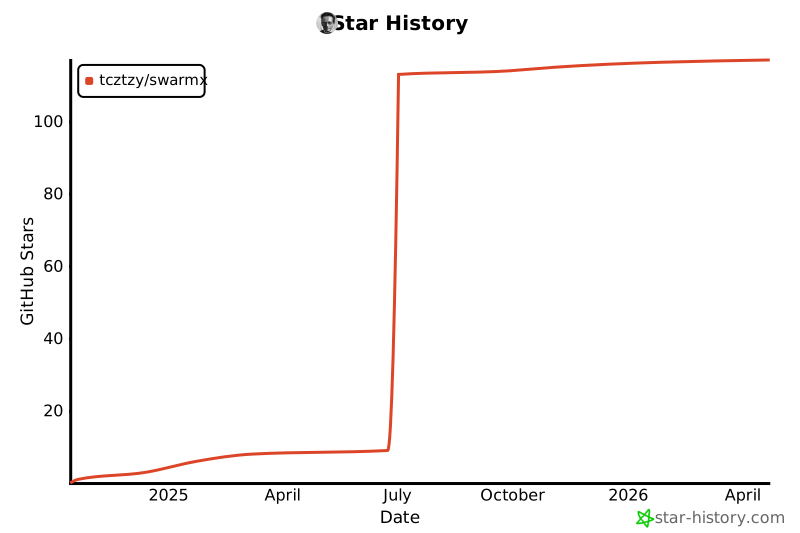
Star History
Quick start
SwarmX automatically loads environment variables from a .env file if present. You can either:
-
Use a .env file (recommended):
# Create a .env file in your project directory
echo "OPENAI_API_KEY=your-api-key" > .env
echo "OPENAI_BASE_URL=http://localhost:11434/v1" >> .env  # optional
uvx swarmx  # Start interactive REPL
-
Set environment variables manually:
export OPENAI_API_KEY="your-api-key"
# export OPENAI_BASE_URL="http://localhost:11434/v1"  # optional
uvx swarmx  # Start interactive REPL
API Server
You can also start SwarmX as an OpenAI-compatible API server:
uvx swarmx serve --host 0.0.0.0 --port 8000
This provides OpenAI-compatible endpoints:
POST /chat/completions- Chat completions with streaming supportGET /models- List available models
Use it with any OpenAI-compatible client:
import openai

client = openai.OpenAI(
    base_url="http://localhost:8000",
    api_key="dummy"  # SwarmX doesn't require authentication
)

response = client.chat.completions.create(
    model="agent-created-by-yourself",
    messages=[{"role": "user", "content": "Hello!"}]
)
Installation
Requires Python 3.11+
$ pip install swarmx # or `uv tool install swarmx`
Usage
import asyncio
from swarmx import Swarm, Agent

client = Swarm()

def transfer_to_agent_b():
    return agent_b


agent_a = Agent(
    name="Agent A",
    instructions="You are a helpful agent.",
    functions=[transfer_to_agent_b],
)

agent_b = Agent(
    name="Agent B",
    model="deepseek-r1:7b",
    instructions="你只能说中文。",  # You can only speak Chinese.
)


async def main():
    response = await client.run(
        agent=agent_a,
        messages=[{"role": "user", "content": "I want to talk to agent B."}],
    )

    print(response.messages[-1]["content"])


asyncio.run(main())
Context Variables
SwarmX supports special context variables that control agent behavior:
background
Provides additional context for the agent. This can be used for:
- Adding external knowledge (web search results, database queries)
- Compressing previous conversation history into summaries
- Isolating context for sub-agents who don't need full conversation history
Example:
context = {
    "background": "Recent news: AI conference announced for next month. User is interested in AI developments."
}
message_slice
Controls which messages are sent to the LLM using Python slice syntax. This enables:
- Context compression by sending only recent messages
- LLM-driven filtering decisions
- Memory management for long conversations
Slice patterns:
":10"- First 10 messages"-5:"- Last 5 messages":0"- No messages (useful withbackgroundfor context compression)"2:8"- Messages from index 2 to 7
Example:
context = {
    "message_slice": "-10:"  # Send only last 10 messages
}
tools
Dynamically selects which tools are available for the current completion. This allows:
- Context-aware tool selection
- Reducing tool overload by showing only relevant tools
- Dynamic tool routing based on conversation context
Example:
context = {
    "tools": [
        {
            "type": "function",
            "function": {
                "name": "search_web",
                "description": "Search the web for information",
                "parameters": {
                    "type": "object",
                    "properties": {
                        "query": {"type": "string"}
                    },
                    "required": ["query"]
                }
            }
        },
        {
            "type": "function",
            "function": {
                "name": "get_weather",
                "description": "Get weather information for a location",
                "parameters": {
                    "type": "object",
                    "properties": {
                        "location": {"type": "string"}
                    },
                    "required": ["location"]
                }
            }
        }
    ]
}
Advanced Usage Examples
Context Compression:
# Compress history into background and send no previous messages
context = {
    "background": "Previous conversation summary: User asked about weather, then travel plans.",
    "message_slice": ":0"  # No previous messages
}
RAG Pattern:
# Add web search results to background, send all messages for comprehensive context
context = {
    "background": "Web search results: Latest AI developments from yesterday's conference...",
    # No slice means all message might pass to LLM
}
Dynamic Tool Selection:
# Based on conversation topic, show only relevant tools
if "weather" in user_message:
    context = {"tools": [{"type": "function", "function": {"name": "get_weather", "description": "Get weather", "parameters": {"type": "object", "properties": {"location": {"type": "string"}}, "required": ["location"]}}}]}
elif "search" in user_message:
    context = {"tools": [{"type": "function", "function": {"name": "search_web", "description": "Search web", "parameters": {"type": "object", "properties": {"query": {"type": "string"}}, "required": ["query"]}}}]}
Architecture
graph TD
   classDef QA fill:#ffffff;
   classDef agent fill:#ffd8ac;
   classDef tool fill:#d3ecee;
   classDef result fill:#b4f2be;
   func1("transfer_to_weather_assistant()"):::tool
   Weather["Weather Assistant"]:::agent
   func2("get_weather('New York')"):::tool
   temp(64):::result
   A["It's 64 degrees in New York."]:::QA
   Q["What's the weather in ny?"]:::QA -->
   Triage["Triage Agent"]:::agent --> Weather --> A
   Triage --> func1 --> Weather
   Weather --> func2 --> temp --> A
Release history Release notifications | RSS feed


Download files
Download the file for your platform. If you're not sure which to choose, learn more about installing packages.
Source Distribution
Built Distribution
Filter files by name, interpreter, ABI, and platform.
If you're not sure about the file name format, learn more about wheel file names.
Copy a direct link to the current filters
File details
Details for the file swarmx-0.7.0a4.tar.gz.
File metadata
- Download URL: swarmx-0.7.0a4.tar.gz
- Upload date:
- Size: 22.5 kB
- Tags: Source
- Uploaded using Trusted Publishing? No
- Uploaded via: uv/0.8.19
File hashes
| Algorithm | Hash digest | |
|---|---|---|
| SHA256 |
758044cefb87de48092c9be6c69521b78b66a95fe2925b204e966206eb66b1ca
|
|
| MD5 |
1e350c5dd9b664450d4f3c5e25ee5425
|
|
| BLAKE2b-256 |
c8ed01aae9a8aa7dd9aea155968e18d324c30a733ca5b01d200bce5327ccbc3a
|
File details
Details for the file swarmx-0.7.0a4-py3-none-any.whl.
File metadata
- Download URL: swarmx-0.7.0a4-py3-none-any.whl
- Upload date:
- Size: 26.2 kB
- Tags: Python 3
- Uploaded using Trusted Publishing? No
- Uploaded via: uv/0.8.19
File hashes
| Algorithm | Hash digest | |
|---|---|---|
| SHA256 |
aade1b918dc16bf7e66980c9750a602efca786f176c702eca2432e2f4f3b9166
|
|
| MD5 |
f831467b5bf289c8e1597fec4512bd53
|
|
| BLAKE2b-256 |
3af73bb699aba1f8e0682a50ea2e355ab9e29deecc1ea9f24b219ce2a53b7c7b
|






