
Swiss Weather MCP Server




A Model Context Protocol (MCP) server that exposes Swiss weather forecast data as callable tools. It reads the official MeteoSwiss local forecast collection, caches it locally, and serves predictions such as rainfall, sunshine, temperature, wind and a worded weather summary. MeteoSwiss publishes these forecasts for 5,614 Swiss locations (weather stations, postal code areas and points of interest), for today and the next 8 days, refreshed every hour.
Additionally there is also an MCP client that can be run to test the server using the stdio transport.
Note: This project is not an official MeteoSwiss product. All forecast data are from the MeteoSwiss Open Data portal. Source: MeteoSwiss
Table of Contents
- Project Structure
- Quick Start
- Installation
- Usage
- Available Tools
- Example Usage with LMStudio
- Tests
- Releasing
- Resources
- License
Project Structure
swiss-weather-mcp/
├── src/swiss_weather_mcp/
│   ├── server.py           # MCP server
│   ├── forecast.py         # Weather values, units and aggregation
│   ├── meteoswiss.py       # MeteoSwiss data source, caching and location lookup
│   ├── parameters.py       # MeteoSwiss parameter codes and pictogram meanings
│   └── client.py           # MCP client (optional)
├── tests/swiss_weather_mcp/  # Tests
├── .github/workflows/      # CI and release pipelines
├── docs/                   # Documentation
├── pyproject.toml          # Project metadata and dependencies
├── uv.lock                 # Pinned, reproducible dependency set
└── Dockerfile
Caches live outside the project, under your OS's standard cache directory (see Installation).
Quick Start
1. Installation
Install the server globally to run it anywhere on your system:
uv tool install swiss-weather-mcp
2. Execution
swiss-weather-mcp-server
No configuration is needed, the server reads everything it requires from MeteoSwiss.
Installation
As a Global CLI Tool
uv tool install swiss-weather-mcp

# With the optional MCP client, which pulls in the OpenAI SDK
uv tool install 'swiss-weather-mcp[client]'
As a Library Dependency
# Using uv
uv add swiss-weather-mcp

# Using pip
pip install swiss-weather-mcp

# With the optional MCP client, which pulls in the OpenAI SDK
uv add 'swiss-weather-mcp[client]'
pip install 'swiss-weather-mcp[client]'
From Source
git clone https://github.com/cuolm/swiss-weather-mcp.git
cd swiss-weather-mcp

# Using uv (Recommended)
uv sync --extra client

# Using pip
python3 -m venv .venv
source .venv/bin/activate  # On Windows: .venv\Scripts\activate
pip install -e ".[client]"
Note:
uv syncinstalls the server only.--extra clientadds the OpenAI SDK needed byswiss-weather-mcp-client.
Note:
llama-servermust already be running when you startswiss-weather-mcp-client, which talks to it but never starts it. The MCP server itself does not need it.- Caches live in your OS cache directory (via platformdirs, e.g.
~/Library/Caches/swiss-weather-mcpon macOS,~/.cache/swiss-weather-mcpon Linux), independent of where the server runs. SetSWISS_WEATHER_MCP_CACHE_DIRto put them elsewhere, or delete the directory to clear them. Forecast files sit in one folder per model run, named by the run's time in UTC, such asruns/202609231100.
Usage
Running the Server
If installed via uv tool install or pip:
# stdio (default)
swiss-weather-mcp-server

# streamable-http
swiss-weather-mcp-server --transport=streamable-http --host=localhost --port=8050
If running within the source repository cloned from GitHub:
# Using uv (Recommended)
uv run swiss-weather-mcp-server

# Using pip, with the virtual environment activated
swiss-weather-mcp-server
Optional flags: --help
Note: By default the server keeps only the rows for the location you asked about, a few kilobytes per parameter. Pass
--cache-all-locationsto keep the whole published file instead (about 31 MB per parameter), which makes questions about further locations need no new download.
Running the Server with Docker
Images are built and published automatically by GitHub Actions to the project's GitHub Container Registry, tagged :latest (newest release) and by version.
- Run the published image, mapping port 8050:
docker run -p 8050:8050 ghcr.io/cuolm/swiss-weather-mcp:latest
- Access the server at:
http://localhost:8050/mcp/
Note: The cache lives inside the container and is lost when it stops. Mount a volume to keep it across restarts, for example
-v swiss-weather-cache:/root/.cache/swiss-weather-mcp.
Manual Build
docker build -t swiss-weather-mcp .
docker run -p 8050:8050 swiss-weather-mcp
Running the MCP Client using Stdio Transport
The bundled MCP client can be used to test the server over the stdio transport. It requires the client extra (see Installation). The client starts the MCP server itself, but not the model server, which has to be running first.
- Install llama.cpp, which provides
llama-server:brew install llama.cpp
- Start it in its own terminal, downloading the model on first use:
llama-server --jinja --no-mmproj -hf unsloth/Qwen3.5-4B-GGUF --port 8080
- Run the client against it in a second terminal:
swiss-weather-mcp-client --model=unsloth/Qwen3.5-4B-GGUF --base-url=http://localhost:8080/v1

# From a source checkout, using uv
uv run --extra client swiss-weather-mcp-client --model=unsloth/Qwen3.5-4B-GGUF --base-url=http://localhost:8080/v1
Note:
--jinjaapplies the model's chat template, without which tool calling is unsupported, and--no-mmprojskips the vision projector that-hfdownloads alongside some models.--base-urldefaults tollama-server's address, and any other OpenAI compatible backend works by pointing it elsewhere, for example LM Studio or vLLM. Pass--modelexactly as the server reports it under/v1/models.
Available Tools
The forecast tools take a location (a name such as "Zurich", or a Swiss postal code such as "8001")
and a Swiss local time, or a date for daily_forecast. They return the value together with the location
they resolved, its altitude, the time or day it applies to, and the model run the forecast came from.
| Tool | Purpose | Example Call |
|---|---|---|
current_date_and_time() |
Today's weekday and the Swiss time now, in the form the tools accept | current_date_and_time() |
daily_forecast(location, date) |
Whole day: lowest and highest hourly temperature, median rainfall with its 10th and 90th percentile, daytime weather in words | daily_forecast("Zurich", "2026-09-23") |
weather_description(location, when) |
The weather in words for the 3 hours up to that time, e.g. "mostly sunny, some clouds" | weather_description("Zurich", "2026-09-23T14:00") |
temperature(location, when) |
Air temperature (°C), mean of the hour up to that time, 2 m above ground | temperature("Zurich", "2026-09-23T14:00") |
total_rainfall(location, start, end) |
Median rainfall (mm) of each hour, summed over a period | total_rainfall("Zurich", "2026-09-23T06:00", "2026-09-23T18:00") |
sunshine_hours(location, start, end) |
Sunshine (h) summed over a period | sunshine_hours("Zurich", "2026-09-23T06:00", "2026-09-23T18:00") |
precipitation_probability(location, when) |
Chance of rain (%) over the 3 hours up to that time | precipitation_probability("Zurich", "2026-09-23T14:00") |
precipitation_rate(location, when) |
Median rainfall (mm) in the hour up to that time | precipitation_rate("Zurich", "2026-09-23T14:00") |
wind_speed(location, when) |
Wind speed (km/h), mean of the hour up to that time | wind_speed("Zurich", "2026-09-23T14:00") |
wind_gusts(location, when) |
Strongest one-second gust (km/h) in the hour up to that time | wind_gusts("Säntis", "2026-09-23T14:00") |
wind_direction(location, when) |
Direction the wind blows from, in degrees and as a compass point | wind_direction("Zurich", "2026-09-23T14:00") |
total_cloud_cover(location, when) |
Estimated total cloud cover (%) plus the low, medium and high layers | total_cloud_cover("Zurich", "2026-09-23T14:00") |
freezing_level(location, when) |
Height of the 0 °C line (m above sea level) | freezing_level("Zermatt", "2026-09-23T14:00") |
Time
- Send times as Swiss clock time in ISO 8601 without an offset, e.g.
"2026-09-23T14:00". The server applies summer or winter time for that date itself. An explicit offset is honoured. - All times in the answers are ISO 8601 Swiss local time with the UTC offset, e.g.
2026-09-23T13:00+02:00. The+02:00shows the difference to UTC:+02:00in summer,+01:00in winter. - MeteoSwiss stamps an hourly average or sum at the end of its hour, so
14:00means 13:00 to 14:00, and a period fromstarttoendcovers exactly the hours in between. Cloud cover and the freezing level are values at that moment instead. - The forecast covers today and the next 8 days.
Note: Ask
current_date_and_time()first when the question is relative, such as "tomorrow" or "tonight", because the tools take a real date rather than an offset.
Note: A location must be one of the places MeteoSwiss publishes. Names are matched exactly, ignoring case and accents, so
zurichfindsZürichbut a region such asTessindoes not match and is rejected rather than guessed at. A city covers several postal code areas and resolves to the lowest one, which is not always its centre (Bern's lowest is 3004, its old town 3011). The answer names the point it used, and a postal code picks a specific district.
Note:
daily_forecastis by far the cheapest tool, about 8 MB against about 31 MB per hourly parameter, so prefer it when the question is about a day rather than an hour.total_cloud_coveris the most expensive because it reads three files.
Note: MeteoSwiss calculates many slightly different possible outcomes, not just one forecast. Temperature and rain are the median of these outcomes: half lie below it and half above. If the possible temperatures at 14:00 are 18, 19, 20, 21 and 23 °C, the median is 20 °C. It is not the most likely value. Medians do not add up: when showers are possible but unlikely in any single hour, every hourly amount is 0, while the day as a whole still has a median of several millimetres. Ask
daily_forecastfor the rain of a day, nottotal_rainfall.
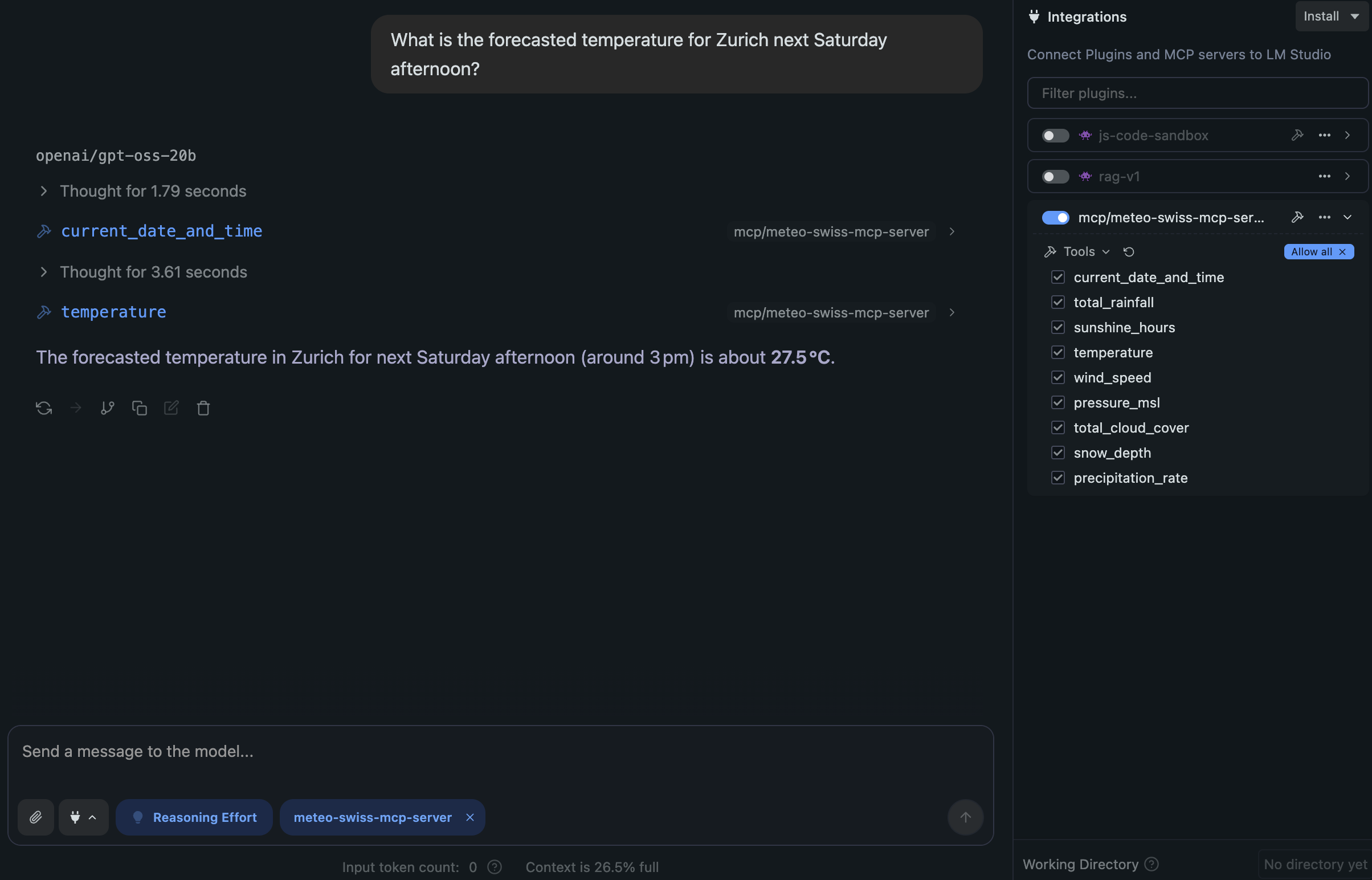
Example Usage with LMStudio
Using the streamable-http transport layer
Configure the mcp.json file in LMStudio:
{
  "mcpServers": {
    "swiss_weather_mcp_server": {
      "url": "http://localhost:8050/mcp/"
    }
  }
}
Run the MCP server with the streamable-http transport layer:
uv run swiss-weather-mcp-server --transport=streamable-http --host=localhost --port=8050
Using the stdio transport layer
Configure the mcp.json file in LMStudio. Replace <path-to-the-project> with your actual local path:
{
  "mcpServers": {
    "swiss_weather_mcp_server": {
      "command": "<path-to-the-project>/.venv/bin/swiss-weather-mcp-server"
    }
  }
}
Tests
Run the tests from the project root with:
uv run pytest

# Or, with an activated virtual environment
pytest
Check the code style with ruff and the type hints with mypy. mypy also checks the client, so install its extra first:
uv sync --group dev --extra client
uv run ruff check
uv run mypy
Every push and pull request runs the tests, ruff, mypy and a Docker build check via the Tests workflow.
Releasing
Versions are derived from Git tags by hatch-vcs — there is no version string to bump by hand.
- Pushing a pre-release tag (e.g.
0.2.0rc1) triggersrelease_test.yaml: tests, publish to TestPyPI, push a versioned image to GHCR, and create a prerelease GitHub Release. - Pushing a final tag (e.g.
0.2.0) triggersrelease.yaml: tests, publish to PyPI, push:<version>and:latestimages to GHCR, and create a GitHub Release.
Both publish jobs use PyPI trusted publishing via the pypi / testpypi GitHub environments — no API tokens are stored in the repository.
Resources
License
Licensed under the Apache License 2.0.
1 maintainer

Release files for swiss-weather-mcp 0.2.0
For a detailed explanation of source distributions (sdists) and built distributions (wheels), please see the package formats documentation.
Source distribution (sdist)
| File | Size | Uploaded | |
|---|---|---|---|
| swiss_weather_mcp-0.2.0.tar.gz | 401.0 kB | Details |
Built distribution (wheel)
| File | Interpreter | ABI | Platform | Reset |
|---|---|---|---|---|
| swiss_weather_mcp-0.2.0-py3-none-any.whl | Python 3 | none | any | Details |
Total release size: 432.1 kB
Release files / swiss_weather_mcp-0.2.0.tar.gz
| Download URL | swiss_weather_mcp-0.2.0.tar.gz |
|---|---|
| Size | 401.0 kB |
| Tags | Source |
|
SHA-256 checksum How to use checksums |
6bf71703793b3dc1dbb0593180a45fc01be48a96aebd67778bb534340e075eee
|
|
BLAKE2b-256 checksum How to use checksums |
3e7184df19fbb017839aab6dc14275612eee49baf526ed47358814c4dc58c30c
|
| Upload date | |
|
Uploaded using Trusted Publishing? What is trusted publishing? |
Yes |
| Uploaded via |
twine/7.0.0 CPython/3.13.14
|
Provenance
Provenance describes where a file came from. On PyPI, provenance is shared via attestations, which provide a verifiable record of the build or publishing details. View details, limitations and caveats.


PyPI Publish Attestation
PyPI verified that this artifact, at this checksum, originated from the publisher listed below.
Signed by GitHub Actions, verified by PyPI on Sep 24, 2026.
Transparency logRelease files / swiss_weather_mcp-0.2.0-py3-none-any.whl
| Download URL | swiss_weather_mcp-0.2.0-py3-none-any.whl |
|---|---|
| Size | 31.1 kB |
| Tags | Python 3 |
|
SHA-256 checksum How to use checksums |
6bd71a0d89faabee51ccd8241e7f8c20d61cf603da36b3a6a58ce055584cb3bc
|
|
BLAKE2b-256 checksum How to use checksums |
cb38da4f01e0e589863f2ec197967bdcec6406ab6c40412ba0177c665ad4f2c0
|
| Upload date | |
|
Uploaded using Trusted Publishing? What is trusted publishing? |
Yes |
| Uploaded via |
twine/7.0.0 CPython/3.13.14
|
Provenance
Provenance describes where a file came from. On PyPI, provenance is shared via attestations, which provide a verifiable record of the build or publishing details. View details, limitations and caveats.
PyPI Publish Attestation
PyPI verified that this artifact, at this checksum, originated from the publisher listed below.
Signed by GitHub Actions, verified by PyPI on Sep 24, 2026.
Transparency log













