
SWMMer: lightweight SWMM I/O and engine runner
A numpy-only toolkit for EPA SWMM file and engine I/O.
swmmer builds a SWMM .inp, runs the EPA SWMM engine (bundled inside the wheel, so no
external dependencies are needed), and reads the binary .out results directly through
the EPA libswmm-output C library via ctypes. numpy is the only required
dependency.
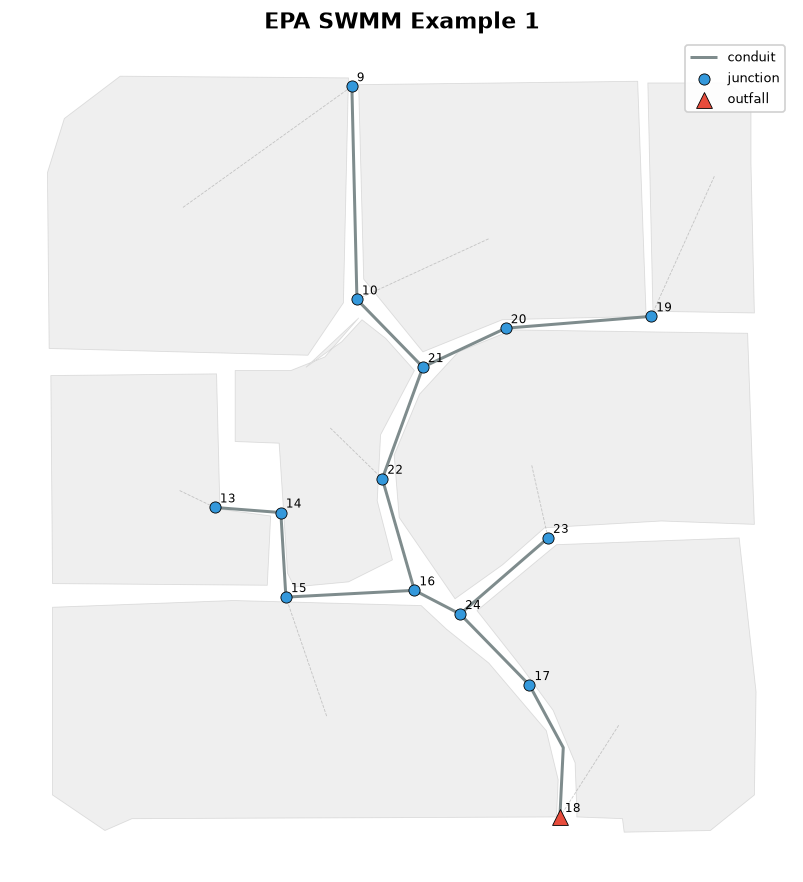
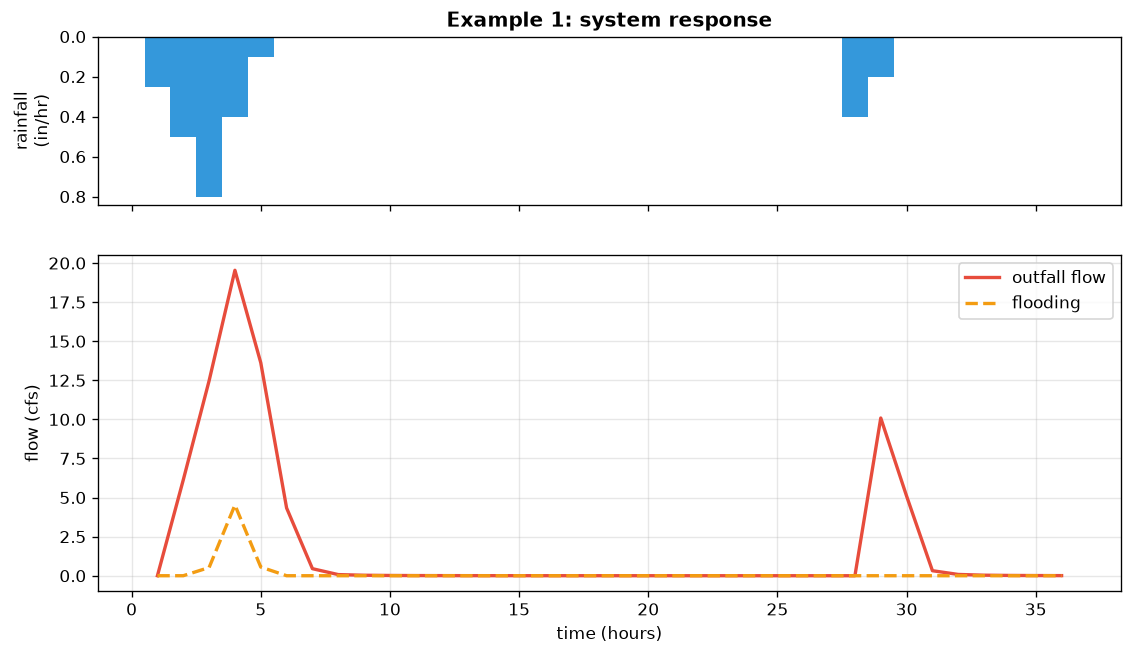
The EPA SWMM Example 1 network and its system response, both produced with swmmer:
Capabilities
- Write input files.
SWMMInputGenerator, together with typed element defaults (junctions, conduits, subcatchments, storage, and more), assembles a valid.inp. - Build design storms.
build_nrcs_hyetographdistributes a total depth into an NRCS (SCS) Type II or Type III hyetograph, andwrite_rain_datwrites the SWMM rain file. - Run the engine.
run_swmminvokes the bundledrunswmmexecutable (also exposed as arunswmmcommand line tool). The engine is compiled into the wheel, so there is nothing to install separately. - Read results.
SWMMResultsreads the binary.outand returns NumPy arrays by element name and attribute (NodeAttr,LinkAttr,SubcatchAttr,SystemAttr), with optionalto_pandasandto_xarrayconverters. - Plot.
swmmer.plotdraws the network map and a longitudinal profile withmatplotlib, and can color elements by any result (peak flow, flooding, and so on).
Installation
pip install swmmer
The SWMM engine (runswmm and libswmm-output) is compiled from source and bundled
inside the wheel, so pip install swmmer is self-contained on Linux, macOS, and
Windows.
Optional extras:
pip install "swmmer[plot]"           # matplotlib, for swmmer.plot
pip install "swmmer[pandas,xarray]"  # SWMMResults.to_pandas() / to_xarray()
Usage
Build a design storm and write it as a SWMM rain file (pure and offline):
from swmmer import build_nrcs_hyetograph, write_rain_dat

hyeto = build_nrcs_hyetograph(150.0, storm_type="III", duration="24-hr")
write_rain_dat(hyeto, "rain.dat")
Run a model and read results by element name:
from swmmer import SWMMResults, SystemAttr, run_swmm

rpt, out = run_swmm("model.inp")
with SWMMResults(out) as res:
    t = res.times_hours
    q = res.system_series(SystemAttr.OUTFALL_FLOW)
Plot the network (requires the plot extra):
import swmmer

fig, ax = swmmer.plot.plot_network("model.inp", labels=True)
The example notebook in the documentation walks through the full workflow: run a model, plot the network, draw hydrographs and a profile, then analyze the results.
Contributing
Contributions are welcome. Please see CONTRIBUTING.md for details.
License
BSD 3-Clause License. See LICENSE for details.
1 maintainer

Metadata
1 maintainer
Release files for swmmer 0.1.2
For a detailed explanation of source distributions (sdists) and built distributions (wheels), please see the package formats documentation.
Source distribution (sdist)
| File | Size | Uploaded | |
|---|---|---|---|
| swmmer-0.1.2.tar.gz | 1.0 MB | Details |
Built distributions (wheels)
| File | Reset | |||
|---|---|---|---|---|
| swmmer-0.1.2-py3-none-win_amd64.whl | Python 3 | none | Windows x86-64 | Details |
| swmmer-0.1.2-py3-none-manylinux2014_x86_64.manylinux_2_17_x86_64.manylinux_2_28_x86_64.whl | Python 3 | none | Linux glibc 2.17+ x86-64, Linux glibc 2.28+ x86-64 | Details |
| swmmer-0.1.2-py3-none-manylinux2014_aarch64.manylinux_2_17_aarch64.manylinux_2_28_aarch64.whl | Python 3 | none | Linux glibc 2.28+ ARM64, Linux glibc 2.17+ ARM64 | Details |
| swmmer-0.1.2-py3-none-macosx_11_0_x86_64.whl | Python 3 | none | macOS 11.0+ x86-64 | Details |
| swmmer-0.1.2-py3-none-macosx_11_0_arm64.whl | Python 3 | none | macOS 11.0+ ARM64 | Details |
Total release size: 5.4 MB
Release files / swmmer-0.1.2.tar.gz
| Download URL | swmmer-0.1.2.tar.gz |
|---|---|
| Size | 1.0 MB |
| Tags | Source |
|
SHA-256 checksum How to use checksums |
d48c5cb19d71aa1714cc90e048619114d46754a10068ec0c3da2554ab3d79489
|
|
BLAKE2b-256 checksum How to use checksums |
caa3b6448ebb96d657e2ce0a255016704ccafd0a7bfa550e5e075751fd480182
|
| Upload date | |
|
Uploaded using Trusted Publishing? What is trusted publishing? |
Yes |
| Uploaded via |
uv/0.11.28 {"installer":{"name":"uv","version":"0.11.28","subcommand":["publish"]},"python":null,"implementation":{"name":null,"version":null},"distro":{"name":"Ubuntu","version":"24.04","id":"noble","libc":null},"system":{"name":null,"release":null},"cpu":null,"openssl_version":null,"setuptools_version":null,"rustc_version":null,"ci":true}
|
Release files / swmmer-0.1.2-py3-none-win_amd64.whl
| Download URL | swmmer-0.1.2-py3-none-win_amd64.whl |
|---|---|
| Size | 1.1 MB |
| Tags | Python 3 Windows x86-64 |
|
SHA-256 checksum How to use checksums |
fb1325f1d009fab3bbd55838498bd8ea64c407ed73c46e1953d5ba66f3301233
|
|
BLAKE2b-256 checksum How to use checksums |
828c6d5805bccb50ef51814a890f8736683cf16689bc01243a11af42353ff6d3
|
| Upload date | |
|
Uploaded using Trusted Publishing? What is trusted publishing? |
Yes |
| Uploaded via |
uv/0.11.28 {"installer":{"name":"uv","version":"0.11.28","subcommand":["publish"]},"python":null,"implementation":{"name":null,"version":null},"distro":{"name":"Ubuntu","version":"24.04","id":"noble","libc":null},"system":{"name":null,"release":null},"cpu":null,"openssl_version":null,"setuptools_version":null,"rustc_version":null,"ci":true}
|
Release files / swmmer-0.1.2-py3-none-manylinux2014_x86_64.manylinux_2_17_x86_64.manylinux_2_28_x86_64.whl
| Download URL | swmmer-0.1.2-py3-none-manylinux2014_x86_64.manylinux_2_17_x86_64.manylinux_2_28_x86_64.whl |
|---|---|
| Size | 467.4 kB |
| Tags | Linux glibc 2.17+ x86-64 Linux glibc 2.28+ x86-64 Python 3 |
|
SHA-256 checksum How to use checksums |
7fdc8c76a8b017921b92848460a11e8b89f1cfda2f342f396f39ea3e6d0552c3
|
|
BLAKE2b-256 checksum How to use checksums |
619a5123673d0cd8973cd838bcd8788a16cf1eefecb58358bb33196aa9188939
|
| Upload date | |
|
Uploaded using Trusted Publishing? What is trusted publishing? |
Yes |
| Uploaded via |
uv/0.11.28 {"installer":{"name":"uv","version":"0.11.28","subcommand":["publish"]},"python":null,"implementation":{"name":null,"version":null},"distro":{"name":"Ubuntu","version":"24.04","id":"noble","libc":null},"system":{"name":null,"release":null},"cpu":null,"openssl_version":null,"setuptools_version":null,"rustc_version":null,"ci":true}
|
Release files / swmmer-0.1.2-py3-none-manylinux2014_aarch64.manylinux_2_17_aarch64.manylinux_2_28_aarch64.whl
| Download URL | swmmer-0.1.2-py3-none-manylinux2014_aarch64.manylinux_2_17_aarch64.manylinux_2_28_aarch64.whl |
|---|---|
| Size | 445.4 kB |
| Tags | Linux glibc 2.17+ ARM64 Linux glibc 2.28+ ARM64 Python 3 |
|
SHA-256 checksum How to use checksums |
01d055340594030768313d80b5c8054a73eb1514507e977e32721a9a04a935eb
|
|
BLAKE2b-256 checksum How to use checksums |
02d6de3d03ab1903fee57e07d59787e4f1880198f0542861d79f5809307f8d8a
|
| Upload date | |
|
Uploaded using Trusted Publishing? What is trusted publishing? |
Yes |
| Uploaded via |
uv/0.11.28 {"installer":{"name":"uv","version":"0.11.28","subcommand":["publish"]},"python":null,"implementation":{"name":null,"version":null},"distro":{"name":"Ubuntu","version":"24.04","id":"noble","libc":null},"system":{"name":null,"release":null},"cpu":null,"openssl_version":null,"setuptools_version":null,"rustc_version":null,"ci":true}
|
Release files / swmmer-0.1.2-py3-none-macosx_11_0_x86_64.whl
| Download URL | swmmer-0.1.2-py3-none-macosx_11_0_x86_64.whl |
|---|---|
| Size | 1.2 MB |
| Tags | Python 3 macOS 11.0+ x86-64 |
|
SHA-256 checksum How to use checksums |
778d567cf898796ad30a494140c91cbb3b6241dacc353f3924da67dc5c1f3129
|
|
BLAKE2b-256 checksum How to use checksums |
ffbf1004aae41c7f7f64423b18d9c6f9032450a8d2524a5f3e0fa5cad74f4cbc
|
| Upload date | |
|
Uploaded using Trusted Publishing? What is trusted publishing? |
Yes |
| Uploaded via |
uv/0.11.28 {"installer":{"name":"uv","version":"0.11.28","subcommand":["publish"]},"python":null,"implementation":{"name":null,"version":null},"distro":{"name":"Ubuntu","version":"24.04","id":"noble","libc":null},"system":{"name":null,"release":null},"cpu":null,"openssl_version":null,"setuptools_version":null,"rustc_version":null,"ci":true}
|
Release files / swmmer-0.1.2-py3-none-macosx_11_0_arm64.whl
| Download URL | swmmer-0.1.2-py3-none-macosx_11_0_arm64.whl |
|---|---|
| Size | 1.1 MB |
| Tags | Python 3 macOS 11.0+ ARM64 |
|
SHA-256 checksum How to use checksums |
c2dedf4981dbf457b7b539aaf34ef43b7ddce68f6c9e30b7c125e6926d6f9d6e
|
|
BLAKE2b-256 checksum How to use checksums |
ef89a8d1ba65f20d16e2a739c3860df780e86c79d385700e6dcbc270f94cd318
|
| Upload date | |
|
Uploaded using Trusted Publishing? What is trusted publishing? |
Yes |
| Uploaded via |
uv/0.11.28 {"installer":{"name":"uv","version":"0.11.28","subcommand":["publish"]},"python":null,"implementation":{"name":null,"version":null},"distro":{"name":"Ubuntu","version":"24.04","id":"noble","libc":null},"system":{"name":null,"release":null},"cpu":null,"openssl_version":null,"setuptools_version":null,"rustc_version":null,"ci":true}
|














