
symbion
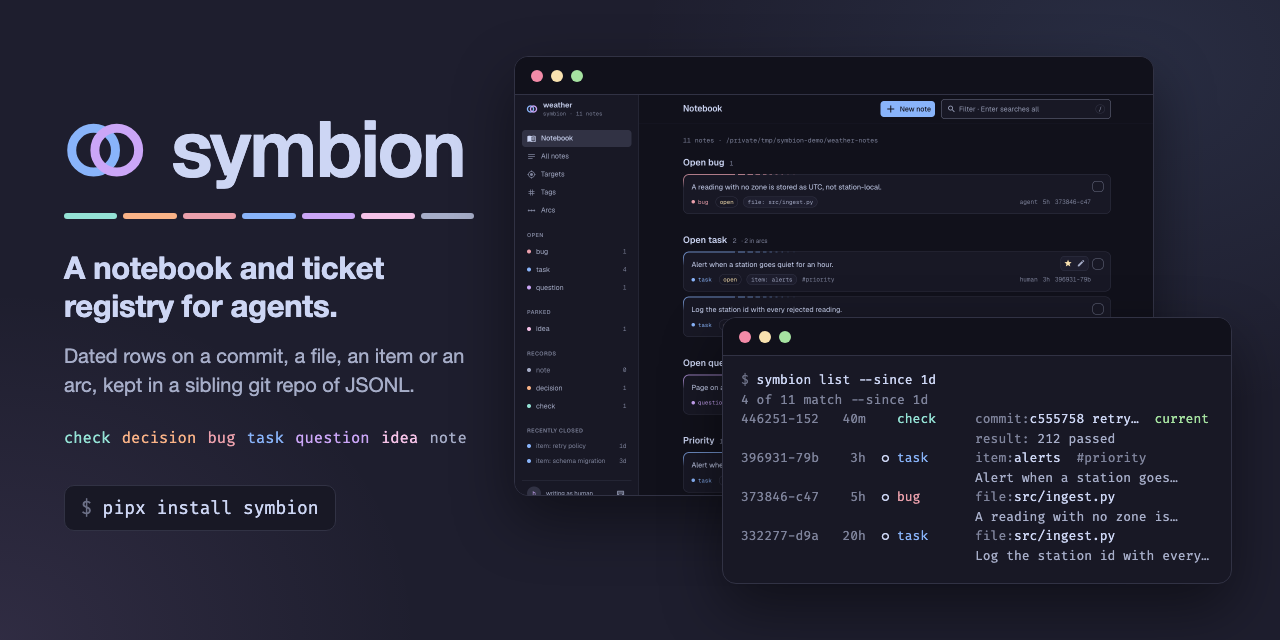
A notebook and ticket registry for one project, shared by you and your coding agent. Bugs, tasks, decisions and verified results go in as dated notes, so what a session learned is still there when the next one starts.
What it does for you
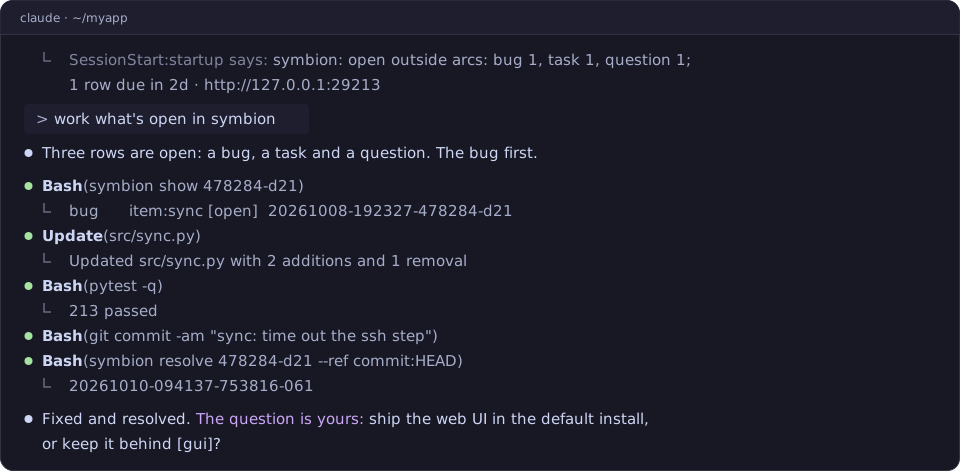
- Each session starts where the last one stopped. A session-start hook
gives the agent the open bugs, tasks and questions, the rows due soon, and
the ones you wrote or answered.
/symbion wrapends a session: the rows it owes, then a store commit whose message is the next session's handoff. You do not brief it again. - A result knows its age. A
checkrecords what ran, what it said, and the commit it ran at. Once the code moves on, it readsbehind 12, not "tests pass". - Questions go both ways. The agent files a
questionfor you. Your answer, from a terminal or the browser, reaches its next session. - Notes attach to things. A note sits on a commit, a file, a named item
or the whole project, so
symbion context --target file:src/x.pyfinds every note on that file. - Checklists across a codebase. An arc is a named line of work with one
box per item: a file, a test, a host.
symbion arc reconcilereports the boxes whose file was renamed or deleted. - Plain files you own. The notes are JSONL in a git repo beside the project. There is no server, account or database. Checking out an old branch does not change your tickets.
- A local web page, if you want one.
symbion servegives boards, search, and a page per note.
symbion works with Claude Code, Codex and Hermes Agent, and the CLI works without any of them.
Install
Python 3.11+ and git. On Windows, use Git for Windows.
pipx install 'symbion[gui]' # or: uv tool install 'symbion[gui]'
[gui] adds the web page (symbion serve); leave it out for the CLI alone.
Run command -v symbion from another directory to check that it is on PATH:
the session-start hook finds symbion through PATH.
Quick start
From your project's root:
symbion init          # lists each change and makes none (exit 1 if there are any)
symbion init --yes    # creates the store, ../<repo>-notes, and links the agent skill
init --yes registers its hooks too when ~/.claude/settings.json does not
exist: one at session start, and one that gives the agent a file's gotcha rows
the first time it touches that file. When the file exists, init prints each
entry to add, or says the hook is already there. symbion init --merge-hook adds the entry for you and keeps the
rest of the file. If your agent's own edit of that file is denied, run it yourself:
in Claude Code, type ! symbion init --merge-hook at the prompt.
A new store takes notes on a commit, an item, the project or an arc. For notes
on files, open ../<repo>-notes/symbion.toml and uncomment file = under
[catalogs] and file = "git" under [renames]. A file target refused before
then names both lines.
Then add one line to CLAUDE.md, and start a session:
- We use symbion for durable notes and tickets.
init --agent codex, --agent hermes or --agent both sets up the other
agents, which take a step more: see the
guide.
Docs
- Guide: install on each platform, TAB completion, adopting a repo with each agent, the first session, and the web page.
- Reference: kinds and arcs, catalogs, conventions, where things live, and development.
- SKILL.md:
what the agent reads, with a table of the common commands.
symbion VERB -hlists every flag of a verb. - Design: why symbion is built as it is.
Development
python3 -m venv .venv && .venv/bin/pip install -e '.[test,gui]'
.venv/bin/python -m pytest -q -n auto
Windows, and making a clone your installed symbion: Development.
1 maintainer

Metadata
1 maintainer
Release files for symbion 0.7.0
For a detailed explanation of source distributions (sdists) and built distributions (wheels), please see the package formats documentation.
Source distribution (sdist)
| File | Size | Uploaded | |
|---|---|---|---|
| symbion-0.7.0.tar.gz | 581.8 kB | Details |
Built distribution (wheel)
| File | Interpreter | ABI | Platform | Reset |
|---|---|---|---|---|
| symbion-0.7.0-py3-none-any.whl | Python 3 | none | any | Details |
Total release size: 949.8 kB
Release files / symbion-0.7.0.tar.gz
| Download URL | symbion-0.7.0.tar.gz |
|---|---|
| Size | 581.8 kB |
| Tags | Source |
|
SHA-256 checksum How to use checksums |
28c23c440db0460af89725c57f838bad607669297fe9f2e39dd17450797f0486
|
|
BLAKE2b-256 checksum How to use checksums |
062b7b683b48fe8eb7cfbef27a9c2fa1f525b44a0814d84e7d498afd1d6b6f98
|
| Upload date | |
|
Uploaded using Trusted Publishing? What is trusted publishing? |
Yes |
| Uploaded via |
twine/7.0.0 CPython/3.13.14
|
Provenance
Provenance describes where a file came from. On PyPI, provenance is shared via attestations, which provide a verifiable record of the build or publishing details. View details, limitations and caveats.


PyPI Publish Attestation
PyPI verified that this artifact, at this checksum, originated from the publisher listed below.
Signed by GitHub Actions, verified by PyPI on Oct 13, 2026.
Transparency logRelease files / symbion-0.7.0-py3-none-any.whl
| Download URL | symbion-0.7.0-py3-none-any.whl |
|---|---|
| Size | 368.0 kB |
| Tags | Python 3 |
|
SHA-256 checksum How to use checksums |
b3043da729f566deafe66996b3e1bab18eb75477a42e4d28d5f56fb102ab3c7d
|
|
BLAKE2b-256 checksum How to use checksums |
83f7276161edc66a1c76eda4e33d0d73cbeaba01047ee8633989e1ff51779ffa
|
| Upload date | |
|
Uploaded using Trusted Publishing? What is trusted publishing? |
Yes |
| Uploaded via |
twine/7.0.0 CPython/3.13.14
|
Provenance
Provenance describes where a file came from. On PyPI, provenance is shared via attestations, which provide a verifiable record of the build or publishing details. View details, limitations and caveats.
PyPI Publish Attestation
PyPI verified that this artifact, at this checksum, originated from the publisher listed below.
Signed by GitHub Actions, verified by PyPI on Oct 13, 2026.
Transparency log













