
This release is a pre-release and may not be stable for production use.
Symphony 🎼
Symphony is a lightweight container and job orchestrator.
A central Conductor schedules Docker and exec jobs across distributed Nodes, balancing workloads using virtual resource capacities instead of raw CPU or memory.
⚠️ Preview Version
Symphony now has a working MVP with:
- ✅ Add deployments
- ✅ Add nodes
- ✅ UI-based configuration
- ✅ Node status with CPU/GPU/RAM usage
- ✅ Automatic scheduling based on virtual capacity availability
- ✅ Automatic restarts
- ✅ Scheduled restarts (cron + timezone)
- ✅ Health checks with auto-restart on failure
- ✅ Live deployment logs over WebSocket
- ✅ Conda env management and activation per deployment
- ✅ Deployment-to-node assignment visibility in API/UI
Current Status
- ✅ Working MVP
- ❌ No releases yet
- ⚠️ APIs and CLI are not final
- ⚠️ Breaking changes expected
Everything in this repository should be considered experimental.
Why Symphony Exists
Symphony: orchestration without owning the node.
Traditional orchestrators such as Kubernetes, Nomad, Docker Swarm, and Mesos assume host-level control, requiring cgroups, root privileges, or a container runtime on the node. These assumptions break down in modern GPU platforms and container-only environments such as R**Pod.
Symphony is purpose-built for these environments, operating entirely in user space, requiring no special privileges, and running wherever a standard container can run.
Focus
-
✅ Easy installation
-
✅ "Just run it" experience
-
❌ No special privileges
-
❌ No host / cgroups / kernel access
-
✅ Works in environments like R**Pod (container-only access)
-
Container runtime only
-
No root on host
-
No /sys/fs/cgroup
-
No iptables
-
No privileged containers
-
No Docker daemon inside container
This immediately disqualifies many orchestrators.
Symphony Design Principles
- ✅ Runs as a normal user-space process
- ✅ Runs entirely inside a container
- ✅ No cgroups
- ✅ No kernel access
- ✅ No privileged mode
- ✅ No node ownership assumptions
Installation Friction (high level)
| System | Installation steps |
|---|---|
| Kubernetes | Cluster setup, CRI, CNI, root, kernel config |
| Nomad | Host agent, ACLs, networking, drivers |
| Docker Swarm | Docker daemon, swarm init |
| Mesos | Zookeeper, agents, isolators |
| Symphony | pip install symphony-orchestra |
Note: This is a simplified, high-level comparison. Real-world installation steps may differ by environment. Please open a PR if you spot inaccuracies or have improvements.
Architecture
User / CLI
     |
     v
+-------------+
|  Conductor  |
+-------------+
       |
       | secure persistent connection (TLS)
       |
+-------------+     +-------------+
|    Node     |     |    Node     |
| (multiple)  | ... | (multiple)  |
+-------------+     +-------------+
Core Concepts
Conductor
The central controller responsible for:
- node registry and health
- capacity tracking
- job scheduling
- job lifecycle management
Nodes
Nodes are clients that connect to the Conductor and can run multiple applications.
Each Node declares:
- one or more groups (e.g.
gpu,cpu,edge-sg) - virtual capacity classes, for example:
A = 100
B = 200
Jobs
Jobs are units of work submitted to the Conductor.
When submitting a job, you specify how much capacity it consumes:
A10
A10,B20
The Conductor schedules the job to an eligible Node and balances workloads automatically.
Features (v1)
- ✅ Single Conductor
- ✅ Multiple Nodes
- ✅ Node groups
- ✅ Virtual capacity classes (A/B/...)
- ❌ Docker jobs
- ✅ Exec jobs
- ✅ Virtual capacity-aware scheduling
- ✅ Heartbeats and health checks
- ✅ Live deployment log streaming (WebSocket)
- ✅ Restart policies with backoff (
never/on-failure/always) - ✅ Scheduled restarts (
auto_restartcron) - ✅ Conda env management + conda activation for exec workloads
- ✅ Deployment-to-node assignment and assignment reason visibility
Installation & Quickstart
- Install Symphony:
pip install symphony-orchestra
- Run the Conductor:
symphony --config conductor.yaml
Notes:
- Certs are generated automatically if not provided.
- Store certs in a persistent location (default:
./storage). - Copy
ca.pem,node-client.pem, andnode-client.keyto all nodes. - WARNING: All nodes use the same client certs.
- Run Nodes:
symphony --config node.yaml
Make sure each node has the required executables and files for your jobs.
-
Add deployments from the UI and they will be scheduled automatically.
-
(Optional but recommended) Add conda env definitions from the UI/API so nodes can auto-provision required environments.
Command-line options (see src/symphony/cli.py):
--config, -c– path to YAML config file (default:config.yaml)--mode– overridemodefrom the config (conductorornode)--log-level– override log level (INFO,DEBUG, …)
Nodes connect outbound only; no public IP is required.
Configuration
Conductor (conductor.yaml)
mode: conductor

logging:
  level: DEBUG
  json: false

conductor:
  # Conductor gRPC listen address.
  listen: "0.0.0.0:50051"
  tls:
    # Folder containing TLS certs/keys for the Conductor and node client certs.
    cert_path: "storage/certs"
modemust beconductor.conductor.listenis the gRPC address nodes connect to.conductor.tls.cert_pathpoints to the directory that holds the CA, server, and node client certificates/keys. Missing files are generated on startup, but you should store them on persistent storage.
Node (node.yaml)
mode: node

logging:
  level: DEBUG
  json: false

node:
  node_id: "node-1"
  conductor_addr: "localhost:50051"
  groups: ["gpu-1"]
  capacities_total:
    Analytic1: 10
  heartbeat_sec: 3.0
  tls:
    ca_file: "storage/certs/ca.pem"
    cert_file: "storage/certs/node-client.pem"
    key_file: "storage/certs/node-client.key"
modemust benode.node.conductor_addrshould match the Conductorlistenaddress.groupsandcapacities_totaldescribe how the node is advertised and scheduled.- Under
node.tls, the node points to the CA certificate and its client certificate/key; these must exist for a secure connection to be created.
API
Symphony exposes:
- a gRPC stream between nodes and the Conductor
- an HTTP API for deployments and node inspection
Security
- gRPC uses mutual TLS (mTLS) between nodes and the Conductor. Both sides present certificates; nodes authenticate the Conductor and the Conductor authenticates nodes.
- The HTTP API is unauthenticated and unencrypted by default. Treat it as open and do not expose it to untrusted networks.
- If you must use the HTTP API outside localhost, put it behind a reverse proxy that enforces TLS and authentication, and/or bind it to a private network only.
Node ↔ Conductor gRPC protocol
Defined in proto/symphony/v1/protocol.proto:
- Service:
ConductorService - RPC:
Connect (stream NodeToConductor) returns (stream ConductorToNode)
Key message types include:
NodeHello– node registration (ID, groups, capacities, static resources)Heartbeat– periodic resource usage and capacity usageDeploymentReq/DeploymentUpdate– deployment requests and updatesDeploymentStatusList– deployment status updates from nodes
HTTP control API
The Conductor runs a FastAPI app (see src/symphony/conductor/api/server.py) on:
- Host:
0.0.0.0 - Port:
8000
Main endpoints (see src/symphony/conductor/api/routes.py):
- Deployments:
POST /deployments– create a deploymentGET /deployments– list deploymentsGET /deployments/{deployment_id}– get a deploymentPATCH /deployments/{deployment_id}– update desired state/specificationDELETE /deployments/{deployment_id}– delete a deployment
- Nodes:
GET /nodes– list connected nodes with their current resource snapshot
- Conda Envs:
POST /conda-envs– create a conda environment definitionGET /conda-envs– list conda environment definitionsDELETE /conda-envs/{env_name}– delete a conda environment definition
- WebSocket Streams:
GET /ws/updates– live snapshots for deployments and nodesGET /ws/deployments/{deployment_id}/logs– on-demand live deployment logs
The same FastAPI app also serves a basic web UI under /ui.
UI location:
http://localhost:8000/ui
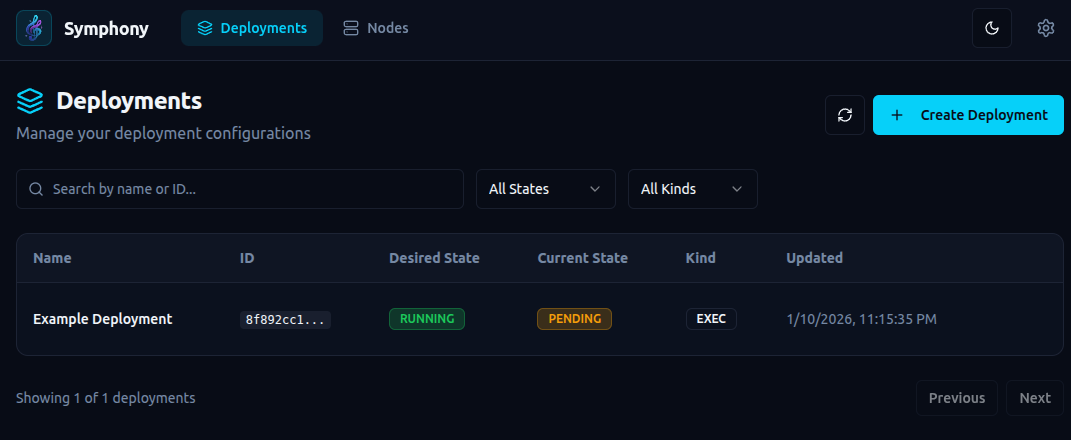
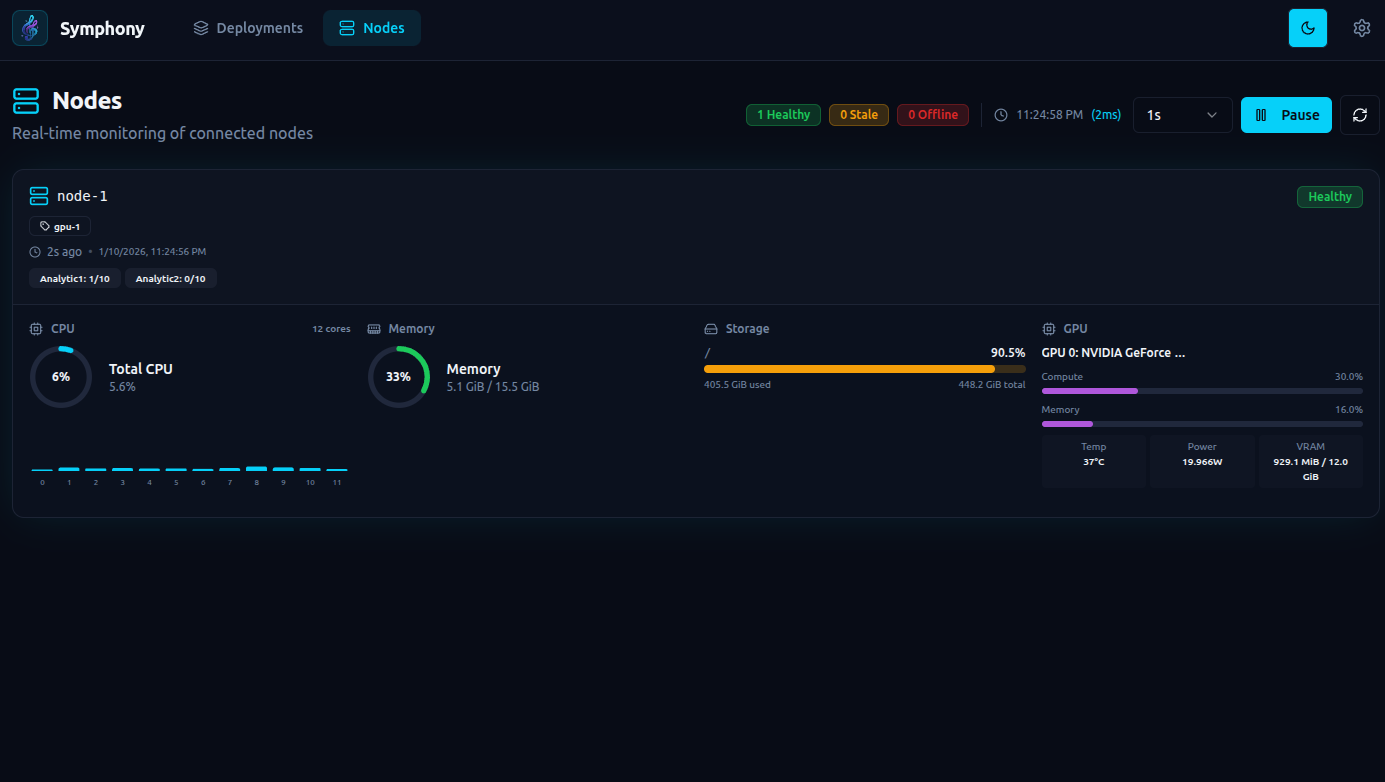
Example deployment spec
{
  "api_version": "symphony/v1",
  "kind": "deployment",
  "metadata": {
    "id": "eg-deployment",
    "name": "Eg deployment"
  },
  "spec": {
    "node_group": "gpu-1",
    "capacity_requests": {
      "Analytic1": 1
    },
    "health_check": {
      "type": "exec",
      "command": "health_check.py",
      "initial_delay_seconds": 5,
      "period_seconds": 20
    },
    "kind": "exec",
    "config": {
      "git_repo": "https://github.com/ttheew/symphony-sample.git",
      "git_ref": "main",
      "token": "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",
      "env_name": "conda-env1",
      "command": [
        "python3",
        "main.py"
      ],
      "env": {
        "LOG_LEVEL": "info"
      }
    },
    "restart_policy": {
      "type": "on-failure",
      "backoff_seconds": 10
    },
    "auto_restart": {
      "enabled": true,
      "cron": "0 3 * * *",
      "timezone": "Asia/Colombo"
    }
  }
}
Key explanations:
node_grouptargets a specific node group label for placement.capacity_requestsdeclares required virtual capacity units for scheduling.kindselects the workload type (execordocker).configholds runtime details for the workload.config.git_repopoints to a git repo to clone before running.config.git_refoptionally pins a branch, tag, or commit.config.tokenoptionally provides a bearer token for private repos.config.env_nameselects a conda env to activate before running the command.config.commandis the entry command to run inside the repo workspace.config.envdefines environment variables passed to the job process.health_checkruns a periodic command; failures trigger restart.auto_restartconfigures scheduled restarts using cron + timezone.restart_policycontrols restart behavior and backoff.restart_policy.typesupportsnever,on-failure, andalways.restart_policy.backoff_secondsadds delay before restart attempts.
Simple Flow (Conda + Git Repo)
- Start one Conductor and one or more Nodes.
- Create required conda envs in Symphony (
/conda-envsor UI). - Create a deployment with:
config.git_repo(and optionalgit_ref/token)config.env_name(one of your conda envs)config.command(your app startup command)
- Conductor assigns the deployment to an eligible node.
- Node clones or updates the git repo locally for that deployment.
- Node activates the selected conda env and runs the command.
- Health checks, restart policy backoff, and optional scheduled restarts keep it healthy.
- Watch node/deployment live state on
/ws/updatesand stream logs on/ws/deployments/{deployment_id}/logs.
1 maintainer

Metadata
1 maintainer
Release files for symphony-orchestra 1.0.0b8
For a detailed explanation of source distributions (sdists) and built distributions (wheels), please see the package formats documentation.
Built distribution (wheel)
| File | Interpreter | ABI | Platform | Reset |
|---|---|---|---|---|
| symphony_orchestra-1.0.0b8-py3-none-any.whl | Python 3 | none | any | Details |
Release files / symphony_orchestra-1.0.0b8-py3-none-any.whl
| Download URL | symphony_orchestra-1.0.0b8-py3-none-any.whl |
|---|---|
| Size | 453.0 kB |
| Tags | Python 3 |
|
SHA-256 checksum How to use checksums |
22b1881ee40b978492161eeea34c00c6901b279bf8b9acedaa16e569a27fcdba
|
|
BLAKE2b-256 checksum How to use checksums |
aeaa85c573f3529569e6cb17eedf6108f6bcd44e7d54ee4dd7fd1f2aebace5a2
|
| Upload date | |
|
Uploaded using Trusted Publishing? What is trusted publishing? |
No |
| Uploaded via |
twine/6.2.0 CPython/3.11.14
|














