
Lightweight container and job orchestrator

Project description
Symphony 🎼
Symphony is a lightweight container and job orchestrator.
A central Conductor schedules Docker and exec jobs across distributed Nodes, balancing workloads using virtual resource capacities instead of raw CPU or memory.
⚠️ Preview Version
Symphony now has a working MVP with:
- ✅ Add deployments
- ✅ Add nodes
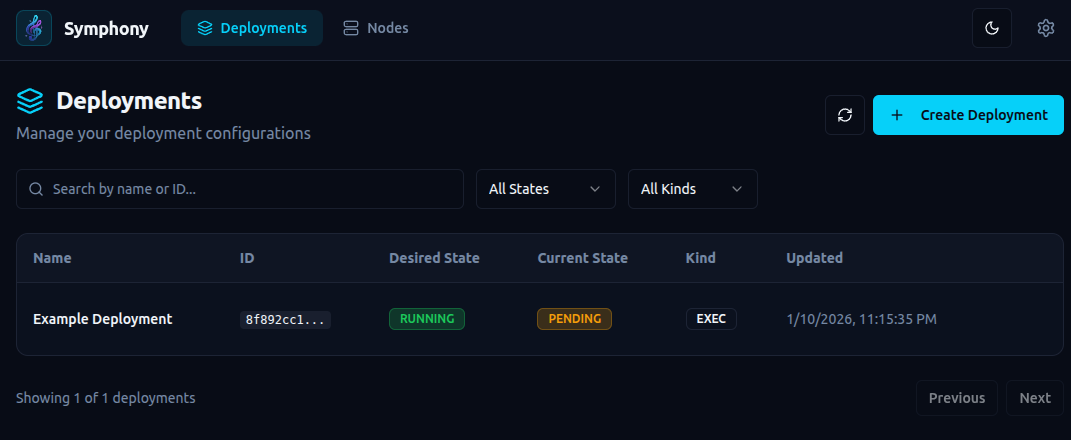
- ✅ UI-based configuration
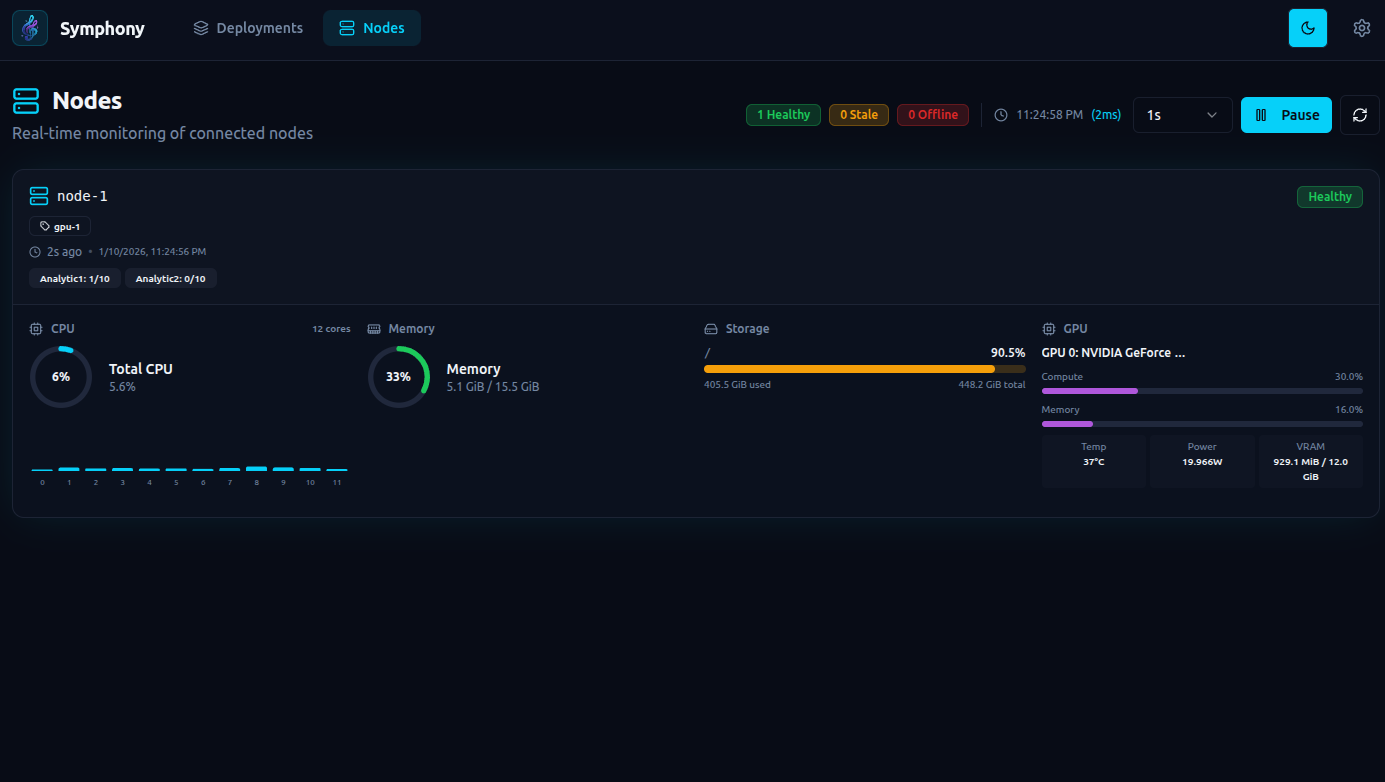
- ✅ Node status with CPU/GPU/RAM usage
- ✅ Automatic scheduling based on virtual capacity availability
- ✅ Automatic restarts
- ✅ Scheduled restarts (cron + timezone)
- ✅ Health checks with auto-restart on failure
- ✅ Live deployment logs over WebSocket
- ✅ Conda env management and activation per deployment
- ✅ Deployment-to-node assignment visibility in API/UI
Current Status
- ✅ Working MVP
- ❌ No releases yet
- ⚠️ APIs and CLI are not final
- ⚠️ Breaking changes expected
Everything in this repository should be considered experimental.
Why Symphony Exists
Symphony: orchestration without owning the node.
Traditional orchestrators such as Kubernetes, Nomad, Docker Swarm, and Mesos assume host-level control, requiring cgroups, root privileges, or a container runtime on the node. These assumptions break down in modern GPU platforms and container-only environments such as R**Pod.
Symphony is purpose-built for these environments, operating entirely in user space, requiring no special privileges, and running wherever a standard container can run.
Focus
-
✅ Easy installation
-
✅ "Just run it" experience
-
❌ No special privileges
-
❌ No host / cgroups / kernel access
-
✅ Works in environments like R**Pod (container-only access)
-
Container runtime only
-
No root on host
-
No /sys/fs/cgroup
-
No iptables
-
No privileged containers
-
No Docker daemon inside container
This immediately disqualifies many orchestrators.
Symphony Design Principles
- ✅ Runs as a normal user-space process
- ✅ Runs entirely inside a container
- ✅ No cgroups
- ✅ No kernel access
- ✅ No privileged mode
- ✅ No node ownership assumptions
Installation Friction (high level)
| System | Installation steps |
|---|---|
| Kubernetes | Cluster setup, CRI, CNI, root, kernel config |
| Nomad | Host agent, ACLs, networking, drivers |
| Docker Swarm | Docker daemon, swarm init |
| Mesos | Zookeeper, agents, isolators |
| Symphony | pip install symphony-orchestra |
Note: This is a simplified, high-level comparison. Real-world installation steps may differ by environment. Please open a PR if you spot inaccuracies or have improvements.
Architecture
User / CLI
     |
     v
+-------------+
|  Conductor  |
+-------------+
       |
       | secure persistent connection (TLS)
       |
+-------------+     +-------------+
|    Node     |     |    Node     |
| (multiple)  | ... | (multiple)  |
+-------------+     +-------------+
Core Concepts
Conductor
The central controller responsible for:
- node registry and health
- capacity tracking
- job scheduling
- job lifecycle management
Nodes
Nodes are clients that connect to the Conductor and can run multiple applications.
Each Node declares:
- one or more groups (e.g.
gpu,cpu,edge-sg) - virtual capacity classes, for example:
A = 100
B = 200
Jobs
Jobs are units of work submitted to the Conductor.
When submitting a job, you specify how much capacity it consumes:
A10
A10,B20
The Conductor schedules the job to an eligible Node and balances workloads automatically.
Features (v1)
- ✅ Single Conductor
- ✅ Multiple Nodes
- ✅ Node groups
- ✅ Virtual capacity classes (A/B/...)
- ❌ Docker jobs
- ✅ Exec jobs
- ✅ Virtual capacity-aware scheduling
- ✅ Heartbeats and health checks
- ✅ Live deployment log streaming (WebSocket)
- ✅ Restart policies with backoff (
never/on-failure/always) - ✅ Scheduled restarts (
auto_restartcron) - ✅ Conda env management + conda activation for exec workloads
- ✅ Deployment-to-node assignment and assignment reason visibility
Installation & Quickstart
- Install Symphony:
pip install symphony-orchestra
- Run the Conductor:
symphony --config conductor.yaml
Notes:
- Certs are generated automatically if not provided.
- Store certs in a persistent location (default:
./storage). - Copy
ca.pem,node-client.pem, andnode-client.keyto all nodes. - WARNING: All nodes use the same client certs.
- Run Nodes:
symphony --config node.yaml
Make sure each node has the required executables and files for your jobs.
-
Add deployments from the UI and they will be scheduled automatically.
-
(Optional but recommended) Add conda env definitions from the UI/API so nodes can auto-provision required environments.
Command-line options (see src/symphony/cli.py):
--config, -c– path to YAML config file (default:config.yaml)--mode– overridemodefrom the config (conductorornode)--log-level– override log level (INFO,DEBUG, …)
Nodes connect outbound only; no public IP is required.
Configuration
Conductor (conductor.yaml)
mode: conductor

logging:
  level: DEBUG
  json: false

conductor:
  # Conductor gRPC listen address.
  listen: "0.0.0.0:50051"
  tls:
    # Folder containing TLS certs/keys for the Conductor and node client certs.
    cert_path: "storage/certs"
modemust beconductor.conductor.listenis the gRPC address nodes connect to.conductor.tls.cert_pathpoints to the directory that holds the CA, server, and node client certificates/keys. Missing files are generated on startup, but you should store them on persistent storage.
Node (node.yaml)
mode: node

logging:
  level: DEBUG
  json: false

node:
  node_id: "node-1"
  conductor_addr: "localhost:50051"
  groups: ["gpu-1"]
  capacities_total:
    Analytic1: 10
  heartbeat_sec: 3.0
  tls:
    ca_file: "storage/certs/ca.pem"
    cert_file: "storage/certs/node-client.pem"
    key_file: "storage/certs/node-client.key"
modemust benode.node.conductor_addrshould match the Conductorlistenaddress.groupsandcapacities_totaldescribe how the node is advertised and scheduled.- Under
node.tls, the node points to the CA certificate and its client certificate/key; these must exist for a secure connection to be created.
API
Symphony exposes:
- a gRPC stream between nodes and the Conductor
- an HTTP API for deployments and node inspection
Security
- gRPC uses mutual TLS (mTLS) between nodes and the Conductor. Both sides present certificates; nodes authenticate the Conductor and the Conductor authenticates nodes.
- The HTTP API is unauthenticated and unencrypted by default. Treat it as open and do not expose it to untrusted networks.
- If you must use the HTTP API outside localhost, put it behind a reverse proxy that enforces TLS and authentication, and/or bind it to a private network only.
Node ↔ Conductor gRPC protocol
Defined in proto/symphony/v1/protocol.proto:
- Service:
ConductorService - RPC:
Connect (stream NodeToConductor) returns (stream ConductorToNode)
Key message types include:
NodeHello– node registration (ID, groups, capacities, static resources)Heartbeat– periodic resource usage and capacity usageDeploymentReq/DeploymentUpdate– deployment requests and updatesDeploymentStatusList– deployment status updates from nodes
HTTP control API
The Conductor runs a FastAPI app (see src/symphony/conductor/api/server.py) on:
- Host:
0.0.0.0 - Port:
8000
Main endpoints (see src/symphony/conductor/api/routes.py):
- Deployments:
POST /deployments– create a deploymentGET /deployments– list deploymentsGET /deployments/{deployment_id}– get a deploymentPATCH /deployments/{deployment_id}– update desired state/specificationDELETE /deployments/{deployment_id}– delete a deployment
- Nodes:
GET /nodes– list connected nodes with their current resource snapshot
- Conda Envs:
POST /conda-envs– create a conda environment definitionGET /conda-envs– list conda environment definitionsDELETE /conda-envs/{env_name}– delete a conda environment definition
- WebSocket Streams:
GET /ws/updates– live snapshots for deployments and nodesGET /ws/deployments/{deployment_id}/logs– on-demand live deployment logs
The same FastAPI app also serves a basic web UI under /ui.
UI location:
http://localhost:8000/ui
Example deployment spec
{
  "api_version": "symphony/v1",
  "kind": "deployment",
  "metadata": {
    "id": "eg-deployment",
    "name": "Eg deployment"
  },
  "spec": {
    "node_group": "gpu-1",
    "capacity_requests": {
      "Analytic1": 1
    },
    "health_check": {
      "type": "exec",
      "command": "health_check.py",
      "initial_delay_seconds": 5,
      "period_seconds": 20
    },
    "kind": "exec",
    "config": {
      "git_repo": "https://github.com/ttheew/symphony-sample.git",
      "git_ref": "main",
      "token": "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",
      "env_name": "conda-env1",
      "command": [
        "python3",
        "main.py"
      ],
      "env": {
        "LOG_LEVEL": "info"
      }
    },
    "restart_policy": {
      "type": "on-failure",
      "backoff_seconds": 10
    },
    "auto_restart": {
      "enabled": true,
      "cron": "0 3 * * *",
      "timezone": "Asia/Colombo"
    }
  }
}
Key explanations:
node_grouptargets a specific node group label for placement.capacity_requestsdeclares required virtual capacity units for scheduling.kindselects the workload type (execordocker).configholds runtime details for the workload.config.git_repopoints to a git repo to clone before running.config.git_refoptionally pins a branch, tag, or commit.config.tokenoptionally provides a bearer token for private repos.config.env_nameselects a conda env to activate before running the command.config.commandis the entry command to run inside the repo workspace.config.envdefines environment variables passed to the job process.health_checkruns a periodic command; failures trigger restart.auto_restartconfigures scheduled restarts using cron + timezone.restart_policycontrols restart behavior and backoff.restart_policy.typesupportsnever,on-failure, andalways.restart_policy.backoff_secondsadds delay before restart attempts.
Simple Flow (Conda + Git Repo)
- Start one Conductor and one or more Nodes.
- Create required conda envs in Symphony (
/conda-envsor UI). - Create a deployment with:
config.git_repo(and optionalgit_ref/token)config.env_name(one of your conda envs)config.command(your app startup command)
- Conductor assigns the deployment to an eligible node.
- Node clones or updates the git repo locally for that deployment.
- Node activates the selected conda env and runs the command.
- Health checks, restart policy backoff, and optional scheduled restarts keep it healthy.
- Watch node/deployment live state on
/ws/updatesand stream logs on/ws/deployments/{deployment_id}/logs.
Release history Release notifications | RSS feed


Download files
Download the file for your platform. If you're not sure which to choose, learn more about installing packages.
Source Distributions
Built Distribution
Filter files by name, interpreter, ABI, and platform.
If you're not sure about the file name format, learn more about wheel file names.
Copy a direct link to the current filters
File details
Details for the file symphony_orchestra-1.0.0b6-py3-none-any.whl.
File metadata
- Download URL: symphony_orchestra-1.0.0b6-py3-none-any.whl
- Upload date:
- Size: 452.0 kB
- Tags: Python 3
- Uploaded using Trusted Publishing? No
- Uploaded via: twine/6.2.0 CPython/3.11.14
File hashes
| Algorithm | Hash digest | |
|---|---|---|
| SHA256 |
e3369141c6497a612aea49d703170afd699f23a6357e51aab92aa6a80e906c3e
|
|
| MD5 |
aeca1b13fc93f4d04be116e797fb42d2
|
|
| BLAKE2b-256 |
f92d018c5465319bf027ad01e89cdaa97b619c21aca19e6bb2133cd1e2e82f7c
|






