
system-diff
See what Claude Code is doing to your system while it works, and learn your system as it goes.
Claude Code edits files; system-diff tells you what those edits do to the system: which part Claude is working on and what that part is, the endpoints, connections, stored data and outside systems it adds, changes or removes, why each of those matters, and when one needs you to look before Claude goes on. Right in Claude Code, beside the chat. So you follow what is happening, learn the parts and the technology behind them, and steer Claude well when it asks.
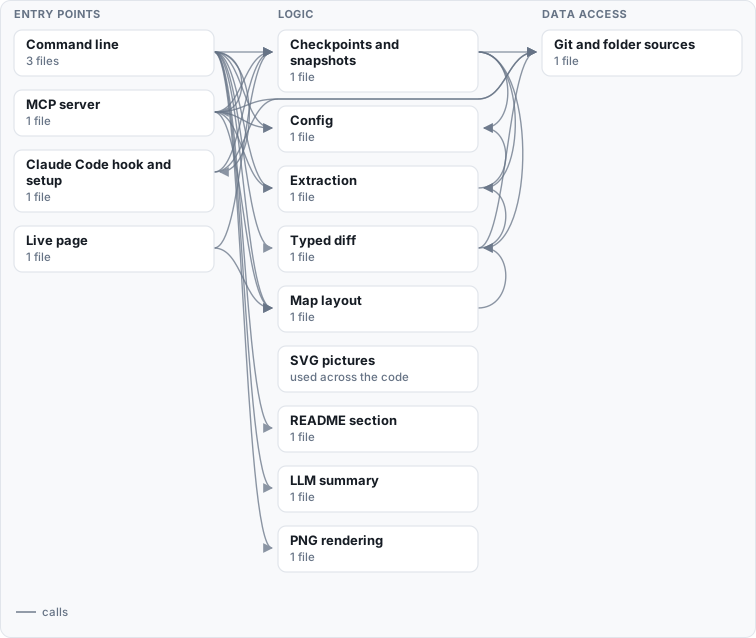
How this map is made
Regenerated by system-diff from the code: the parts and their columns from system-diff.toml, the connections from imports, API calls and the settings each part reads, the outside systems from the settings a deploy configuration sets, and the tables from the migrations. Parts used everywhere are drawn without the arrows into them, and each part keeps only its strongest connections; system-diff map writes all of them to system.json.
Read by the code but set by no deploy configuration, so not drawn: Headless Chromium (Docker or Playwright) (png).
In Claude Code
pipx install "system-diff[mcp,tui]"
system-diff setup claude --no-status-line   # the hooks, a skill and the MCP server (--scope project, --undo)
Then, in Claude Code, the System diff pane:
/plugin marketplace add simplifiedmachine/system-diff
/plugin install system-diff
Python 3.11 or newer. Claude Code opens the pane by itself when the terminal is wide enough; /system-diff opens
it again after you close it. (Should another marketplace you added also have a plugin called system-diff,
/plugin install system-diff@system-diff names this one.) From a clone, claude --plugin-dir mods/system-diff
loads it for one launch. Upgrading from an earlier version: run system-diff setup claude again; it updates the
hooks it added before, and frees /system-diff for the pane.
The System diff pane
A tab beside Claude Code's own file diff: your system drawn the way a system designer draws it, live, with what
Claude is changing in it. /system-diff close (or "× close" in its tab row) hides it; /system-diff brings it back.
- Now follows Claude, in the order your attention needs it:
- What Claude is doing ("● Claude is working ✎ Editing API") and what you asked.
- ▲ Needs your attention, only when something does. That means: an endpoint removed that a page still calls, a new way to change state, a dependency cycle, a dependency pointing up the layers, a new outside system inside a request, a table dropped, or a setting no deploy sets. Each comes with what it trades off and the question to ask Claude before it goes on.
- The system diagram:
- What it draws: who uses the system (people, programs, AI agents), where they come in, the containers that do the work with their components inside, and the data and outside systems it relies on. Flows join them, named for what they carry (HTTPS, MCP, SQL, a terminal).
- Colours: Claude's component is lit in blue; what this turn added is green, changed yellow, removed red.
- Pick: click the diagram, then ← ↑ ↓ → picks a box. Its flows in and out light up with the boxes at their other ends, and a line says what it uses and what uses it.
- Zoom: Enter (or a second click) zooms in on a container's components, with the lines between them.
bgoes back,ffollows Claude again. - Scroll:
[]scroll a wide diagram across; shift ↑ ↓, Page Up/Down or the wheel scroll a tall one.
- This turn: each change to the design, and what it trades off.
- Learn: how the part Claude works on is designed.
- The principle its place calls for: an edge of the system, an adapter, a shared foundation, a coordinator.
- Where it sits, and what to watch, such as cycles and layering.
- The basics of a technology only where it is new: new to the system this turn, or one you marked new to you.
- What just happened: the system diff, step by step. Each change an edit made is said in plain words, with why it matters and the file it came from. Edits that changed no structure are told once.
- Map: the system diagram since your checkpoint, every box to pick and zoom into.
- Changes: every change since your checkpoint, and this turn, read for design. Once you have understood it, tell
Claude "mark it as seen" (or run
system-diff checkpoint): from then on you see only what is new to you. - Topics: the stack, technology by technology. Pick one and the parts that use it light up in the diagram; space marks it new to you, so Learn explains its basics.
One meaning per colour, so your eye goes where it should:
- Blue: where Claude is and what you picked.
- Yellow: what changed and what needs you.
- Green: what is new, done or to learn.
- White: what to read.
- Gray: the background (why, when, labels).
- Red: only what was taken away.
n m c t switch views.
In the conversation
- After an edit that changes the system's structure, one line under it: "System diff: API now answers GET /health · a new way in: it needs the same checks as the others". Edits that change no structure stay quiet.
- At the end of each turn, one line on what the turn did to the system, or which parts it edited when the structure stayed the same; nothing for a turn that only talked.
- Ask Claude "what is the API part?" or "what does this change do?": the MCP server gives it
explain(the facts to teach from, and a diagram to show you),system_diff(the exact list of changes;base: turnfor this turn only),system_map,draw(pictures of a process or a sequence of calls) andcheckpoint(mark what you have seen, so the next diff shows only what is new to you).
The pane and the hooks send nothing anywhere: the working tree is read as a snapshot (untracked files included)
without touching your index, HEAD or branches; the checkpoint and the start of each turn live under
refs/worktree/system-diff/ (each worktree its own, for Claude sessions in parallel), and what the hooks note under
.git/system-diff/, never pushed. Only the optional lessons you ask an LLM for (e in the terminal view, diff --narrate) go to your own LLM, and they carry the structure, never the code.
Configuration
With no config, system-diff makes a first picture from the code:
- Parts: every folder of code is a part named by its path; tests and build tooling are left out.
- Front end: a front end goes under What people use, and the paths it calls are matched to the endpoints that answer them.
- Data and outside systems: databases and outside services are found from the compose file and the client libraries the code imports; tables from the migrations and the models.
- Who uses it: a front end's people, an API's callers, an MCP server's AI agents, a command line's developer.
A system-diff.toml at the repository root names the parts and says what is what:
tests = ["tests/**"]

[code]
roots = ["app/", "web/src/"]

[[actors]]                  # who uses the system, drawn first
id = "customers"
label = "Customers"
uses = ["web:browser"]      # part: what the flow carries

[[components]]
id = "api"
label = "API"
kind = "interface"          # ui | interface | logic | data: the column it is drawn in
group = "Backend"           # the container it is drawn in, with the others of its group
about = "orders and payments"
paths = ["app/api/**"]

[[externals]]
id = "postgres"
label = "PostgreSQL"
shape = "db"
env = ["DATABASE_URL"]      # the settings that reach it
Every key, and how the code is read: the wiki.
Add-ons
The same engine, outside the pane. Deterministic: the same code gives the same picture, byte for byte, and a part that did not change keeps its place.
- Pull requests: every pull request gets its system diff as a comment, and CI fails when the README's map is out
of date (
.github/workflows/system-diff.yml, which you can copy). This repository runs it on itself. - Command line:
system-diff map --dir . --out docs/diagrams          # the system as it is now: system.json, system.svg
system-diff diff --base origin/main --out out        # what this branch does to it: headline, plan, diff.svg
system-diff diff --base HEAD --head . --out out      # what your uncommitted work does to it
system-diff readme --json docs/diagrams/system.json  # keep the map in README.md current
system-diff show API                                 # one part zoomed in, and what it is, in any terminal
system-diff draw SPEC.json                           # hand-made pictures in the same look
diff --narrateadds a plain-words summary from your own LLM;[png]adds PNG output. - Terminal view (
system-diff tui): the pane's views as a full-screen terminal app, for a terminal beside any agent. It opens by itself next to Claude Code in tmux, zellij, WezTerm, kitty and Windows Terminal; in VS Code, setup adds a task that opens it with the folder. - Status line (
system-diff setup claudewithout--no-status-line): the pane's first lines under Claude Code's prompt, for when the pane is not open. - Browser page (
system-diff watch): the same with the SVG pictures, at http://127.0.0.1:8765/.
License
MIT
1 maintainer

Metadata
1 maintainer
Release files for system-diff 0.3.4
For a detailed explanation of source distributions (sdists) and built distributions (wheels), please see the package formats documentation.
Source distribution (sdist)
| File | Size | Uploaded | Provenance | Actions |
|---|---|---|---|---|
| system_diff-0.3.4.tar.gz | 179.2 kB | With provenance | Details for system_diff-0.3.4.tar.gz |
Built distribution (wheel)
| File | Interpreter | ABI | Platform | Actions Reset |
|---|---|---|---|---|
| system_diff-0.3.4-py3-none-any.whl | Python 3 | none | any | Details for system_diff-0.3.4-py3-none-any.whl |
Total release size: 334.8 kB
Release files / system_diff-0.3.4.tar.gz
| Download URL | system_diff-0.3.4.tar.gz |
|---|---|
| Size | 179.2 kB |
| Tags | Source |
|
SHA-256 checksum How to use checksums |
9f225cf4be77450478a8cb0ed8b895e98cf2013256800b23014caf5e10aa9901
|
|
BLAKE2b-256 checksum How to use checksums |
8c0838ac23b8ad8ba290b700a2ca8385ebae9acbbcbfebae82ed380bffab370a
|
| Upload date | |
|
Uploaded using Trusted Publishing? What is trusted publishing? |
Yes |
| Uploaded via |
twine/7.0.0 CPython/3.13.16
|
Provenance
Provenance describes where a file came from. On PyPI, provenance is shared via attestations, which provide a verifiable record of the build or publishing details. View details, limitations and caveats.


PyPI Publish Attestation
PyPI verified that this artifact, at this checksum, originated from the publisher listed below.
Signed by GitHub Actions, verified by PyPI on Nov 10, 2026.
Transparency logRelease files / system_diff-0.3.4-py3-none-any.whl
| Download URL | system_diff-0.3.4-py3-none-any.whl |
|---|---|
| Size | 155.6 kB |
| Tags | Python 3 |
|
SHA-256 checksum How to use checksums |
744c5f23394980827f545bf909ac58a6daf95f496dbd808a6bb823b322fde27c
|
|
BLAKE2b-256 checksum How to use checksums |
81a42d105b8695441986ae1b34a3c551025c4442ab1117cf1c75f4ddd8c3cb06
|
| Upload date | |
|
Uploaded using Trusted Publishing? What is trusted publishing? |
Yes |
| Uploaded via |
twine/7.0.0 CPython/3.13.16
|
Provenance
Provenance describes where a file came from. On PyPI, provenance is shared via attestations, which provide a verifiable record of the build or publishing details. View details, limitations and caveats.
PyPI Publish Attestation
PyPI verified that this artifact, at this checksum, originated from the publisher listed below.
Signed by GitHub Actions, verified by PyPI on Nov 10, 2026.
Transparency logSecurity for system-diff 0.3.4
Provenance
Provenance describes where a file came from. On PyPI, provenance is shared via attestations, which provide a verifiable record of the build or publishing details. View details, limitations and caveats.
Full provenance
Both files in this release have been uploaded with provenance metadata.
Attestation for system_diff-0.3.4.tar.gz
PyPI Publish Attestation
PyPI verified that this artifact, at this checksum, originated from the publisher listed below.
Signed by GitHub Actions, verified by PyPI on Nov 10, 2026.
Transparency logA note on package security
PyPI is a repository for distributing packages, not a service for auditing them. While third-party security researchers and our staff do their best to detect and remove malicious packages, PyPI cannot guarantee the quality, security or suitability of any given package.
To learn more about protecting yourself from malicious actors, visit our package security documentation.














