
table-png
Turn a table into a PNG image that renders correctly everywhere — Korean, Chinese and Japanese text included.
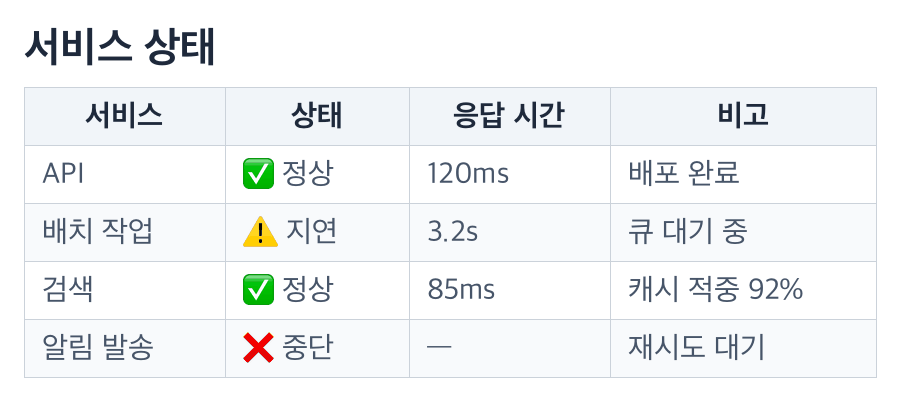
Chat apps, phone notifications, bots, issue trackers and social posts all show Markdown as literal pipes. This tool draws the table as an image instead, so the reader sees a table and not | 서비스 | 상태 |.
$ pipx install table-png
$ table-png status.md --out status.png
Why
- CJK text that actually renders. The renderer picks a Korean-capable font on macOS, Linux and Windows, and falls back per glyph when a symbol is missing.
- Colour emoji. ✅ ⚠️ ❌ and family or flag sequences stay in colour when the system has a colour emoji font. Without one they show as boxes, and the command tells you which font to install.
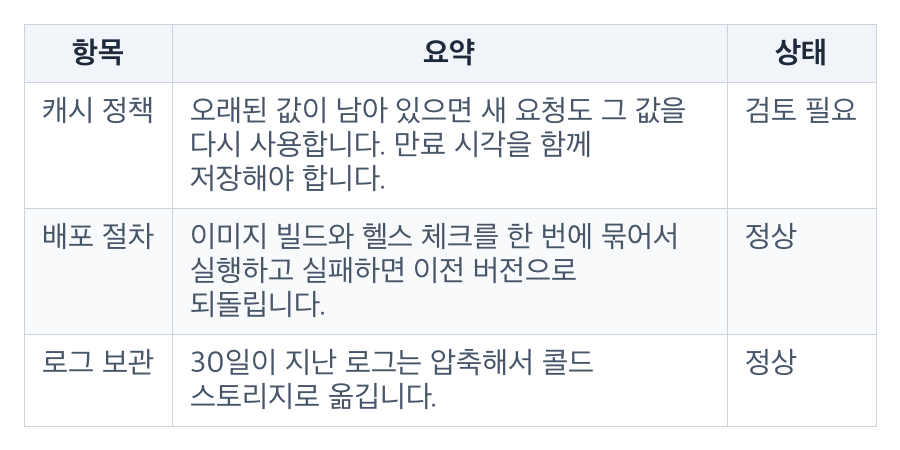
- Readable on a phone. Cells wrap inside their column, widths balance across the table, and a long table paginates instead of shrinking to an unreadable strip.
- Three input formats. JSON, a Markdown pipe table, or CSV. Markdown markup (
**bold**,`code`, links) is stripped to plain text, so a table copied out of a document works as is. Give it a whole Markdown answer: the first table is used and the prose around it is ignored. - One dependency. Pillow. No browser, no headless Chrome, no network.
Install
$ pipx install table-png     # recommended: isolated, on PATH
$ uvx table-png --help       # or run without installing
$ pip install table-png      # inside a project
Python 3.9 or newer. On a minimal Linux box you also need a CJK font:
$ sudo apt install fonts-noto-cjk fonts-noto-color-emoji
Usage
Markdown table
$ table-png status.md --out status.png
| 서비스 | 상태 | 응답 시간 |
|---|---|---|
| API | ✅ 정상 | 120ms |
| 배치 작업 | ⚠️ 지연 | 3.2s |
| 알림 발송 | ❌ 중단 | — |
CSV
$ table-png report.csv --out report.png --title "주간 리포트"
JSON
$ table-png table.json --out table.png
{
  "headers": ["항목", "수량", "설명"],
  "rows": [
    ["사과", 12, "아삭하고 달콤한 국내산 사과"],
    ["배", 3, "긴 설명도 셀 너비 안에서 줄바꿈됩니다"]
  ],
  "align": ["l", "r", "l"]
}
align is optional; each entry is l, c or r and defaults to l.
Pipe from another command
$ some-command --format markdown | table-png - --out out.png
- is the default input, so the last argument can be omitted when the table arrives on stdin.
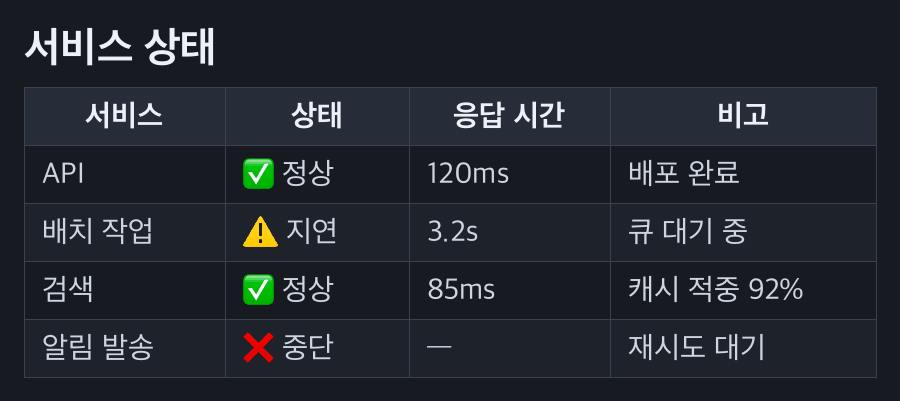
Dark theme
For a dark chat client or a dark slide background:
$ table-png status.md --out status-dark.png --theme dark
Wrapped cells
Long text wraps inside its column; the row grows and the table stays readable:
Options
| Option | Default | Meaning |
|---|---|---|
INPUT |
stdin | Input file, or - for stdin |
-o, --out PATH |
required | Output PNG. Pagination adds -001, -002, … |
-f, --format auto|json|markdown|csv |
auto |
Input format. auto looks at the content, then the file extension |
--title TEXT |
empty | Heading drawn above the table |
-w, --width PX |
1080 |
Image width, clamped to 720–1600 |
--font-size PX |
30 |
Body text size; padding and title scale with it |
--rows-per-page N |
40 |
Rows per image before pagination |
--theme light|dark |
light |
Colour theme |
--font PATH |
auto | CJK-capable font file |
--emoji-font PATH |
auto | Colour emoji font file |
--json |
off | Print the machine-readable result object |
--version |
Print the version |
Environment variables: TABLE_PNG_FONT and TABLE_PNG_EMOJI_FONT do the same as --font and --emoji-font.
Result object
With --json the command prints one JSON object and exits non-zero on failure:
{"ok":true,"png":"/abs/status.png","width":1080,"height":401,"rows":4}
A paginated render returns arrays: "png": ["…-001.png", "…-002.png"] and a matching "height". An error prints {"error":"…"} and exits 1.
Python API
from pathlib import Path

from table_png import RenderOptions, read_table, render_table

table = read_table("| 이름 | 점수 |\n|---|---|\n| 김 | 92 |", fmt="markdown")
result = render_table(
    table,
    Path("score.png"),
    RenderOptions(title="점수", theme="dark", width=900),
)
print(result["png"], result["height"])
read_table(text, fmt="auto") parses a string; read_source(path_or_dash) reads a file or stdin; render_table(table, path, options) draws the pages.
Fonts
The first font that loads wins. Override it with --font or TABLE_PNG_FONT.
| Platform | Text font | Colour emoji |
|---|---|---|
| macOS | Apple SD Gothic Neo, PingFang, Arial Unicode | Apple Color Emoji |
| Linux | Noto Sans CJK (several distro paths), NanumGothic, UnDotum, then fc-match sans-serif:lang=ko |
Noto Color Emoji, then fc-match emoji |
| Windows | Malgun Gothic, Yu Gothic, Microsoft YaHei, MS Gothic, SimSun | Segoe UI Emoji |
Tested on macOS and Ubuntu 24.04. The Windows font paths are standard but not yet tested; reports welcome.
If no CJK font can be found, the command fails with a message that names --font and TABLE_PNG_FONT instead of drawing empty boxes.
Agents
If you are an AI agent asked to produce a table image, read AGENTS.md. The Claude Code skill lives in skill/table-png/SKILL.md; install it by copying that folder to ~/.claude/skills/table-png/.
License
MIT — see LICENSE.
1 maintainer

Metadata
1 maintainer
Release files for table-png 0.1.0
For a detailed explanation of source distributions (sdists) and built distributions (wheels), please see the package formats documentation.
Source distribution (sdist)
| File | Size | Uploaded | Provenance | Actions |
|---|---|---|---|---|
| table_png-0.1.0.tar.gz | 23.1 kB | Without provenance | Details for table_png-0.1.0.tar.gz |
Built distribution (wheel)
| File | Interpreter | ABI | Platform | Actions Reset |
|---|---|---|---|---|
| table_png-0.1.0-py3-none-any.whl | Python 3 | none | any | Details for table_png-0.1.0-py3-none-any.whl |
Total release size: 45.3 kB
Release files / table_png-0.1.0.tar.gz
| Download URL | table_png-0.1.0.tar.gz |
|---|---|
| Size | 23.1 kB |
| Tags | Source |
|
SHA-256 checksum How to use checksums |
78f69e1563e4e46aac476165aecfcb2bbdb46bb8947c31ee39f5067f6a35e647
|
|
BLAKE2b-256 checksum How to use checksums |
97c087c8cafbbc113676d91761b0008de821fa5862aa06a9ea0e3fd1148a0251
|
| Upload date | |
|
Uploaded using Trusted Publishing? What is trusted publishing? |
No |
| Uploaded via |
twine/7.0.0 CPython/3.12.8
|
Release files / table_png-0.1.0-py3-none-any.whl
| Download URL | table_png-0.1.0-py3-none-any.whl |
|---|---|
| Size | 22.2 kB |
| Tags | Python 3 |
|
SHA-256 checksum How to use checksums |
2fae6a4f5f57436a94d0b44987294339bd22d1b38fc145b9ac5760790e355873
|
|
BLAKE2b-256 checksum How to use checksums |
2903d8f5adc7a44d2b12cf417e02bfbd69d634a687aed60775c9e81061515f57
|
| Upload date | |
|
Uploaded using Trusted Publishing? What is trusted publishing? |
No |
| Uploaded via |
twine/7.0.0 CPython/3.12.8
|
Security for table-png 0.1.0
Provenance
Provenance describes where a file came from. On PyPI, provenance is shared via attestations, which provide a verifiable record of the build or publishing details. View details, limitations and caveats.
No provenance found
None of the files in this release were uploaded with provenance metadata.
A note on package security
PyPI is a repository for distributing packages, not a service for auditing them. While third-party security researchers and our staff do their best to detect and remove malicious packages, PyPI cannot guarantee the quality, security or suitability of any given package.
To learn more about protecting yourself from malicious actors, visit our package security documentation.














