
table-png
A command-line tool that renders Markdown, CSV or JSON tables as PNG images for places that do not display tables.
Install
$ pipx install table-png
$ uv tool install table-png
Python 3.9 or newer; Pillow is the only runtime dependency.
Quick start
$ table-png docs/demo/status.md --out /tmp/table-status.png --title "Service status"
/private/tmp/table-status.png

$ table-png docs/demo/status.csv --out /tmp/table-status-csv.png --title "Service status"
/private/tmp/table-status-csv.png

$ table-png docs/demo/status.json --out /tmp/table-status-json.png --title "Service status" --theme dark
/private/tmp/table-status-json.png
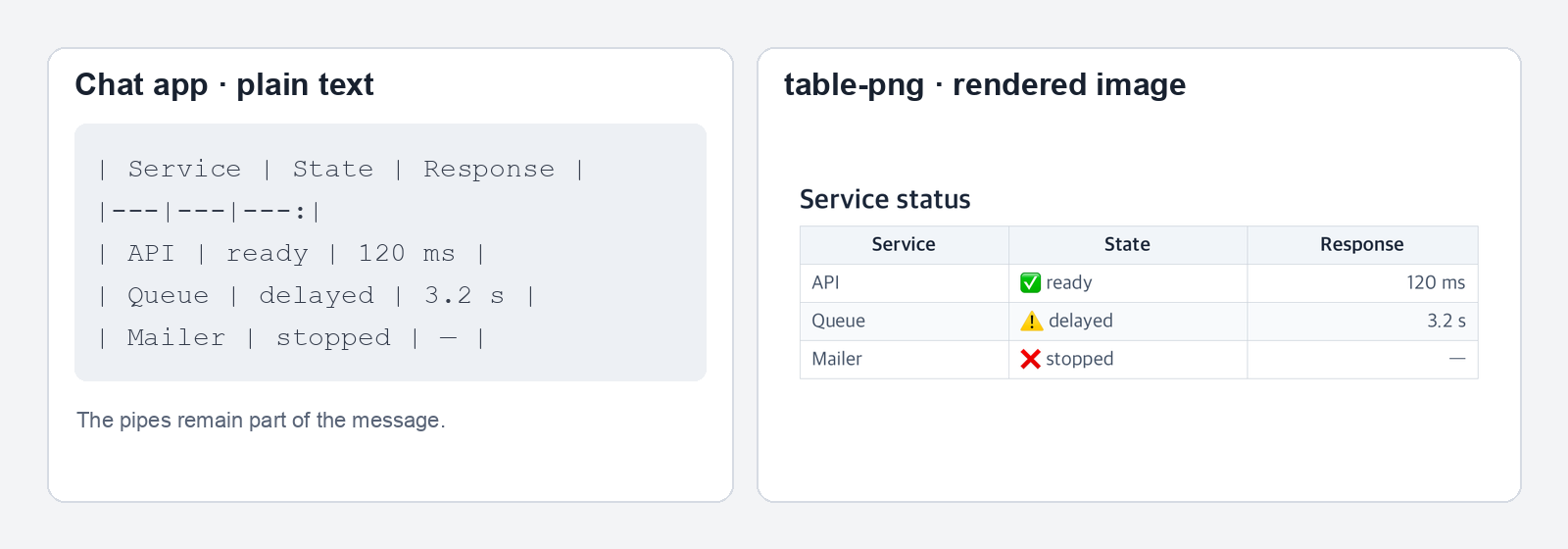
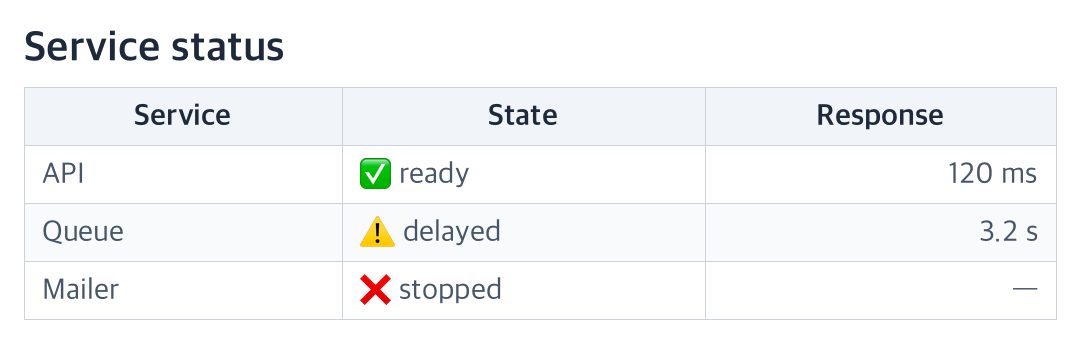
status.md can contain a Markdown pipe table. The command also reads CSV and JSON, or a table piped to table-png - --out status.png. --theme dark draws the same input for a dark background.
| Service | State | Response |
|---|---|---:|
| API | ✅ ready | 120 ms |
| Queue | ⚠️ delayed | 3.2 s |
| Mailer | ❌ stopped | — |
Why
Some chat, notification and image-only fields display Markdown pipes as text. table-png draws the cells into an image. It searches for CJK-capable text and emoji fonts on macOS, Linux and Windows; when a CJK font is missing, it reports the font option to use.

Cells wrap to fit the image. Tables longer than --rows-per-page (40 by default) produce numbered PNG pages. Width is clamped to 720–1600 pixels.
Options
| Option | Default | Purpose |
|---|---|---|
INPUT |
- (stdin) |
File path or standard input |
-o, --out PATH |
required | Output image path |
-f, --format |
auto |
auto, markdown, csv or json |
--title TEXT |
none | Text above the table |
-w, --width PX |
1080 |
Image width, clamped to 720–1600 |
--rows-per-page N |
40 |
Rows in each image |
--theme |
light |
light or dark |
--json |
off | Print output path and image dimensions as JSON |
Limits
Pillow and a suitable local font are required. This project has been exercised on macOS, Ubuntu 24.04 and Windows 11. On Windows, flag emoji render as country letters and family emoji sequences render as separate faces.
License
MIT.
1 maintainer

Metadata
1 maintainer
Release files for table-png 0.1.2
For a detailed explanation of source distributions (sdists) and built distributions (wheels), please see the package formats documentation.
Source distribution (sdist)
| File | Size | Uploaded | Provenance | Actions |
|---|---|---|---|---|
| table_png-0.1.2.tar.gz | 19.9 kB | Without provenance | Details for table_png-0.1.2.tar.gz |
Built distribution (wheel)
| File | Interpreter | ABI | Platform | Actions Reset |
|---|---|---|---|---|
| table_png-0.1.2-py3-none-any.whl | Python 3 | none | any | Details for table_png-0.1.2-py3-none-any.whl |
Total release size: 40.4 kB
Release files / table_png-0.1.2.tar.gz
| Download URL | table_png-0.1.2.tar.gz |
|---|---|
| Size | 19.9 kB |
| Tags | Source |
|
SHA-256 checksum How to use checksums |
f87fc17e8770b9d2763f58ac5821388548f891196f524df780fc3ff4d8eb69b4
|
|
BLAKE2b-256 checksum How to use checksums |
82e7f736558b3e2fa0a8a49aade43d5f4153316d8e385feabbc71f7355495656
|
| Upload date | |
|
Uploaded using Trusted Publishing? What is trusted publishing? |
No |
| Uploaded via |
twine/7.0.0 CPython/3.12.8
|
Release files / table_png-0.1.2-py3-none-any.whl
| Download URL | table_png-0.1.2-py3-none-any.whl |
|---|---|
| Size | 20.5 kB |
| Tags | Python 3 |
|
SHA-256 checksum How to use checksums |
ed01b048b56be60536a9e2e3dcb95fee4a6cc494615a2507607bf4413fa342d3
|
|
BLAKE2b-256 checksum How to use checksums |
3ddc743bf00827a3fefb510943f1db5181915de31fd29f2fcc5ebcbb4057c568
|
| Upload date | |
|
Uploaded using Trusted Publishing? What is trusted publishing? |
No |
| Uploaded via |
twine/7.0.0 CPython/3.12.8
|
Security for table-png 0.1.2
Provenance
Provenance describes where a file came from. On PyPI, provenance is shared via attestations, which provide a verifiable record of the build or publishing details. View details, limitations and caveats.
No provenance found
None of the files in this release were uploaded with provenance metadata.
A note on package security
PyPI is a repository for distributing packages, not a service for auditing them. While third-party security researchers and our staff do their best to detect and remove malicious packages, PyPI cannot guarantee the quality, security or suitability of any given package.
To learn more about protecting yourself from malicious actors, visit our package security documentation.














