
Tabling is a Python library, inspired by HTML and CSS, for creating highly customizable tables in the console.

Project description
Tabling




Tabling is a Python library, inspired by HTML and CSS, for creating highly customizable tables in the console.
Features
- Add/remove/swap rows, columns, and cells.
- Find & replace values
- Sort rows or columns by key
- Customize background, font, padding, margin, and borders
- Modify text alignment, direction, spacing, wrapping
- 6+ border styles: single, double, dashed, dotted, solid, curved
- 5+ font styles: bold, italic, strikethrough, underline, overline
- All HTML colors: 140+ names, all RGB values, all HEX codes
- Import/export from CSV, JSON, HTML, Markdown, Plain Text, TSV, XLSX, SQLite
- Design UIs like how HTML tables were once used before CSS Grid and Flexbox
Installation
pip install tabling
Quick Start
1. Create a Table
from tabling import Table

table = Table(colspacing=1, rowspacing=0)
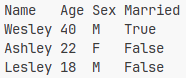
2. Add Data
table.add_row(("Name", "Age", "Sex"))
table.add_row(("Wesley", 40, "M"))
table.add_row(("Ashley", 22, "F"))
table.add_row(("Lesley", 18, "M"))
table.add_column(("Married", True, False, False))
3. Print the Table
print(table)
Methods
The following table methods allow you to manipulate a table.
| Method | Description |
|---|---|
add_row(entries) |
Add a row |
add_column(entries) |
Add a column |
insert_row(index, entries) |
Insert a row at a position |
insert_column(index, entries) |
Insert a column at a position |
remove_row(index) |
Remove a row |
remove_column(index) |
Remove a column |
swap_rows(index1, index2) |
Swap two rows |
swap_columns(index1, index2) |
Swap two columns |
sort_rows(key, start=0, reverse=False) |
Sort rows by column key |
sort_columns(key, start=0, reverse=False) |
Sort columns by row key |
find(value) |
Highlight matching values |
replace(old, new) |
Replace values |
clear() |
Remove all rows & columns |
Customization
Each element (table, row, column, cell) supports properties similar to CSS:
| Property | Attribute | Type | Description |
|---|---|---|---|
| background | color | str / None | Background color |
| border | style | str / None | Border style |
| color | str / None | Border color | |
| font | style | str / None | Font style |
| color | str / None | Font color | |
| margin | left | int | Margin to the left |
| right | int | Margin to the right | |
| top | int | Margin to the top | |
| bottom | int | Margin to the bottom | |
| inline | tuple | Margin to the left & right | |
| block | tuple | Margin to the top & bottom | |
| padding | left | int | Padding to the left |
| right | int | Padding to the right | |
| top | int | Padding to the top | |
| bottom | int | Padding to the bottom | |
| inline | tuple | Padding to the left & right | |
| block | tuple | Padding to the top & bottom | |
| text | justify | str | Horizontal alignment |
| align | str | Vertical alignment | |
| wrap | bool | Whether to wrap | |
| visible | bool | Whether to show | |
| reverse | bool | Whether to reverse direction | |
| letter_spacing | int | Spaces between letters | |
| word_spacing | int | Spaces between words |
Example
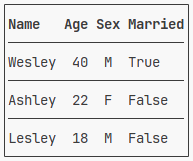
General Syntax: element.property.attribute = value
Tip: A table behaves like a list of rows, and a row behaves like a list of cells—both support indexing, slicing, and iteration.
table.border.style = "single"
table[0].font.style = "bold"
for row in table[1:]:
    row.border.top.style = "single"
    row[1].text.justify = "center"
    row[2].text.justify = "center"
Explore Tabling Templates for ready-made table styles.
Import/Export
Tabling supports import and export in multiple file formats—CSV, TSV, JSON, HTML, Markdown, Plain Text, XLSX, SQLite—via the tabling.io module.
Examples
Exporting
from tabling import Table
from tabling.io import csv, tsv, json, html, md, txt, xlsx, sqlite

table = Table(colspacing=1, rowspacing=0)
# Add Data & customize...

csv.dump(table, "table.csv")
tsv.dump(table, "table.tsv")
json.dump(table, "table.json")
html.dump(table, "table.html")
md.dump(table, "table.md")
txt.dump(table, "table.txt")
xlsx.dump(table, "table.xlsx")
sqlite.dump(table, "table.db", "title")
Importing
from tabling import Table
from tabling.io import csv, tsv, json, html, md, xlsx, sqlite

table = Table(colspacing=1, rowspacing=0)

csv.load(table, "table.csv")
tsv.load(table, "table.tsv")
json.load(table, "table.json")
html.load(table, "table.html")
md.load(table, "table.md")
xlsx.load(table, "table.xlsx")
sqlite.load(table, "table.db", "title")
License
This project is licensed under the MIT License. See the LICENSE for full details.
Release history Release notifications | RSS feed


Download files
Download the file for your platform. If you're not sure which to choose, learn more about installing packages.
Source Distribution
Built Distribution
Filter files by name, interpreter, ABI, and platform.
If you're not sure about the file name format, learn more about wheel file names.
Copy a direct link to the current filters
File details
Details for the file tabling-2.2.1.tar.gz.
File metadata
- Download URL: tabling-2.2.1.tar.gz
- Upload date:
- Size: 14.7 kB
- Tags: Source
- Uploaded using Trusted Publishing? No
- Uploaded via: twine/6.1.0 CPython/3.13.3
File hashes
| Algorithm | Hash digest | |
|---|---|---|
| SHA256 |
9ef5c0ced9cb6430ef433c75f1a9c730ddb6e89b9ba9dc88cb295712ece3e43f
|
|
| MD5 |
63a348e69ff84136c932386c0c55bfd8
|
|
| BLAKE2b-256 |
0976230a321d843609012742c990a8c57e1be006dc35caf5a27ffe31bbebdd4b
|
File details
Details for the file tabling-2.2.1-py3-none-any.whl.
File metadata
- Download URL: tabling-2.2.1-py3-none-any.whl
- Upload date:
- Size: 16.4 kB
- Tags: Python 3
- Uploaded using Trusted Publishing? No
- Uploaded via: twine/6.1.0 CPython/3.13.3
File hashes
| Algorithm | Hash digest | |
|---|---|---|
| SHA256 |
d464b56fe80d604bdc7ed400afa8db899dc8f610b37e393c7c548185c6229e95
|
|
| MD5 |
d1c87b773f6144601fd41a3e4ba234e9
|
|
| BLAKE2b-256 |
29597b5e5af9ce7ce30fd5e034b3f46cb40f679b33115f69e63676996b37d960
|






