
Simple wrapper for tabula-java, read tables from PDF into DataFrame

Project description
tabula-py

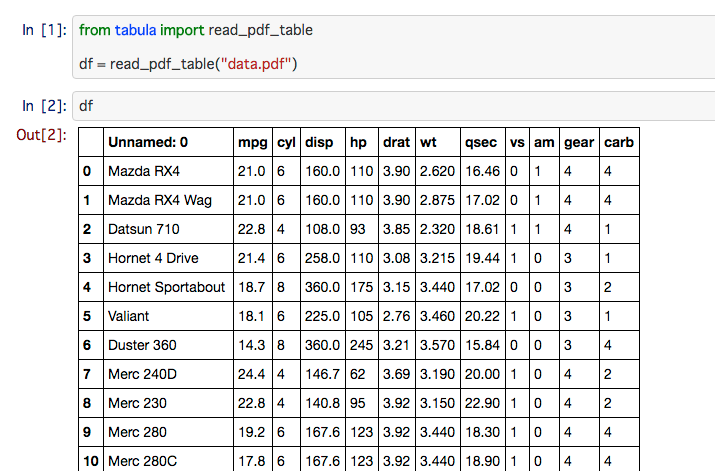
tabula-py is a simple Python wrapper of tabula-java, which can read table of PDF.
You can read tables from PDF and convert into pandas's DataFrame. tabula-py also enables you to convert a PDF file into CSV/TSV/JSON file.
Requirements
- Java
- Confirmed working with Java 7, 8
- pandas
- requests
- distro
OS
I confirmed working on macOS and Ubuntu. But some people confirm it works on Windows 10. See also following the setting procedure.
Usage
Install
pip install tabula-py
If you want to become a contributor, you can install dependency for development of tabula-py as follows:
pip install -r requirements.txt -c constraints.txt
Example
tabula-py enables you to extract table from PDF into DataFrame and JSON. It also can extract tables from PDF and save file as CSV, TSV or JSON.
import tabula

# Read pdf into DataFrame
df = tabula.read_pdf("test.pdf", options)

# Read remote pdf into DataFrame
df2 = tabula.read_pdf("https://github.com/tabulapdf/tabula-java/raw/master/src/test/resources/technology/tabula/arabic.pdf")

# convert PDF into CSV
tabula.convert_into("test.pdf", "output.csv", output_format="csv")

# convert all PDFs in a directory
tabula.convert_into_by_batch("input_directory", output_format='csv')
See example notebook
Get tabula-py working (Windows 10)
This instruction is originally written by @lahoffm. Thanks!
- If you don't have it already, install Java
- Try to run example code (replace the appropriate PDF file name).
- If there's a
FileNotFoundErrorwhen it callsread_pdf(), and when you typejavaon command line it says'java' is not recognized as an internal or external command, operable program or batch file, you should setPATHenvironment variable to point to the Java directory. - Find the main Java folder like
jre...orjdk.... On Windows 10 it was underC:\Program Files\Java - On Windows 10: Control Panel -> System and Security -> System -> Advanced System Settings -> Environment Variables -> Select PATH --> Edit
- Add the
binfolder likeC:\Program Files\Java\jre1.8.0_144\bin, hit OK a bunch of times. - On command line,
javashould now print a list of options, andtabula.read_pdf()should run.
Options
- pages (str, int,
listofint, optional)- An optional values specifying pages to extract from. It allows
str,int,listofint. - Example: 1, '1-2,3', 'all' or [1,2]. Default is 1
- An optional values specifying pages to extract from. It allows
- guess (bool, optional):
- Guess the portion of the page to analyze per page. Default
True
- Guess the portion of the page to analyze per page. Default
- area (
listoffloat, optional):- Portion of the page to analyze(top,left,bottom,right).
- Example: [269.875, 12.75, 790.5, 561]. Default is entire page
- lattice (bool, optional):
- [
spreadsheetoption is deprecated] Force PDF to be extracted using lattice-mode extraction (if there are ruling lines separating each cell, as in a PDF of an Excel spreadsheet).
- [
- stream (bool, optional):
- [
nospreadsheetoption is deprecated] Force PDF to be extracted using stream-mode extraction (if there are no ruling lines separating each cell, as in a PDF of an Excel spreadsheet)
- [
- password (bool, optional):
- Password to decrypt document. Default is empty
- silent (bool, optional):
- Suppress all stderr output.
- columns (list, optional):
- X coordinates of column boundaries.
- Example: [10.1, 20.2, 30.3]
- output_format (str, optional):
- Format for output file or extracted object.
- For
read_pdf():json,dataframe - For
convert_into():csv,tsv,json
- output_path (str, optional):
- Output file path. File format of it is depends on
format. - Same as
--outfileoption of tabula-java.
- Output file path. File format of it is depends on
- java_options (
list, optional):- Set java options like
-Xmx256m.
- Set java options like
- pandas_options (
dict, optional):- Set pandas options like
{'header': None}.
- Set pandas options like
- multiple_tables (bool, optional):
- (Experimental) Extract multiple tables.
- This option uses JSON as an intermediate format, so if tabula-java output format will change, this option doesn't work.
FAQ
tabula-py does not work
There are several possible reasons, but tabula-py is just a wrapper of tabula-java, make sure you've installed Java and you can use java command on your terminal. Many issue reporters forget to set PATH for java command.
You can check whether tabula-py can call java from Python process with tabula.environment_info() function.
I can't from tabula import read_pdf
If you've installed tabula, it will be conflict the namespace. You should install tabula-py after removing tabula.
pip uninstall tabula
pip install tabula-py
The result is different from tabula-java. Or, stream option seems not to work appropreately
tabula-py set guess option True by default, for beginners. It is known to make a conflict between stream option. If you feel something strange with your result, please set guess=False.
Can I use option xxx?
Yes. You can use options argument as following. The format is same as cli of tabula-java.
read_pdf(file_path, options="--columns 10.1,20.2,30.3")
How can I ignore useless area?
In short, you can extract with area and spreadsheet option.
In [4]: tabula.read_pdf('./table.pdf', spreadsheet=True, area=(337.29, 226.49, 472.85, 384.91))
Picked up JAVA_TOOL_OPTIONS: -Dfile.encoding=UTF-8
Out[4]:
  Unnamed: 0 Col2 Col3 Col4 Col5
0          A    B   12    R    G
1        NaN    R    T   23    H
2          B    B   33    R    A
3          C    T   99    E    M
4          D    I   12   34    M
5          E    I    I    W   90
6        NaN    1    2    W    h
7        NaN    4    3    E    H
8          F    E   E4    R    4
How to use area option
According to tabula-java wiki, there is a explain how to specify the area: https://github.com/tabulapdf/tabula-java/wiki/Using-the-command-line-tabula-extractor-tool#grab-coordinates-of-the-table-you-want
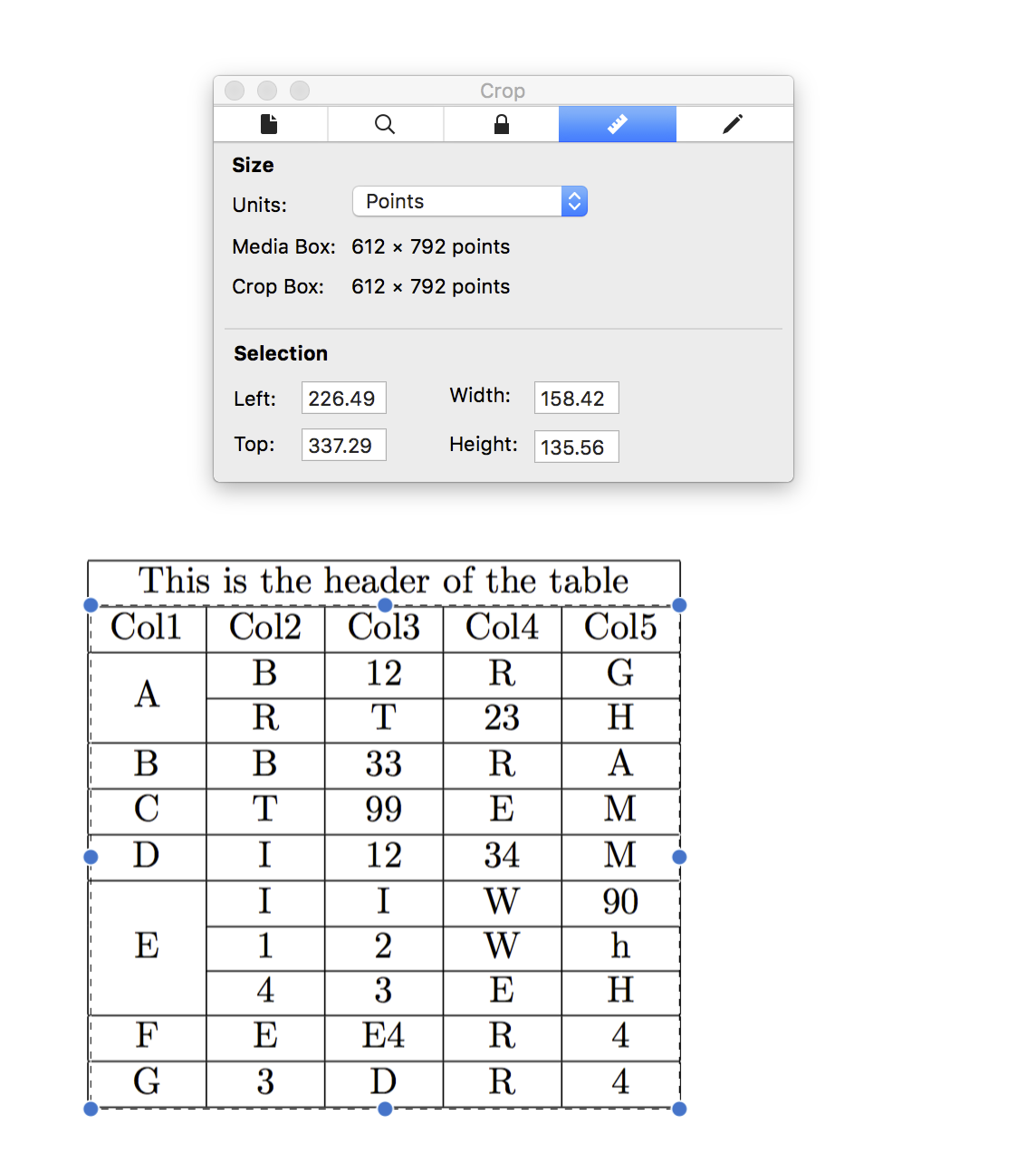
For example, using macOS's preview, I got area information of this PDF:
java -jar ./target/tabula-1.0.1-jar-with-dependencies.jar -p all -a $y1,$x1,$y2,$x2 -o $csvfile $filename
given
Note the left, top, height, and width parameters and calculate the following:

y1 = top
x1 = left
y2 = top + height
x2 = left + width
I confirmed with tabula-java:
java -jar ./tabula/tabula-1.0.1-jar-with-dependencies.jar -a "337.29,226.49,472.85,384.91" table.pdf
Without -r(same as --spreadsheet) option, it does not work properly.
I faced CParserError. How can I extract multiple tables?
Use mutiple_tables option.
I want to prevent tabula-py from stealing focus on every call on my mac
Set java_options=["-Djava.awt.headless=true"]. kudos @jakekara
Release history Release notifications | RSS feed


Download files
Download the file for your platform. If you're not sure which to choose, learn more about installing packages.
Source Distributions
Built Distribution
Filter files by name, interpreter, ABI, and platform.
If you're not sure about the file name format, learn more about wheel file names.
Copy a direct link to the current filters
File details
Details for the file tabula_py-1.2.0-py2.py3-none-any.whl.
File metadata
- Download URL: tabula_py-1.2.0-py2.py3-none-any.whl
- Upload date:
- Size: 20.4 MB
- Tags: Python 2, Python 3
- Uploaded using Trusted Publishing? No
File hashes
| Algorithm | Hash digest | |
|---|---|---|
| SHA256 |
f87932ca3afb4a62fe6ebcddadc9f51151b1a8c375e151a17389974c0182ec37
|
|
| MD5 |
8a645c051c3c09fdb0110309781fcef0
|
|
| BLAKE2b-256 |
a80b2108c427d6907280f75f9c6f9f6065a3a2965b94fbb010c3cf2f3730684d
|






