
CodeAgent
自主全栈开发 Agent — 用 Markdown 配置人格与行为,开箱即用,DeepSeek 就绪。






界面预览
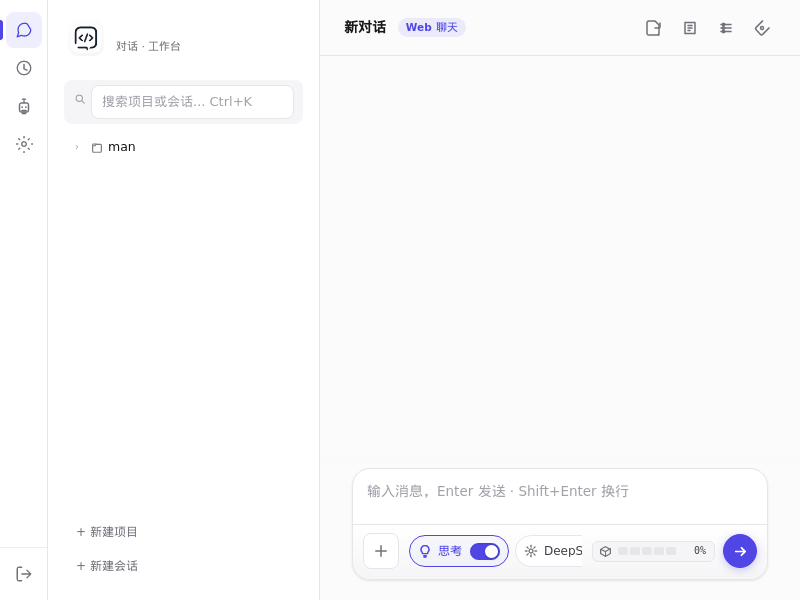
内置 Web UI(单页应用,零构建)—— 项目/会话树、工具调用链、mermaid 图表、思考开关、模型切换,开箱即用。
为什么选 CodeAgent
| 痛点 | CodeAgent 的解法 |
|---|---|
| 🤖 通用助手只会聊天,不会干活 | 自主全栈 Agent:独立承接「需求 → 开发 → 测试 → 部署」完整项目周期 |
| 📜 Agent 行为难定制、像黑盒 | 人格即配置:用 Markdown(agent.md / soul.md / skills.md)定义身份、行为准则、技能,改配置即改人格 |
| 💸 商业工具按量收费、数据在云端 | 免费开源 + 自托管:本地运行,数据不出门,无订阅 |
| 🇨🇳 国内网络环境装不上、用不顺 | DeepSeek 就绪 + 国内友好:内置 DeepSeek 适配,自动切换清华 PyPI 镜像 |
核心特性
- 🧠 LLM 驱动 — 支持 DeepSeek、OpenAI、Anthropic、Ollama 本地模型及兼容 API,可切换
- 📜 人格即配置 — 用 Markdown 定义 Agent 的身份、行为准则、技能,无需改代码
- 🛠️ 45+ 内置工具 — 文件操作、Shell 执行、代码分析、Git 管理、数据库、部署、搜索
- 🌐 内置 Web UI — 零构建单页应用:项目/会话树、工具调用链、mermaid 图表、健康面板、深色模式
- 💬 CLI + 交互式聊天 —
codeagent chat --llm、codeagent run "任务",两种姿势随意切 - 📋 项目管控 — 内置待办管理、项目规划(docs/plans 面板)、版本追踪
- 🔌 可扩展 — 自定义工具、Webhook、多 Agent 协作(Multi-Agent Hub)
- 🧩 多步工作流 — 内置 fix-and-commit、new-feature、audit-project 等自动化流水线
- ⏰ 定时任务 — 内置 cron 调度,Web UI 可视化配置,到点自动干活
- 🖥️ 跨平台 — Linux / macOS / Windows 桌面端(DMG / EXE)+ Docker 镜像
- 🌍 国内友好 — 自动检测国内网络,使用 PyPI 镜像(清华源)加速安装
快速开始
📦 通过 PyPI 安装(推荐)
pip install tagword-codeagent
codeagent serve
浏览器打开 http://localhost:8765 即可使用。
💡 包名说明:
codeagent在 PyPI 上已被占用,本项目以tagword-codeagent发布。 核心引擎seed-kernel/seed-model-providers/seed-toolbox均为 PyPI 公开包,随 pip 自动安装,无需额外操作。
🐳 通过 Docker 运行
docker pull ghcr.io/tagword/codeagent:latest

# 运行(挂载数据持久化)
docker run -d --name codeagent \
  -p 8765:8765 \
  -v ~/.codeagent:/root/.codeagent \
  ghcr.io/tagword/codeagent:latest
浏览器打开 http://localhost:8765 即可使用(更多见 ARCHITECTURE.md)。
⭐ 一键运行(GitHub 源码)
git clone https://github.com/tagword/codeagent.git
cd codeagent
bash run.sh
脚本会自动:
- 检测 Python(≥ 3.9)和 Git
- 自动识别国内网络 → 使用清华 PyPI 镜像加速
- 创建虚拟环境
.venv - 安装 CodeAgent 及全部依赖(核心引擎 seed 框架,随 pip 自动拉取)
- 启动 Web 服务 → 浏览器打开
http://localhost:8765
💡 支持自定义参数:
bash run.sh --port 8766 --host 0.0.0.0💡run.sh内置了网络重试和 tarball 降级机制,网络不稳定时比pip install -e .更可靠 💡 Windows 用户可使用install.ps1/run.ps1
🔧 源码手动安装
git clone https://github.com/tagword/codeagent.git
cd codeagent

python -m venv .venv
source .venv/bin/activate  # Windows: .venv\Scripts\activate

# 依赖(seed-kernel 等)自动从 PyPI 拉取
pip install -e .

codeagent serve
命令行速查
codeagent --help                 # 查看帮助
codeagent serve                  # 启动 Web 服务(默认 8765 端口)
codeagent chat --llm             # 启动交互式聊天(LLM + 工具循环)
codeagent run "整理文件结构"      # 运行单次任务
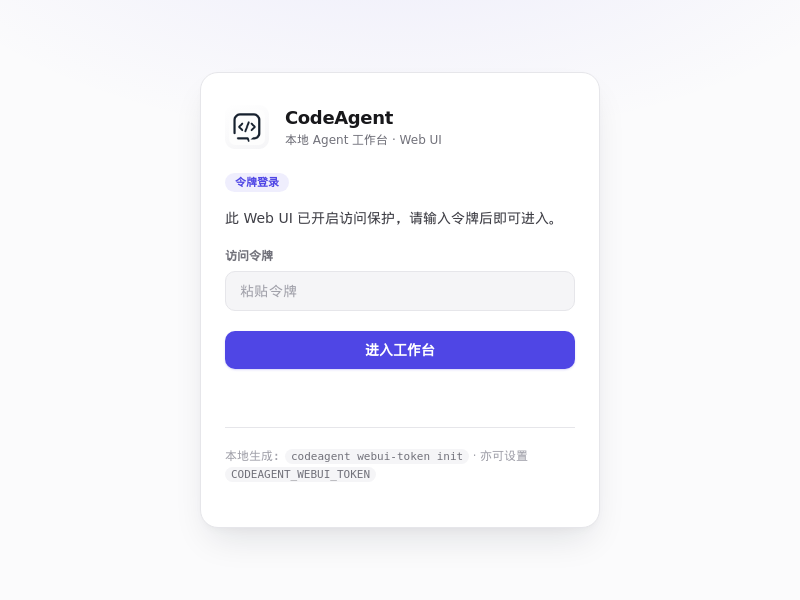
codeagent webui-token init       # 生成 Web UI 访问令牌
codeagent webui-token show       # 查看当前令牌
codeagent config init            # 初始化配置文件
codeagent restart serve --port 8765  # 重启服务
配置
首次运行执行 codeagent config init,生成配置文件到 config/ 目录。
核心环境变量(首次运行 codeagent config init 生成 config/env,含注释模板):
| 配置项 | 说明 |
|---|---|
CODEAGENT_PROVIDER |
LLM 提供商(deepseek / openai / anthropic / ollama 等) |
CODEAGENT_API_KEY |
API 密钥 |
CODEAGENT_MODEL |
模型名称 |
CODEAGENT_BASE_URL |
API 端点地址 |
CODEAGENT_AGENT_ID |
当前 Agent 标识(默认 default) |
CODEAGENT_WEBUI_TOKEN |
Web UI 访问令牌(也可用 codeagent webui-token init 生成) |
项目结构
codeagent/
├── codeagent/              # 核心源码
│   ├── cli/                # 命令行入口
│   ├── core/               # 核心模块(bootstrap / env / attachments 等)
│   ├── memory/             # 长期记忆与经验沉淀
│   ├── persona_defaults/   # 默认 Agent 人格(agent.md / soul.md / skills.md 等)
│   ├── runtime/            # 运行时管理
│   ├── server/             # HTTP / WebSocket 服务
│   ├── skills/             # 内置技能定义
│   ├── tools/              # 工具系统
│   └── web/                # Web 认证与内置 Web UI(单页应用,运行时内联)
├── packaging/              # 桌面端打包(macOS DMG / Windows EXE)
├── tests/                  # 测试
├── assets/                 # 图标与界面截图
├── run.sh / run.ps1        # 一键运行脚本
├── install.sh / install.ps1 # 一键安装脚本
├── Dockerfile              # 容器镜像(ghcr.io/tagword/codeagent)
├── pyproject.toml          # 项目元数据与依赖
└── README.md
技术栈
| 层 | 技术 |
|---|---|
| 核心引擎 | seed-kernel(LLM 调用 / 路由 / 会话 / 工具运行时) |
| 后端服务 | Python 3.9+ / Starlette / WebSocket / Uvicorn |
| 内置 Web UI | 原生 JS 单页应用(运行时内联,零构建;mermaid / marked / DOMPurify) |
| LLM 集成 | DeepSeek / OpenAI / Anthropic / Ollama / 兼容 API |
| 工具系统 | 异步工具调度 + 安全检查 + 沙箱 |
| 数据存储 | SQLite(会话 / 记忆 / 项目状态) |
与同类对比
| CodeAgent | Cursor | Claude Code | Aider | OpenHands | |
|---|---|---|---|---|---|
| 开源 & 自托管 | ✅ | ❌ | ❌ | ✅ | ✅ |
| 人格/行为可配置(Markdown) | ✅ | ❌ | 部分 | ❌ | ❌ |
| 内置 Web UI | ✅ | ✅ | ❌ | ❌ | ✅ |
| 多 LLM 后端(含 DeepSeek/Ollama) | ✅ | 部分 | 仅 Anthropic | ✅ | ✅ |
| 国内网络友好(镜像加速) | ✅ | ❌ | ❌ | ❌ | ❌ |
| 免费 | ✅ | ❌ | ❌ | ✅ | 部分 |
开发
# 安装开发依赖
pip install -e '.[dev]'

# 运行测试
pytest

# 代码检查
ruff check codeagent/

# 安全审计
bandit -r codeagent/
社区
- 🐛 提 Issue / 💡 提建议:https://github.com/tagword/codeagent/issues
- 🤝 贡献指南:CONTRIBUTING.md
- 📜 更新日志:CHANGELOG.md
许可证
MIT © 2025-2026 tagword
1 maintainer

Metadata
1 maintainer
Release files for tagword-codeagent 1.2.8
For a detailed explanation of source distributions (sdists) and built distributions (wheels), please see the package formats documentation.
Source distribution (sdist)
| File | Size | Uploaded | Provenance | Actions |
|---|---|---|---|---|
| tagword_codeagent-1.2.8.tar.gz | 1.7 MB | Without provenance | Details for tagword_codeagent-1.2.8.tar.gz |
Built distribution (wheel)
| File | Interpreter | ABI | Platform | Actions Reset |
|---|---|---|---|---|
| tagword_codeagent-1.2.8-py3-none-any.whl | Python 3 | none | any | Details for tagword_codeagent-1.2.8-py3-none-any.whl |
Total release size: 3.4 MB
Release files / tagword_codeagent-1.2.8.tar.gz
| Download URL | tagword_codeagent-1.2.8.tar.gz |
|---|---|
| Size | 1.7 MB |
| Tags | Source |
|
SHA-256 checksum How to use checksums |
19b8345d6059c28563c0a428f169724724c62f3a08bfe3edf47cc50da127852b
|
|
BLAKE2b-256 checksum How to use checksums |
bfa53671936990c43e0eb8ae323ea179b50b84875086ee115c0394c694ac5acd
|
| Upload date | |
|
Uploaded using Trusted Publishing? What is trusted publishing? |
No |
| Uploaded via |
twine/6.2.0 CPython/3.13.11
|
Release files / tagword_codeagent-1.2.8-py3-none-any.whl
| Download URL | tagword_codeagent-1.2.8-py3-none-any.whl |
|---|---|
| Size | 1.7 MB |
| Tags | Python 3 |
|
SHA-256 checksum How to use checksums |
655e8c76af2b7993bf8b18260ccfca5e7d617b31b82bbbb9f3d9e0e29a38da49
|
|
BLAKE2b-256 checksum How to use checksums |
d0993535329ee5633bd7e85daa92eb65e7a4b1274a6968bd390dbff288f9268c
|
| Upload date | |
|
Uploaded using Trusted Publishing? What is trusted publishing? |
No |
| Uploaded via |
twine/6.2.0 CPython/3.13.11
|
Security for tagword-codeagent 1.2.8
Provenance
Provenance describes where a file came from. On PyPI, provenance is shared via attestations, which provide a verifiable record of the build or publishing details. View details, limitations and caveats.
No provenance found
None of the files in this release were uploaded with provenance metadata.
A note on package security
PyPI is a repository for distributing packages, not a service for auditing them. While third-party security researchers and our staff do their best to detect and remove malicious packages, PyPI cannot guarantee the quality, security or suitability of any given package.
To learn more about protecting yourself from malicious actors, visit our package security documentation.














