
Taku
Simple script manager for creating, running, and syncing scripts.






Installation
uv tool install taku-cli
or
uv tool install "taku-cli[bling]" # just adds some colors
Quick Start
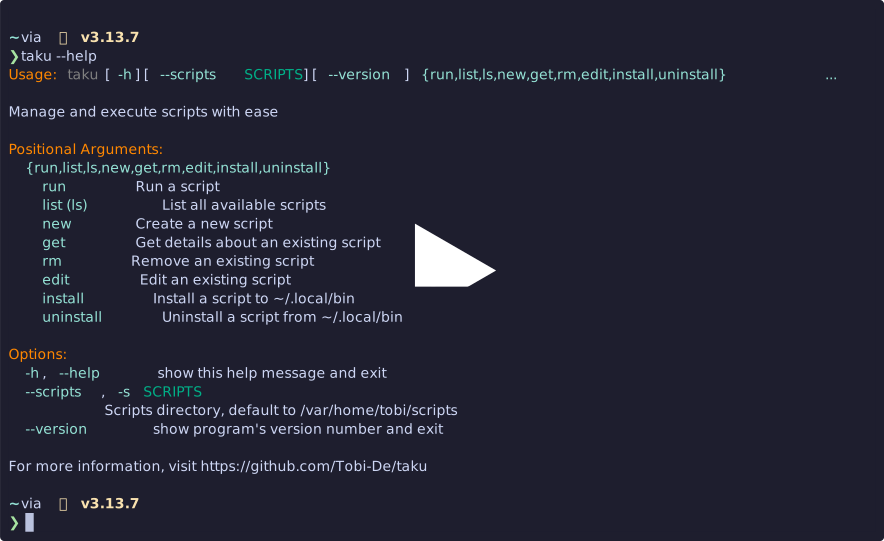
Commands
taku new <name> [--template/-t <name>]- Create a new script from templatetaku list- List all scripts, add-tto also list templatestaku get <name>- Show script detailstaku edit <name>- Edit a script (auto-pushes to git if repository)taku run <name> [args...]- Run a script with optional argumentstaku rm <name>- Remove a script (auto-pushes to git if repository)taku install <name|all>- Install script to~/.local/bintaku uninstall <name|all>- Remove script from~/.local/bin
Configuration
Set the scripts directory:
export TAKU_SCRIPTS=~/my-scripts
Default: ~/scripts
Templates
Create templates in <scripts-dir>/.templates/ and use with:
taku new myapp --template python
Template resolution order:
<scripts-dir>/.templates/<template-name>./<template-name>(current directory)
Templates can use ${script_name} variable for substitution.
Example Python template (~/.scripts/.templates/python):
#!/usr/bin/env -S uv run --script
# /// script
# requires-python = ">=3.12"
# dependencies = []
# ///


def main() -> None:
    print("Hello from $script_name!")


if __name__ == "__main__":
    main()
Git Integration
If your scripts directory is a Git repository, taku will automatically commit and push changes whenever you edit or remove scripts.
This keeps your changes synced, but to complete the auto-sync feature you also need to set up each machine to regularly pull the latest scripts.
Using cron
-
Open your crontab:
crontab -e -
Add a line to pull updates every 15 minutes (adjust the path to your scripts directory):
*/15 * * * * cd /home/tobi/scripts && git pull >/dev/null 2>&1
Using systemd-timers
-
Create a service file
/etc/systemd/system/scripts-sync.service(adjust the path to your scripts directory):[Unit] Description=Synchronize scripts from remote [Service] Type=oneshot User=tobi WorkingDirectory=/home/tobi/scripts ExecStart=/usr/bin/git pull
-
Create a timer file
/etc/systemd/system/scripts-sync.timer:[Unit] Description=Periodic synchronization of scripts [Timer] OnBootSec=1min OnUnitActiveSec=15min Persistent=true [Install] WantedBy=timers.target
-
Enable the timer:
sudo systemctl daemon-reload
sudo systemctl enable --now scripts-sync.timer
This will run a git pull in your scripts directory every 15 minutes.
1 maintainer

Metadata
1 maintainer
Release files for taku-cli 0.4.14
For a detailed explanation of source distributions (sdists) and built distributions (wheels), please see the package formats documentation.
Source distribution (sdist)
| File | Size | Uploaded | |
|---|---|---|---|
| taku_cli-0.4.14.tar.gz | 8.6 kB | Details |
Built distribution (wheel)
| File | Interpreter | ABI | Platform | Reset |
|---|---|---|---|---|
| taku_cli-0.4.14-py3-none-any.whl | Python 3 | none | any | Details |
Total release size: 17.9 kB
Release files / taku_cli-0.4.14.tar.gz
| Download URL | taku_cli-0.4.14.tar.gz |
|---|---|
| Size | 8.6 kB |
| Tags | Source |
|
SHA-256 checksum How to use checksums |
d6828816594f08310163ffeda51e4eaf9c004acb7189300cbe13c4b1bd9f3774
|
|
BLAKE2b-256 checksum How to use checksums |
5c954f389d5b817035579773a2b2b92c38b3de48a356920bdac2818b37260ec2
|
| Upload date | |
|
Uploaded using Trusted Publishing? What is trusted publishing? |
Yes |
| Uploaded via |
twine/6.1.0 CPython/3.13.7
|
Provenance
Provenance describes where a file came from. On PyPI, provenance is shared via attestations, which provide a verifiable record of the build or publishing details. View details, limitations and caveats.


PyPI Publish Attestation
PyPI verified that this artifact, at this checksum, originated from the publisher listed below.
Signed by GitHub Actions, verified by PyPI on Dec 13, 2025.
Transparency logRelease files / taku_cli-0.4.14-py3-none-any.whl
| Download URL | taku_cli-0.4.14-py3-none-any.whl |
|---|---|
| Size | 9.3 kB |
| Tags | Python 3 |
|
SHA-256 checksum How to use checksums |
ece56e94791f2ed2fbe9ab4af324a599255fc47c6ed99e79024fc9e902a97442
|
|
BLAKE2b-256 checksum How to use checksums |
39d19a12109be515ee7af2fca21da56ad6a3dd524f6f1be724bef2f710ee0a4d
|
| Upload date | |
|
Uploaded using Trusted Publishing? What is trusted publishing? |
Yes |
| Uploaded via |
twine/6.1.0 CPython/3.13.7
|
Provenance
Provenance describes where a file came from. On PyPI, provenance is shared via attestations, which provide a verifiable record of the build or publishing details. View details, limitations and caveats.
PyPI Publish Attestation
PyPI verified that this artifact, at this checksum, originated from the publisher listed below.
Signed by GitHub Actions, verified by PyPI on Dec 13, 2025.
Transparency log













