
Simple script manager for creating, running, and syncing bash scripts
Verified details
These details have been verified by PyPIProject links
GitHub Statistics
Maintainers

Project description
Taku
Simple script manager for creating, running, and syncing scripts.






Installation
uv tool install taku-cli
or
uv tool install "taku-cli[bling]" # just adds some colors
Quick Start
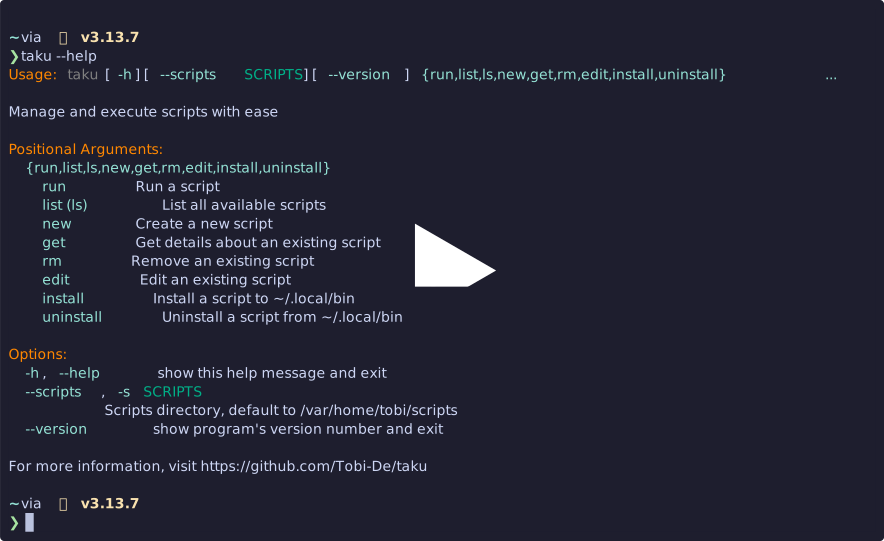
Commands
taku new <name> [--template/-t <name>]- Create a new script from templatetaku list- List all scripts, add-tto also list templatestaku get <name>- Show script detailstaku edit <name>- Edit a script (auto-pushes to git if repository)taku run <name> [args...]- Run a script with optional argumentstaku rm <name>- Remove a script (auto-pushes to git if repository)taku install <name|all>- Install script to~/.local/bintaku uninstall <name|all>- Remove script from~/.local/bin
Configuration
Set the scripts directory:
export TAKU_SCRIPTS=~/my-scripts
Default: ~/scripts
Templates
Create templates in <scripts-dir>/.templates/ and use with:
taku new myapp --template python
Template resolution order:
<scripts-dir>/.templates/<template-name>./<template-name>(current directory)
Templates can use ${script_name} variable for substitution.
Example Python template (~/.scripts/.templates/python):
#!/usr/bin/env -S uv run --script
# /// script
# requires-python = ">=3.12"
# dependencies = []
# ///


def main() -> None:
    print("Hello from $script_name!")


if __name__ == "__main__":
    main()
Git Integration
If your scripts directory is a Git repository, taku will automatically commit and push changes whenever you edit or remove scripts.
This keeps your changes synced, but to complete the auto-sync feature you also need to set up each machine to regularly pull the latest scripts.
Using cron
-
Open your crontab:
crontab -e -
Add a line to pull updates every 15 minutes (adjust the path to your scripts directory):
*/15 * * * * cd /home/tobi/scripts && git pull >/dev/null 2>&1
Using systemd-timers
-
Create a service file
/etc/systemd/system/scripts-sync.service(adjust the path to your scripts directory):[Unit] Description=Synchronize scripts from remote [Service] Type=oneshot WorkingDirectory=/home/tobi/scripts ExecStart=/usr/bin/git pull
-
Create a timer file
/etc/systemd/system/scripts-sync.timer:[Unit] Description=Periodic synchronization of scripts [Timer] OnBootSec=1min OnUnitActiveSec=15min Persistent=true [Install] WantedBy=timers.target
-
Enable the timer:
sudo systemctl daemon-reload
sudo systemctl enable --now scripts-sync.timer
This will run a git pull in your scripts directory every 15 minutes.
Project details
Verified details
These details have been verified by PyPIProject links
GitHub Statistics
Maintainers
Release history Release notifications | RSS feed


Download files
Download the file for your platform. If you're not sure which to choose, learn more about installing packages.
Source Distribution
Built Distribution
Filter files by name, interpreter, ABI, and platform.
If you're not sure about the file name format, learn more about wheel file names.
Copy a direct link to the current filters
File details
Details for the file taku_cli-0.4.12.tar.gz.
File metadata
- Download URL: taku_cli-0.4.12.tar.gz
- Upload date:
- Size: 8.3 kB
- Tags: Source
- Uploaded using Trusted Publishing? Yes
- Uploaded via: twine/6.1.0 CPython/3.13.7
File hashes
| Algorithm | Hash digest | |
|---|---|---|
| SHA256 |
e355f203d104f36e26ff1372bb445f8a5c426ff880cc2e229a703fb18c567802
|
|
| MD5 |
469f6a7f4535cea1e7ae8557c6607d56
|
|
| BLAKE2b-256 |
d0ab7febfb7eb64d6a1b0d22cbd01e1b754c947df3da48a83da4f558e3701dbf
|
Provenance
The following attestation bundles were made for taku_cli-0.4.12.tar.gz:
Publisher:
publish.yml on Tobi-De/taku
-
Statement:
-
Statement type:
https://in-toto.io/Statement/v1 -
Predicate type:
https://docs.pypi.org/attestations/publish/v1 -
Subject name:
taku_cli-0.4.12.tar.gz -
Subject digest:
e355f203d104f36e26ff1372bb445f8a5c426ff880cc2e229a703fb18c567802 - Sigstore transparency entry: 574225713
- Sigstore integration time:
-
Permalink:
Tobi-De/taku@2178492e92dec146b05503b5540eb241dc7efd60 -
Branch / Tag:
refs/tags/v0.4.12 - Owner: https://github.com/Tobi-De
-
Access:
public
-
Token Issuer:
https://token.actions.githubusercontent.com -
Runner Environment:
github-hosted -
Publication workflow:
publish.yml@2178492e92dec146b05503b5540eb241dc7efd60 -
Trigger Event:
push
-
Statement type:
File details
Details for the file taku_cli-0.4.12-py3-none-any.whl.
File metadata
- Download URL: taku_cli-0.4.12-py3-none-any.whl
- Upload date:
- Size: 9.0 kB
- Tags: Python 3
- Uploaded using Trusted Publishing? Yes
- Uploaded via: twine/6.1.0 CPython/3.13.7
File hashes
| Algorithm | Hash digest | |
|---|---|---|
| SHA256 |
fc7d7c0f886fdd075330355dfc20bcc109f778aaaa75dd764bdf1e97f5a434ce
|
|
| MD5 |
ff332c400d1bd2288c83a058a3ac8b31
|
|
| BLAKE2b-256 |
d7b4ef59d104026a3cb57f28819b5187257b978fa4313cc1cb9d45df2cedd92f
|
Provenance
The following attestation bundles were made for taku_cli-0.4.12-py3-none-any.whl:
Publisher:
publish.yml on Tobi-De/taku
-
Statement:
-
Statement type:
https://in-toto.io/Statement/v1 -
Predicate type:
https://docs.pypi.org/attestations/publish/v1 -
Subject name:
taku_cli-0.4.12-py3-none-any.whl -
Subject digest:
fc7d7c0f886fdd075330355dfc20bcc109f778aaaa75dd764bdf1e97f5a434ce - Sigstore transparency entry: 574225725
- Sigstore integration time:
-
Permalink:
Tobi-De/taku@2178492e92dec146b05503b5540eb241dc7efd60 -
Branch / Tag:
refs/tags/v0.4.12 - Owner: https://github.com/Tobi-De
-
Access:
public
-
Token Issuer:
https://token.actions.githubusercontent.com -
Runner Environment:
github-hosted -
Publication workflow:
publish.yml@2178492e92dec146b05503b5540eb241dc7efd60 -
Trigger Event:
push
-
Statement type:






