
CLI and Python API for running Talend Cloud jobs

Project description
talend-task
CLI and Python API for running Talend Cloud jobs
- Copyright (c) 2026 Corey Goldberg
- Development: GitHub
- Releases: PyPI
- License: MIT
Status
| Latest Version |

|
| Build (CI) |


|
| Supported Python Versions |

|
About
The talend-task package provides a command-line interface and Python API
client for executing and monitoring jobs in Talend Cloud,
including ETL pipelines and other data workflows. It uses the
Processing API to trigger executions and monitor
their status.
The package consists of:
talend_task: command-line interface (CLI)talend_task.talend_client: Python API client module providing theTalendClientandCredentialclasses
In this package, a "job" refers to a runnable Talend Task. Running a job creates a corresponding Talend Execution.
Installation
Install the package from PyPI:
pip install talend-task
CLI
talend_task is a CLI for running and monitoring jobs in
Talend Cloud.
After installation, the talend_task command is available in your shell.
Select a job interactively or pass --job directly.
CLI Options:
$ talend_task --help
usage: talend_task [-h] [--debug] [--wait] [--activity] [--job NAME] [--timeout SECS]
                   [--poll-interval SECS]

Talend Cloud CLI

options:
  -h, --help            show this help message and exit
  --debug               enable debug logging
  --wait                wait for job to complete and return status
  --activity            show recent runs without executing job (cannot use --wait)
  --job NAME            job name
  --timeout SECS        timeout (requires --wait, default: none)
  --poll-interval SECS  polling interval (requires --wait, default: 5)
CLI Configuration
The CLI requires authentication credentials and the URL of the Talend Cloud API endpoint for your region. These are configured using environment variables.
TALEND_API_URL: Talend Cloud regional API endpoint
export TALEND_API_URL=https://api.<region>.cloud.talend.com
(region = us, eu, us-west, etc.)
Authentication
Talend Cloud supports two authentication methods, depending on the account identity.
User Account
Regular user accounts authenticate using a Personal Access Token (PAT). A PAT represents a specific user and inherits that user's permissions. Personal access tokens are generated in the Talend Management Console.
TALEND_ACCESS_TOKEN: Personal Access Token
export TALEND_ACCESS_TOKEN=<access-token>
Service Account
Service accounts authenticate using the OAuth 2.0 Client Credentials flow. The Client ID and Client Secret are used to obtain a short-lived access token from the OAuth2 token endpoint. Access tokens are automatically refreshed before they expire.
TALEND_CLIENT_ID: Client IDTALEND_CLIENT_SECRET: Client Secret
export TALEND_CLIENT_ID=<client-id>
export TALEND_CLIENT_SECRET=<client-secret>
Using a .env File
Instead of setting environment variables, you can define them in a .env
file in the current directory.
User account
TALEND_API_URL=https://api.<region>.cloud.talend.com
TALEND_ACCESS_TOKEN=<access-token>
Service account
TALEND_API_URL=https://api.<region>.cloud.talend.com
TALEND_CLIENT_ID=<client-id>
TALEND_CLIENT_SECRET=<client-secret>
Example CLI Usage
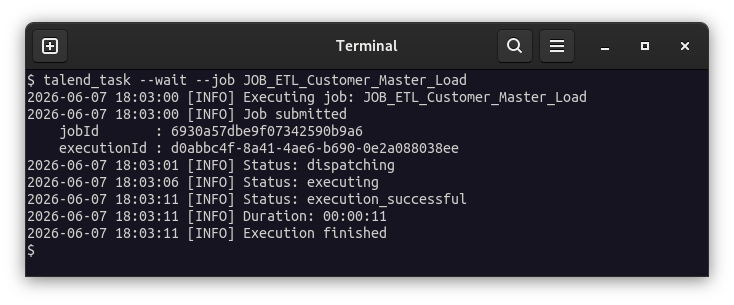
Direct Mode
Run a job by providing --job <name>:
talend_task --wait --job Job1
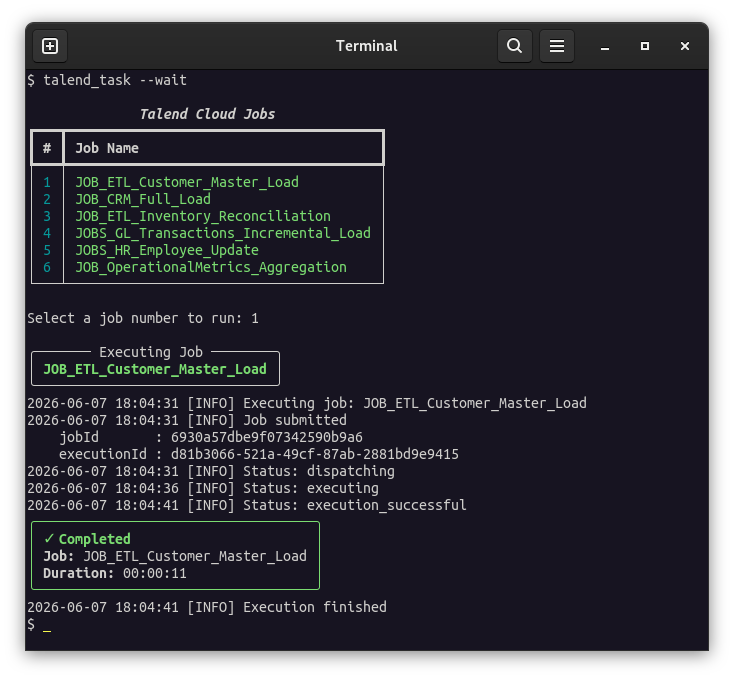
Interactive Mode
Run the CLI without specifying a job to select and execute one from a menu:
talend_task --wait
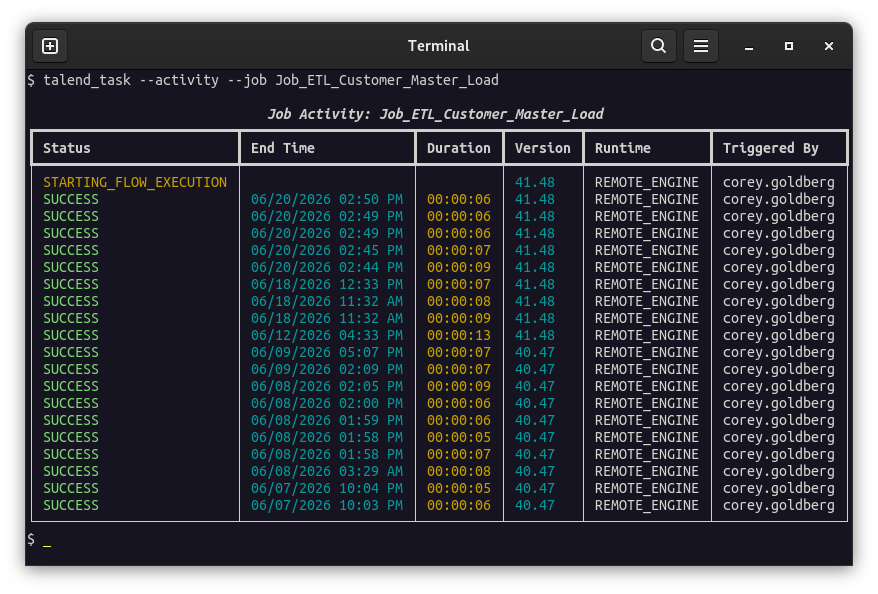
Activity Mode
Show recent runs for a job without executing it:
talend_task --activity --job Job1
CLI Screenshots
Interactive Mode
Direct Mode
Activity Mode
Python API Client
Use the TalendClient and Credential classes to authenticate and interact
with the Talend Cloud Processing API
from Python.
See the module API documentation for more information.
Example Client Usage
Run a job using a Personal Aceess Token for authentication:
from talend_task import StaticTokenCredential, TalendClient

api_url = "https://api.us.cloud.talend.com"
access_token = "token123"

credential = StaticTokenCredential(access_token)

with TalendClient(api_url, credential) as client:
    job_id = client.get_job_id("Job_123")
    status = client.run(job_id, wait=True)
Run a job using OAuth 2.0 Client Credentials flow for authentication:
from talend_task import OAuthClientCredential, TalendClient

api_url = "https://api.us.cloud.talend.com"
client_id = "id123"
client_secret = "secret123"

credential = OAuthClientCredential(client_id, client_secret)

with TalendClient(api_url, credential) as client:
    job_id = client.get_job_id("Job_123")
    status = client.run(job_id, wait=True)
Development
-
Install as editable package with required development/testing dependencies:
pip install --editable --group dev --group test . -
Run all tests:
pytest -
Run linting and formatting:
tox -e lint -
Run validation, linting, formatting, and all tests across all supported/installed Python environments:
tox
Project Structure
./
├── .github/
│   └── workflows/
│       ├── docs.yml
│       └── test.yml
├── src/
│   └── talend_task/
│       ├── __init__.py
│       ├── cli.py
│       └── talend_client.py
├── tests/
│   ├── test_cli.py
│   ├── test_credential.py
│   ├── test_talend_client.py
│   └── test_talend_session.py
├── pyproject.toml
└── tox.ini
Project details
Release history Release notifications | RSS feed


Download files
Download the file for your platform. If you're not sure which to choose, learn more about installing packages.
Source Distribution
Built Distribution
Filter files by name, interpreter, ABI, and platform.
If you're not sure about the file name format, learn more about wheel file names.
Copy a direct link to the current filters
File details
Details for the file talend_task-0.1.16.tar.gz.
File metadata
- Download URL: talend_task-0.1.16.tar.gz
- Upload date:
- Size: 19.9 kB
- Tags: Source
- Uploaded using Trusted Publishing? No
- Uploaded via: twine/6.2.0 CPython/3.14.6
File hashes
| Algorithm | Hash digest | |
|---|---|---|
| SHA256 |
4eba4b1224265e44823d89ff54b8ca9fa220123304131116a81727c6d764286e
|
|
| MD5 |
915d9eb9617a56164e478d3b92beffdd
|
|
| BLAKE2b-256 |
a7b7a34ac1ba885e7176e6e7b7872efc7ebed269cf52d15429311c24283a160a
|
File details
Details for the file talend_task-0.1.16-py3-none-any.whl.
File metadata
- Download URL: talend_task-0.1.16-py3-none-any.whl
- Upload date:
- Size: 12.7 kB
- Tags: Python 3
- Uploaded using Trusted Publishing? No
- Uploaded via: twine/6.2.0 CPython/3.14.6
File hashes
| Algorithm | Hash digest | |
|---|---|---|
| SHA256 |
e236616585fe6c77d000cbb6e71f9bff2acbf7a2801804ef10ebf3c2459b5609
|
|
| MD5 |
2ddef6248de74437e3cc8a0c63880009
|
|
| BLAKE2b-256 |
859e2a49737440bc547dd94957d0430cc668816096e44f3f8f15593e627a546f
|






