
🤝 tandem
One coding session. Two AI agents. Zero lost context.
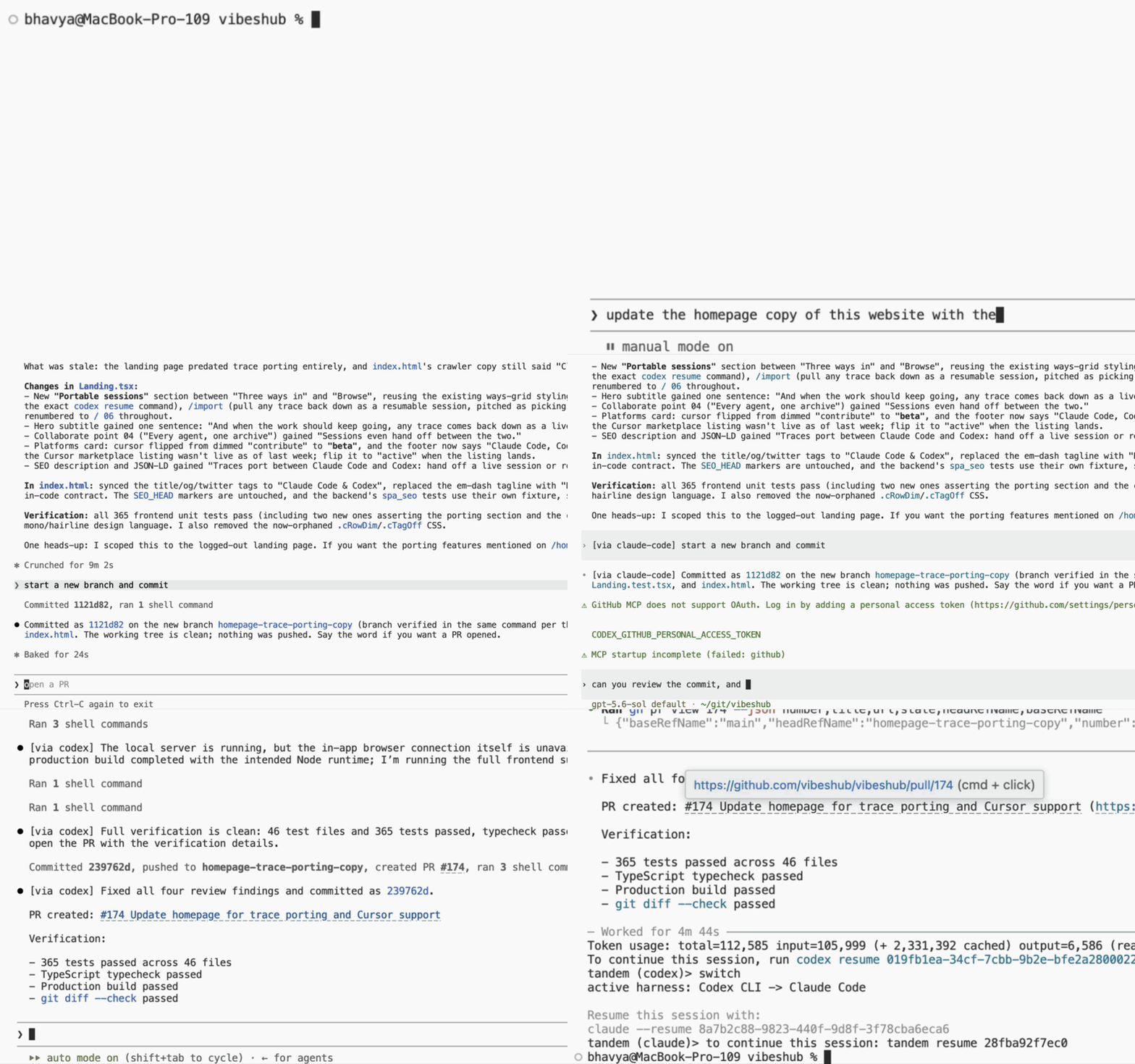
Run Claude Code and OpenAI Codex CLI as a single paired session — each model in its own native harness. Work in either one, flip to the other with Ctrl-], and pick up exactly where you left off. Only one model runs per turn; the other stays in sync through pure local file translation.


uv tool install tandem-cli
Quick start
You'll need Python 3.11+ and the claude and codex CLIs on your PATH.
uv tool install tandem-cli   # or: pip install tandem-cli
cd your-project
tandem                       # fresh paired session; drops you into claude
Work normally — that's the real Claude Code TUI. When you want the other model, press Ctrl-]: tandem closes out the harness at the turn boundary and reopens the same conversation in Codex a couple of seconds later. Press it again to come back. The bottom row tracks who you're facing:
claude ● │ codex ○ ^] flips
Pressed mid-turn, the flip arms and fires the moment the model finishes (the bar says so; press again to cancel).
Exit the harness the usual way and you're back at your shell, with the session saved and a hint for picking it up again:
to continue this session: tandem resume a1b2c3d4e5f6
Come back anytime:
tandem resume                # most recent session in this directory
tandem resume a1b2c3d4e5f6   # a specific one (id from the exit hint)
Why tandem?
🖥️ One CLI, two harnesses, zero ceremony.
tandem is the terminal you live in. It fronts the real Claude Code or
Codex TUI — pixel-for-pixel native — and Ctrl-] flips to the other
one in a couple of seconds, same conversation, same files, same history.
A one-line tab bar on the bottom row shows which model you're facing;
everything above it is the untouched native UI.
🆕 0.2 — GPT subagents inside Claude Code
Type "get the code reviewed by gpt" and tandem's plugin hands the task to a local codex worker; the verdict lands back in your Claude session, and your Claude quota stays on the main thread. Pin any model your codex account offers ("ask sol to review it") or set a cheap default once. Setup and routing: GPT subagents guide.

⏳ Hit a usage limit? Just keep going.
Claude runs out of its usage window mid-refactor? Press Ctrl-] and Codex continues the same conversation a second later — same files, same history, same plan. Two subscriptions become one long runway.
🌩️ Immune to outages.
An Anthropic or OpenAI outage doesn't stop your work: Ctrl-], keep going in the other harness, and flip back whenever it clears.
Five more reasons — subscriptions not API bills, two model families on one problem, native harnesses, instant switching, privacy: Why tandem?
How it works
- Only one model runs per turn — the other side is never invoked to "catch up".
- As you work, tandem translates the growing transcript into the other CLI's native session format — pure local file I/O, no model calls — so the other side is always resume-ready.
- Each CLI is the real thing running on a PTY: your keybindings, slash commands, and MCP servers all work exactly as they do today — tandem reserves exactly one key (Ctrl-]) and one terminal row (the tab bar).
- A flip waits for the turn boundary, exits the fronted CLI gracefully, lets the sync settle, and resumes the other side — no stop in between.
- Everything stays local: the CLIs' own session files plus a small
SQLite database in
~/.tandem. No cloud sync, no telemetry. - Uninstall tandem tomorrow and both sessions still resume natively
with
claude --resumeandcodex resume.
Full mechanics — sync engine, crash safety, compatibility ranges: How tandem works.
Command cheat sheet
| Command | What it does |
|---|---|
tandem |
Start a fresh paired session (Claude active; --active codex to flip) |
Ctrl-] |
Flip to the other harness from inside a running session (rebindable in [frame]) |
tandem resume [id] |
Continue the most recent (or a specific) session |
tandem run --on codex "…" |
One-off prompt to the other agent, with full context |
tandem sub "…" |
Run one delegated task on a codex model (what GPT subagents use under the hood) |
tandem status |
Show pairing, roles, and sync position |
tandem plugin install |
Install the Claude Code plugin (also offered on first tandem launch) |
Three maintenance commands round it out: tandem doctor (health
check), tandem sync (manual catch-up translation), and tandem sync-mcp (share MCP server configs between the tools).
Docs
- GPT subagents — plugin install, worker model, routing modes, sandbox & trust boundary
- Why tandem? — the full pitch, all eight reasons
- Configuration —
the optional
~/.tandem/config.toml: subagent workers, per-harness startup args, the flip key and tab bar - How tandem works — sync engine, PTY passthrough, compatibility, where your data lives
- Developing tandem — dev setup and the converter adapter interface
- Observed session formats — the claude/codex transcript details tandem is pinned against
License
1 maintainer

Download files
Download the file for your platform. If you're not sure which to choose, learn more about installing packages.
Source Distribution
Built Distribution
Filter files by name, interpreter, ABI, and platform.
If you're not sure about the file name format, learn more about wheel file names.
Copy a direct link to the current filters
File details
Details for the file tandem_cli-0.3.0.tar.gz.
File metadata
- Download URL: tandem_cli-0.3.0.tar.gz
- Upload date:
- Size: 7.5 MB
- Tags: Source
- Uploaded using Trusted Publishing? No
- Uploaded via: uv/0.11.14 {"installer":{"name":"uv","version":"0.11.14","subcommand":["publish"]},"python":null,"implementation":{"name":null,"version":null},"distro":{"name":"macOS","version":null,"id":null,"libc":null},"system":{"name":null,"release":null},"cpu":null,"openssl_version":null,"setuptools_version":null,"rustc_version":null,"ci":null}
File hashes
| Algorithm | Hash digest | |
|---|---|---|
| SHA256 |
0078dbb42141fbcf9a95ee18a8a5c3089ab01afbeab44ab572cb103cebb5f794
|
|
| MD5 |
d0f02c938f0a523e2028f29bc44c4c27
|
|
| BLAKE2b-256 |
538e7ec91eb4cbab1e0bb13be6dadb7760705c4b2c2a7fa6d75c5dcdbef2b42b
|
File details
Details for the file tandem_cli-0.3.0-py3-none-any.whl.
File metadata
- Download URL: tandem_cli-0.3.0-py3-none-any.whl
- Upload date:
- Size: 108.3 kB
- Tags: Python 3
- Uploaded using Trusted Publishing? No
- Uploaded via: uv/0.11.14 {"installer":{"name":"uv","version":"0.11.14","subcommand":["publish"]},"python":null,"implementation":{"name":null,"version":null},"distro":{"name":"macOS","version":null,"id":null,"libc":null},"system":{"name":null,"release":null},"cpu":null,"openssl_version":null,"setuptools_version":null,"rustc_version":null,"ci":null}
File hashes
| Algorithm | Hash digest | |
|---|---|---|
| SHA256 |
e6b2184904800d3233ee77534ec10970e9fc498a2d47550040753600eb7cf11d
|
|
| MD5 |
3703b0917d58942ab9224be996b4fe09
|
|
| BLAKE2b-256 |
76e7049caae71da96c54be7a47359145f7330c6078a03aece36192950f45fab5
|







